4 Best Budget Large Volume 3D Printers for 2027
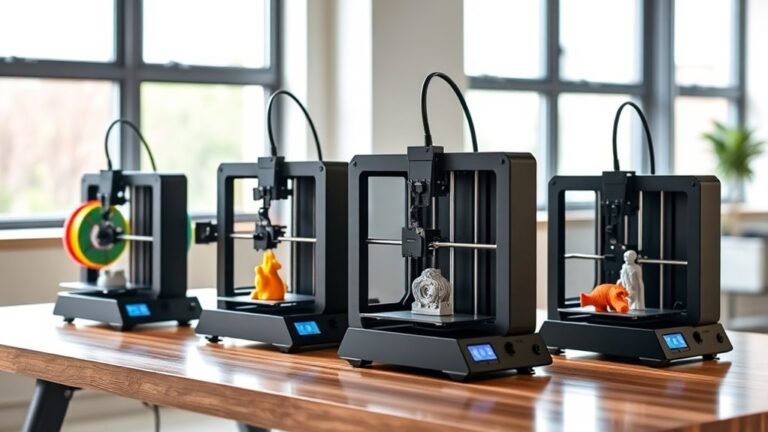
For budget-friendly large volume 3D printing in 2027, you’ve got some solid options to consider. The Creality Ender 3 V3 Mega is great for seamless 420mm builds and supports a variety of flexible filaments. It’s perfect if you want quality without breaking the bank.
Then there’s the LONGER LK10 Plus, which offers fast printing speeds with precise motion control. Its build area is a roomy 320×320×400mm, making it ideal for bigger projects.
If speed matters to you, the Creality Ender-5 Max is worth checking out. It delivers high speeds up to 700mm/s and boasts a spacious 400mm cube build volume.
Last but not least, the Longer LK5 Pro combines stability and strong build quality over an 11.8 × 11.8 × 15.7-inch area. Each of these printers has something unique to offer, so explore how they match your specific needs.
| Image | Name | Editor's Rating | Price |
|---|---|---|---|

|
|
||

|
|
||

|
|
||

|
|
Creality Ender 3 V3 Mega Large-Format 3D Printer, 420mm Build Volume
- 420mm³ LARGE BUILD VOLUME FOR BIGGER PRINTS: Print large models, prototypes, cosplay props, and functional parts with a 420 × 420 × 420mm build volume. Create more...
- 85A–95A TPU FLEXIBLE FILAMENT PRINTING: Go beyond standard rigid materials with support for 85A, 90A, and 95A TPU. The optimized extrusion system helps deliver more...
- KEEP LONG PRINTS RUNNING WITH SMART FILAMENT MANAGEMENT: Automatic filament relay helps switch to another loaded spool when filament runs out, while filament runout and...
- 500mm/s HIGH-SPEED PRINTING WITH VIBRATION COMPENSATION: Print at speeds up to 500mm/s with acceleration up to 8,000mm/s². Smart extrusion and vibration compensation...
- EASIER SETUP AND MAINTENANCE FOR DAILY PRINTING: 81-point auto leveling helps achieve a consistent first layer across the large build platform, while the quick-swap...
The Creality Ender 3 V3 Mega is designed for those who need to bring large-scale 3D projects to life without sacrificing quality. Its expansive 420 × 420 × 420 mm build volume allows you to create big models or single-piece prototypes, cutting down on seams and assembly time. This makes it ideal for producing functional parts and detailed designs in one go.
This printer supports a variety of filaments, including PLA, PETG, and flexible TPU with hardness ranging from 85A to 95A. Such flexibility is perfect for crafting footwear components or protective gear. Smart extrusion combined with vibration compensation ensures your prints remain stable, even when running at speeds up to 500 mm/s.
Maintenance is simplified with features like automatic filament relay and 81-point auto leveling, which keep your prints consistent and reduce manual adjustments. While some technical skill is helpful to maximize its advanced features, these systems make long runs more manageable and reliable.
The Creality Ender 3 V3 Mega balances large-format capabilities with user-friendly design, making it a practical tool for hobbyists and small-scale producers focused on quality and versatility.
Best for: Makers and small-batch producers needing a budget-friendly large-format 3D printer with flexible filament support.
What We Like:
- Large 420 × 420 × 420 mm build volume for seamless big prints
- Supports flexible TPU filaments with smart extrusion for stability
- Automatic filament relay and 81-point auto leveling simplify long prints
- Vibration compensation aids high-speed printing without quality loss
Specification:
| Feature | Details |
|---|---|
| Manufacturer | Creality |
| Build Volume | 420 × 420 × 420 mm |
| Supported Filaments | PLA, PETG, TPU (85A–95A) |
| Max Print Speed | Up to 500 mm/s |
| Auto Leveling Points | 81 |
LONGER New LK10 Plus 3D Printer,320×320×400mm Large Printer Volume
- 【Large Build Volume 320×320×400mm】 Featuring a large 3D printer build volume of 320×320×400mm (12.59"×12.59"×15.75"), LK10 Plus allows you to print large models...
- 【500mm/s High-Speed Printing】 Powered by Klipper firmware, LK10 Plus delivers up to 500mm/s printing speed and 10000mm/s² acceleration. This high-speed FDM 3D...
- 【High-Flow Direct Drive Extruder】 The upgraded dual-gear direct drive extruder provides strong extrusion performance and smooth filament feeding with a high flow...
- 【Auto Bed Leveling & Smart Z Offset】 Equipped with eddy current sensor technology, LK10 Plus automatically detects bed surface conditions and compensates in real...
- 【Smart Printing Experience】 Built-in filament runout detection and power-loss recovery help prevent failed prints. Dual-band WiFi (2.4GHz & 5GHz) enables stable...

The LONGER LK10 Plus 3D Printer is designed to meet the demands of users needing a large build volume and reliable performance. Its spacious 320×320×400mm printing area allows you to create bigger models or multiple parts in one go, reducing interruptions. This makes it ideal for professional projects or advanced hobbyists working on complex designs.
The printer’s dual Z-axis and silent TMC2209 stepper drivers ensure smooth, precise movement for consistent, high-quality results. Running on Klipper firmware, it supports impressive speeds up to 500 mm/s and rapid acceleration, helping you finish prints faster without sacrificing accuracy.
Maintenance is simple with features like filament runout detection and power-loss recovery, which keep prints safe from common interruptions. The upgraded dual-gear direct-drive extruder handles a variety of filaments including PLA, ABS, and TPU, providing versatility while maintaining ease of use.
Auto bed leveling with real-time surface compensation reduces setup time and improves first-layer adhesion, so you spend less time troubleshooting and more time printing. While the printer is relatively heavy, its robust design supports stability throughout long print jobs.
Best for: users seeking a large-volume 3D printer with fast print speeds, precise motion control, and versatile filament compatibility for professional or advanced hobbyist projects.
What We Like:
- Large 320×320×400mm build volume for big prints
- Smooth, precise motion with dual Z-axis and TMC2209 drivers
- Fast printing speeds up to 500 mm/s with Klipper firmware
- Filament runout detection and power-loss recovery for hassle-free printing
- Auto bed leveling with real-time surface compensation
Specification:
| Feature | Details |
|---|---|
| Manufacturer | LONGER |
| Build Volume | 320×320×400 mm |
| Weight | 30.5 lb (13.8 kg) |
| Extruder Type | Dual-gear direct-drive |
| Stepper Drivers | TMC2209 |
| Firmware | Klipper |
| Supported Filaments | PLA, ABS, TPU |
Creality Ender-5 Max 3D Printer, 400mm Build, 700mm/s Printing
- 【Massive Build Volume of 400x400x400mm】 Designed for professionals, the Ender-5 Max offers a spacious build area to handle large projects and batch printing...
- 【Ultra-Fast Printing Speed of 700mm/s】 Equipped with high-performance XY-axis motors, this printer delivers a peak speed of 700mm/s with an acceleration of...
- 【Precision with 36-Point Auto Leveling】The intelligent auto-leveling system features 36 reference points for accurate and efficient leveling, enabling optimal...
- 【Durable All-Metal Extruder】The near-end dual-gear extruder ensures stable performance with high wear resistance, supporting continuous printing for extended hours...
- 【Enhanced Productivity with LAN Multi-Device Control】 Featuring LAN-based multi-printer management and an upgraded Creality Print slicing software, the Ender-5 Max...
The Creality Ender-5 Max is designed to tackle large-scale 3D printing projects with ease. Its spacious 400 x 400 x 400 mm build volume lets you create big parts or multiple pieces in one go, improving workflow efficiency. With a peak printing speed of 700 mm/s, this printer significantly cuts down production time without sacrificing precision.
Maintaining consistent print quality is effortless thanks to the 36-point intelligent auto-leveling system. This feature ensures your build platform stays perfectly calibrated, reducing failed prints and wasted material. The all-metal dual-gear extruder minimizes clogging issues, making it reliable for long print runs and batch jobs.
The printer’s robust design includes upgraded XY-axis motors for stable, accurate movements. While it weighs nearly 69 pounds, its sturdy frame supports high-speed printing with minimal vibrations. Setup may require some patience, but the enhanced Creality Print software and LAN-based multi-printer control simplify device management for professional environments.
Overall, the Ender-5 Max balances large-format capability, speed, and quality, making it a solid choice for demanding FDM printing tasks.
Best for: Professionals and businesses requiring a high-speed, large-format 3D printer for batch and complex FDM projects.
What We Like:
- Large 400 x 400 x 400 mm build volume for versatile printing
- Fast peak speed of 700 mm/s with precise XY motors
- Intelligent 36-point auto-leveling for consistent prints
- Durable all-metal dual-gear extruder reduces maintenance
- LAN-based multi-printer control enhances workflow management
Specification:
| Feature | Details |
|---|---|
| Manufacturer | Creality |
| Build Volume | 400 x 400 x 400 mm |
| Peak Printing Speed | 700 mm/s |
| Weight | ~69 lb (31.3 kg) |
| Dimensions | 25.5 x 33.5 x 28.4 inches |
| Extruder Type | All-metal dual-gear |
Longer LK5 Pro 3 3D Printer Large Build Volume
- 【Stable Triangular Structure】Achieve superior stability with the LK5 Pro 3D printer's sturdy triangular structure. The reinforced inclined rods minimize errors from...
- 【Maximum Build Size & Material Compatibility】Unlock boundless creativity with Longer LK5 Pro 3D printer, featuring a maximum build size of 11.8" x 11.8" x...
- 【180mm/s Printing Speed & 0.1mm Precision】Immerse yourself in the advanced features of the Longer LK5 Pro 3D printer. Equipped with powerful firmware, it achieves...
- 【Filament Depletion Detection & Auto-Resume Printing】The LK5 Pro 3D printer, with its upgraded 32-bit mainboard, ensures improved print quality. It features sensors...
- 【Upgraded Configuration for Maximum Stability】Enhance print quality with our silicon carbide lattice glass platform, ensuring uniform temperature on the print bed for...
The Longer LK5 Pro 3D printer offers a large build volume that enables you to bring ambitious projects to life with ease. Its stable triangular frame and reinforced rods minimize vibrations, resulting in more precise and durable prints. This design also reduces maintenance needs by protecting key components from wear caused by resonance.
This model supports a spacious build area of 11.8 x 11.8 x 15.7 inches, accommodating a variety of materials for versatile use. The advanced firmware allows printing speeds up to 180 mm/s while maintaining 0.1 mm precision, helping you complete projects faster without sacrificing quality. Automatic X/Y calibration further enhances accuracy and reduces setup time.
The printer includes practical features like filament detection and power-loss auto-resume, ensuring your prints finish smoothly even during interruptions. Its silicon carbide glass bed guarantees consistent adhesion and easy part removal, simplifying routine maintenance. Although mostly pre-assembled, some setup is required, which may be challenging for beginners.
Best for: hobbyists, educators, and DIY enthusiasts needing a reliable, large-format 3D printer with strong stability and precision.
What We Like:
- Large 11.8 x 11.8 x 15.7 inch build volume for diverse projects
- Stable frame design reduces resonance and improves durability
- Filament detection and power-loss auto-resume for uninterrupted printing
- Silicon carbide glass bed offers consistent adhesion and easy cleanup
Specification:
| Feature | Details |
|---|---|
| Manufacturer | Longer |
| Build Volume | 11.8 x 11.8 x 15.7 inches |
| Dimensions | 20 x 20 x 15 inches |
| Weight | 28.2 pounds |
| Frame Material | Reinforced rods, triangular frame |
| Print Speed | Up to 180 mm/s |
| Precision | 0.1 mm |
Factors to Consider When Choosing a Budget Large Volume 3D Printer
When choosing a budget large volume 3D printer, you need to take into account how much build space you actually require and how fast and precise the prints should be.
Also, think about the types of filament you want to use, along with the printer’s reliability and consistency.
Don’t forget to check if it has easy-to-use bed leveling technology to save you time and hassle. It really makes a difference!
Build Volume Requirements
How much build volume do you really need for your 3D projects? Start by matching the build volume to your largest expected single-piece print, measuring the required X, Y, and Z dimensions.
Keep in mind that usable build volume is slightly less than the stated maximum because of clearance and bed-edge tolerances—allow a 5 to 10 mm margin. Think carefully about whether you need more vertical height or horizontal area since tall and wide prints demand different capacities.
Larger volumes will increase print times and require better thermal management, so make certain your setup can maintain stable temperatures. Also, consider the space for transport, installation, and maintenance, as printers with very large volumes need extra room around them for easy part removal and servicing.
Print Speed And Precision
Choosing the right build volume sets the foundation, but print speed and precision determine how efficiently and accurately your printer delivers results. You’ll want to balance maximum speed and acceleration with your printer’s frame rigidity and firmware capabilities to reduce vibration and maintain surface quality.
Smaller layer heights and finer nozzle diameters improve detail but increase print time. It’s all about finding the sweet spot between detail and speed.
Look for sturdy linear rails and vibration compensation features that enhance dimensional accuracy during fast moves. The extrusion system plays a key role too—direct-drive setups with stable hotends guarantee consistent pressure, reducing blobbing and stringing on fine details.
Finally, calibration tools like multi-point auto-leveling and real-time surface compensation keep your first layer solid. This helps preserve accuracy across large prints, especially on tall or wide models.
Supported Filament Types
What types of filament do you need your large volume 3D printer to handle? Start with common thermoplastics like PLA and PETG as your baseline.
If you want stronger, heat-resistant, or flexible prints, look for compatibility with ABS, Nylon, or TPU. For flexible filaments like TPU, verify the printer has a direct-drive or specialized extrusion system that supports the appropriate Shore hardness for reliable feeding.
Printing engineering materials means your printer must reach higher nozzle and bed temperatures. Ideally, it should also have an enclosed or heated chamber to minimize warping.
Also, check for features like filament runout detection and robust extrusion hardware to handle abrasive or soft filaments. If you want multi-material printing, confirm the firmware and extruder setup support multi-spool switching or dual extrusion for color and functional prints.
Reliability And Print Consistency
After ensuring your printer supports the filament types you need, you’ll want to focus on reliability and print consistency, especially with large volume builds. Larger platforms amplify issues like thermal warping and uneven first-layer adhesion, so look for printers with multi-point auto-leveling or mesh compensation for uniform quality.
Reliable filament management features—like runout detection, tangle sensing, and spool-switching—help prevent failed prints during lengthy jobs. Power-loss recovery is another must-have to avoid wasted time.
A sturdy motion system with dual Z axes or reinforced frames reduces layer shifts and resonance, ensuring dimensional accuracy. Also, opt for extruders designed for high-viscosity filaments, with clog-resistant paths and quick-swap hotends.
Finally, consistent heated beds and enclosures maintain stable surface temperatures, minimizing warping and adhesion issues on big prints. It really makes a difference when you’re working on those larger projects!
Bed Leveling Technology
Mastering bed leveling technology is essential when working with large-volume 3D printers because uneven surfaces can ruin your prints before they even start. For large beds, multi-point or mesh auto-leveling with 25 to 100+ probing points helps correct tilt and surface irregularities effectively.
Non-contact sensors like eddy-current or proximity types map metal or composite beds accurately, boosting first-layer consistency. Automatic Z-offset calibration measures nozzle-to-bed distance in real time, reducing squish variability after nozzle or bed swaps.
Look for printers offering independent surface compensation with high-resolution correction grids to maintain adhesion across vast areas. Reliable systems also include thermal compensation and frequent re-probing since bed warp and thermal expansion over 300–400 mm spans can shift leveling during lengthy or high-temperature prints.
Maintenance And Ease Of Use
You’ll often find that ease of maintenance and user-friendly features make a big difference when working with budget large volume 3D printers. Choose models with automated bed-leveling and mesh compensation to reduce manual adjustments and improve first-layer adhesion.
Look for quick-swap hotends and accessible extruders to simplify clog clearing and part replacements, minimizing downtime. Filament runout and tangle detection, along with power-loss recovery, help prevent failed prints and lessen the need for constant monitoring.
Make sure wear parts like nozzles, PTFE liners, belts, and bearings are user-replaceable and standardized for affordable, fast upkeep. Also, consider firmware that supports diagnostic logs and remote print monitoring, making troubleshooting and maintenance easier. That way, you can keep your printer running smoothly without hassle.
Connectivity And Software Features
How can connectivity and software features enhance your experience with budget large volume 3D printers? Dual-band Wi-Fi or wired Ethernet offers faster, more stable file transfers, minimizing interruptions during large uploads.
Remote printing and monitoring let you start, pause, and track prints from anywhere, cutting down failed jobs. Firmware compatibility with popular ecosystems like Marlin or Klipper guarantees you can use community plugins and troubleshoot easily.
Features like on-board slicing, resume-after-power-loss, and print-job queuing boost convenience and reliability for long prints. If you manage multiple printers, multi-printer dashboards and print history logs simplify batching and maintenance.
Prioritizing these connectivity and software capabilities means smoother, more efficient large-volume printing without constant hands-on supervision. It really makes the whole printing process way less stressful and more productive.
Budget And Value Considerations
When choosing a budget large volume 3D printer, it’s essential to look beyond the upfront price and consider the overall value it delivers. Start by comparing build volume per dollar to see which printer offers the most space for your money.
Don’t forget the total cost of ownership—factor in consumables like filament and replacement parts you’ll likely need within the first year. Prioritize features that minimize failed prints, such as filament runout detection and power-loss recovery. These can save you both material and time.
Also, check the firmware type and community support. Active communities and open-source firmware can really help reduce troubleshooting costs.
Finally, review warranty length and spare-part availability. Affordable printers can get costly if replacements are rare or expensive.
This approach guarantees you make a smart, budget-friendly choice.
Frequently Asked Questions
What Types of Filaments Are Compatible With These Large Volume Printers?
You’ll find these printers handle PLA, ABS, PETG, and TPU filaments easily. Some even support specialty materials like nylon or carbon fiber blends.
This gives you flexibility for strong, durable, or flexible large-scale prints without much hassle.
How Noisy Are These 3D Printers During Operation?
These printers aren’t as noisy as you might think—they hum like a gentle fan. You’ll hear some motor sounds during operation, but they’re generally manageable.
They won’t disrupt your workspace or conversations while printing large projects. So, you can keep working or chatting without much distraction.
What Software Is Recommended for Slicing Models on These Printers?
You should use Cura or PrusaSlicer for slicing models—they’re user-friendly and compatible with most printers. If you want more control, try Simplify3D.
These options help you prepare and optimize prints effectively. It’s pretty straightforward once you get the hang of it!
Are These Printers Suitable for Beginners or Require Advanced Skills?
These printers can be suitable for beginners if you’re willing to learn. They often require some setup and tweaking.
But don’t worry, with a bit of patience and some helpful online resources, you’ll pick up the skills pretty quickly.
Before you know it, you’ll be handling successful large-volume prints like a pro!
What Is the Average Power Consumption of These Large Volume 3D Printers?
You know what they say: “Don’t bite off more than you can chew.” These printers usually consume around 100 to 300 watts during operation.
Conclusion
When choosing your budget large volume 3D printer, consider build size, printing speed, and reliability. Whether you want the Creality Ender 3 V3 Mega’s expansive 420mm build or the LONGER New LK10 Plus’s balanced volume, these factors matter a lot.
You might also look at the speedy Creality Ender-5 Max or the versatile Longer LK5 Pro 3. Focus on quality, ease of use, and support because they make a huge difference in your printing experience.
At the end of the day, pick a printer that fits your needs, your budget, and your creative vision perfectly. Finding the right budget large volume 3D printer means balancing size, speed, and reliability to get the best value. That way, you’ll enjoy 3D printing without breaking the bank or compromising on quality.