9 Best Black and White Professional Printers for 2027
You need a reliable black and white printer that balances speed, quality, and connectivity for 2027. Finding the right professional printer can make a huge difference, whether you’re running a small business or managing a busy office. The market offers plenty of options designed to fit various needs and budgets.
The Brother DCP-L2640DW and HL-L2405W are perfect for small teams and home offices, especially with their wireless convenience. Meanwhile, HP’s LaserJet Pro 4001dn and M234dw deliver fast printing speeds along with robust security features to keep your documents safe.
If your printing demands are larger, consider the Brother HL-L5210DN or Xerox B410. These models are built for high-volume work and can handle heavy use with ease. For truly large workflows, HP’s Enterprise M634z stands out as a powerful solution. Explore these options to find the best fit for your professional printing needs.
| Image | Name | Editor's Rating | Price |
|---|---|---|---|

|
|
||

|
|
||

|
|
||

|
|
||

|
|
Brother DCP-L2640DW Wireless Compact Monochrome Printer
- BEST FOR SMALL BUSINESSES – Engineered for extraordinary productivity, the Brother DCP-L2640DW Monochrome (Black & White) 3-in-1 combines laser printer, scanner, copier...
- FAST PRINTER WITH EFFICIENT SCANNING – Produces documents quickly with print speeds up to 36 ppm(2) and scan speeds up to 23.6/7.9 ipm(3) (black/color). A 50-page auto...
- FLEXIBLE CONNECTION OPTIONS – Easily navigate the changing demands of your business with secure multi-device connectivity via built-in dual-band wireless (2.4GHz...
- BROTHER MOBILE CONNECT APP – Print, scan, and manage your wireless printer anytime, from almost anywhere from your mobile device. Order Brother Genuine Supplies, track...
- CHOOSE BROTHER GENUINE TONER – When it’s time to replace your toner, be sure to choose Brother Genuine TN830 or TN830XL replacement toner. And with Refresh EZ Print...

Experience seamless printing with the Brother DCP-L2640DW, designed to meet the demands of busy small businesses and home offices. This compact monochrome printer delivers sharp, professional-quality prints at speeds up to 36 pages per minute, helping you complete tasks quickly and efficiently.
Its multifunction design combines printing, copying, and scanning into one space-saving device. The 250-sheet capacity and 50-page automatic document feeder reduce interruptions, allowing you to focus on important work without frequent paper refills.
Connectivity is straightforward with dual-band Wi-Fi, Ethernet, and USB options. You can also control the printer remotely through the Brother Mobile Connect app, making it easier to manage jobs from your smartphone or laptop.
Maintenance is simple and cost-effective thanks to its energy-saving features like automatic duplex printing and toner save mode. This printer balances performance and eco-friendliness, ideal for environments where reliability and ease of use are essential.
Best for: Professionals and small teams needing a fast, dependable monochrome printer with wireless multitasking capabilities.
What We Like:
- Fast 36 ppm print and copy speed
- Flexible dual-band Wi-Fi and Ethernet connectivity
- Automatic duplex printing for reduced paper use
- Compact design that fits tight office spaces
- Easy remote management via mobile app
Specification:
| Feature | Description |
|---|---|
| Manufacturer | Brother |
| Dimensions (W x D x H) | 16.1 x 15.7 x 12 inches (40.9 x 39.9 x 30.5 cm) |
| Weight | 15.4 lb (7 kg) |
| Color | White with black accents |
| Paper Capacity | 250 sheets + 50-page ADF |
Brother HL-L2405W Wireless Monochrome Laser Printer
- BEST FOR HOMES & HOME OFFICES – Engineered for consistent, premium print quality, the Brother HL-L2405W Monochrome (Black & White) Laser Printer delivers sharp, crisp...
- COMPACT, CONNECTED PRINTER – Flexible connection options make this an ideal printer for home use and at-home offices. Securely connect to multiple devices with built-in...
- BROTHER MOBILE CONNECT APP – Manage your printer remotely and print from your mobile device anytime, from almost anywhere. Order Brother Genuine Supplies, track toner...
- VERSATILE PAPER HANDLING – Enjoy seamless, reliable everyday printing with the 250-sheet paper tray(4) and a manual feed slot that enables printing on envelopes and...
- BROTHER IS AT YOUR SIDE – Backed by Brother with a 1-year limited warranty and free online, call, or live chat support for the life of your printer
The Brother HL-L2405W offers a compact and efficient solution for fast, wireless black-and-white printing. Its space-saving design fits neatly into small home offices, helping you maintain an organized workspace. Printing up to 30 pages per minute, it ensures quick document turnaround without sacrificing clarity.
Connectivity is seamless with dual-band Wi-Fi and USB 2.0 support, allowing easy access from laptops, smartphones, and tablets. Though it is a print-only device, the manual feed slot provides versatility for envelopes and specialty paper, while manual duplex printing helps reduce paper use when needed.
Maintenance is straightforward thanks to the Brother Mobile Connect app, which lets you manage print jobs remotely and monitor toner levels. This keeps your workflow smooth and minimizes downtime. Its sharp 1200 x 1200 dpi resolution produces professional-quality monochrome prints ideal for everyday documents.
Best for: small home offices or individuals needing fast, reliable, wireless monochrome printing in a compact footprint.
What We Like:
- Fast printing speed of up to 30 pages per minute.
- Dual-band Wi-Fi and USB 2.0 for versatile connectivity.
- Mobile Connect app enables remote management and toner tracking.
- Compact design fits well in limited spaces.
Specification:
| Feature | Details |
|---|---|
| Manufacturer | Brother |
| Dimensions | Compact (exact size not provided) |
| Weight | Not specified |
| Color Options | Monochrome (black & white) |
| Connectivity | Dual-band Wi-Fi, USB 2.0 |
| Print Resolution | 1200 x 1200 dpi |
| Paper Capacity | 250 sheets |
HP LaserJet Pro 4001dn | Monochrome | Laser Printer
- CONNECT VIA ETHERNET ONLY – Does not support wireless printing. For wireless printing, look for LaserJet Pro 4001dw
- FROM AMERICA'S MOST TRUSTED PRINTER BRAND – Perfect for small teams printing professional-quality black & white documents and reports plus auto 2-sided printing...
- BLAZING FAST PRINT SPEEDS – Up to 42 black-and-white pages per minute single-sided
- PROTECTS YOUR DATA – Includes HP Wolf Pro Security with customizable settings so your printer and information are always secure
- PRINT FROM ANY DEVICE – Print from any mobile device, PC or tablet. Ethernet included. Works with Microsoft, Mac, AirPrint, Android, Chromebook and more
The HP LaserJet Pro 4001dn is designed to meet the needs of small teams requiring fast and dependable monochrome printing. It delivers sharp, professional-quality prints at speeds up to 42 pages per minute. This quick first-page output helps reduce waiting times and keeps your workflow moving smoothly.
Its automatic duplex printing feature allows double-sided documents, saving paper and reducing costs. The printer supports a variety of media types and holds up to 350 sheets across two trays, minimizing the need for frequent paper refills.
Maintenance is straightforward with the printer’s reliable design, though it requires original HP cartridges to ensure optimal performance. Connectivity is provided via Ethernet and USB, making it suitable for office setups with wired networks. Mobile printing is possible through the HP Smart app, adding convenience for users on the go.
Security is a priority with built-in HP Wolf Pro Security and PIN authentication. These features help protect sensitive information, making it well-suited for secure office environments.
Best for: Small teams of up to 10 users needing fast, reliable monochrome printing with strong security features in an office environment.
What We Like:
- Fast printing speed with sharp 1200 x 1200 dpi resolution
- Automatic duplex printing and large 350-sheet capacity
- Strong security via HP Wolf Pro Security and PIN authentication
- Mobile printing support through the HP Smart app
Specification:
| Feature | Details |
|---|---|
| Manufacturer | HP |
| Dimensions | Not specified |
| Weight | Not specified |
| Print Technology | Monochrome Laser |
| Print Speed | Up to 42 ppm |
| Print Resolution | 1200 x 1200 dpi |
| Paper Capacity | Up to 350 sheets (2 trays) |
| Connectivity | Ethernet, USB |
| Mobile Printing | HP Smart app |
HP LaserJet M234dw Monochrome Printer | All-in-One | Wireless | Duplex
No products found.
Experience efficient, reliable printing designed for small teams and businesses with the HP LaserJet M234dw. This monochrome all-in-one printer handles printing, copying, and scanning with ease, helping you stay productive without hassle. Its fast output of up to 30 pages per minute ensures your documents are ready when you need them.
The printer’s automatic duplex feature reduces paper use and waste, making it an eco-friendly choice. Connectivity is seamless with dual-band Wi-Fi and Ethernet options, so you can print from multiple devices effortlessly. The compact design fits well in tight office spaces without compromising performance.
Maintenance is straightforward, though the toner cartridge yields about 700 pages, which might require frequent replacement for high-volume users. The HP Smart app enhances workflow by enabling mobile printing and cloud scanning, reducing time spent at the device.
Built-in security features protect your sensitive data, giving you peace of mind in a busy office environment. Overall, this printer balances functionality and convenience for efficient office workflows.
Best for: Small teams and businesses needing a fast, reliable monochrome all-in-one printer with wireless connectivity.
What We Like:
- Fast printing speed up to 30 ppm with clear 600 x 600 dpi resolution
- Automatic duplex printing to save paper
- Dual-band Wi-Fi and Ethernet for versatile connectivity
- Compact design fits small workspaces
- HP Smart app support for mobile and cloud printing
Specification:
| Feature | Details |
|---|---|
| Manufacturer | HP |
| Dimensions | Not specified |
| Weight | Not specified |
| Printing Speed | Up to 30 pages per minute |
| Print Resolution | 600 x 600 dpi |
| Connectivity | Dual-band Wi-Fi, Ethernet |
| Paper Capacity | Up to 150 sheets |
| Toner Yield | Approximately 700 pages |
HP LaserJet Pro 3105sdw Monochrome Laser Printer | All-in-One
No products found.
The HP LaserJet Pro 3105sdw is designed to boost productivity for small business teams. It delivers sharp, professional-quality black-and-white prints at speeds up to 33 pages per minute. This printer handles multiple tasks like copying, scanning, and faxing easily through an intuitive app, helping you stay efficient.
Its automatic duplex printing reduces paper waste and streamlines your workflow. The single paper tray holds up to 250 sheets, making it suitable for moderate printing volumes with simple maintenance. Connectivity options include Wi-Fi, Ethernet, USB, and mobile printing, allowing you to print effortlessly from various devices.
HP’s AI-driven features enhance scanned documents by creating clean copies and smart email subjects. Robust security functions protect your data, ensuring peace of mind in busy office environments. The compact design fits well in small spaces without sacrificing reliability or performance.
Best for: Small to medium business teams needing fast, versatile monochrome printing with all-in-one functionality.
What We Like:
- Fast print speed of up to 33 ppm with automatic duplex.
- All-in-one capabilities for print, copy, scan, and app-based fax.
- Multiple connectivity options including Wi-Fi and Ethernet.
- AI-powered scanning enhances document clarity and organization.
- Secure printing protects sensitive data.
Specification:
| Feature | Details |
|---|---|
| Manufacturer | HP |
| Dimensions (W×D×H) | 16.5 × 14.7 × 12.7 inches |
| Weight | 23.7 lb (10.75 kg) |
| Color | White |
| Paper Capacity | 250 sheets |
Canon imageCLASS LBP6030w Wireless Monochrome Laser Printer
- FAST PRINT SPEEDS: Print up to 19 pages per minute.
- COMPACT DESIGN: Space-saving, compact design fits anywhere in your home, school or small office.
- WIRELESS CONNECTIVITY: Print from almost anywhere in your workspace using your compatible mobile device.
- PAPER CAPACITY: Up to 150 sheets.
- SUSTAINABILITY: Uses less than 2 watts in Energy Saver mode.
The Canon imageCLASS LBP6030w offers a straightforward solution for fast, reliable black-and-white printing. Its compact design fits neatly on any desk, making it a practical choice for home offices or small workspaces. Wireless connectivity eliminates cable clutter, allowing you to print easily from laptops and mobile devices.
This printer handles everyday printing demands efficiently, producing clear documents at a speed of up to 19 pages per minute with a crisp 600 x 600 dpi resolution. The 150-sheet paper tray and high-yield toner cartridge reduce frequent interruptions, supporting smooth workflow throughout the day.
Maintenance is simple with the toner’s 1,600-page yield, minimizing the need for constant replacements. Energy consumption stays low, with less than 2 watts used in standby mode, helping to reduce power costs without sacrificing performance.
While it only supports monochrome printing and has a modest paper capacity, its user-friendly interface and compact size make it ideal for those prioritizing essential printing tasks over advanced features.
Best for: Small business owners and individuals who need consistent, wireless monochrome printing with a space-saving design.
What We Like:
- Fast printing speed of up to 19 ppm with sharp 600 x 600 dpi resolution
- Wireless printing from laptops and mobile devices for added convenience
- Compact and lightweight for easy placement in tight spaces
- Long-lasting toner cartridge minimizes maintenance frequency
- Energy-efficient operation with low standby power consumption
Specification:
| Feature | Details |
|---|---|
| Manufacturer | Canon |
| Dimensions | Compact size (exact size not provided) |
| Weight | 11 lb (approx. 5 kg) |
| Connectivity | Wireless |
| Print Resolution | 600 x 600 dpi |
| Print Speed | Up to 19 pages per minute |
| Paper Capacity | 150 sheets |
| Toner Yield | Approximately 1,600 pages |
| Color Support | Monochrome only |
Brother HL-L5210DN Monochrome Laser Printer with Duplex
- FAST PRINTING FOR INCREASED EFFICIENCY: The Brother HL-L5210DN business monochrome laser printer delivers high-quality output and a print speed of up to 48ppm(1) to help...
- COST-EFFICIENT OUTPUT: Help reduce operating costs by using the Brother Genuine TN920XXL super high-yield 11,000-page replacement toner cartridge. Includes a Brother...
- EXPANDABLE PAPER CAPACITY: 250-sheet capacity paper tray is adjustable for letter or legal-sized paper and 100-sheet capacity multipurpose tray is ideal for printing on...
- BUILT-IN NETWORKING:Features a Gigabit Ethernet interface to seamlessly set up and share with multiple users on your wired network and print from a wide variety of mobile...
- ADVANCED SECURITY FEATURES: Equipped with Triple Layer Security features to help safeguard your network, keep your devices secure, and protect documents in transit to and...
The Brother HL-L5210DN is designed to streamline your black-and-white printing tasks with dependable speed and precision. It prints up to 48 pages per minute, helping you finish large jobs quickly. The duplex feature lets you print on both sides automatically, saving paper and reducing costs.
This printer supports high-yield toner cartridges that can print up to 3,000 pages, minimizing the frequency of replacements and maintenance. Its flexible paper handling includes a 250-sheet adjustable tray and a 100-sheet multipurpose tray, with an optional expansion up to 1,390 sheets for busy offices.
Connectivity is straightforward with built-in Gigabit Ethernet, allowing multiple users to share the printer easily. Mobile printing support adds convenience, letting you print directly from smartphones or tablets. Security is a priority with Triple Layer Security, protecting your network and sensitive documents from unauthorized access.
While it only prints in monochrome, it offers a secure and efficient solution for professional environments where color is not essential. The absence of wireless connectivity means it relies on wired networks, which can enhance stability in busy offices.
Best for: Small to medium-sized offices and professionals needing fast, cost-effective monochrome printing with strong security features.
What We Like:
- Fast printing at up to 48 ppm with automatic duplexing
- Long-lasting 3,000-page toner cartridges reduce maintenance
- Flexible paper handling with expandable capacity
- Secure printing with Triple Layer Security
- Reliable wired Gigabit Ethernet connection
Specification:
| Feature | Details |
|---|---|
| Manufacturer | Brother |
| Printing Technology | Monochrome Laser |
| Print Speed | Up to 48 ppm |
| Duplex Printing | Automatic |
| Paper Capacity | 250-sheet adjustable tray + 100-sheet multipurpose tray (expandable to 1,390 sheets) |
| Connectivity | Gigabit Ethernet |
| Security Features | Triple Layer Security |
Xerox B410 Black and White Laser Printer for Business – Print Only
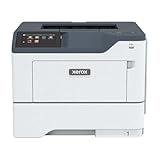
- FAST BLACK & WHITE PRINTING: Deliver professional results with reliable print speeds up to 50 ppm. Designed to keep demanding business teams and commercial workgroups...
- BUSINESS QUALITY: Produce sharp black text and clear graphics. Ensure business documents, reports and presentations look polished every time.
- FLEXIBLE CONNECTIVITY: Connect through Gigabit Ethernet and print easily from laptops, smartphones and tablets with Apple AirPrint and Mopria. Optional Wi‑Fi provides...
- EASY SMARTPHONE SETUP: Get printing in minutes. Use the Xerox Easy Assist App for a simplified, guided installation that eliminates complex manuals and traditional driver...
- VALUE FOR YOUR BUSINESS: Built for commercial workgroups needing high-volume printing up to 20,000 pages per month. High-yield toner options mean fewer interruptions and...
The Xerox B410 is designed to meet the demands of busy offices needing rapid, high-volume black-and-white printing. It delivers sharp text and clear graphics efficiently, making it ideal for environments where speed and quality matter. With a print speed of up to 50 pages per minute, it keeps workflow smooth and uninterrupted.
Connectivity is versatile, offering Gigabit Ethernet, Apple AirPrint, and Mopria support. Optional Wi-Fi adds flexibility in placement, accommodating different office setups. Setup is straightforward with the Xerox Easy Assist App, allowing users to get started quickly without technical delays.
Maintenance is simplified by the use of high-yield toner cartridges that reduce the frequency of replacements. This lowers operating costs and minimizes downtime. The printer is built for reliability in high-volume tasks but may not be the best fit for low-volume users due to its design focus.
Its functionality is tailored for professional environments that require consistent black-and-white printing without the need for color. The B410 balances speed, quality, and ease of use in a compact design that fits well in business settings.
Best for: businesses and commercial teams requiring fast, consistent black-and-white printing with professional results.
What We Like:
- Fast print speed of up to 50 pages per minute for high productivity.
- Multiple connectivity options including Ethernet, Apple AirPrint, Mopria, and optional Wi-Fi.
- Easy setup and management via Xerox Easy Assist App.
- High-yield toner cartridges reduce cost and downtime.
- Compact design suited for busy office environments.
Specification:
| Feature | Details |
|---|---|
| Manufacturer | Xerox |
| Dimensions (W×D×H) | 15.8 × 15.3 × 11.8 inches |
| Weight | 18.3 lb (8.3 kg) |
| Color Options | Black and White only |
| Connectivity | Gigabit Ethernet, Apple AirPrint, Mopria, Optional Wi-Fi |
HP LaserJet Enterprise M634z | Monochrome | Laser Printer | All-in-One

- World's most secure printing: Print, scan, copy, and fax professional-quality documents with the HP LaserJet Enterprise MFP M634z, a multifunction laser printer with...
- Protect your network from attacks: Your monochrome laser printer has the industry's deepest security with embedded features that help protect your sensitive data, thwart...
- High-speed performance meets energy-efficiency: Keep business moving with duplex printing, 5.2 seconds first page out time, and print speeds of up to 55 ppm; this printer...
- Accelerate workflow: Enhance productivity with a 150-page auto-document feeder with single-pass, 2-sided scanning, a 9" color touchscreen, and features that help detect...
- Loaded for productivity: Paper handling features include 3 additional 550-sheet paper trays with a wheeled stand for a total 2300-sheet input tray capacity for paper...
Experience fast, reliable printing with the HP LaserJet Enterprise M634z, designed to keep busy offices productive. This monochrome all-in-one laser printer handles large volumes with ease, delivering professional-quality documents quickly to reduce wait times.
Its energy-efficient design and JetIntelligence toner technology help lower operating costs. The first page prints in just 5.2 seconds, so tasks start without delay. A 150-page auto-document feeder scans both sides in a single pass, streamlining workflows and saving time.
The printer’s massive 2,300-sheet input capacity and 1,000-sheet stapler/stacker support uninterrupted printing and finishing. The 9-inch color touchscreen simplifies operation by providing clear alerts and easy access to functions. Robust embedded security safeguards your network from threats, protecting sensitive data.
Maintenance is straightforward with high-capacity supplies that reduce downtime. Though it prints only in monochrome and occupies a sizable footprint, the M634z fits well in high-demand environments needing speed and multifunction capability.
Best for: High-volume business environments requiring fast, secure, and reliable monochrome all-in-one printing and scanning solutions.
What We Like:
- Fast printing speeds up to 55 ppm with quick first-page output
- Advanced security features protect sensitive information
- Large input and finishing capacity for uninterrupted workflow
- Efficient single-pass duplex scanning with an intuitive touchscreen
Specification:
| Feature | Details |
|---|---|
| Manufacturer | HP |
| Print Technology | Monochrome Laser |
| Printing Speed | Up to 55 pages per minute (ppm) |
| First Page Out Time | 5.2 seconds |
| Input Capacity | 2,300 sheets |
| Finishing Capacity | 1,000-sheet stapler/stacker |
| Auto Document Feeder | 150 pages, single-pass duplex |
| Display | 9-inch color touchscreen |
| Dimensions (WxDxH) | Not specified |
| Weight | Not specified |
Factors to Consider When Choosing a Black and White Professional Printer

When choosing a black and white professional printer, you’ll want to focus on print speed to keep up with your workflow and connectivity options that fit your setup.
Don’t overlook print quality standards and paper handling capacity to guarantee your documents look sharp and the printer meets your volume needs.
Also, check if duplex printing is included to save time and reduce paper waste. It’s a small feature that can make a big difference in efficiency.
Print Speed Importance
Consider print speed a critical factor when choosing a black and white professional printer, as it directly affects your workflow efficiency. Higher print speeds, measured in pages per minute (ppm), cut wait times substantially—moving from around 30 ppm to 50 ppm can reduce print time by 40% on large jobs.
Don’t overlook first-page-out time; printers that deliver pages in 5–9 seconds respond faster than those taking 8–12+ seconds. This is especially important for frequent small jobs, where every second counts.
Remember to check duplex throughput since automatic two-sided printing often lowers effective ppm. If your work involves scanning or copying, include those speeds too, as slow scanner or copier performance can bottleneck your process.
Finally, match the printer’s rated duty cycle and daily volume with your expected usage. This helps prevent wear and overheating, keeping your printer running smoothly over time.
Connectivity Options Available
Choosing the right connectivity options guarantees your black and white professional printer integrates smoothly with your existing workflow and devices. Make sure it supports network interfaces like dual-band Wi-Fi (2.4/5 GHz), Gigabit Ethernet for stable wired connections, and USB 2.0 for direct local printing.
If you print from smartphones or tablets, look for compatibility with AirPrint, Mopria, or app-based printing—these let you print without installing full drivers. For multiple users or heavy workloads, wired Ethernet or dual-band Wi-Fi with robust roaming reduces delays and packet loss.
Don’t forget to check management and security features such as remote fleet management, driverless printing, and authentication methods like PIN or pull printing. Also, confirm support for optional interfaces like Wi-Fi Direct or extra USB ports if you need flexible placement or guest access.
Print Quality Standards
Although print speed and connectivity matter, you’ll want to prioritize print quality standards to get the best results from your black and white professional printer. Aim for at least 600 x 600 dpi resolution for crisp text, and 1200 x 1200 dpi or higher if you need sharp fine line art or small fonts.
Check the toner and drum system—high-yield toner and stable drums reduce graininess and keep density consistent on long runs. Consider bit depth and halftone capabilities; 1 bpp suits pure black and white text, but advanced dithering improves grayscale images.
Also, pay attention to warm-up stability since instant readiness prevents tone shifts. Finally, make sure the printer handles media smoothly to avoid smearing, misregistration, and banding that degrade your print quality.
Paper Handling Capacity
Many black and white professional printers offer input trays that hold between 150 and 350 sheets or more. This helps reduce how often you need to refill paper during busy periods.
You should check the input tray capacity to make sure it aligns with your daily or monthly print volume. Also, verify if the printer has multipurpose or bypass trays that support envelopes, labels, and card stock. These trays help handle specialty jobs without interrupting regular printing.
Consider the maximum expandable paper capacity and whether additional trays are available. This is especially important if you expect your printing needs to grow or require multiple paper sizes.
Don’t forget to check the output tray capacity and stacking reliability. This will help you avoid jams or damage when handling large print jobs, minimizing your need for intervention during high-volume runs.
Duplex Printing Features
When managing high-volume printing, automatic duplex printing can cut your paper use by up to half. This not only saves costs but also frees up storage space.
You’ll want to check the duplex speed and duty cycle compatibility. Some printers slow down on two-sided jobs, which can bottleneck your workflow.
Make sure the printer handles duplex printing on legal-size paper and mixed media like envelopes and labels. That way, you don’t need to switch settings manually.
Also, consider if it offers automatic duplex scanning or a single-pass duplex ADF. These features speed up two-sided copying and scanning tasks.
Finally, verify that duplex printing works smoothly over your preferred connections—network, USB, or mobile. And check that drivers or apps let you set duplex as the default to keep output consistent and efficient.
Consumables And Cost
Beyond duplex capabilities, understanding the ongoing costs tied to consumables can save you money and hassle. Start by comparing cost-per-page—divide the toner cartridge price by its rated yield. High-yield cartridges often lower costs despite higher upfront prices.
Don’t forget to factor in drum unit and fuser replacements, as some printers require periodic servicing that adds expenses. Check if your printer restricts you to original-brand cartridges or allows third-party options. Firmware updates can impact supply costs, so keep an eye on that too.
Also, include maintenance supplies like transfer belts, rollers, and waste toner bottles in your cost calculations, especially with expected monthly volumes. Finally, evaluate subscription or auto-replenishment programs carefully. Consider pricing, minimums, and overage rules to make sure you choose the most cost-effective and convenient solution.
Security And Management
Because printers often handle sensitive information, you’ll want to prioritize strong security and management features when choosing a black and white professional printer. Make sure the printer supports user authentication methods like PIN, badge, or pull-print to keep documents secure.
Also, verify built-in network security protocols such as TLS/SSL, IPsec, and SNMPv3 to protect data in transit. It’s important to check for firmware signing and automatic secure updates to prevent unauthorized installations.
Look for centralized management tools that let you monitor device status, toner levels, and security remotely. Plus, confirm support for audit logging and secure storage with encryption or secure erase to meet compliance and forensic requirements.
These features really help safeguard your data and make device management much easier and more effective.
Frequently Asked Questions
What Is the Average Cost per Page for Black and White Printers?
You’ll usually pay around 1 to 5 cents per black and white page, depending on your printer model and ink efficiency.
Choosing high-yield cartridges and proper maintenance helps you keep costs low over time.
It’s pretty simple—better cartridges and a little care go a long way in saving money.
How Do Black and White Printers Compare in Energy Efficiency?
You’ll find black and white printers generally use less energy than color ones because they have simpler printing mechanisms. They’re more efficient, especially in standby mode, helping you save on power without sacrificing print quality.
It’s pretty straightforward — fewer colors mean fewer parts working at once. So, if you’re looking to cut down on energy use, a black and white printer is usually the way to go.
Are There Specific Maintenance Tips for Monochrome Laser Printers?
You should clean the drum regularly, replace toner cartridges timely, and check for paper jams.
Also, avoid touching the drum, store supplies properly, and update firmware often.
Doing these things will help keep your printer running smoothly.
Can These Printers Handle High-Volume Printing Continuously?
Yes, these printers can handle high-volume printing continuously. But you’ll want to follow maintenance schedules and use proper cooling periods.
This helps make sure they run smoothly without overheating. Plus, it prevents frequent breakdowns during heavy workloads.
What Security Features Are Common in Professional Monochrome Printers?
You’ll find common security features like user authentication, encrypted data transfer, and secure print release. These help protect sensitive documents and prevent unauthorized access.
Plus, automatic firmware updates keep your printer up to date with the latest security patches. This way, your printing environment stays safe and secure without you having to worry.
Conclusion
So, if you’re still clinging to that ancient printer that sounds like a dying robot, it’s time for an upgrade. Imagine your office humming smoothly, no paper jams, no mysterious smudges, just crisp black and white perfection.
These professional printers won’t just print—they’ll practically do a tap dance on your desk. Choose wisely, and your documents will look so sharp, even your spreadsheets might start demanding a raise.
Investing in one of the best black and white professional printers for 2027 means you’re not just buying a device—you’re boosting productivity and ensuring every printout is flawless. Say goodbye to frustrating print errors and hello to efficiency and quality that stand out in any office environment. With the right printer, your black and white prints will be sharp, consistent, and professional every time.