12 Best Barcode Printers for 2027 That Boost Your Business
You want a barcode printer that’s reliable, efficient, and fits your business needs. Finding the right one can really boost your operations and save you time. Consider models like the CLABEL 221D for compact Bluetooth use or the iDPRT SP310 with versatile label widths.
DYMO’s LabelWriter 550 series offers office-friendly options, while Brother’s QL-820NWB delivers fast, high-resolution prints with solid connectivity. For mobile labeling, the KNAON Bluetooth printer is handy.
Understanding key features will help you pick the best fit for sharp, durable labels and smooth operations ahead. With the right barcode printer, your business can run more smoothly and keep up with growing demands.
| Image | Name | Editor's Rating | Price |
|---|---|---|---|

|
|
||

|
|
||
|
|
||

|
|
||

|
|
CLABEL 221D 2″ Bluetooth Barcode Label Printer for Small Business
No products found.
The CLABEL 221D is designed to meet the needs of small businesses requiring fast, reliable barcode label printing. This compact 2″ Bluetooth thermal printer provides sharp, direct thermal printing without ink, making it a practical choice for on-demand label creation. It produces crisp 203 dpi barcode and QR code labels that help ensure smooth scanning and accurate product tracking.
This printer supports label widths from 25 to 50 mm and can hold up to 150 sheets, allowing uninterrupted printing at a speed of 50 pages per minute. Its Bluetooth and USB connectivity options make it easy to connect with mobile devices and PCs. Users can quickly design labels through the accompanying app, streamlining label customization and batch printing.
Maintenance is straightforward since it uses thermal printing technology, eliminating the need for ink cartridges or ribbons. This reduces ongoing costs and simplifies upkeep. However, it only prints monochrome labels and is not compatible with tablets or POS systems, which limits some point-of-sale integrations.
The CLABEL 221D is ideal for printing retail price tags, clothing labels, and gift stickers, offering a blend of portability and efficiency for small-scale labeling tasks.
Best for: Small business owners needing a compact, dependable Bluetooth barcode label printer for quick, on-demand label printing.
What We Like:
- Sharp 203 dpi direct thermal printing ensures clear barcode readability.
- Flexible Bluetooth and USB connectivity for use with various devices.
- Compact size with a 150-sheet capacity supports fast, continuous printing.
- Inkless printing reduces maintenance and operating costs.
Specification:
| Feature | Details |
|---|---|
| Manufacturer | CLABEL |
| Print Width | 2 inches (25-50 mm) |
| Print Resolution | 203 dpi |
| Connectivity | Bluetooth, USB |
| Sheet Capacity | Up to 150 sheets |
| Print Speed | 50 pages per minute |
| Color Printing | Monochrome only |
iDPRT SP310 Thermal Label Printer, Label Maker Fits 1″-3.35″ Width
No products found.
The iDPRT SP310 Thermal Label Printer offers a practical solution for businesses seeking efficient, inkless label printing. It handles labels from 1″ to 3.35″ wide, making it adaptable to various labeling needs. This printer’s direct thermal technology means no ink or toner is required, reducing ongoing costs and maintenance.
Designed for ease of use, the SP310 connects via USB and supports multiple operating systems, ensuring broad compatibility with existing devices. Its 203 DPI resolution and 4 ips speed provide clear, sharp labels and barcodes quickly, improving productivity in busy work environments. The printer also accepts third-party thermal rolls, which adds flexibility and cost savings.
Maintenance is straightforward since the printer uses a simple, compact design with minimal moving parts. The included HereLabel software allows users to create custom labels without subscriptions, simplifying label design and batch printing. However, it only prints in monochrome and is limited to runs of 100 copies, which may not suit very high-volume needs.
Best for: Small businesses and office users who need a fast, reliable, and versatile thermal label printer compatible with a variety of devices.
What We Like:
- Supports label widths from 1″ to 3.35″ and third-party thermal rolls
- Fast print speed of 4 ips with sharp 203 DPI output
- Free, subscription-free HereLabel software for easy label creation
Specification:
| Feature | Details |
|---|---|
| Manufacturer | iDPRT |
| Label Width Range | 1″ to 3.35″ (2.54 to 8.5 cm) |
| Print Resolution | 203 DPI |
| Print Speed | 4 inches per second |
| Connectivity | USB |
| Color | Monochrome (black/white) |
DYMO LabelWriter 550 Series Label Printer
- Print precise quantities instead of wrestling with sheet labels
- ONLY WORKS WITH AUTHENTIC DYMO LABELS: Uses only high-quality, BPA-free DYMO Authentic LabelWriter labels; paper labels are made from FSC certified material
- NEVER BUY INK AGAIN: Direct thermal label printer, no expensive ink or toner required
- ELIMINATE WASTE AND HASSLE OF SHEET LABELS: Print precise label quantities with ease
The DYMO LabelWriter 550 Series Label Printer is designed to simplify your labeling tasks while reducing waste. Its automatic label recognition ensures every print is precise, helping you save time and materials. This makes it perfect for busy office environments where accuracy and efficiency matter.
This printer uses direct thermal technology, so you won’t need ink or toner. This reduces maintenance and operating costs, letting you focus on your work without interruptions. The printer also runs up to 20% faster than previous models, speeding up your labeling process.
Its compact and portable design fits easily on any desk without taking up much space. The plastic-free packaging adds an eco-friendly touch, supporting sustainability efforts without compromising convenience. USB connectivity and a clear LCD display offer straightforward control over your labels.
One limitation is that it only works with DYMO’s BPA-free, FSC-certified labels, which may restrict your label choices. Additionally, it connects via a single USB port, lacking wireless options. Despite these aspects, the DYMO LabelWriter 550 delivers reliable speed and precision for everyday labeling needs.
Best for: Professionals and office users needing a fast, precise, and eco-conscious label printer with easy-to-manage features.
What We Like:
- Automatic label recognition reduces errors and waste
- No ink or toner required, lowering maintenance demands
- Compact design with plastic-free packaging supports sustainability
- Faster printing speeds improve productivity
- Clear LCD display and USB connectivity simplify operation
Specification:
| Feature | Details |
|---|---|
| Manufacturer | DYMO |
| Dimensions | Approx. 6.7 x 5.4 x 7.9 inches |
| Weight | About 3.3 lbs (1.5 kg) |
| Printing Method | Direct Thermal |
| Label Compatibility | DYMO BPA-free, FSC-certified labels |
| Connectivity | USB only |
| Display | LCD screen |
CLABEL 221B 2″ Bluetooth Thermal Label Printer with 3 Label Rolls, Black
- 【No Brand Lock-in】 No RFID chips, no brand lock-in. Use any standard thermal label rolls you like. Say goodbye to expensive proprietary paper and enjoy the freedom to...
- 【2" Printing for Business & Home】 The CLABEL 221B supports a wider range of 25mm-50mm (0.98-2Inch). Perfect for small business needs. Generate scannable barcodes...
- 【NO Learning Curve – Easy Setup】 Open, connect, print. Our "Clabel trade" App offers quick Bluetooth connection in seconds. Access hundreds of creative templates...
- 【Durable, Sharp & Smudge Quality】 Our matched thermal labels are waterproof, oil-proof, and highly resistant to friction or scratches. Whether used in a busy kitchen...
- 【Bluetooth Connection】 Our printer supports Bluetooth connection with Android and iOS smartphones. It does not support iPad. For computer connection, please use USB...

Experience the convenience of on-the-go label printing with the CLABEL 221B 2″ Bluetooth Thermal Label Printer. This compact device connects effortlessly to your Android or iOS smartphone via Bluetooth, allowing you to create sharp, clear labels without the hassle of ink cartridges. Its inkless thermal printing technology ensures maintenance is simple and mess-free.
Designed for efficiency, it supports label widths from 0.98 to 2 inches and prints up to 35 pages per minute. This makes it ideal for printing barcodes, price tags, and address labels quickly and accurately. The included three rolls of waterproof, oil-proof, and scratch-resistant labels guarantee durability, even in demanding environments.
The printer’s lightweight build enhances portability, while the USB port offers compatibility with computers for added flexibility. However, note that it does not support Bluetooth connections with iPad devices and prints only in monochrome. The label capacity supports up to 50 labels per roll, so larger jobs may require frequent reloading.
Best for: Small business owners and home users needing a portable, easy-to-use label printer compatible with smartphones and computers for fast, durable label creation.
What We Like:
- Lightweight and easily portable with Bluetooth connectivity for smartphones.
- Inkless thermal printing producing waterproof, scratch-resistant labels.
- Supports multiple label widths with fast printing speeds.
- USB connectivity for computer use alongside smartphone compatibility.
Specification:
| Feature | Details |
|---|---|
| Manufacturer | CLABEL |
| Label Width Range | 0.98 – 2 inches |
| Print Speed | Up to 35 pages per minute |
| Connectivity | Bluetooth (Android, iOS), USB |
| Label Rolls Included | 3 |
| Color | Black |
| Maximum Labels per Roll | 50 |
KNAON Bluetooth 4×6 Thermal Shipping Label Printer
- Bluetooth Wireless Connection: KNAON Bluetooth shipping label printer enables wireless printing. For Mobile users, download the 'FlashLabel Pro' app from APP Store or...
- USB Cable Connectivity: This printer ensures seamless USB connectivity with macOS, Windows (7 and above), ChromeOS, and Linux. KNAON printer features a built-in USB drive...
- Versatile DIY Labeling Options: KNAON Thermal Shipping Label Printer offers a vast selection of pre-designed templates, including 3,000+ templates, 5,000+ icons, and...
- Seamless Multi-Platform Compatibility: This Bluetooth shipping label printer works effortlessly with all major platforms, including Amazon, eBay, Shopify, USPS, UPS...
- Portable & Stylish Design: KNAON multi-function thermal label printer offers user-friendly operation in a compact design. Its perfect size (7.17 x 3.9 x 3.43 inches...
The KNAON Bluetooth 4×6 Thermal Shipping Label Printer offers a simple and effective solution for printing shipping labels on the go. Its wireless Bluetooth connection allows easy pairing with your phone or laptop, eliminating tangled cords and setup hassles. This printer produces sharp black-and-white labels quickly, helping you streamline your shipping process.
Designed for efficiency, it prints labels at a resolution of 203 dpi and a speed of 180 mm/s. The compact size makes it ideal for small spaces while still accommodating labels up to 4.2 inches wide. You can rely on the FlashLabel Pro app to access thousands of templates and connect with major platforms like Amazon and Shopify, saving time on label design.
Maintenance is straightforward since this thermal printer requires no ink or toner—just replace the thermal paper as needed. However, it only supports monochrome printing and depends on the FlashLabel Pro app, which may limit software flexibility. It comes with a USB-C cable for charging and data transfer, making recharging and connectivity hassle-free.
Best for: Small business owners, home office users, and shipping professionals needing a portable, wireless thermal label printer compatible with multiple platforms.
What We Like:
- Fast, clear monochrome printing at 203 dpi and 180 mm/s speed
- Extensive template options and platform integration via FlashLabel Pro app
- Compact, lightweight design with Bluetooth and USB-C connectivity
Specification:
| Feature | Details |
|---|---|
| Manufacturer | KNAON |
| Print Resolution | 203 dpi |
| Print Speed | Up to 180 mm/s |
| Media Width | Up to 4.2 inches |
| Connectivity | Bluetooth, USB-C |
| Included Accessories | USB-C cable, 10 test labels |
| Dimensions | Compact, lightweight design |
Zebra ZD410 Direct Thermal Label Printer (Renewed)
- Compact Thermal Printer – Small footprint ideal for limited workspace environments.
- 2-Inch Print Width – Designed for labels, barcodes, wristbands, and more.
- USB Connectivity – Easy plug-and-play integration with PCs and POS systems.
- Fast Printing Performance – Speeds up productivity in retail, healthcare, and logistics industries.
- User-Friendly Design – Simplified media loading and intuitive controls for effortless use.
The Zebra ZD410 Direct Thermal Label Printer (Renewed) delivers efficient, no-fuss label printing in a sleek, compact design. It simplifies your workflow by using direct thermal technology, which means no ribbons or toner are needed. This reduces maintenance and helps you avoid extra costs.
Its crisp 203 DPI resolution produces clear text and barcodes on labels up to 2.25 inches wide, perfect for tight spaces where clarity matters. The printer supports USB and Bluetooth connections, making it easy to integrate with your existing systems and print from multiple devices.
Loading new labels is straightforward, minimizing downtime and keeping your operations running smoothly. As a renewed model, it has been professionally inspected to ensure dependable performance, offering a cost-effective solution for businesses.
This printer is ideal for retail, healthcare, or logistics environments where fast, reliable labeling is essential but space is limited. Keep in mind its 2-inch print width and 203 DPI resolution may not suit all labeling requirements.
Best for: Small businesses and professionals needing a compact, reliable label printer with straightforward direct thermal printing and flexible connectivity.
What We Like:
- Space-saving design fits well in constrained work areas.
- Maintenance-free printing with no ribbons or toner required.
- Simple media loading reduces downtime.
- USB and Bluetooth connectivity offer versatile printing options.
Specification:
| Feature | Details |
|---|---|
| Manufacturer | Zebra Technologies |
| Dimensions | Compact size suitable for small workspaces |
| Print Technology | Direct Thermal |
| Print Resolution | 203 DPI |
| Max Print Width | 2.25 inches |
| Connectivity | USB, Bluetooth |
| Model Condition | Renewed (professionally inspected) |
ZP450 Zebra Direct Thermal Label Barcode Printer – USB, Serial & Parallel
- [Efficient Label Printing] The Zebra ZP 450 is purpose-built for label printing, offering direct thermal technology with a max print speed 5 ips & max print resolution...
- [Plug-and-Play Connectivity] With Parallel, USB, and Serial connectivity options, this printer easily integrates into various low-volume printing environments, such as...
- [Cost-Effective Labeling] No need for toner or ribbons, reducing operational costs and provide monochrome color output. The fixed media width optimizes label printing...
- [Compact and Durable Design] The double-walled construction and sleek design make this desktop printer robust enough for busy work environments, ensuring it can withstand...
- [Versatile Label Compatibility] The printer can handle a variety of label types, including UPS, FedEx, labels, making it a versatile choice for businesses that require...
Experience hassle-free labeling with the ZP450 Zebra Direct Thermal Label Barcode Printer, designed to streamline shipping and retail tasks. Its direct thermal technology means no toner or ribbons are required, cutting down on maintenance and supply costs. You can print clear, crisp labels quickly, enhancing your workflow efficiency.
The printer connects smoothly via USB, serial, or parallel ports, fitting easily into your existing setup. Its compact, double-walled construction withstands busy office or warehouse environments without taking up much space. This durability ensures long-lasting performance where reliability matters most.
Maintenance is simple since the ZP450 doesn’t rely on ink cartridges or ribbons. Just load the thermal labels and start printing. This feature reduces downtime and keeps your operations running smoothly. The fixed media width helps maintain consistent label quality, though it may limit size options.
While it only prints in monochrome, the ZP450 delivers sharp black labels ideal for barcodes and shipping information. This makes it a practical choice for businesses focused on straightforward labeling needs without extra complexity.
Best for: Small to medium-sized businesses needing a dependable, easy-to-maintain label printer for shipping, retail, and logistics applications.
What We Like:
- Direct thermal printing eliminates toner and ribbon costs.
- Multiple connectivity options (USB, serial, parallel) for versatile integration.
- Durable, compact design fits tight spaces and busy environments.
- Quick print speeds up to 5 inches per second for efficient labeling.
Specification:
| Feature | Details |
|---|---|
| Manufacturer | Zebra Technologies |
| Dimensions | Approx. 8.4 x 7.4 x 6.7 in |
| Weight | Around 3.1 lbs |
| Printing Method | Direct Thermal |
| Print Resolution | 203 dpi |
| Connectivity | USB, Serial, Parallel |
| Media Width | Fixed |
CLABEL Desktop Thermal Barcode Label Printer, 2-3 Inch Bluetooth

- High-Speed & Clear Printing】 – Print labels quickly and efficiently with the CLABEL 320D label printer. Equipped with 203 DPI technology and a high-speed chip, it...
- 【No Bound Consumables, Cost-Saving】 – The 320D label printer is not locked to proprietary consumables. Use compatible thermal paper from different brands, as long...
- 【USB & Bluetooth Connectivity】 – Connect the CT320D via USB for convenient printing, or use Bluetooth to print from your phone through the Clabel Trade app. Enjoy...
- 【Powerful Label Design APP】 – Create and customize labels with the Clabel Trade app. Choose from built-in templates or create your own, with support for QR codes...
- 【Versatile for Small Business & Home】 – Designed for everyday labeling tasks at home or in small businesses. Use it for labeling, organizing, marking, inventory and...
Discover a compact solution for efficient labeling with the CLABEL Desktop Thermal Barcode Label Printer. Its Bluetooth connectivity allows seamless printing from smartphones, laptops, or PCs, making it ideal for users who need labels on the go. This printer supports 2 to 3-inch thermal labels without restricting you to specific media brands, offering flexibility and convenience.
The device excels in producing clear, monochrome prints at 203 DPI, suitable for everyday labeling tasks such as organizing inventory, shipping, or product identification. Its fast printing speed helps streamline workflow, although actual speed may vary depending on label complexity. The gray, compact design fits easily on desktops or workstations, saving valuable space.
Maintenance is straightforward since it avoids proprietary media, reducing ongoing costs and simplifying label replacement. The included Clabel Trade app enhances productivity with built-in templates and custom design options like QR codes and barcodes, allowing users to tailor labels to their specific needs.
While the printer is limited to monochrome output and a moderate print resolution, it remains a practical choice for small businesses and home users focused on reliable, portable label printing.
Best for: Small businesses and home users needing a versatile, Bluetooth-enabled thermal label printer for quick and flexible labeling tasks.
What We Like:
- Bluetooth and USB connectivity for versatile device compatibility
- Supports 2–3 inch thermal labels without proprietary media restrictions
- User-friendly app with customizable templates and QR code integration
- Compact design ideal for limited workspace environments
Specification:
| Feature | Details |
|---|---|
| Manufacturer | CLABEL |
| Dimensions | Compact (exact size not specified) |
| Weight | Not specified |
| Media Size | 2 to 3 inches |
| Printing Method | Thermal, monochrome |
| Resolution | 203 x 203 DPI |
| Connectivity | Bluetooth, USB |
| Color | Gray |
Zebra ZD220 Direct Thermal USB Barcode Printer

- Direct thermal printing technology eliminates the need for ink, toner, or ribbons, reducing operating costs and maintenance requirements for high-volume label printing
- USB connectivity provides reliable plug-and-play installation with Windows and Mac systems for seamless integration into existing workflows
- Compact desktop design saves valuable workspace while delivering professional-quality barcode labels, shipping labels, and receipts at speeds up to 6 inches per second
- Durable construction and easy media loading support continuous operation in demanding environments with simple drop-in label roll installation for minimal downtime
The Zebra ZD220 Direct Thermal USB Barcode Printer is designed to streamline your labeling process with efficiency and ease. It uses direct thermal printing technology, which means no need for ink, toner, or ribbons. This reduces maintenance and lowers ongoing costs, making it ideal for fast-paced work environments.
Its compact desktop design saves space and simplifies media loading with drop-in label rolls. The printer produces crisp labels and barcodes at a resolution of 203 x 203 DPI, supporting tasks like shipping labels, receipts, and inventory tags. It prints at speeds up to 6 inches per second, balancing quality and productivity.
Connectivity is straightforward with USB support for both Windows and Mac, ensuring broad compatibility without complicated setup. While it doesn’t offer wireless or network options, it excels in small to medium-sized settings that prioritize reliability and simplicity.
The Zebra ZD220 is perfect for users who need a durable, easy-to-maintain printer for everyday labeling tasks without extra features that complicate usage.
Best for: Small to medium businesses and retail environments needing a compact, reliable, and easy-to-use barcode and label printer with minimal maintenance.
What We Like:
- Direct thermal printing eliminates the need for ink or ribbons.
- Space-saving design with simple drop-in label loading.
- USB connectivity compatible with Windows and Mac.
- Reliable performance for standard barcode and shipping labels.
Specification:
| Feature | Details |
|---|---|
| Manufacturer | Zebra Technologies |
| Dimensions | 7.3 x 5.8 x 5.9 inches |
| Weight | 2.1 lbs (0.95 kg) |
| Print Technology | Direct Thermal |
| Resolution | 203 x 203 DPI |
| Print Speed | Up to 6 inches/second |
| Connectivity | USB |
| Compatible OS | Windows, Mac |
Brother QL-820NWB Professional Monochrome Label Printer
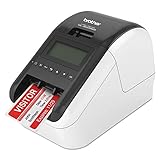
- Flexible connectivity the QL 820NWB network label printer features Bluetooth wireless technology, Ethernet and Wireless (802.11B/g/N) interfaces
- Also offers a USB host interface for use with a peripheral such as a Scanner
- Ultra fast, up to 110 standard address labels per minute with black text at 300dpi
- Easy to read monochrome LCD screen allows for standalone use
- Print amazing black/red labels using DK 2251; Maximum Label Length: 3 feet
The Brother QL-820NWB Professional Monochrome Label Printer is designed to meet the demands of busy workplaces needing quick, crisp label printing. It solves the problem of slow or unclear labeling by producing up to 110 high-resolution labels per minute. This speed ensures smooth workflow and helps avoid delays in shipping or inventory management.
With versatile connectivity options like Bluetooth, Ethernet, wireless 802.11b/g/n, and USB host for peripherals, it easily integrates into various office setups. The clear monochrome LCD screen allows for standalone operation, enabling users to print labels without a computer. This simplifies use and reduces dependency on external devices.
The printer supports printing black/red labels with the DK-2251 consumable and can create labels up to 3 feet long. This flexibility accommodates diverse labeling needs, from simple address labels to lengthy tags. Maintenance is straightforward, with easy-to-replace consumables and reliable build quality.
Its monochrome-only display and print limitations mean it may not suit those needing full-color labels. However, its robust functionality and connectivity make it a strong choice for professional environments requiring consistent, high-speed monochrome label printing.
Best for: Businesses and professionals who require fast, high-quality monochrome label printing with versatile connectivity and standalone operation capabilities.
What We Like:
- Fast printing speed up to 110 labels per minute at 300 dpi resolution
- Multiple connectivity options including Bluetooth, Ethernet, wireless, and USB host
- Supports black/red label printing and extra-long labels up to 3 feet
- Easy standalone operation via monochrome LCD screen
- Simple maintenance with quick consumable replacement
Specification:
| Feature | Specification |
|---|---|
| Manufacturer | Brother |
| Dimensions | Approx. 7.6 x 5.8 x 6.9 inches (19.3 x 14.7 x 17.5 cm) |
| Weight | Approx. 3.3 lbs (1.5 kg) |
| Print Resolution | 300 dpi |
| Connectivity | Bluetooth, Ethernet, Wi-Fi 802.11b/g/n, USB host |
| Label Length | Up to 3 feet (approx. 91 cm) |
Brother QL-1110NWB Wireless Thermal Label Printer

- PRINTS ON WIDE FORMAT LABELS UP TO 4” WIDE: Perfect for printing mailing, address and postage labels for packages along with visitor and name badges
- CONNECTIVITY & WIRELESS PRINTING: Bluetooth wireless technology, Ethernet or Wireless (802. 11b/g/n) interfaces; print wirelessly from mobile devices(1)
- BARCODE CROP FUNCTION: No more printing sheets of barcodes. Now, easily crop and select barcodes and UPCs for printing from templates (Windows only).Database File...
- Operating system : Windows Vista, Windows 7, Windows 8/8. 1, Windows 10; Server 2008/2008 R2/2012/2012 R2/2016; Mac OS X 10. 11 - 10. 13. x . “PLUG & LABEL” FEATURE...
- NETWORK MANAGEMENT TOOLS & FREE SOFTWARE DEVELOPMENT KITS (SDK): Easily integrate & manage via network, free SDKs for Windows, iOS & Android systems. Maximum Label...
The Brother QL-1110NWB Wireless Thermal Label Printer offers a practical solution for businesses needing wide-format labels without hassle. It prints crisp, monochrome labels up to 4 inches wide, perfect for barcodes and postage. This printer’s sharp 300 dpi resolution ensures clear, professional output every time.
Connectivity is flexible, supporting wireless options like Bluetooth and Wi-Fi, along with Ethernet and USB for wired setups. This versatility allows easy integration into various work environments. The included P-touch Editor software streamlines label creation with database support and barcode cropping features.
Designed to fit neatly on your desk, the printer weighs just 3.9 pounds, making it easy to move if needed. Maintenance is straightforward as it uses thermal printing technology, which means no ink or toner refills are necessary. However, it prints only in monochrome, which may limit use cases requiring color.
Label length capabilities depend on connection type, with USB allowing longer labels than serial connections. Overall, the QL-1110NWB enhances labeling efficiency while offering flexible connectivity and user-friendly software.
Best for: Businesses and individuals needing a reliable, versatile label printer for wide-format, barcode, and postage labels with wireless and wired connectivity options.
What We Like:
- Produces sharp, high-resolution (300 dpi) monochrome labels up to 4 inches wide
- Multiple connectivity choices including Bluetooth, Wi-Fi, Ethernet, and USB
- P-touch Editor software supports database integration and barcode cropping
- Compact and lightweight design fits easily on desks
- Thermal printing eliminates the need for ink or toner replacements
Specification:
| Feature | Details |
|---|---|
| Manufacturer | Brother |
| Dimensions (W×D×H) | Approx. 7.9 × 11.8 × 5.8 in (20 × 30 × 14.7 cm) |
| Weight | 3.9 lbs (1.77 kg) |
| Printing Technology | Wireless Thermal Printing |
| Max Label Width | 4 inches (102 mm) |
| Print Resolution | 300 dpi |
| Connectivity | Bluetooth, Wi-Fi, Ethernet, USB |
DYMO LabelWriter 450 Turbo Thermal Printer (Renewed)

- TURBO LABELING AND PRINTING: Create and print up to 71 4-line address, shipping, file folder and barcode labels, name badges, and more per minute
- ELIMINATE THE WASTE AND HASSLE OF SHEET LABELS: The DYMO LabelWriter 450 Turbo prints precise quantities without difficulty
- NEVER BUY INK AGAIN: Direct Thermal printing technology eliminates the cost of ink and toner
- EASILY CUSTOMIZE AND PRINT LABELS: Create labels directly from text in Microsoft Word, Excel, Outlook, and Google Contacts
- USE WITH AUTHENTIC DYMO LABELS: For best performance, use DYMO LabelWriter Labels in a variety of sizes
Handle your labeling needs quickly and efficiently with the DYMO LabelWriter 450 Turbo Thermal Printer (Renewed). This compact printer produces up to 71 labels per minute, saving valuable time on shipping, filing, and organizing tasks. Its direct thermal technology means no ink or toner is required, cutting down on maintenance and ongoing costs.
The printer’s design eliminates wasted labels by printing only what you need, reducing expenses and clutter. It connects easily via USB 2.0, making setup simple and straightforward for any workspace. You can create and customize labels directly from Microsoft Word, Excel, Outlook, or Google Contacts, ensuring seamless integration with your existing software.
Maintenance is minimal since there are no cartridges to replace, and the renewed model has been tested to perform like new. This makes it a practical choice for small businesses or individuals looking for reliable, fast label printing without extra hassle.
Best for: Small businesses and home offices needing fast, cost-effective label printing for shipping, organization, and barcode use.
What We Like:
- Prints up to 71 labels per minute for quick labeling.
- Direct thermal printing eliminates ink and toner requirements.
- Compatible with popular software for easy label creation.
- Compact design fits easily on any desk.
- Renewed and tested for reliable performance.
Specification:
| Feature | Details |
|---|---|
| Manufacturer | DYMO |
| Dimensions | Approximately 7.0 x 4.9 x 6.7 inches (17.8 x 12.5 x 17 cm) |
| Weight | Around 2.7 lbs (1.2 kg) |
| Printing Method | Direct thermal |
| Connectivity | USB 2.0 |
| Color Options | Monochrome (black only) |
Factors to Consider When Choosing a Barcode Printer

When choosing a barcode printer, you’ll want to contemplate print resolution to guarantee clear labels and connectivity options that fit your setup. Don’t forget to check media compatibility and print speed to match your workload.
Also, factor in durability and build quality for long-term reliability. It’s all about finding the right balance that suits your specific needs.
Print Resolution Importance
Although print resolution might seem like a technical detail, it directly affects how accurately your barcode prints and scans. Resolution, measured in dpi, determines barcode detail and the minimum X-dimension.
For example, 203 dpi works well for standard 1D barcodes, but very small or dense 2D codes often need 300 to 600 dpi. Higher dpi improves scannability at close range but can slow printing speed due to larger file processing.
You’ll want to match resolution to your label size and scanner capability to avoid read failures caused by edge aliasing. Also, remember that high resolution won’t fix poor contrast or smudging—use quality media and set print darkness properly.
For flexibility, pick a printer offering configurable resolutions or modes to balance sharpness and throughput for different label types. It’s all about finding the right balance for your specific needs.
Connectivity Options Overview
Picking the right connectivity option can make or break your barcode printing setup. If you need reliable, low-latency printing for a single workstation, USB 2.0 is a solid choice. It often requires specific drivers, though.
For mobile or point-of-sale use, Bluetooth offers wireless convenience. Keep in mind, it has limited range and pairing capacity.
Wi-Fi lets multiple users print remotely within a local network. But it demands proper network setup and security to work smoothly.
If you run a high-volume or enterprise environment, Ethernet provides the most stable multi-user connection. It’s easy to integrate via DHCP or static IP.
Legacy interfaces like serial or parallel ports still exist in some industrial settings for direct device control. However, they are slower and less common in modern setups.
Choose connectivity based on your workflow, environment, and device compatibility. It really depends on what fits your needs best.
Media Compatibility Range
Make sure you check the media compatibility range before settling on a barcode printer, as it directly affects your printing quality and efficiency. Look at supported label widths and media types—whether you need continuous rolls, die-cut labels, tags, or wristbands.
Confirm the printer handles your media’s thickness and core diameter, since roll size and label gap sensitivity impact loading and performance. Also, check if the printer works with generic labels or demands branded ones to avoid costly vendor lock-in.
Verify its sensors and drivers support your label formats like gaps, black marks, or notches to prevent misfeeds. Finally, match media durability—water or oil resistance, thermal or synthetic materials, and adhesive type—to your environment so your barcodes stay scannable and last as long as you need.
Print Speed Requirements
When choosing a barcode printer, you’ll want to zero in on print speed to keep up with your workflow demands. High-volume operations typically require printers rated at 4–8 inches per second (ips) or 50+ labels per minute, while low-volume or on-demand users can manage with 1–3 ips.
Keep in mind, printing dense barcodes or high-resolution graphics slows down speed, so pick a printer with a higher base speed to hit your targets. Also, wider or longer labels reduce labels per minute despite the same linear speed.
Factor in your peak versus average demand—select a printer that can sustain throughput beyond your busiest shifts to avoid bottlenecks. Ultimately, account for connection and processing delays, as real-world speeds often run 10–30% below rated specs.
Durability and Build Quality
Although speed and print quality are essential, durability and build quality play an equally important role in choosing a barcode printer that lasts. You should check the printer’s enclosure material—metal chassis and reinforced hinges handle wear and vibration better than plastic, especially in high-use settings.
Verify the rated duty cycle and MTBF to make certain it meets your label volume without breaking down prematurely. Industrial-grade parts like heavy-duty cutters and robust feed mechanisms boost longevity during frequent media changes.
Don’t forget to confirm environmental ratings, including temperature, humidity tolerance, and dust or water protection, if your printer runs in tough conditions. Finally, assess serviceability—easy access to replaceable parts, availability of spares, and a solid warranty will keep your printer reliable and reduce long-term costs.
Software and App Support
Durability and build quality keep your barcode printer running smoothly, but software and app support determine how well it fits into your workflow. Make sure the printer’s software supports your operating systems—Windows, macOS, Linux, iOS, and Android—with easy-to-install drivers.
Look for label design apps that offer CSV import, serialized barcode generation, template saving, and batch printing to handle high-volume jobs efficiently. Confirm the software auto-detects label size and calibrates gaps or black marks to avoid print errors.
If you need integration with POS or inventory systems, check for APIs or SDKs that fit your platform. Finally, consider licensing terms and whether the software works offline or relies on cloud access, so your printing won’t stop if your internet goes down.
Size and Portability
Since space and mobility directly impact your workflow, choosing the right size and portability for your barcode printer is essential. Consider the printer’s footprint and weight to make certain it fits your available counter or shelf space.
If you need mobile labeling at point-of-sale or in the field, opt for a compact, portable model that supports battery operation and easy transport. Match the printer’s maximum media width and roll diameter to your typical label sizes so you avoid carrying oversized equipment.
Keep in mind that smaller printers usually hold fewer labels and suit low-to-moderate throughput, while larger units handle higher volumes. Also, evaluate connectivity options—Bluetooth or Wi-Fi for mobile use lets you place the printer flexibly without cables, whereas USB or Ethernet suits stationary setups.
Warranty and Support
When choosing a barcode printer, you’ll want to carefully review the warranty and support options to protect your investment and minimize downtime. Check the warranty length—commonly 90 days to 2 years—and confirm it aligns with your usage and replacement risks.
Understand what’s covered: parts, labor, printheads, and accessories, since printheads often have limited or no coverage. Consider the service type—on-site, depot, or carry-in—and how return shipping might affect your operation’s downtime.
Look for extended warranty plans or next-business-day support if uptime is critical. Finally, evaluate the vendor’s technical support channels, hours, and whether firmware updates and online resources come free.
Solid warranty and support make certain your printer stays reliable and your business keeps running smoothly.
Frequently Asked Questions
How Do Barcode Printers Integrate With Existing Inventory Software?
You simply connect your barcode printer to your inventory software via USB, network, or Bluetooth. Most printers support common protocols and integrate with software APIs.
This lets you print labels directly from your existing inventory management system. It’s pretty straightforward and helps keep everything synced up smoothly.
What Types of Barcode Labels Are Compatible With These Printers?
You can use paper, polyester, and polypropylene labels with these printers. They also support thermal transfer and direct thermal labels, so you’ll find options for durability, weather resistance, and different surface types to match your business needs.
That means whether you need something tough for outdoor use or just a simple label for everyday tasks, these printers have you covered. It’s all about finding the right fit for what you do.
Can These Printers Print Color Barcodes or Only Monochrome?
You won’t believe it, but many barcode printers can print vibrant color barcodes, not just monochrome!
You’ll find options that handle both, letting you customize labels with stunning hues to make your business stand out instantly. It’s pretty cool how much variety you get these days. So, if you’re thinking color, you’re definitely not out of luck!
What Is the Average Lifespan of a Thermal Barcode Printer?
You can expect a thermal barcode printer to last around 5 to 7 years with proper care. Regular maintenance and using quality labels will help you extend its lifespan and keep printing smoothly.
It’s kind of like taking care of any other tech device — a little attention goes a long way. So, if you treat it right, it should serve you well for quite a while!
Are There Specific Maintenance Tips for Prolonging Printer Durability?
Yes, you should regularly clean the printhead and avoid dust buildup. Using quality labels also makes a big difference.
Keep the printer in a cool, dry place to prevent damage. Don’t forget to update the firmware as well.
These simple steps will help you extend your printer’s durability and keep its performance top-notch.
Conclusion
Choosing the right barcode printer can truly streamline your business operations and save you time. Remember, “A stitch in time saves nine”—investing in a quality printer now prevents headaches later.
Whether you need Bluetooth convenience, wide label compatibility, or professional-grade speed, there’s a perfect option on this list for you. Pick the one that fits your needs, and watch your efficiency and productivity soar!
Selecting the best barcode printer is crucial for any business aiming to improve inventory management and shipping processes. With the right device, you’ll enjoy faster printing speeds, reliable performance, and seamless connectivity options like USB or wireless.
So, take advantage of these top barcode printers for 2027 and boost your business operations today. A smart choice here means less downtime, fewer errors, and greater overall success!