2 Best Cheap Printers for T-Shirt Printing in 2027
You’ll want the Epson SureColor F170 for vibrant dye-sublimation on light or polyester fabrics, perfect if you’re a hobbyist or small business.
It’s a great choice if you’re looking for bright, detailed prints without breaking the bank.
For darker garments needing white ink and larger prints, the KOMHOW 1390 A3 DTF is budget-friendly with fast speeds and self-cleaning features to minimize upkeep.
Its efficiency makes it ideal for those who want quality and convenience in one package.
Both printers support essential connectivity options, but your choice depends on fabric type, print size, and workflow needs.
Explore further to find which suits your setup best.
| Image | Name | Editor's Rating | Price |
|---|---|---|---|

|
|
||
|
|
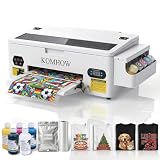
Epson SureColor F170 Dye-Sublimation Printer Kit
- Confidence - Epson authorized partner. Original Epson Manufactured product delivered in Epson’s factory-sealed packaging with Epson documentation and Epson’s full...
- Genuine Epson Ink Included - Comes with a full set of OEM Epson sublimation inks, certified ECO PASSPORT by OEKO-TEX for safe use on textiles, apparel, mugs, mousepads...
- Astounding Print Quality - Epson's Surecolor F170 Sublimation printer boasts the PrecisionCore printhead which offers Precision Droplet Control for the most outstanding...
- Versatile Media Support - Includes a 150-sheet auto-feed tray for added efficiency. Epson SureColor sublimation printers house the paper in a dust resistant closed tray...
- Compact Reliable Solution - Space-saving design with user-friendly setup for MacOS & Windows. Please note that connection to mobile devices is not supported with this...
Start your custom T-shirt printing journey with the Epson SureColor F170 Dye-Sublimation Printer Kit, designed to bring professional-quality results without the hassle. This compact printer delivers vibrant, detailed prints at 1200 x 600 dpi, making it ideal for textiles and apparel projects.
The complete kit includes everything you need to get started—sublimation ink, starter blanks, thermal tape, and sublimation paper—all factory-sealed for quality assurance. Its PrecisionCore technology ensures sharp, clear designs that stand out on fabric. The printer’s wireless, USB, and Ethernet connectivity options offer flexible setup in any workspace.
Maintenance is straightforward, with a dust-resistant tray that holds up to 150 sheets, helping keep your materials clean and organized. While the print speed is modest at about 1 page per minute, it suits hobbyists and small business owners who prioritize quality over volume.
Keep in mind, mobile device printing is not supported, and media width is limited to 8.5 inches, which may restrict larger projects. Overall, the Epson SureColor F170 is a reliable, user-friendly choice for those focused on textile printing without complexity.
Best for: Hobbyists, crafters, and small business owners seeking an affordable, compact dye-sublimation printer for apparel and textiles.
What We Like:
- Complete starter kit with OEM inks and materials included
- Sharp, vibrant prints with PrecisionCore technology
- Flexible connectivity: wireless, USB, and Ethernet
- Dust-resistant paper tray holding 150 sheets
Specification:
| Feature | Details |
|---|---|
| Manufacturer | Epson |
| Print Resolution | 1200 x 600 dpi |
| Connectivity | Wireless, USB, Ethernet |
| Media Width | Up to 8.5 inches |
| Paper Tray Capacity | 150 sheets |
| Technology | PrecisionCore |
| Included Materials | Sublimation ink, blanks, thermal tape, sublimation paper |
1390 A3 DTF T-Shirt Heat Transfer Printer
- 【Easy to Start, Built for Small Businesses】Designed with a low learning curve and simple maintenance, this DTF printer machine helps you start printing with...
- 【Printer Only – Flexible DTF Setup】Includes the DTF printer for high-quality film printing. Ideal for users who already have curing and heat press equipment, or...
- 【Smart White Ink System, Less Maintenance Hassle】This DTF printer features white ink circulation, mixing, and self-cleaning functions to help keep ink flowing...
- 【High-Resolution, Professional Print Quality】Produces sharp details, smooth gradients, and vibrant colors to accurately reproduce your designs. Suitable for logos...
- 【Guided Setup & Dedicated Customer Support】Our professional support team guides you step by step through your first print after delivery. Ongoing technical assistance...
The KOMHOW 1390 A3 DTF Printer is designed to simplify creating vibrant, multi-color T-shirt prints with sharp detail. It handles A3-sized media efficiently, allowing users to produce high-quality designs quickly and accurately. This printer’s white ink circulation system reduces clogging and ensures consistent color output.
Maintenance is straightforward thanks to the built-in self-cleaning feature. This minimizes downtime and keeps print quality reliable over time. The printer connects via USB and uses Windows-compatible RIP software, offering precise control over print details.
Ideal for small apparel shops and independent creators, this printer supports small-batch production without sacrificing quality. While it requires separate curing and heat-press tools, it delivers professional results with affordable upfront investment. KOMHOW also provides setup guidance and ongoing support to help users get started.
The printer’s focus on efficient, vibrant DTF printing makes it a practical choice for those wanting to expand their custom apparel offerings with minimal hassle.
Best for: Small apparel businesses and independent designers needing affordable, high-quality A3-sized DTF printing for small orders.
What We Like:
- White ink circulation and self-cleaning reduce maintenance needs
- Prints up to 10 color pages per minute with vibrant, precise output
- Easy USB connection and Windows RIP software for detailed control
- Setup support and technical assistance from KOMHOW
Specification:
| Feature | Detail |
|---|---|
| Manufacturer | KOMHOW |
| Media Size | A3 (11.7 x 16.5 inches) |
| Print Speed | Up to 10 color pages/min |
| Connectivity | USB |
| Software Compatibility | Windows RIP software |
| Ink System | White ink circulation |
Factors to Consider When Choosing a Cheap Printer for T Shirt Printing
When choosing a cheap printer for T-shirt printing, you’ll want to focus on print quality and resolution to guarantee sharp designs. Consider the ink type and compatibility, along with the maximum print size you need.
Don’t forget to check the printer’s speed, efficiency, and connectivity options to match your workflow. These little details can really make a difference in your printing experience.
Print Quality and Resolution
Although cheap printers might seem like a bargain, you’ll want to prioritize print quality and resolution to make certain your T-shirt designs look sharp and vibrant. Aim for printers with at least 600 x 600 dpi for clear garment graphics, or 1200 x 600 dpi if you want sharper photographic prints.
Color depth and accurate color management are pivotal to keep your prints vivid and consistent, avoiding banding or color shifts. Pay attention to droplet size and placement, since smaller droplets create smooth gradients and reduce graininess on fabric.
If you print on dark garments, a printer that lays down high-resolution white ink or underbase white is vital to keep colors bright. Finally, choose a printer with stable ink delivery and maintenance features to guarantee consistent quality over long print runs.
Ink Type and Compatibility
Print quality depends heavily on the type of ink your printer uses and how well it matches your fabric. If you go for dye-sublimation, remember it requires sublimation inks and works best on light-colored or polyester fabrics.
This method delivers vibrant, durable prints. For dark garments, direct-to-film (DTF) and direct-to-garment (DTG) printers need specialty inks with white capabilities plus pretreatments to get accurate colors and opaque whites.
You’ll also want to check ink chemistry—pigment inks resist washing better, while dye and sublimation inks give brighter colors on compatible materials. Make sure your printer’s ink formulation matches its printhead technology and supports maintenance features like white-ink circulation to avoid clogging.
Finally, consider total ink cost, yield, and certifications like OEKO-TEX if apparel safety is important to you. It’s all about finding the right balance for your specific printing needs.
Maximum Print Size
Since your designs need room to breathe, you should first check the maximum print size your printer supports. Knowing the printable width and length, whether it’s A4, A3, or wider sublimation/DTF sizes like 13″×24″, is vital because it directly affects garment size and print placement.
Make sure the printer’s maximum media size fits your largest intended area—chest prints generally need 11″–12″ width, while full-front designs may require 12″–15″ or more. Don’t overlook printable margins and platen size, as non-printable borders can shrink your actual design space.
Also, match the print size with your heat press capacity; printing larger transfers than your press can handle won’t work. If you plan multi-panel prints, consider alignment and extra finishing time for seamless results.
Speed and Efficiency
When choosing a cheap printer for T-shirt printing, you’ll want to focus on how quickly it can handle your typical designs and garment sizes. Measure throughput by prints per hour to reduce turnaround on batch orders.
Don’t overlook the total job time—include pre- and post-press steps like transfer printing and curing, as these affect overall speed. Check if the printer does simultaneous color passes; multiple passes multiply print time.
Also, consider how often maintenance is needed—frequent head cleaning or ink circulation cuts into your production time. Finally, look at media handling speed and capacity. Large sheet feeds and higher stack capacities mean less frequent reloading, boosting your sustained efficiency and letting you get more done with less hassle.
Connectivity Options Available
How do you connect your printer to get the best workflow for your T-shirt business? USB connectivity is common on budget printers, offering a reliable direct link to one computer—but it limits you to a single device nearby.
If you want flexibility, Wi-Fi lets you print wirelessly from multiple devices. It’s perfect for small shops or home studios, though it may be slower or less stable sometimes.
For stable, high-speed network printing that supports multiple users, Ethernet is ideal. This is especially true in small business setups where consistent transfer and remote management matter.
Also, check your printer’s compatibility with your operating system and drivers. If you plan to print from various stations or use RIP servers, prioritize network options like Ethernet or Wi-Fi over USB for smoother, scalable operation.
Maintenance and Durability
Though cheap printers can save you money upfront, you’ll want to take into account maintenance and durability to avoid costly downtime and repairs. Establishing regular maintenance routines like nozzle checks, printhead cleaning, and ink circulation—especially for white inks—prevents clogs and extends printhead life.
Opt for printers with automated cleaning features and ink circulation systems to reduce manual upkeep and downtime. Use manufacturer-recommended inks stored properly in temperature-controlled, sealed containers to avoid chemical degradation and nozzle blockages.
Mechanical durability matters too: metal feed paths, sturdy platen rollers, and dust-resistant housings lower maintenance frequency. Remember, budget printers for high-volume textile work often need more frequent maintenance and parts replacements, so factor in ongoing service costs and spare parts availability to gauge the printer’s true cost of ownership.
Frequently Asked Questions
Can These Printers Print on Materials Other Than Fabric?
Yes, you can print on materials like paper, vinyl, and some plastics with these printers. Just be sure to check each model’s specifications to guarantee compatibility with the surfaces you want to use beyond fabric.
It’s always a good idea to double-check before you start printing. That way, you’ll know for sure if the printer will handle your chosen material without any issues.
How Long Do Printed Designs Typically Last After Washing?
Printed designs typically last 20-50 washes. But while some fade quickly with harsh detergents, others stay vibrant through countless cycles.
You’ll want to wash your shirts inside out and avoid bleach. This helps keep them looking fresh longer.
Are There Eco-Friendly Ink Options Compatible With These Printers?
Yes, you’ll find eco-friendly ink options compatible with most affordable t-shirt printers. Look for water-based or soy-based inks—they’re less toxic, biodegradable, and offer vibrant prints.
Plus, these inks help reduce environmental impact during your printing projects. It’s a smart choice if you want to keep things green without sacrificing quality.
What Maintenance Is Required to Keep the Printers in Good Condition?
You’ll need to clean printheads regularly, check ink levels, and perform nozzle checks to avoid clogs.
Keep the printer dust-free, update firmware, and use it often to prevent drying. Proper maintenance guarantees consistent, high-quality prints.
Can These Printers Be Used for Bulk Commercial Printing Jobs?
You can use these printers for small to moderate bulk jobs, but they might struggle with high volume commercial demands.
Regular breaks and maintenance will help, but for heavy-duty printing, a more robust machine suits you better.
Conclusion
Choosing the right cheap printer for t-shirt printing doesn’t have to feel like searching for a needle in a haystack. With the Epson SureColor F170 and the 1390 A3 DTF Heat Transfer Printer, you’re getting quality and reliability without breaking the bank.
Keep an eye on print quality, ink compatibility, and maintenance to make certain your prints always shine. These factors are key to making the most out of your printer investment.
Pick wisely, and your t-shirt designs will speak volumes without costing a fortune! Affordable t-shirt printing is totally possible when you choose the right printer. So, whether you’re starting a small business or just printing for fun, these budget-friendly options will help your creativity stand out.