8 Best Barcode Printers for Shopify in 2027 (Top Picks)
You need a barcode printer that’s fast, reliable, and works seamlessly with Shopify to keep your business running smoothly. Whether you’re labeling products, organizing inventory, or shipping orders, having the right barcode printer can make all the difference.
The iDPRT SP310 offers inkless printing and supports a wide range of operating systems, making it a versatile choice. Meanwhile, the DYMO LabelWriter 550 shines with crisp 300 dpi labels using DYMO’s proprietary media.
If portability is key, KNAON and Nelko provide Bluetooth connections and mobile app integration, perfect for on-the-go labeling. The Brother QL-820NWB delivers professional speeds along with multi-network options for busy workspaces.
Each of these printers balances performance, media options, and software compatibility to keep your labeling process smooth. Take a closer look at their features to find the best fit for your Shopify store!
| Image | Name | Editor's Rating | Price |
|---|---|---|---|

|
|
||
|
|
||

|
|
||
|
|
||

|
|
iDPRT SP310 Thermal Label Printer, Label Maker Fits 1″-3.35″ Width
No products found.
The iDPRT SP310 Thermal Label Printer offers a practical solution for businesses needing efficient, inkless label printing. It prints labels ranging from 1″ to 3.35″ wide, perfect for organizing inventory and shipping tasks. This printer eliminates the hassle and cost of ink or toner with its direct thermal technology.
Designed for ease of use, the SP310 connects via USB and supports multiple operating systems, including Windows, macOS, Linux, and more. Its 203 DPI resolution ensures clear, sharp labels, while the fast printing speed of up to 4 inches per second helps boost productivity. The built-in smart sensor aligns labels precisely, reducing wasted materials.
Maintenance is straightforward since no ink cartridges are needed, and it accepts third-party label rolls, giving flexibility in supplies. The included HereLabel software simplifies designing and printing, allowing bulk import and barcode generation to streamline label creation.
Though it prints only in monochrome and lacks wireless connectivity, the SP310 remains a reliable choice for small businesses and offices needing accurate, fast label printing without ink mess.
Best for: Small business owners and office users seeking an inkless label printer compatible with various operating systems for efficient label production.
What We Like:
- Inkless direct thermal printing reduces cost and mess
- Supports Windows, macOS, Linux, ChromeOS, and Raspberry Pi
- Includes free HereLabel software with bulk import and barcode tools
- Smart sensor ensures precise label alignment
- Accepts third-party label rolls for supply flexibility
Specification:
| Feature | Details |
|---|---|
| Manufacturer | iDPRT |
| Label Width Range | 1″ to 3.35″ (2.54 to 8.5 cm) |
| Resolution | 203 DPI |
| Print Speed | Up to 4 inches per second |
| Connectivity | USB only |
| Compatible OS | Windows, macOS, Linux, ChromeOS, Raspberry Pi |
DYMO LabelWriter 550 Series Label Printer
- Print precise quantities instead of wrestling with sheet labels
- ONLY WORKS WITH AUTHENTIC DYMO LABELS: Uses only high-quality, BPA-free DYMO Authentic LabelWriter labels; paper labels are made from FSC certified material
- NEVER BUY INK AGAIN: Direct thermal label printer, no expensive ink or toner required
- ELIMINATE WASTE AND HASSLE OF SHEET LABELS: Print precise label quantities with ease
The DYMO LabelWriter 550 Series Label Printer is designed to simplify your label printing tasks. It removes the need for manual adjustments by automatically recognizing labels, ensuring every print is accurate and hassle-free. This makes it ideal for busy Shopify sellers who need reliable, fast labeling without interruptions.
Using thermal printing technology, it prints directly onto labels without requiring ink or toner. This reduces maintenance and lowers operating costs. Its speed is up to 20% faster than previous models, helping you complete printing jobs more quickly while minimizing waste.
The printer works exclusively with DYMO’s BPA-free, FSC-certified labels. This guarantees consistent print quality at 300 dpi and precise label counts, supporting both environmental responsibility and professional results. Its compact size and plastic-free packaging further contribute to an eco-friendly workspace.
While the printer’s compatibility is limited to DYMO labels, this ensures optimal performance and print quality. Its straightforward setup and low maintenance needs make it a practical tool for small businesses focused on efficiency and sustainability.
Best for: Small business owners and Shopify sellers who need fast, precise, and eco-friendly label printing with minimal manual setup.
What We Like:
- Automatic label recognition for quick, accurate printing
- Direct thermal printing eliminates ink or toner use
- Compact design supports an eco-conscious workspace
- Uses BPA-free, FSC-certified labels for safe, sustainable printing
Specification:
| Feature | Details |
|---|---|
| Manufacturer | DYMO |
| Dimensions | Compact size (exact size not specified) |
| Weight | Not specified |
| Printing Method | Direct thermal |
| Print Resolution | 300 dpi |
| Label Compatibility | DYMO BPA-free, FSC-certified labels only |
KNAON Portable Bluetooth Thermal Shipping Label Printer
- Bluetooth Wireless Connection: KNAON Bluetooth shipping label printer enables wireless printing. For Mobile users, download the 'FlashLabel Pro' app from APP Store or...
- USB Cable Connectivity: This printer ensures seamless USB connectivity with macOS, Windows (7 and above), ChromeOS, and Linux. KNAON printer features a built-in USB drive...
- Versatile DIY Labeling Options: KNAON Thermal Shipping Label Printer offers a vast selection of pre-designed templates, including 3,000+ templates, 5,000+ icons, and...
- Seamless Multi-Platform Compatibility: This Bluetooth shipping label printer works effortlessly with all major platforms, including Amazon, eBay, Shopify, USPS, UPS...
- Portable & Stylish Design: KNAON multi-function thermal label printer offers user-friendly operation in a compact design. Its perfect size (7.17 x 3.9 x 3.43 inches...
Experience fast and efficient label printing with the KNAON Portable Bluetooth Thermal Shipping Label Printer. Designed to streamline your shipping process, this compact device delivers sharp, monochrome labels quickly, helping you stay organized and reduce delays.
Its wireless Bluetooth connection pairs seamlessly with the FlashLabel Pro app, compatible with iOS, Android, macOS, and Windows. This flexibility lets you print directly from your preferred device. A USB-C port also offers a reliable wired option for busy workstations.
The printer supports over 3,000 label templates and integrates with major platforms like Shopify, Amazon, and USPS, making it easy to customize labels for shipping, barcodes, and price tags. Its lightweight design and simple setup ensure you can use it anywhere, saving space and effort.
Maintenance is straightforward with minimal parts to clean or replace. However, the printer only supports monochrome thermal printing and uses proprietary software, which may limit compatibility with some third-party apps. Included media covers just a few labels, so plan to purchase more for extended use.
Best for: Small business owners and e-commerce sellers needing a fast, portable, and wireless solution for printing shipping and barcode labels on the go.
What We Like:
- Fast print speed up to 180 mm/s with clear 203 dpi output
- Wide platform compatibility through the FlashLabel Pro app
- Compact, lightweight design with Bluetooth and USB-C options
- Easy maintenance with minimal upkeep required
Specification:
| Feature | Details |
|---|---|
| Manufacturer | KNAON |
| Dimensions | Compact and lightweight |
| Print Speed | Up to 180 mm/s |
| Print Resolution | 203 dpi monochrome |
| Connectivity | Bluetooth, USB-C |
| Compatible OS | iOS, Android, macOS, Windows |
Nelko Bluetooth Thermal Shipping Label Printer, 4×6 Thermal Label Printer
- Go Wireless by Bluetooth: Download the "NELKO"app to print via Bluetooth on your Nelko Bluetooth thermal label printer for iOS and Android. Printing shipping labels has...
- Print via USB: For Windows (7 and later), Mac OS,Chrome OS, you can connect the desktop label printer via USB cable. Note that Mac OS only works with USB connection, you...
- Good Helper for Cost Saving: Advanced thermal direct technology is adopted to achieve the printing speed of 150 mm/s, up to 72 sheets 4x6 labels/min. High speed brings...
- Strong Platform Compatibility: This bluetooth shipping label printer can work with virtually all platforms, including Amazon, Ebay, Shopify, USPS, UPS, Esty, PayPal...
- Suitable for Commercial and Home Use: Printer driver, instruction videos and problem shooting videos are provided in U-Disk for better setting. Nelko PL70E label printer...
The Nelko Bluetooth Thermal Shipping Label Printer brings convenience and efficiency to your shipping process. Its compact design fits easily in tight workspaces, making it perfect for busy e-commerce sellers. You can print crisp 4×6 labels quickly without the hassle of ink or toner, saving time and reducing maintenance.
This thermal label printer connects effortlessly through Bluetooth or USB, supporting a wide range of devices including laptops, Macs, and mobile phones. Its fast printing speed of up to 72 labels per minute helps you keep up with high-volume orders without delays.
Maintenance is simple since it uses direct thermal printing technology. While labels may fade if exposed to heat or sunlight over time, this printer is ideal for short-term shipping labels. The intelligent self-test and auto paper return features ensure smooth operation and reduce paper jams.
The Nelko printer is designed for small business owners who need a portable, reliable tool to streamline their shipping workflow. Its lightweight build and versatile connectivity options make it a practical choice for on-the-go printing.
Best for: Small e-commerce sellers and Shopify store owners needing an efficient, portable thermal shipping label printer.
What We Like:
- Supports Bluetooth and USB connections compatible with various devices
- Prints up to 72 high-quality 4×6 labels per minute without ink or toner
- Compact, lightweight design with auto paper return for easy handling
- Intelligent self-test feature helps maintain smooth operation
Specification:
| Feature | Details |
|---|---|
| Manufacturer | Nelko |
| Dimensions | Compact size (exact not specified) |
| Weight | 1.4 kg |
| Printing Method | Direct thermal |
| Label Size | 4 x 6 inches |
| Print Resolution | 203 × 203 DPI |
| Connectivity | Bluetooth, USB |
Bluetooth Thermal Shipping Label Printer with 50 Labels
- Built-in Label Holder – This shipping label printer includes an integrated label holder that supports roll label installation within the printer structure. The holder...
- Wireless Printing – Supports printing via Bluetooth from iPhone, iPad, Android devices, and Windows computers. USB connection is available for Mac. The printer is...
- Label Compatibility – Supports direct thermal labels with widths from 1.57" to 4.1", including shipping labels, barcode labels, address labels, warehouse labels...
- Platform Compatibility – Works with USPS, UPS, FedEx, Amazon, Etsy, Shopify, eBay, ShipStation, Pirate Ship, Shippo, and other shipping and e-commerce platforms that...
- Package Includes – Comes with 50 pcs 4" x 6" thermal shipping labels. Supports direct thermal printing without ink, toner, or ribbons. Setup instructions are included...
Experience hassle-free shipping with the Bluetooth Thermal Shipping Label Printer, designed for sellers who demand speed and convenience. This compact device lets you print crisp 4×6 labels wirelessly, eliminating the clutter of cables. Its direct thermal technology means no ink or toner is needed, reducing maintenance and ongoing costs.
Connecting seamlessly via Bluetooth to iPhone, Android, and Windows devices, this printer fits perfectly into your mobile workflow. Mac users can also connect through USB for added flexibility. The built-in label bin holds up to 350 labels, which minimizes interruptions and keeps your shipping process moving smoothly.
Ideal for Shopify sellers, this printer supports major carriers like USPS and FedEx, ensuring compatibility with your preferred platforms. While it prints only in black and white, the 203 dpi resolution delivers sharp, readable labels that withstand routine handling. Keep in mind, direct thermal prints may fade if exposed to heat or sunlight over time.
Best for: Shopify sellers and small business owners needing a compact, fast, and wireless label printer for efficient shipping.
What We Like:
- High-speed printing at up to 150 mm/s with clear 203 dpi quality
- Wireless Bluetooth connection plus USB support for versatile device pairing
- Built-in label bin accommodates large rolls, reducing downtime
- No ink or toner needed, simplifying maintenance and lowering costs
Specification:
| Feature | Details |
|---|---|
| Manufacturer | Not specified |
| Dimensions | Compact (exact size not provided) |
| Weight | Not specified |
| Material | Not specified |
| Color Options | Black |
| Print Method | Direct thermal |
| Print Resolution | 203 dpi |
| Print Speed | Up to 150 mm/s |
| Label Size | 4 x 6 inches |
| Connectivity | Bluetooth, USB |
| Compatible Devices | iPhone, Android, Windows, Mac |
MUNBYN Bluetooth Thermal Label Printer, Wireless 4×6 Shipping Label Printer
- VERSATILE LABEL SIZES FOR MORE USES: Print a wide range of direct thermal labels from 1.57" to 4.25" wide, giving you the flexibility to handle everything from shipping...
- Save on Long-Term Costs: Designed as a thermal printer, it lasts up to 970,000 labels—six times more than ordinary devices. Its professional-grade engineering ensures a...
- DAC Dynamic Algorithm Tech: As the first thermal shipping label printer with a 4-inch DAC chip, it auto-calibrates to reduce label misalignment and delivers precision for...
- Enhanced Clarity: Built for professional-grade output, this shipping label printer ensures 0.1 mm font legibility. It’s ideal for creating crisp monochrome labels...
- Whisper-Quiet Performance: Operating at just 60 dB—quieter than typing—this thermal label printer maintains focus in quiet environments like home offices, libraries...
The MUNBYN Bluetooth Thermal Label Printer offers a compact and wireless solution for printing 4×6-inch shipping labels with ease. Its thermal printing technology produces sharp, monochrome images without the need for ink, saving both time and expense. This printer helps eliminate common issues like paper jams, ensuring smooth operation for busy work environments.
Designed for seamless compatibility, it connects via Bluetooth or USB to Android, iOS, Windows, and Mac devices. This flexibility makes it ideal for small business owners or Shopify sellers who require reliable label printing across multiple platforms. The quiet operation and automatic calibration enhance user experience by simplifying setup and minimizing noise.
Maintenance is straightforward since the printer uses thermal paper instead of ink cartridges, reducing ongoing costs and upkeep. Its durable design supports printing up to 970,000 labels, maintaining consistent performance over time. However, it only prints in monochrome and handles one sheet at a time, which may limit some specialized labeling needs.
Overall, the MUNBYN Bluetooth Thermal Label Printer streamlines label production, making it a practical choice for those seeking efficiency and reliability in a compact wireless device.
Best for: Small businesses and Shopify sellers needing a reliable, wireless label printer compatible with various devices.
What We Like:
- Crisp 4×6-inch monochrome labels with ink-free thermal printing
- Low jam rate and high durability up to 970,000 labels
- Broad connectivity with Bluetooth and USB for multiple operating systems
- Quiet operation with automatic calibration for hassle-free use
Specification:
| Feature | Details |
|---|---|
| Manufacturer | MUNBYN |
| Dimensions | Compact size (exact dimensions not specified) |
| Connectivity | Bluetooth, USB |
| Supported OS | Android, iOS, Windows, Mac |
| Label Size | 4 x 6 inches |
| Printing Color | Monochrome (black and white) |
Rongta Bluetooth 4×6 Thermal Shipping Label Printer

- Label maker for Shipping labels & small business labels
- supports multiple-size wide wireless printing
- Download "RONGTA" app for phone to bluetooth print
- Download computer driver for PC/Laptop to USB print
- Inkless Thermal Printing for Sharp Clarity
The Rongta Bluetooth 4×6 Thermal Shipping Label Printer offers a practical solution for small businesses needing quick and reliable label printing. Its wireless Bluetooth connectivity allows seamless printing from various devices, simplifying your shipping process.
This compact printer produces crisp, inkless 4×6-inch labels at a resolution of 203 dpi and a speed of 15 pages per minute. Using thermal paper, it eliminates the hassle and expense of ink or toner replacements. Setup is straightforward via the RONGTA app or computer driver, ensuring minimal downtime.
Designed for efficiency, the Rongta printer supports multiple operating systems including Windows, macOS, Android, and iOS. Its lightweight design makes it easy to integrate into any workspace without occupying much room. However, its monochrome printing and fixed 4×6-inch media size may limit some labeling needs.
Maintenance is simple since the device requires no ink cartridges and minimal cleaning. The printer focuses solely on shipping labels, so it does not offer duplex printing or scanning functions despite some scanner listings.
Best for: Small business owners and individuals needing a reliable, wireless, and efficient thermal label printer for 4×6-inch shipping labels.
What We Like:
- Wireless Bluetooth and USB connectivity with broad device compatibility
- Inkless thermal printing reduces running costs and upkeep
- Compact, lightweight design with fast 15 ppm print speed
- Easy setup via dedicated app or driver on multiple platforms
Specification:
| Feature | Details |
|---|---|
| Manufacturer | Rongta |
| Dimensions | Compact and lightweight (exact size not specified) |
| Weight | Lightweight (exact weight not specified) |
| Print Size | 4 x 6 inches |
| Resolution | 203 dpi |
| Connectivity | Bluetooth, USB |
| Color Options | White (RP425 model) |
| Operating Systems | Windows, macOS, Android, iOS |
Brother QL-820NWB Professional Monochrome Label Printer
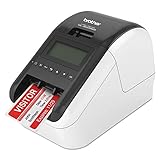
- Flexible connectivity the QL 820NWB network label printer features Bluetooth wireless technology, Ethernet and Wireless (802.11B/g/N) interfaces
- Also offers a USB host interface for use with a peripheral such as a Scanner
- Ultra fast, up to 110 standard address labels per minute with black text at 300dpi
- Easy to read monochrome LCD screen allows for standalone use
- Print amazing black/red labels using DK 2251; Maximum Label Length: 3 feet

The Brother QL-820NWB Professional Monochrome Label Printer is designed to boost your labeling efficiency. If you often print large volumes of labels, this printer handles the task quickly and reliably. It produces sharp black text with a high 300 dpi resolution, ensuring every label is clear and professional.
Its versatile connectivity options simplify setup in various work environments. You can link it through Bluetooth, Ethernet, Wi-Fi, or USB, making it easy to integrate with systems like Shopify. The monochrome LCD screen lets you operate the printer independently when needed, adding flexibility.
This model supports special media, including black and red labels using DK-2251 consumables. It even prints labels up to 3 feet long, accommodating a wide range of labeling needs. Maintenance is straightforward, helping you keep the printer running smoothly without hassle.
While it offers only monochrome printing, the ability to print red labels adds some color variety. The standalone interface is simple but may feel less modern compared to touchscreen models. The upfront cost reflects its advanced capabilities and high-speed performance.
Best for: Businesses and professionals requiring a fast, high-volume monochrome label printer with flexible connectivity and media options.
What We Like:
- Fast printing speed of up to 110 labels per minute at 300 dpi.
- Multiple connectivity options: Bluetooth, Ethernet, Wi-Fi, and USB.
- Supports special black/red label media and extra-long label printing.
- Monochrome LCD screen enables standalone operation.
- Durable build suited for professional labeling demands.
Specification:
| Feature | Details |
|---|---|
| Manufacturer | Brother |
| Dimensions | Not specified |
| Weight | Not specified |
| Color Options | Monochrome (black text, red labels with consumables) |
| Connectivity | Bluetooth, Ethernet, Wi-Fi, USB |
| Print Resolution | 300 dpi |
| Maximum Label Length | Up to 3 feet |
Factors to Consider When Choosing a Barcode Printer for Shopify

When choosing a barcode printer for Shopify, you’ll want to focus on print quality and resolution to guarantee clear labels. Consider connectivity options and compatibility with your system for smooth operation.
Don’t forget to check label size, printing speed, and software integration to keep your workflow efficient. These factors will help you pick the right printer that fits your specific needs.
Print Quality and Resolution
Often, print quality and resolution determine how reliably your Shopify barcode printer performs. You should choose a printer with at least 203 x 203 dpi for clear barcodes. But if you’re printing tiny barcodes, dense QR codes, or fine text, go for 300 dpi or higher.
Make sure the printer supports your barcode symbologies—like Code128 or EAN-13—and can render them at recommended sizes. That way, scanners can read them easily.
Control print contrast and darkness to avoid bleeding or gray gaps that cause errors. Also, match your label stock with the printer’s resolution since higher dpi needs better thermal paper to keep edges sharp and barcodes durable.
Finally, test your printed barcodes at typical scanner distances and speeds. This helps guarantee smooth scanning before full deployment.
Connectivity and Compatibility
Beyond print quality, how your barcode printer connects and works with your existing devices can make or break your Shopify labeling process. Make sure the printer supports the connection methods your setup uses—USB or Ethernet for desktop workstations, and Bluetooth or Wi‑Fi if you print from mobile devices.
Check driver and OS compatibility with Windows, macOS, Linux, ChromeOS, iOS, or Android to avoid forced workarounds. Confirm it accepts standard label formats like PDF, ZPL, EPL, or ESC/POS used by Shopify or your shipping apps.
If multiple users print, opt for a printer with both wired and wireless modes or an Ethernet port for network access. Ultimately, if you print from phones or tablets, verify mobile SDKs or companion apps are available and compatible with your network’s security policies.
Label Size and Type
Since label size and type directly impact your printing efficiency and label durability, you need to choose a barcode printer that handles the specific dimensions and materials your Shopify operations require. Confirm the maximum and minimum printable widths and lengths—like 1″ to 4.25″ widths or 4″×6″ shipping labels—so your labels fit without cropping or scaling.
Decide between roll or fanfold labels, thermal direct or thermal transfer printing, and pre-perforated versus continuous labels based on how durable and long-lasting your prints must be. Match label materials to your needs: paper for short-term shipping, synthetic for long-term storage, or weather-resistant types for outdoor use.
Also, make certain your printer supports the adhesive backing, liner core size, and common label formats you’ll use to keep printing smooth and hassle-free. It’s all about making sure your labels look great and hold up, no matter what your business throws at them.
Speed and Efficiency
When choosing a barcode printer for your Shopify store, you’ll want to make sure it prints fast enough to keep up with your daily label volume without causing delays. Match the printer’s speed—measured in inches per second or labels per minute—to your expected workload.
For high-volume fulfillment, look for speeds of 4–6+ inches per second or 50–100+ 4×6 labels per minute. Also, check the printer’s duty cycle and maximum continuous print run to avoid overheating during peak times.
Larger media capacity helps reduce roll changes, keeping your process smooth. It’s a great way to save time and hassle.
Opt for fast wired connections like USB or Ethernet to prevent delays. And finally, choose models with batch-printing and label formatting features to speed up large SKU or shipping runs and minimize operator effort.
Software and Integration
Although hardware specs matter, you’ll want to prioritize software and integration features to guarantee your barcode printer works seamlessly with Shopify. Make sure your printer supports drivers or APIs compatible with your platform and Shopify’s accepted label languages like PDF, ZPL, or ESC/POS.
Confirm it handles the label sizes and resolutions Shopify and shipping carriers use, such as 4×6 or 2×3 labels at 203–300 dpi. Look for integrations with Shopify shipping or fulfillment apps, enabling one-click batch printing and automated barcode generation.
Your printer should support network, Bluetooth, or USB printing with features like print queuing and bulk CSV imports. Finally, software tools like template editors, serialized barcode printing, and built-in calibration help guarantee precise label alignment and reduce misprints.
Frequently Asked Questions
Can Barcode Printers Integrate With Shopify POS Systems?
Yes, you can integrate barcode printers with Shopify POS systems. They connect seamlessly, letting you print labels directly from your sales interface.
This speeds up checkout and inventory management without any hassle or extra steps. It’s a smooth process that really helps streamline your operations.
What Is the Average Lifespan of a Barcode Printer?
You can expect a barcode printer to last around 3 to 5 years with regular use.
Proper maintenance and quality supplies will help you extend its lifespan and keep it running smoothly.
Are Barcode Printers Compatible With Mobile Devices?
You know what they say, “where there’s a will, there’s a way.”
Yes, you’ll find many barcode printers compatible with mobile devices, letting you print labels on the go using apps and Bluetooth or Wi-Fi connections effortlessly.
How Do I Maintain and Clean My Barcode Printer?
You should regularly clean the printhead with isopropyl alcohol, remove dust and debris from rollers, and avoid using harsh chemicals.
Turn off your printer before cleaning, and follow the manufacturer’s maintenance schedule to keep it running smoothly.
This way, your barcode printer will last longer and perform better. Just a little upkeep goes a long way!
Can Barcode Printers Print in Color or Only Monochrome?
About 70% of barcode printers only print in monochrome, but you can find color models too.
If you want vibrant labels, you’ll need a color thermal or inkjet printer designed specifically for that purpose.
Conclusion
Choosing the right barcode printer for your Shopify store is like picking the perfect tool to carve your brand’s identity. With options from compact Bluetooth models to professional-grade printers, you’ve got the power to streamline your shipping and inventory effortlessly.
Trust your needs and budget to guide you, and you’ll have labels printing smoothly like a well-oiled machine. This makes your business run faster and more efficiently every day.
When selecting a barcode printer for Shopify, consider factors like print quality, speed, connectivity options, and durability. The best barcode printers can save you time, reduce errors, and enhance customer satisfaction by ensuring accurate labeling.
In 2027, investing in a reliable barcode printer tailored for Shopify can transform your inventory management. It’s not just about printing labels—it’s about optimizing your entire workflow for success.