8 Best Cheap Phone Printers for 2027
You’ll find affordable phone printers like the Rongta Wireless Thermal Printer for crisp black-and-white receipts and labels, and the KODAK Mini 2 Retro or Step for vibrant 2×3-inch color photos with durable coatings.
For stickers and journaling, consider compact thermal models like the NADAIIN D20 or Mini Portable Bluetooth Printer. The NDYIN N80 suits travel with its extended battery and document printing.
Models like HP Sprocket and Phomemo add ease with apps and sharper prints. Explore these options to match your printing needs perfectly.
| Image | Name | Editor's Rating | Price |
|---|---|---|---|

|
|
||

|
|
||

|
|
||

|
|
||

|
|
Rongta Wireless Thermal Portable Printer for Mobile
- Easy to Set Up: RONGTA F11A portable thermal printer for travel go by bluetooth.Download "RONGTA" APP from Google Play or APP store for iOS and Android Phone or...
- RONGTA portable printer, 203DPI resolution, large to 8.5" design, easy to use and maintain. Print forms, letters, assignments, study materials, and travel documents...
- Stylish Thermal Printer:Rongta bluetooth wireless printer, It is compatible with your go-to paper sizes—including US Letter, Legal, A4 thermal papers. What’s more, it...
- Portable and Compact: When traveling you can take Rongta portable printer wireless in your backpack or tote bag wherever you need. It is compact and portable whether in...
- Warm Tips: Do Not Support Chrome. Rongta portable printers wireless for travel can't support pair bluetooth via Phone or tablet directly, must be pair on the"RONGTA" APP...

Experience hassle-free printing with the Rongta Wireless Thermal Portable Printer, designed for on-the-go convenience. This compact device connects effortlessly to your phone or laptop via Bluetooth or USB, making mobile printing simple and reliable.
Its inkless thermal technology means you never have to worry about replacing ink cartridges or ribbons. Just load thermal paper, and you’re ready to print crisp, clear black-and-white documents quickly. The printer’s 203 dpi resolution ensures legible output for receipts, labels, or simple prints.
Weighing light and fitting easily into bags, this printer suits users who need a portable solution without sacrificing ease of use. It supports Android, iOS, Windows, and macOS, streamlining printing tasks across multiple devices with the dedicated RONGTA app.
While it prints only on thermal paper and supports single-sided black-and-white printing, it focuses on practical functionality rather than complex media options. Note that printing through Chrome or Bluetooth pairing outside the app isn’t supported.
Best for: Professionals and individuals seeking a lightweight, easy-to-use thermal printer for quick, mobile black-and-white printing needs.
What We Like:
- Compact and lightweight for easy portability
- Inkless thermal printing reduces maintenance
- Compatible with Android, iOS, Windows, and macOS
- Simple connectivity via Bluetooth and USB
- Clear 203 dpi resolution for legible prints
Specification:
| Feature | Details |
|---|---|
| Manufacturer | Rongta |
| Dimensions | Compact (exact size not provided) |
| Weight | Lightweight (exact weight not provided) |
| Color | Black |
| Connectivity | Bluetooth, USB |
| Supported OS | Android, iOS, Windows, macOS |
| Print Technology | Inkless thermal |
| Resolution | 203 dpi |
| Paper Size | Up to Letter size |
KODAK Mini 2 Retro 2×3 Portable Photo Printer, 4PASS, 38 Sheets, White
- Instant Photo Printing: The KODAK Mini 2 Retro is a portable photo printer designed to turn smartphone pictures into high quality prints in seconds. Whether capturing...
- Genuine 4PASS dye sublimation printing: Each photo is produced in three color layers and finished with a clear protective lamination layer. In approximately 55 seconds...
- Easy to Use: Print photos quickly without complicated setup or technical steps. Simply power on, connect wireless bluetooth, and start printing within seconds. The Mini...
- Print Anytime, Anywhere: Small enough to fit in your hand, bag, or even a pocket, the Mini 2 Retro is built for on-the-go printing. Ideal for parties, trips, school...
- KODAK Photo Printer APP: Featuring integrated Bluetooth connectivity, this portable printer connects to compatible iOS and Android devices through the KODAK Photo Printer...
Capture and print your memories instantly with the KODAK Mini 2 Retro 2×3 Portable Photo Printer. Designed for those who want vibrant, high-quality prints on the go, this compact printer fits comfortably in your hand or pocket. It solves the hassle of waiting for photos by delivering durable, 2×3-inch prints quickly and conveniently.
Using advanced 4PASS dye sublimation technology, your photos come out water- and fingerprint-resistant, maintaining their vivid colors over time. The printer connects effortlessly via Bluetooth to iOS and Android devices, allowing you to edit and crop images directly through the KODAK app before printing.
Maintenance is simple with included cartridges and photo sheets, ensuring you can start printing right away. When supplies run low, just replace the cartridges and paper to keep creating your favorite memories. Its portable design and ease of use make it ideal for travel, events, or creative projects.
Best for: Anyone needing a compact, easy-to-use portable printer for quick, high-quality 2×3-inch photo prints during travel or special occasions.
What We Like:
- Produces vibrant, water- and fingerprint-resistant photos with 4PASS technology
- Compact and pocket-friendly for easy portability
- Simple Bluetooth setup with iOS and Android compatibility
- In-app editing tools for quick image adjustments
- Includes cartridges and photo sheets to start printing immediately
Specification:
| Feature | Details |
|---|---|
| Manufacturer | KODAK |
| Print Size | 2 x 3 inches (5.1 x 7.6 cm) |
| Technology | 4PASS Dye Sublimation |
| Connectivity | Bluetooth (iOS & Android) |
| Included | 4 cartridges, 38 sheets, USB-C cable, user guide |
| Color | White |
Mini Sticker Printer, D20 Portable Bluetooth Thermal Sticker Maker
- 【Sticker Maker with 3 Rolls Paper】: NADAIIN D20 mini sticker printer easy APP control, portable sticker printer make more fun with DIY stickers, various styles of...
- 【Thermal Sticker Printer 】: Thermal technology, Inkless sticker printer high-quality imaging prints, save your money, no ink and toner needed, clean and tidy...
- 【Print Pods Mini Printer】: Print paper up to 2"inch wide,continuous paper. Only print black. Printing retro style graphics. Half the size of a phone and weighing only...
- 【Perfect for Gift】: The compact& cute print pod is a perfect gift for teens, students, and families. It also takes photos, graphics, banners and notes for...
- 【How to Print on Phones】:1). Long press the power button to turn on 2). Download NADA PRINT from your app store 3). Enable Bluetooth on your phone and Connect the...
The NADAIIN D20 Mini Sticker Printer offers a simple solution for printing stickers and labels wherever you go. Its compact design fits easily in your pocket, making it perfect for on-the-spot creativity. Using thermal printing technology, it produces clear black-and-white prints without ink, saving you from messy cartridges.
This portable printer connects seamlessly via Bluetooth to your smartphone through the NADA PRINT app. You can quickly print notes, photos, or labels up to 2 inches wide, ideal for organizing, crafting, or adding personal touches. The rechargeable battery lasts up to a month, reducing the hassle of frequent charging.
Maintenance is straightforward since it requires no ink refills, just replace the thermal paper rolls when needed. While it only prints monochrome images, this keeps operation simple and cost-effective. Its lightweight build and fast speed ensure efficient printing on the move.
Best for: Students, crafters, and anyone needing portable, inkless label or sticker printing with app convenience.
What We Like:
- Compact, pocket-sized design for easy portability
- Inkless thermal printing eliminates the need for cartridges
- Long-lasting rechargeable battery supports extended use
- Fast printing speed with clear 203 DPI resolution
Specification:
| Feature | Details |
|---|---|
| Manufacturer | NADAIIN |
| Dimensions | Compact (fits in pocket) |
| Print Width | Up to 2 inches |
| Resolution | 203 DPI |
| Connectivity | Bluetooth |
| Battery Life | Up to 1 month per charge |
| Included Items | 3 rolls thermal paper, USB-C cable, setup guide |
| Color Options | Green |
Mini Portable Bluetooth Thermal Sticker Printer
- Free App control: The [Fun Print] application is always free for users, no need to subscribe to any paid services. Massive of free templates in the app. You can print...
- 8 Rolls of Printing Thermal Paper: Mini printer equipped with 8 rolls of thermal printing paper (5 rolls of thermal paper + 3 rolls of adhesive colorful thermal paper...
- 203dpi Clear Printing: JEPEErbz mini pocket printer has a cute look and small size, specially designed for kids. More importantly, compared with similar mini sticker...
- Mini Bluetooth Inkless Printer: Bluetooth 4.0 connection. System for Android 4.0 and IOS8.0 or above. JEPEErbz mini portable printer is an inkless printer, you don’t...
- Wireless Printing : Our mini portable printer for iphone is built-in 1200mAh rechargeable battery which is longer lasting use for one week. The inkless portable printer...
Capture your creativity on the go with this mini portable Bluetooth thermal sticker printer. It lets you print stickers, memos, and photos wirelessly, making journaling and quick notes effortless. The Bluetooth 4.0 connection pairs smoothly with iOS or Android devices, controlled through the intuitive Fun Print app.
This printer uses thermal technology, so there’s no need for ink cartridges. It prints clear, monochrome images at 203 DPI on included adhesive and colorful thermal paper rolls. Its compact, lightweight design makes it easy to carry, weighing just 358 grams, while the rechargeable 1200 mAh battery ensures long-lasting use without frequent charging.
Maintenance is simple since you only need to replace the thermal paper rolls. The inkless printing reduces mess and the need for costly supplies. This device is ideal for users who want a practical, portable solution for creative labeling, photo printing, and DIY crafts.
However, the printer only produces monochrome prints, and the resolution is limited to 203 × 203 DPI. It is designed solely for printing, without scanning or multi-tray features.
Best for: Creative individuals and journaling enthusiasts seeking a compact, inkless Bluetooth sticker printer for on-the-go use.
What We Like:
- Wireless Bluetooth 4.0 with easy app control for iOS and Android
- Includes 8 rolls of adhesive and colorful thermal paper for versatile use
- Lightweight, portable design with efficient rechargeable battery
Specification:
| Feature | Details |
|---|---|
| Manufacturer | Not specified |
| Dimensions | Not specified |
| Weight | 358 grams (0.79 lb) |
| Connectivity | Bluetooth 4.0 |
| Printing Method | Thermal (inkless) |
| Resolution | 203 × 203 DPI |
| Battery Capacity | 1200 mAh rechargeable |
| Included Paper | 8 thermal paper rolls (adhesive and colorful) |
Portable Printers Wireless for Travel, N80 Bluetooth Thermal Printer
No products found.
Experience hassle-free printing wherever your work takes you with the NDYIN N80 Bluetooth Thermal Printer. Designed for professionals on the move, this compact printer offers reliable, inkless printing that simplifies document handling during travel. It connects seamlessly to your iPhone, Android, or tablet via Bluetooth, allowing quick access through the Nada Print app.
The N80 prints clear, monochrome documents on thermal paper, eliminating the need for ink, toner, or ribbons. Its built-in rechargeable battery supports printing up to 160 sheets per charge, reducing downtime and keeping you productive throughout your day. When needed, connect to laptops using the USB-C port, though Bluetooth functionality is limited to mobile devices.
Maintenance is straightforward since the printer uses thermal paper exclusively, which means no messy cartridges or replacements. However, note that the charging adapter is not included, so you’ll need to use an existing charger or purchase one separately. Its lightweight and compact design make it easy to carry in any bag, making it a practical tool for busy travelers and professionals.
Best for: Professionals and travelers needing a portable, inkless printer for on-the-go monochrome document printing via Bluetooth from mobile devices.
What We Like:
- Compact, travel-friendly design for easy portability
- Inkless thermal printing requires no ink, toner, or ribbons
- Long-lasting rechargeable battery supports up to 160 prints per charge
- USB-C connection available for laptop use with driver installation
Specification:
| Feature | Details |
|---|---|
| Manufacturer | NDYIN |
| Dimensions | Compact (exact size not specified) |
| Weight | Lightweight (exact weight not specified) |
| Connectivity | Bluetooth (mobile devices), USB-C (laptops) |
| Paper Type | Thermal paper (US Letter, A4) |
| Battery | Rechargeable, up to 160 sheets per charge |
| Color Options | Not specified |
KODAK Step Portable Instant Smartphone Photo Printer
- STEP UP YOUR PRINTING GAME | No more making plans to print tomorrow. | Kodak step printer connects to any ios or android smartphone, tablet or similar device [via...
- AMAZING ZERO-INK TECHNOLOGY: ZINK innovation eliminates the need for pricy ink cartridges, toners or ribbons. 2” x 3” sticky-back paper with embedded dye crystals...
- FULL EDITING SUITE VIA APP | Download the free Kodak App to create collages & customize your snaps with stunning filters, interesting borders, cool stickers, funny text...
- TAKE YOUR PROJECTS TO GO: Skip the Computer Connections, Messy Wires & Clunky Equipment. Our palm-sized printer weighs less than a pound, sets up fast & delivers gorgeous...
- CUTE, COMPACT & COLORFUL: Step printer is designed for photo-loving influencers & crafters of all ages & skill levels. Portable, lightweight device features built-in...
Capture and print your favorite moments instantly with the KODAK Step Portable Instant Smartphone Photo Printer. This device solves the hassle of messy ink cartridges by using innovative ZINK Zero Ink technology. You get vibrant 2” x 3” photos that come with a protective coating to resist moisture and smudges, making your prints durable.
Connecting is simple and fast through Bluetooth or NFC with both iOS and Android devices. The Kodak App lets you customize images with filters, stickers, and text before printing. This portable printer is lightweight and rechargeable, making it easy to carry for travel, events, or creative projects.
Maintenance is straightforward since there are no ink cartridges to replace. The printer holds up to 10 sheets, and the battery supports about 25 prints per charge. While it prints one photo per minute, its compact design and mess-free operation make it a practical choice for on-the-go use.
Best for: Anyone seeking a compact, easy-to-use portable photo printer for quick, sticky-back prints suitable for travel, events, and crafts.
What We Like:
- Uses ZINK Zero Ink technology, no ink cartridges needed
- Compatible with iOS and Android via Bluetooth and NFC
- Customizable prints with Kodak App filters and stickers
- Lightweight and rechargeable with protective photo coating
- Compact design ideal for travel and events
Specification:
| Feature | Details |
|---|---|
| Manufacturer | KODAK |
| Photo Size | 2 x 3 inches |
| Connectivity | Bluetooth, NFC |
| Sheet Capacity | 10 sheets |
| Battery Life | Approx. 25 photos/charge |
| Weight | Lightweight (exact weight not specified) |
| Color Options | Not specified |
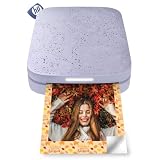
HP Sprocket 2×3 Portable Wireless Photo Printer
- PRINT PHOTOS ON DEMAND HP Sprocket 2nd Edition Printer Prints 2”x 3” Photographs from Your Smartphone or Social Media. For iOS 10-Plus & Android 5-Plus, Bluetooth 5.3
- ZINK ZERO INK TECHNOLOGY No Expensive Toner or Ribbon Replacements. Glossy Sticky-Back Photo Paper Has Colors Embedded Inside for Amazing Resistance to Water, Smudges...
- UNIQUE FILTERS, FRAMES & FLAIR Customize Your Snaps with Cool Editing Tools on the Free HP App. Apply Stickers, Borders & Emojis, Share Albums.
- CONNECT TO MULTIPLE DEVICES Set Up Sprocket at Parties So Friends Can Print Instantly Shareable Photos—At the Same Time. Personalized LED Light Lets You Know Who’s...
- SLIM, PORTABLE DESIGN Wireless Pocket-Sized Rechargeable Printer is Compact Enough to Carry in Your Backpack, Purse, or Pocket. Micro USB Charging Cable with...
Capture and print your favorite moments instantly with the HP Sprocket 2×3 Portable Wireless Photo Printer. This compact device lets you create vibrant, smudge-proof photos anytime, anywhere, solving the hassle of bulky printers or waiting for prints. Its pocket-sized design fits easily in your bag, making it ideal for travel and gatherings.
Using ZINK technology, this printer requires no ink or ribbon replacements, reducing maintenance and ongoing costs. It prints durable 2″ x 3″ glossy photos that resist water, smudges, and tears, ensuring your memories stay clear and lasting. The sticky-back photos can be easily displayed or shared.
Connecting is simple with Bluetooth 5.3, allowing multiple iOS or Android devices to print simultaneously. The personalized LED indicator adds a fun touch by showing who’s printing. A rechargeable battery supports roughly 35 prints per charge, so you can print on the go without frequent recharging.
Photo customization is easy with the free HP app, where you can add filters, stickers, and borders before printing. However, it requires using the app, which offers fewer editing options than some other software. The device charges via micro USB, which is less convenient than newer USB-C standards.
Best for: Anyone needing a portable, easy-to-use photo printer for creating personalized, durable prints directly from their smartphone while traveling or socializing.
What We Like:
- Ink-free ZINK technology reduces maintenance
- Bluetooth 5.3 supports multiple devices simultaneously
- Compact, lightweight design ideal for travel
- Rechargeable battery allows about 35 prints per charge
- Prints water- and smudge-resistant sticky-back photos
Specification:
| Feature | Details |
|---|---|
| Manufacturer | HP |
| Dimensions | Pocket-sized (approximate) |
| Weight | Lightweight |
| Printing Size | 2″ x 3″ photos |
| Color Options | Purple |
| Connectivity | Bluetooth 5.3 |
| Battery | Rechargeable, ~35 prints/charge |
| Charging Port | Micro USB |
Phomemo M832D Touchscreen Portable Inkless Printer & 23 Pcs (1 Roll) Paper

- User-Friendly Touchscreen Smart Printer: The M832D mobile printer features an upgraded smart digital display offers easy access to battery and connection status, and...
- Portable & Lightweight Design: Phomemo M832D compact printer weighs just 1.5lb, with a compact size that fits easily into your backpack, briefcase, or car. Optimized...
- Wide Compatibility & Connectivity 50% Faster: Wireless travel printer compatible with iPhone, Android Phone, and iPad via Bluetooth - Optimized Bluetooth boosts...
- Multi-Size & Multi-Type Paper Support: Supports 8.5" x 11" US Letter, A4, 2.08''(53mm), 3.15''(80mm), and 4.33''(110mm) thermal paper. Compatible with thermal roll paper...
- Inkless Printing with 300dpi Clarity: Adopt advanced thermal technology, no ink, toner, or ribbons required. Print more efficiently and economically while ink free to...
Experience the convenience of on-the-go printing with the Phomemo M832D Touchscreen Portable Inkless Printer. Designed for quick and easy monochrome printing, this compact device solves the problem of bulky printers and messy ink cartridges. Its inkless technology means no smudges or drying time, making printing hassle-free wherever you are.
The touchscreen interface simplifies operation, while smart paper detection ensures you always use the right thermal paper size. With a resolution of 300 DPI and printing speeds up to 6 pages per minute, it delivers clear, sharp prints efficiently. The quiet motor lets you print without disturbance, ideal for shared spaces.
Maintenance is simple since it uses thermal paper rolls instead of ink cartridges. The built-in 2600 mAh battery supports up to 200 pages on a single charge, perfect for travel, office, or home use. Weighing just 1.5 pounds, this printer is lightweight and highly portable.
While it only prints in monochrome and requires thermal paper, the Phomemo M832D remains a practical solution for quick, reliable thermal printing with easy connectivity via Bluetooth or USB-C.
Best for: users needing a portable, inkless printer for efficient monochrome thermal printing from smartphones, tablets, or laptops.
What We Like:
- Compact, lightweight design ideal for travel and various settings
- Touchscreen with smart paper detection for ease of use
- Long-lasting battery supports up to 200 pages per charge
- Quiet printing operation suitable for quiet environments
Specification:
| Feature | Details |
|---|---|
| Manufacturer | Phomemo |
| Dimensions | Not specified |
| Weight | 1.5 lb (approx. 0.68 kg) |
| Print Resolution | 300 DPI |
| Print Speed | Up to 6 pages/min |
| Battery Capacity | 2600 mAh |
| Connectivity | Bluetooth, USB-C |
| Paper Type | Thermal paper |
Factors to Consider When Choosing a Cheap Phone Printer
When choosing a cheap phone printer, you’ll want to focus on print quality and resolution to guarantee clear images. Check the connectivity options and supported media types to match your needs.
Also, consider portability, size, and battery life for convenience on the go. That way, you can easily carry your printer and use it whenever you need without hassle.
Print Quality And Resolution
Since print quality hinges on resolution, you’ll want a printer offering at least 300 dpi for vibrant color photos and 203 dpi for clear monochrome text or stickers.
Keep in mind the printing technology—dye-sublimation and ZINK deliver richer color gradations and longer-lasting prints with protective layers. Meanwhile, thermal printers excel at sharp, high-contrast monochrome images like labels.
Match the printer’s native resolution and effective print size to your needs. Low-res models work fine for small snapshots or text labels, but higher resolution is key for detailed photos or enlargements.
Always test print samples to check edge sharpness, gradient smoothness, and text legibility. And watch out for pixelation or banding, as they reveal a printer’s resolution limits and processing quality.
Connectivity Options Available
Print quality is only part of the equation; you also need to take into account how your phone connects to the printer.
Bluetooth is the most common wireless option, letting you print directly from iOS or Android devices without cables. Though, it may require an app for pairing and sending print jobs.
USB connections, typically USB-C or micro-USB, offer a stable wired link. They’re often necessary for drivers or file transfers on laptops.
Wi-Fi or Wi-Fi Direct supports multiple devices and higher data rates. This makes it great for larger files or cloud printing.
NFC simplifies pairing—just tap compatible devices. But keep in mind, both devices have to support it.
Be cautious with printers that rely solely on proprietary apps. They can limit your options by restricting printing to specific software.
Choose connectivity that fits your phone and printing needs. It’s all about what works best for you.
Supported Media Types
Although connectivity plays a crucial role, you also need to take into account the types of media your cheap phone printer supports. Confirm whether it handles thermal roll paper, adhesive or sticker paper, or specific photo sizes like 2×3 in or A4.
Many budget printers accept only one or two media types, so check if it prints on sticky-back or laminated photo paper versus plain thermal paper. Dye-sublimation and ZINK media produce colorful, coated photos, while thermal paper is usually monochrome and uncoated.
Also, verify maximum media width and length to make certain it fits your printing needs, whether receipts, full-page documents, or pocket photos. Look for compatibility with continuous rolls, pre-cut sheets, and adhesive-backed rolls.
And don’t forget to confirm any restrictions or specialized media requirements to maintain quality and warranty. It’s better to be sure upfront than run into issues later!
Portability And Size
When choosing a cheap phone printer, you’ll want to take into account how portable and compact the device is, especially if you plan to carry it around frequently. Aim for printers weighing under 600 grams and measuring roughly 4 × 3 × 1.5 inches for true pocket portability.
Keep in mind that smaller printers often limit you to credit-card or label-sized prints. Also, consider how easy it is to load paper—top-loading designs and preloaded consumables can save you time on the go.
Check connection options too; many compact models rely solely on app-based Bluetooth pairing, which may not suit laptop use. By focusing on these size and portability factors, you’ll find a cheap phone printer that fits your lifestyle and printing needs without adding bulk.
Battery Life And Power
Since you’ll likely rely on your phone printer while on the move, battery life and power management become essential factors to keep in mind. Check the battery capacity, usually between 500 and 2600 mAh, and compare the estimated prints per full charge.
Remember, a faster print speed drains battery quicker, reducing total prints per charge. Look for USB charging support, preferably USB-C, and confirm if a charging adapter is included to avoid inconvenient delays.
Efficient power management features like standby modes can extend usage time when not printing. If you travel frequently, opt for models with replaceable or higher-capacity batteries.
Always prioritize real-world battery life stats—such as prints per charge or operational hours—over technical specs like voltage or cell count for a clearer picture of performance.
Compatibility With Devices
Battery life matters little if your phone printer won’t connect smoothly with your devices. First, confirm the printer supports your phone’s OS and version—whether iOS 8.0+ or Android 4.0+—to guarantee app compatibility and Bluetooth connection.
Check connection options like Bluetooth, Bluetooth Low Energy, or USB-C, since some printers only pair via their app and don’t show in system Bluetooth settings. It’s a bit annoying but good to know upfront.
If you want to print from a laptop or desktop, verify Windows/macOS compatibility and available USB or driver support. Also, make sure the companion app handles your file types—photos, PDFs, or web pages—and offers features you need.
Finally, watch for OS-specific restrictions, like app-only Bluetooth pairing or missing macOS drivers, to avoid surprises after purchase. Better to be prepared than stuck later!
Frequently Asked Questions
How Long Do the Printer Batteries Typically Last on a Single Charge?
Printer batteries typically last between 1 to 3 hours on a single charge, depending on usage and model. You’ll usually get around 20 to 50 prints before needing to recharge.
Are These Printers Compatible With All Smartphone Operating Systems?
Yes, most phone printers work with both Android and iOS devices. You’ll just need to download their app, which is usually free.
Always double-check compatibility before buying to guarantee smooth printing from your smartphone. It’s a quick step that saves you from headaches later on!
Can These Printers Print Directly From Social Media Apps?
Yes, you can print directly from social media apps with most phone printers. They usually support direct printing through app sharing features or companion apps.
This makes it super easy for you to print photos straight from Instagram, Facebook, or Snapchat. So, no need to save images separately before printing!
What Are the Warranty Terms for Cheap Phone Printers?
You’ll usually get a one-year limited warranty on cheap phone printers, covering defects and malfunctions.
Some brands offer extended plans, but most don’t cover accidental damage. So, it’s a good idea to handle your printer carefully to avoid any issues.
How Do These Printers Handle Photo Quality in Low Light Conditions?
Low light leads to less lively, less luminous prints, but these printers do their best to brighten your blurry shots. You’ll find some subtle shading struggles, yet they still snap solid, satisfying snapshots in dim settings.
They might not make every detail pop perfectly, but overall, they handle those tricky lighting conditions pretty well. So, if you’re shooting in low light, you can still expect decent results.
Conclusion
Choosing the perfect cheap phone printer doesn’t have to feel like finding a needle in a haystack. With so many options—from thermal to inkless, retro to modern—you’ve got the power to capture your memories instantly and effortlessly.
Imagine the joy of holding your favorite moments in your hand, anytime, anywhere. Don’t let cost hold you back; the right printer is out there, ready to turn your photos into lasting treasures.
When picking a cheap phone printer, think about what fits your style and needs best. Whether you want something compact for travel or a device with vibrant color prints, there’s something for everyone. So go ahead, explore the options and find the perfect affordable phone printer that brings your photos to life without breaking the bank.