3 Best Bluetooth Printer Adapters for 2027
For reliable Bluetooth printer adapters in 2027, you’ll want options that combine ease of use, strong connectivity, and versatility.
These adapters make printing wireless and hassle-free, whether you’re at home or in the office. Finding the right Bluetooth adapter can boost your productivity by letting you connect multiple devices seamlessly.
The UGREEN USB Bluetooth 6.0 Adapter is great for its easy plug-and-play setup and supports up to five devices.
It’s perfect if you want something straightforward without compromising performance.
The ORICO USB Bluetooth 6.0 Adapter stands out with its ability to connect up to seven devices and offers a stable 30-meter range.
This makes it ideal for larger spaces or multiple users.
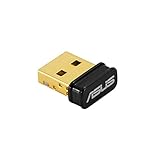
If portability’s key, the ASUS USB-BT500 offers an ultra-small design and Bluetooth 5.0 speeds.
It’s compact enough to carry around and doesn’t sacrifice speed.
Keep these in mind, and you’ll discover what makes each adapter truly stand out.
| Image | Name | Editor's Rating | Price |
|---|---|---|---|

|
|
||

|
|
||
|
|
UGREEN USB Bluetooth 6.0 Adapter for PC Bluetooth Dongle Receiver
- Latest Bluetooth 6.0 EDR Adapter: This Bluetooth adapter for PC adopts the latest Bluetooth 6.0 EDR and BLE technology, delivering faster data transfer speeds, seamless...
- Wide Backward Compatibility: Backward compatible with Bluetooth 5.4/5.3 and earlier Bluetooth versions for broad device pairing.
- EDR and BLE Technology - This Bluetooth dongle is equipped with enhanced data rate and Bluetooth low energy, it wil optimize energy.
- Up to 5 Devices Sync Connected: This Bluetooth dongle for PC supports up to 5 different types of Bluetooth devices to be connected at the same time without interfering...
- Plug and Play: The Bluetooth receiver is developed for Windows systems only and does not support other systems. No driver installation is required under Windows...

The UGREEN USB Bluetooth 6.0 Adapter is designed to simplify your connectivity needs. It allows you to connect up to five devices simultaneously, so your mouse, keyboard, phone, and headphones can all work together without interruption. This makes it easier to manage multiple peripherals from a single PC.
Equipped with the latest Bluetooth 6.0 technology, the adapter ensures fast data transfers of up to 800 kbps. It also uses energy-efficient features that help extend the battery life of your connected devices. This means you get reliable performance without draining power unnecessarily.
Setup is hassle-free with its plug-and-play design for Windows 11, 10, and 8.1. You don’t need to install any drivers, making it convenient to use right out of the box. For the best connection quality, it’s recommended to disable other Bluetooth devices nearby.
While it supports multiple devices, only one audio device of the same type can play music at a time. Also, it is not compatible with Linux, MacOS, Windows 7, or gaming consoles like PS and Xbox.
Best for: Users who need a straightforward, multi-device Bluetooth adapter with the latest Bluetooth 6.0 support for Windows PCs.
What We Like:
- Connects up to 5 devices simultaneously for seamless multitasking
- Fast and energy-efficient Bluetooth 6.0 data transfer
- Easy plug-and-play setup with no driver installation needed
- Compact design fits easily into any USB port
Specification:
| Feature | Details |
|---|---|
| Manufacturer | UGREEN |
| Dimensions | Compact USB dongle size |
| Weight | Lightweight |
| Compatible OS | Windows 11/10/8.1 |
| Bluetooth Version | 6.0 |
ORICO USB Bluetooth 6.0 Adapter (BTA-60)
- 【Advanced Bluetooth 6.0 Dual-Mode Technology】 This Bluetooth adapter utilizes Bluetooth 6.0 dual-mode (BR/EDR+BLE) technology, equipped with the original Realtek...
- 【Up to 7 Devices Simultaneous Sync】 This Bluetooth dongle supports seamless connection of up to 7 different Bluetooth devices at once, with no signal interference...
- 【3 Mbps High-Speed Transmission + 30-Meter Range】 Our Orico Bluetooth device supports transmission speeds of up to 3 Mbps for smooth and stable audio and file...
- 【Plug-and-Play Mini Gold-Plated USB 2.0 Port]】 The Bluetooth dongle for PC with Mini USB 2.0 gold-plated connector, corrosion-resistant and stable signal...
- 【Easy Installation with Original Drivers + Wide Device Compatibility】 The Bluetooth adapter supports one-click installation, making setup effortless for Windows...
The ORICO USB Bluetooth 6.0 Adapter (BTA-60) offers a seamless way to connect multiple devices without interference. It allows you to link up to seven devices simultaneously, such as printers, keyboards, and smartphones, within a reliable 30-meter range. This adapter helps reduce clutter and simplifies managing your wireless connections.
Designed with the Realtek RTL8761B-CG chipset, it supports Bluetooth versions 2.0 through 5.4, ensuring compatibility with a wide range of devices. Its compact black design and gold-plated mini USB 2.0 connector provide durability and stable data transmission. This makes it a practical choice for users needing a robust and long-lasting adapter.
Installation is straightforward with plug-and-play support on Windows 8.1, 10, and 11. Windows 7 users need to install drivers, and the adapter does not support Mac OS or Linux. While it connects multiple devices, only one audio device can play sound at a time, which is important to consider for audio setups.
Best for: users needing a compact and reliable Bluetooth 6.0 adapter to connect multiple devices simultaneously on Windows PCs with easy installation.
What We Like:
- Connects up to 7 devices simultaneously without interference
- Compatible with Bluetooth versions 2.0 through 5.4
- Durable compact design with gold-plated USB connector
- Simple plug-and-play setup for Windows 8.1 and newer
Specification:
| Feature | Details |
|---|---|
| Manufacturer | ORICO |
| Chipset | Realtek RTL8761B-CG |
| Bluetooth Version | 2.0 to 5.4 |
| Connection Range | Up to 30 meters |
| USB Connector Type | Mini USB 2.0, gold-plated |
| Compatible OS | Windows 7 (driver needed), 8.1, 10, 11 |
| Color | Black |
ASUS USB-BT500 Ultra Small Bluetooth 5 Adapter
- Bluetooth 5.0 for Faster, Further Coverage- Transfer data up to twice as fast as before, and with 4X the range in BLE
- Wireless Connection, free of limitation - Enables wireless communication with Bluetooth-enabled devices
- Full Compatibility - Backward compatible with Bluetooth2.1/3.x/4.x
- Power Saving for Devices - Bluetooth Low Energy technology for energy-saving wireless connectivity
- Ultra-small Design - Highly portable and easy to use.
Experience seamless connectivity with the ASUS USB-BT500 Ultra Small Bluetooth 5 Adapter. Its compact design fits discreetly into any USB port, solving the hassle of bulky adapters that disrupt your workspace. This adapter improves your device’s Bluetooth performance by doubling data transfer speeds and extending Bluetooth Low Energy range, making wireless connections smoother and more reliable.
Designed for easy use, the adapter supports a wide range of devices including desktops, laptops, headphones, and speakers. Its backward compatibility with older Bluetooth versions ensures you can connect with various gadgets without compatibility issues. Maintenance is simple—just plug it in and enjoy stable connections without frequent troubleshooting.
Weighing only 4.54 grams, this ultra-portable adapter is ideal for users who need a reliable Bluetooth solution on the go. It operates efficiently, helping extend your device’s battery life during wireless use. However, it is limited to Windows operating systems and has a data transfer cap of 4 Mbps, which may not suit all high-speed needs.
Best for: Users seeking a compact, energy-efficient Bluetooth 5 adapter to enhance wireless connectivity on Windows desktops or laptops.
What We Like:
- Ultra-small form factor fits any USB port without obstruction
- Bluetooth 5 technology offers faster speeds and longer range
- Backward compatibility with multiple Bluetooth versions
- Lightweight and energy-efficient design
Specification:
| Feature | Details |
|---|---|
| Manufacturer | ASUS |
| Dimensions | Ultra-small (approx.) |
| Weight | 4.54 grams (0.01 lb) |
| Bluetooth Version | 5.0 |
| Compatibility | Windows 7 and above |
Factors to Consider When Choosing a Bluetooth Printer Adapter
When choosing a Bluetooth printer adapter, you’ll want to check if it’s compatible with your devices and supports the latest Bluetooth version for better performance. Consider the data transfer speed and how many connections it can handle at once.
Also, look for an adapter that’s easy to install and set up to save you time. It’s worth picking one that won’t have you fiddling with complicated settings. This way, you can get printing without the hassle.
Compatibility With Devices
Although choosing a Bluetooth printer adapter might seem straightforward, confirming compatibility with your devices is essential for seamless operation. First, confirm the adapter supports your operating system—some don’t work with Linux or MacOS, and older Windows versions might need specific drivers.
Next, check how many devices the adapter can connect to simultaneously, especially if you plan to use several devices at once. Make sure the adapter supports the exact types of devices you want to connect, like printers, to prevent connection issues.
Also, verify backward compatibility so it works with older Bluetooth devices you might still have. By focusing on these compatibility factors, you’ll avoid headaches and confirm your Bluetooth printer adapter integrates smoothly with your existing tech.
Bluetooth Version Support
Since Bluetooth version support directly affects your adapter’s performance, it’s crucial to choose one that matches your printing needs. Newer versions like Bluetooth 5.0 and 6.0 offer improved range—up to four times greater than older versions—and better power efficiency, thanks to Bluetooth Low Energy (BLE).
This is especially useful if you rely on portable printers or want to save battery life. You’ll also benefit from backward compatibility, meaning your adapter can connect seamlessly with devices using older Bluetooth versions.
Additionally, newer versions often support multiple simultaneous connections, allowing you to link several devices without hassle. Picking the right Bluetooth version guarantees your adapter works efficiently, stays connected longer, and meets your printing demands without compromising on compatibility or power consumption.
Data Transfer Speed
Choosing a Bluetooth printer adapter means paying close attention to data transfer speed, as it directly impacts how fast your files move and how smoothly your printing tasks run.
Bluetooth 6.0 can reach speeds up to 800 kilobits per second, while Bluetooth 5.0 offers up to 4 megabits per second, making a big difference in handling large files quickly.
Environmental factors like obstacles and interference can slow transfer rates, but newer versions typically perform better in crowded areas.
For heavy data tasks, choose adapters supporting Enhanced Data Rate (EDR) and Bluetooth Low Energy (BLE) to guarantee efficient, fast transmission.
Also, keep in mind that backward compatibility allows older devices to connect but won’t boost their speeds, so matching your adapter’s version to your devices is key.
Number Of Connections
Several factors influence how many devices you can connect to a Bluetooth printer adapter at once, and understanding these can help you choose the right one. You’ll want to check how many simultaneous connections the adapter supports—some handle up to 5 devices, while others can connect up to 7.
This difference impacts how easily multiple users can share the printer without interference. In office settings, having more connections boosts productivity by allowing several users to print seamlessly.
Also, consider the adapter’s range, as a longer range lets you connect devices spread out over a larger area. Finally, make sure the adapter manages audio notifications properly, allowing only one device to play sounds at a time to avoid confusion during printing jobs.
Installation And Setup
When setting up a Bluetooth printer adapter, you’ll want to verify it’s compatible with your operating system to avoid installation headaches. Some adapters need specific drivers for Windows 7 or might not support Linux or MacOS.
Look for plug-and-play adapters—they eliminate complicated driver installs and make setup straightforward. Also, check if the adapter supports multiple simultaneous connections; this lets you connect several devices without fuss.
Consider the adapter’s size and design, too. Ultra-small models are less obtrusive and easier to handle.
Focusing on these factors guarantees a smooth installation process, so your Bluetooth printer adapter works seamlessly with your devices from the start.
Range And Signal Strength
Although Bluetooth adapters often boast ranges up to 30 meters, your actual connection distance depends heavily on factors like walls and electronic interference.
When choosing a Bluetooth printer adapter, look for models using Bluetooth 6.0 or Bluetooth Low Energy (BLE) technology. These offer better signal strength, faster transmission speeds, and improved power efficiency.
Keep in mind that physical obstacles like walls can reduce effective range, so consider your environment carefully. It really pays to think about where your devices will be placed.
Additionally, if you plan to connect multiple devices simultaneously, pick an adapter designed to handle several connections without signal drops or interference.
Prioritizing these features guarantees a stable, reliable connection that keeps your printing seamless, no matter where your devices are placed within your workspace.
Frequently Asked Questions
Can Bluetooth Printer Adapters Work With Mobile Devices?
Yes, Bluetooth printer adapters work with mobile devices. You just need to pair your phone or tablet with the adapter, and you can print wirelessly from apps without any hassle or extra cables.
It’s pretty straightforward. Once paired, printing becomes super convenient and cable-free. No need to worry about compatibility issues either!
Do Bluetooth Adapters Affect Printer Speed or Quality?
Imagine a tiny bridge carrying your print job swiftly across a stream—Bluetooth adapters usually don’t slow speed or harm quality.
You won’t notice delays or smudges unless interference or outdated tech gets in the way.
Are Bluetooth Printer Adapters Compatible With All Operating Systems?
Bluetooth printer adapters aren’t always compatible with all operating systems. You’ll want to check the specific adapter’s specs to verify it supports your device’s OS, whether it’s Windows, macOS, Android, or iOS before buying.
It’s always a good idea to double-check because not every adapter plays nice with every system. That way, you avoid any surprises when you try to connect.
How Secure Are Bluetooth Connections for Printing?
You might be surprised, but Bluetooth connections for printing are generally secure, using encryption and authentication.
Still, you should keep your devices updated and avoid public networks to prevent unauthorized access or data interception. It’s always better to be safe than sorry!
Can Multiple Devices Connect to One Bluetooth Printer Adapter?
You can connect multiple devices to one Bluetooth printer adapter, but usually only one prints at a time.
You’ll need to manage connections carefully to avoid conflicts and guarantee smooth printing from each device.
It’s a good idea to check which device is connected before sending a print job. That way, you can keep everything running without a hitch.
Conclusion
Just like choosing the right key to access a treasure chest, picking the perfect Bluetooth printer adapter can transform your printing experience effortlessly. Whether you go with UGREEN’s cutting-edge USB Bluetooth 6.0, ORICO’s reliable BTA-60, or ASUS’s ultra-compact USB-BT500, you’re set to enjoy seamless connectivity.
Keep your needs in mind, and you’ll find the adapter that fits like a glove, turning your printer into a wireless powerhouse ready for anything. With the best Bluetooth printer adapter, you can say goodbye to tangled cables and hello to smooth, hassle-free printing.
So, whether you want fast data transfer, easy setup, or broad device compatibility, these Bluetooth printer adapters deliver it all. Choose the right one, and watch your printing setup become smarter, simpler, and more efficient than ever before.