7 Best Auto Leveling 3D Printers for 2027
If you’re on the hunt for the best auto-leveling 3D printers in 2027, you’re in the right place. These printers make your life easier by ensuring perfect bed leveling every time, which means better print quality and less hassle. Whether you’re a beginner or a seasoned pro, having reliable auto-leveling saves you time and frustration.
Take the Bambu Lab P2S Combo, for example. It delivers high-speed, multi-color printing and smart material handling that’s hard to beat. Then there’s the Creality Ender 3 V3 SE, which is perfect for beginners thanks to its easy setup and CR Touch auto-leveling feature.
FLASHFORGE AD5X and Adventurer 5M Pro bring precise multi-material printing to the table along with convenient remote monitoring. Meanwhile, the Anycubic Kobra X Multicolor and Creality K2 Combo stand out for fast, reliable multi-color prints that get the job done efficiently.
If you already have a compatible printer, the CR Touch Kit is a great add-on for automated leveling. Explore these options and find the one that fits your 3D printing projects perfectly!
| Image | Name | Editor's Rating | Price |
|---|---|---|---|

|
|
||

|
|
||

|
|
||

|
|
||

|
|
Bambu Lab P2S Combo, P2S 3D Printer & AMS 2 Pro, Multi-Color 3D Printing
- High-Speed Precision: The Bambu Lab P2S 3D printer prints up to 600 mm/s while maintaining exceptional accuracy. With the PMSM Servo Extruder and Active Flowrate...
- Ready to Print in 15 Minutes: Set up your P2S FDM 3D printer and start printing in just 15 minutes. With AI failure detection, quick-swap nozzles, and automatic...
- Effortless Multi-Color Printing: The AMS 2 Pro enables seamless multi-color/multi-material 3D printing. It features built-in filament drying at up to 65 °C, keeping...
- Smart Airflow for Any Filament: The Adaptive Airflow System automatically balances cooling and heat retention—keeping overhangs crisp with cool air, or maintaining a...
- Limitless Creativity, Seamless Workflow: Explore over one million 3D models on MakerWorld and bring them to life with a smooth, unified workflow using Bambu Studio, Bambu...
The Bambu Lab P2S Combo offers a powerful solution for precise and efficient 3D printing. Designed to tackle the challenges of multi-material and multi-color projects, it combines the P2S 3D Printer with the AMS 2 Pro accessory. This pairing allows users to print complex designs with automatic calibration and quick-swap nozzles, reducing downtime and improving workflow.
Its CoreXY motion system reaches speeds up to 600 mm/s, delivering sharp details through advanced extrusion technology. The AMS 2 Pro adds value by drying filament, controlling airflow adaptively, and filtering air to maintain print quality and a clean workspace. These features help avoid common printing issues like clogged nozzles and inconsistent layers.
Maintenance is straightforward with automatic calibration and easy filament management. While the setup takes only about 15 minutes, the system’s advanced features cater more to users comfortable with technology. The printer’s weight of 46.3 pounds means it’s best suited for stationary use rather than frequent transport.
Best for: professionals and enthusiasts seeking a high-speed, multi-color 3D printer that balances precision with streamlined material handling.
What We Like:
- High-speed CoreXY system with precise motion control
- AMS 2 Pro ensures reliable multi-color and multi-material printing
- Automatic calibration and quick-swap nozzles simplify maintenance
- Filament drying and adaptive airflow improve print consistency
- Integrated carbon filter maintains clean air around the printer
Specification:
| Specification | Details |
|---|---|
| Manufacturer | Bambu Lab |
| Dimensions | Not specified |
| Weight | 46.3 lb (21 kg) |
| Material | Not specified |
| Color Options | Not specified |
Creality Ender 3 V3 SE Beginner-Friendly 3D Printer with Auto Leveling
- 250mm/s High-Speed Printing: Print at speeds of up to 250mm/s with 2500mm/s² acceleration, helping you complete prototypes, functional parts, and everyday projects...
- Easy Setup with Auto Leveling: Designed for a fast and straightforward setup, the Ender 3 V3 SE can be assembled in just a few simple steps. CR Touch Auto Leveling and...
- Proven Sprite Direct Drive Extruder: The upgraded Sprite Direct Drive Extruder provides smooth and consistent filament feeding for PLA, PETG, and TPU. Its proven design...
- Stable Motion System for Consistent Results: Dual synchronized Z-axis lead screws and precision Y-axis linear shafts work together to help reduce vibration and Z...
- Quiet Operation with Easy Print Removal: A 32-bit silent mainboard helps reduce operating noise for a more comfortable printing experience, while the flexible PC spring...
The Creality Ender 3 V3 SE is designed to make 3D printing simple and reliable for beginners. Its CR Touch auto leveling system removes the guesswork from setup, ensuring your first layer sticks perfectly every time. This feature saves time and frustration, making the printing process smoother.
The printer’s upgraded Sprite Direct Drive Extruder supports common filaments like PLA, PETG, and TPU with consistent feeding. This allows you to work on a variety of projects without worrying about filament jams or extrusion issues. Plus, the auto filament loading adds extra convenience.
Built with precision in mind, the Ender 3 V3 SE uses dual Z-axis lead screws and sturdy Y-axis shafts to reduce vibration and wobble. This results in sharper, more detailed prints at speeds up to 250 mm/s. Its quiet 32-bit mainboard also keeps noise levels low during operation.
Maintenance is straightforward thanks to the flexible build plate, which makes removing finished models easy and reduces the risk of damage. This printer is well-suited for everyday prototyping and hobby projects where ease of use and consistent quality matter.
Best for: Beginners and hobbyists seeking an easy-to-use 3D printer with reliable auto leveling and smooth extrusion for daily creative work.
What We Like:
- CR Touch auto leveling with automatic Z-offset calibration
- Upgraded Sprite Direct Drive Extruder for smooth filament handling
- Dual synchronized Z-axis lead screws reduce vibration for better print quality
- Quiet operation with a 32-bit mainboard
- Flexible build plate simplifies model removal
Specification:
| Feature | Details |
|---|---|
| Manufacturer | Creality |
| Dimensions (L×W×H) | Not specified |
| Weight | Not specified |
| Supported Filaments | PLA, PETG, TPU |
| Max Print Speed | 250 mm/s |
| Mainboard | Quiet 32-bit |
| Auto Leveling System | CR Touch |
FLASHFORGE AD5X Multi-Material Multi-Color 3D Printer
- Build for Speed and Full-Color Printing: Bring your creative vision to life with vibrant and multicolored 3D prints in 4-colors. With speed of up to 600mm/s and...
- Seamless Printing, Precise Control: Full auto leveling sensor measures multiple points on the print bed to ensure consistent distance between nozzle and bed. As well as...
- Multi-Material and Multi-Color Capability: Intelligent Filament System (IFS) allows you to print in multiple colors and materials simultaneously. Among the wide selection...
- CoreXY Structure, Vibration Compensation: With its all-metal motion CoreXY structure offers highly rigid, reducing the risk of errors caused by vibration or mechanical...
- Compact Design, Space Saving: With its lightweight, modular design and intelligent filament system (IFS), Four spools of filament arranged side by side, AD5X offers...
Experience the power of ultra-fast, multi-material 3D printing with the FLASHFORGE AD5X. This printer tackles complex projects by allowing you to print four colors or materials simultaneously, simplifying workflows and boosting creativity. Its Intelligent Filament System handles PLA, TPU, and PETG with ease, giving you flexibility without frequent manual changes.
The AD5X’s full-auto leveling sensor ensures precise nozzle-to-bed distance every time. This feature solves common adhesion problems, helping you achieve a consistent first layer and reducing print failures. Its sturdy CoreXY all-metal frame minimizes vibrations, keeping layers sharp and aligned even at high speeds.
Designed for convenience, the AD5X is compact and lightweight enough to fit in most workspaces. Maintenance is straightforward, and it supports DIY filament setups, allowing users to customize their filament choices. While advanced features may require a learning curve, the printer’s reliability and high detail output make it a valuable tool.
Best for: Professionals and enthusiasts needing fast, multi-color, and multi-material 3D printing with precise auto-leveling and excellent detail.
What We Like:
- Prints up to 600 mm/s with precise acceleration
- Simultaneous 4-color/material printing with Intelligent Filament System
- Full-auto leveling sensor for reliable first-layer adhesion
- Sturdy CoreXY all-metal frame with vibration control
- Supports DIY filament setups for versatility
Specification:
| Manufacturer | FlashForge |
|---|---|
| Dimensions (L×W×H) | Compact and lightweight |
| Weight | 22 lbs (10 kg) |
| Frame Material | All-metal CoreXY design |
| Filament Support | PLA, TPU, PETG variants |
| Color Options | Multi-color printing |
Anycubic Kobra X Multicolor 3D Printer, Easy Setup, Native 4-Color
- 【 Newest Level - 19-Color with 4 ACE 2 Pro】Why settle for one color when you can have multicolor? The Kobra X comes born with 4 colors built-in. It is innovative 3D...
- 【 Savings 2X Time】Stop wasting hours and filament on purging! Kobra X impresora 3D reduces the filament and machine travel path by 81.25%, so 2X the Speed, and...
- 【Hardened Precision & High Speed 】 Equipped with a high-durability hardened steel nozzle and vibration compensation, the Kobra X ensures every layer remains smooth...
- 【Flawless First Layer with LeviQ 3.0】The LeviQ 3.0 and auto bed leveling system uses a 49-point calibration and advanced leveling algorithm to ensure 100% bed...
- 【Smart AI Monitoring & Large Model Library】APP remote control, features Spaghetti detection and foreign object detection. The innovative top-mount spool holder...

Experience the ease of vibrant multicolor 3D printing with the Anycubic Kobra X Multicolor. Designed for makers who need quick and simple setup, this printer solves the common hassles of color changes and long print times. Its native 4-color system lets you create complex designs without the mess of constant filament purging.
You can expand the setup to support up to 19 colors by adding extra units, which cuts filament waste by over 80% and doubles your printing speed. The Kobra X delivers a top speed of 600 mm/s, combined with a durable hardened steel nozzle and the precise LeviQ 3.0 auto bed leveling system. This ensures each print is smooth and accurate.
Maintenance is straightforward with smart AI technology that monitors prints and detects issues early. The dual-band Wi-Fi feature allows for seamless remote control and monitoring. With a generous 260 mm build volume, this printer fits both beginner projects and professional multicolor workflows.
Overall, the Anycubic Kobra X Multicolor enhances productivity and creativity by simplifying multicolor printing while maintaining high-quality results.
Best for: Makers, educators, and professionals who need fast, reliable multicolor 3D printing with versatile material support.
What We Like:
- Native 4-color printing with easy expansion up to 19 colors reduces waste and speeds up prints.
- High-speed printing at 600 mm/s with hardened steel nozzle for durability and precision.
- LeviQ 3.0 auto bed leveling ensures hassle-free setup and consistent quality.
- Smart AI monitoring and dual-band Wi-Fi enable remote control and early issue detection.
Specification:
| Feature | Details |
|---|---|
| Manufacturer | Anycubic |
| Build Volume | 260 × 260 × 260 mm |
| Max Print Speed | 600 mm/s |
| Nozzle Material | Hardened Steel |
| Color System | Native 4-color, expandable |
| Connectivity | Dual-band Wi-Fi |
Creality K2 Combo 3D Printer with Auto Leveling
- Multicolor 3D Printing: 4 × CFS for up to 16 colors. By hooking up as many as four CFS units together, you are able to print in the splendor of 16 colors. Saves the need...
- Ultra Quiet Printing: Silent Mode for a quieter printing experience. Annoyed by the buzzing noise? Not K2. By adopting step-servo motors and dynamically balanced fans. It...
- Out-of-the-Box Experience: Pre-assembled for plug and play. You can use K2 right after unpacking and screen installation. Unlocks a wider selection of materials...
- Smart Auto Leveling & AI Camera: Faster leveling of only the target print area. The leveling sensor only probes and levels the bed area relevant to the desired print...
- Superior Print Quality: Sturdy frame and precise step-servo motor system. K2 uses 3 step-servo motors, both in the extruder and on the X/Y axis. They can adjust torque...
The Creality K2 Combo is designed for creators who want precise multicolor 3D prints without extra steps like hand painting. It supports up to 16 colors through linked CFS units, making complex, colorful projects easier to execute. The 260 × 260 × 260 mm build volume offers ample space for detailed prints.
This printer features a next-generation direct drive extruder with dynamic torque adjustment, ensuring smooth and accurate filament flow even at high speeds up to 600 mm/s. Its smart auto-leveling system targets the relevant bed areas quickly, reducing manual calibration time and improving first-layer adhesion.
Maintenance is straightforward, thanks to a nearly fully assembled setup and an ultra-quiet design that enhances user comfort. The AI camera monitoring provides real-time print tracking, helping users catch issues early and minimize failed prints.
While it works well with materials like PLA, PETG, ABS, PLA-CF, and PET, the build volume may limit very large projects. Also, the screen requires installation after unpacking, adding a small setup step.
Best for: Professionals and hobbyists seeking reliable, high-quality multicolor 3D printing with minimal setup and real-time monitoring.
What We Like:
- Supports up to 16 colors through linked CFS units for vibrant prints
- Smart auto-leveling reduces setup time and improves accuracy
- AI camera monitoring enables real-time print failure detection
- Ultra-quiet operation with a sturdy frame for stable printing
Specification:
| Feature | Details |
|---|---|
| Manufacturer | Creality |
| Build Volume | 260 × 260 × 260 mm |
| Supported Materials | PLA, PETG, ABS, PLA-CF, PET |
| Maximum Print Speed | Up to 600 mm/s |
| Color Options | Multi-color (up to 16) |
Creality CR Touch Auto Leveling Sensor Kit
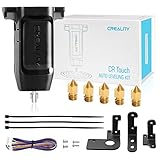
- 【Wide Application】This Creality cr touch auto-leveling kit is equipped with 3 mounting brackets and is only suitable for the following 3D printers with V4.4.2/V...
- 【About Reflash the Firmware】1. Download the corresponding firmware from the Creality official website. 2. copy it to the SD card. 3. Rename it to 123.bin, 4. Insert...
- 【Independent research and development Stable function】CR Touch is a Creality 3D research institute self-developed 3D printer platform leveling solution based on...
- 【Multi-point detection Smart compensation】CR Touch performs multi-point detaction on the printing platform and records the heigh of each detaction point. The system...
- 【Strong compatibility】Creality CR Touch auto leveling kit Compatible with PEI / sticker / glass / metal platform.
The Creality CR Touch Auto Leveling Sensor Kit takes the hassle out of manual bed leveling. It automatically maps your print bed using multi-point detection, adjusting for any tilt between the nozzle and the surface. This ensures your first layer adheres perfectly, reducing print failures and saving time.
Designed for Ender and CR-10 printers with compatible 32-bit motherboards, this sensor kit integrates seamlessly with your machine. Installation requires a firmware update via SD card, which unlocks the sensor’s full functionality. The sensor reliably works on various surfaces such as PEI, glass, metal, and stickers, adapting well to different build plates.
Maintenance is straightforward thanks to its durable design, rated for over 100,000 uses. This longevity means fewer replacements and stable leveling performance over time. The kit includes everything needed for setup: sensor, nozzles, brackets, screws, cable ties, and a clear installation guide.
While highly effective, it’s essential to verify your printer model and motherboard compatibility before purchase to avoid issues. The firmware update process may also require some technical confidence.
Best for: Users of Ender 3, Ender 5, and CR-10 3D printers with compatible 32-bit motherboards seeking reliable automatic bed leveling.
What We Like:
- Accurate multi-point leveling with automatic tilt compensation
- Compatible with diverse build surfaces including PEI and glass
- Durable sensor design supports extensive use
- Complete kit with installation materials included
Specification:
| Feature | Details |
|---|---|
| Manufacturer | Creality |
| Compatible Models | Ender 3, Ender 5, CR-10 |
| Motherboard Type | Compatible 32-bit |
| Build Surface | PEI, glass, metal, stickers |
| Durability | Over 100,000 activations |
FLASHFORGE Adventurer 5M Pro 3D Printer with 1 Click Auto Printing System

- 600mm/s Speed & CoreXY Structure — Powered by an all-metal CoreXY frame and 20,000mm/s² acceleration, Adventurer 5M Pro reaches speeds up to 600mm/s. Integrated...
- 3-Second Quick-Swap Nozzle & Auto Leveling — Features a tool-free, quick-release nozzle mechanism for effortless 3-second replacements across multiple sizes...
- Dual Filtration System & Quiet Enclosure — Built with an integrated dual filtration system and a fully enclosed chamber to ensure a clean printing environment and...
- 280°C High-Temp Extruder & Broad Material Compatibility — With a 280°C max nozzle temperature and a 110°C heated bed, it reliably prints engineering materials like...
- Smart Camera & Mobile Control — Features a built-in camera for real-time monitoring and time-lapse video creation. Monitor progress, adjust settings, and receive...
Experience precision and speed with the FLASHFORGE Adventurer 5M Pro, a 3D printer designed to tackle complex projects effortlessly. Its one-click auto-leveling and tool-free nozzle system simplify setup, letting you focus on creating rather than adjusting. The all-metal CoreXY frame supports rapid movement and smooth operation, reducing print time without sacrificing quality.
Maintenance is straightforward thanks to the quick-release nozzles and a heated bed that reaches 110°C, allowing easy switching between materials like ABS, PLA, and PETG. The fully enclosed chamber with dual filtration stabilizes temperature and reduces odors, ensuring consistent results and a cleaner workspace.
This printer’s built-in camera and mobile app control keep you connected, providing real-time monitoring and remote management. While the moderate build volume suits many engineering and hobbyist needs, it may limit very large projects. The compact 22-pound design requires a dedicated workspace but balances portability with robust construction.
Best for: Professionals and advanced hobbyists seeking a fast, precise 3D printer with versatile material compatibility and advanced control features.
What We Like:
- Fast printing speeds with vibration compensation for smooth, quiet operation
- Tool-free, quick-release nozzles and heated bed for easy maintenance and material versatility
- Fully enclosed chamber with dual filtration for stable printing conditions
- Built-in camera and mobile app for remote monitoring and control
Specification:
| Feature | Details |
|---|---|
| Manufacturer | FLASHFORGE |
| Build Volume | 220 x 220 x 220 mm |
| Acceleration | Up to 20,000 mm/s² |
| Max Print Speed | 600 mm/s |
| Heated Bed Temp | Up to 110°C |
| Noise Level | Under 50 dB |
| Weight | 22 lb (10 kg) |
| Frame Material | All-metal CoreXY |
Factors to Consider When Choosing an Auto Leveling 3D Printer

When choosing an auto leveling 3D printer, you’ll want to focus on accuracy, print speed compatibility, and the range of materials it supports.
Don’t forget to take into account how easy it is to set up and how much noise or vibration it produces. These factors will help you find a printer that fits your needs and workflow.
Auto Leveling Accuracy
Although many factors influence print quality, auto leveling accuracy plays a crucial role in achieving consistent first layers. You’ll want to take into account the sensor type since inductive and capacitive probes offer about 0.01–0.05 mm precision, while touch sensors like BLTouch range from 0.02 to 0.1 mm repeatability.
The number and spread of probing points matter too—a 25-point or higher grid maps bed curvature far better than just three points. Don’t overlook probe stability under real printing conditions; vibrations and temperature shifts can cause errors around 0.05 mm if the sensor isn’t stable.
Firmware mesh resolution and interpolation also impact accuracy, with finer grids and bilinear or bicubic interpolation reducing deviations. Finally, make sure to calibrate the sensor-to-nozzle offset regularly to avoid misalignment that can ruin your first layer.
Print Speed Compatibility
If you plan to print at high speeds, you’ll need an auto-leveling system that can keep up with rapid motion and accurately compensate for bed tilt in real time. Look for a system with high probing frequency, responsive sensors, and multi-point mapping to capture precise bed topology, especially on larger beds.
The firmware must apply real-time mesh compensation and synchronize with the motion controller to prevent Z-height lag during fast moves and accelerations. Since thermal and mechanical drift increase at speed, prefer sensors that allow quick pre-print or in-print probing to maintain first-layer quality.
Also, confirm the probe’s cycle time is short enough so it doesn’t bottleneck pre-print routines when pushing print speeds beyond 200–300 mm/s. Choosing compatible auto-leveling guarantees smooth, accurate prints at your desired pace.
Material Support Range
Achieving reliable first-layer adhesion depends not only on precise bed leveling but also on the materials you plan to use. Check that your printer’s hotend can reach at least 300°C and the heated bed 110°C if you want to print high-temp filaments like Nylon, ABS, or carbon-fiber blends.
If flexible materials like TPU are on your list, choose a direct-drive extruder or a short Bowden path to avoid under-extrusion and filament buckling. Multi-material printing demands compatibility with water-soluble supports like PVA and precise control over extrusion and cooling settings.
Also, make certain your printer supports filament drying or accepts pre-dried filament, which is vital for hygroscopic materials like Nylon and PETG to prevent bubbles and weak layers. A broad material profile library helps you fine-tune parameters for various filaments.
Ease Of Setup
When picking an auto leveling 3D printer, you’ll want one that gets you up and running quickly with minimal hassle. Look for models with full-auto bed leveling using multi-point probing—25 to 49 points guarantee better first-layer reliability and less manual Z-offset tweaking.
Choose printers that need few firmware updates or manual calibrations; plug-and-play sensors that auto-detect offsets let you start printing within 10–20 minutes. Prioritize options with clear setup workflows, like on-screen prompts or companion apps, and built-in diagnostics so you can finish leveling without technical expertise.
Also, consider how easily the sensor mounts—drop-in or tool-free installations with included cables speed up assembly. Finally, check if the leveling routine targets only the print area to cut pre-print prep time, especially for frequent or multi-part jobs.
Noise And Vibration
Once your auto leveling 3D printer is set up and ready to go, noise and vibration become key factors that affect your printing experience and output quality. Higher speeds and acceleration often increase vibration and noise, so choose printers with vibration suppression algorithms or rigid motion systems to keep layers aligned and reduce sound.
Dual or synchronized lead screws and reinforced frames help cut Z-wobble and resonant ringing, enhancing surface finish without slowing prints. Look for 32-bit mainboards with silent stepper drivers to minimize motion noise, and check decibel ratings when available.
Features like flexible build plates and quick-release nozzles let you remove parts quietly. Plus, enclosures, damping mounts, and well-tensioned belts reduce airborne noise and vibration transfer, preserving accuracy at higher speeds.
Multi-Color Printing
Multi-color printing often demands a sophisticated multi-extrusion system that can seamlessly switch filaments without causing color contamination or blobs. When choosing an auto leveling 3D printer, ensure it maintains precise bed and nozzle height consistency to prevent layer shifts or Z-offset errors. These issues can ruin color transitions with visible banding.
Look for filament management features like enclosed chambers or drying systems to combat moisture-related problems such as stringing and inconsistent flow. These problems tend to stand out more in multi-color prints. So, keeping your filament dry is a big plus.
Also, consider print speed, tool-change time, and purge length because these factors impact material waste and total job duration. Faster tool changes and shorter purges mean less waste and quicker prints.
Finally, verify that the printer supports slicer functions like wipe towers or ooze shields. Accurate calibration routines, including multi-nozzle Z-offset adjustments, are key to achieving sharp, repeatable color boundaries. This helps keep your multi-color prints looking clean and professional every time.
Software Integration
Evaluate how well your 3D printer’s software integrates with its auto leveling system to guarantee smooth, accurate printing. Make sure your slicer and printer control software support automatic mesh transfer and storage. This way, bed-leveling data sticks around across prints and updates.
Look for built-in mesh visualization and editing tools like heatmaps and point overlays. These help you diagnose probe issues and fine-tune compensation easily. It’s a real time-saver when things don’t go as planned.
Seamless integration between firmware, host software, and slicer is key. It ensures Z-offsets and probe corrections get applied automatically during G-code generation without any extra hassle.
Also, check if there are remote monitoring and logging features. These record auto-level runs, probe readings, and errors, which come in handy when troubleshooting.
Finally, pick platforms that offer automatic updates and community plugin support. Staying compatible and benefiting from advanced probing algorithms over time makes a big difference.
Build Volume Capacity
After ensuring your software handles auto-leveling smoothly, the next step is to take into account how your printer’s build volume affects leveling performance. Choose a build volume that fits your largest prints plus room for supports and enclosures. Desktop printers usually range between 200–300 mm per axis, while prosumer models often exceed 300 mm or offer volumes like 260 × 260 × 260 mm.
Larger volumes mean longer print times and a greater risk of bed-leveling inconsistencies. So, make certain the auto-leveling system probes enough points to map surface tilt and warp accurately. If you batch print multiple parts, prioritize wider or deeper beds to fit more models per run.
Also, verify usable build area versus nominal specs to make certain your sensor covers the actual printable surface you’ll use. It’s all about matching the build volume to your needs without compromising on accuracy or efficiency.
Frequently Asked Questions
How Does Auto Leveling Impact Print Quality?
Auto leveling guarantees your print bed is perfectly aligned, so your first layer sticks well and prints consistently. This reduces errors and warping, which is a big win for your prints.
Plus, it improves overall print quality, making your 3D prints more precise and reliable every time. You’ll notice the difference right from the start of your print!
Can Auto Leveling Sensors Require Recalibration?
Think auto leveling sensors never need recalibration? They do, especially after moving your printer or changing the build surface.
You’ll want to recalibrate periodically to keep your prints precise and avoid annoying errors. It’s a quick step that saves a lot of hassle down the line.
Are There Different Types of Auto Leveling Technologies?
Yes, you’ll find different types like inductive, capacitive, and BLTouch sensors. Each one detects the bed differently, which is pretty cool.
Does Auto Leveling Work With All Filament Types?
Auto leveling works with most filament types since it focuses on bed leveling, not filament properties. However, you might need to adjust settings for flexible or specialty filaments to guarantee peak print quality and adhesion.
It’s pretty handy because it takes the guesswork out of getting your bed perfectly level. But remember, different filaments can behave differently, so a little tweaking might be necessary to get the best results.
How Does Auto Leveling Affect Printing Speed?
You might think auto leveling slows things down, but it actually saves you time by reducing failed prints and manual adjustments.
It slightly adds to setup but speeds up overall printing by ensuring accuracy from the start.
Conclusion
Choosing the right auto leveling 3D printer in 2027 is like picking the perfect horse for a Renaissance joust—precision and reliability matter. Whether you’re a beginner or a pro, these top models like the Bambu Lab P2S Combo or Creality Ender 3 V3 SE offer seamless setup and consistent results.
So, jump in confidently, knowing your prints will be flawless without the hassle. Your future creations await—no more guesswork, just smooth, smart printing!
When it comes to auto leveling 3D printers, ease of use and accuracy are key. These printers take the stress out of bed leveling, ensuring your prints come out perfect every time. Whether you want to speed up your workflow or improve print quality, investing in a reliable auto leveling 3D printer is a game changer.
In 2027, the best auto leveling 3D printers combine advanced technology with user-friendly features. From beginners to pros, these models deliver consistent, high-quality results that make 3D printing more accessible and enjoyable. So, get ready to create stunning prints with less hassle and more confidence!