13 Best All-in-One Printers for Small Business Success in 2027
You’ll want an all-in-one printer that balances speed, reliability, and versatile features like wireless connectivity and duplex scanning. These features are essential for small businesses aiming to boost productivity without breaking the bank.
Consider models like the HP OfficeJet Pro 8125 for compact productivity or Epson’s Workforce Pro WF-4935 for high-volume durability. Brother’s INKvestment 5010 offers cost-efficient ink use, while the DCP-L2640DW shines with fast monochrome printing.
Each printer suits different small business needs without compromising quality. So, take a moment to explore further and find which printer aligns best with your workflow and budget. It’s all about choosing the right tool to keep your business running smoothly.
| Image | Name | Editor's Rating | Price |
|---|---|---|---|

|
|
||

|
|
||

|
|
||

|
|
||

|
|
HP OfficeJet Pro 8125 Wireless All-in-One Printer
- FROM AMERICA'S MOST TRUSTED PRINTER BRAND – The OfficeJet Pro 8125 is perfect for home offices printing professional-quality color documents like business documents...
- 3 MONTH TRIAL OF INSTANT INK INCLUDED – Subscribe to the Instant Ink delivery service to get ink delivered directly to your door before you run out, and you save up to...
- KEY FEATURES – Fast color printing, scan, copy, auto 2-sided printing, auto document feeder, and a 225-sheet input tray
- 2.7-INCH TOUCHSCREEN – Quickly navigate your printer with a large color touchscreen and a phone-like user interface
- WIRELESS PRINTING – Stay connected with our most reliable dual-band Wi-Fi, which automatically detects and resolves connection issues

The HP OfficeJet Pro 8125 Wireless All-in-One Printer is designed to simplify your daily office tasks. It combines printing, scanning, copying, and faxing in one compact device. This printer helps you manage multiple document needs without clutter or hassle.
Its fast print speeds—up to 20 ppm for black and 10 ppm for color—allow you to complete jobs quickly. The automatic duplex printing feature reduces paper use by printing on both sides. The 2.7-inch color touchscreen makes settings easy to adjust, saving you time on navigation.
Wireless dual-band Wi-Fi and mobile app support enable printing from laptops and smartphones effortlessly. This flexibility keeps your workflow smooth whether you work from home or a small office. The printer’s eco-friendly design uses over 45% recycled plastic, reflecting a commitment to sustainability.
Maintenance is straightforward, but be aware that it requires original HP ink cartridges with chips. This may limit third-party ink use and affect running costs. Additionally, the single-sided automatic document feeder means scanning double-sided pages takes extra steps.
Best for: Small business owners and home office users needing an efficient, multifunction printer with wireless connectivity and eco-conscious design.
What We Like:
- Fast print speeds with duplex printing save time and paper
- Simple 2.7-inch touchscreen and mobile app enhance ease of use
- Eco-friendly build using over 45% recycled plastic
- Wireless dual-band Wi-Fi supports flexible printing options
- AI-driven print optimization helps reduce waste
Specification:
| Feature | Details |
|---|---|
| Manufacturer | HP |
| Dimensions (W×D×H) | Approx. 17.3 × 14.3 × 9.5 in |
| Weight | Approx. 17.1 lb (7.75 kg) |
| Material | Recycled plastic components |
| Connectivity | Wireless dual-band Wi-Fi |
| Display | 2.7-inch color touchscreen |
Epson Workforce Pro WF-4935 Wireless All-in-One Printer
- Built for Speed — PrecisionCore Heat-Free technology delivers fast, high-volume printing with 25 (black)/12 (color) ISO ppm and fast first-page-out
- High-Precision Office Printing — Accurate dot placement and DURABrite Ultra instant-dry pigment inks for professional-quality prints
- High-Volume Durability for Heavy Workloads — Innovative heat-free technology engineered for reliability and reduced downtime
- Complete Duplex Solution — All-in-one printer with auto 2-sided print, copy, scan and fax; plus 50-sheet ADF
- Maximize Printing Productivity — High-performance office printer with 500-sheet paper capacity; includes two 250-sheet trays for added convenience
The Epson Workforce Pro WF-4935 Wireless All-in-One Printer is designed to handle high-volume printing with ease. Its heat-free PrecisionCore inkjet technology ensures fast, reliable output without the usual downtime. This makes it ideal for busy small businesses that need consistent productivity.
With print speeds of 25 ppm in black and 12 ppm for color, it keeps your workflow moving efficiently. The auto-duplex printing and scanning with a 50-sheet automatic document feeder saves both time and paper, streamlining document management. Dual 250-sheet trays reduce the need for frequent paper refills.
Maintenance is straightforward thanks to DURABrite Ultra pigment inks, which deliver sharp, long-lasting prints suitable for professional documents and colorful projects. The 4.3-inch touchscreen simplifies navigation, while wireless, Ethernet, and USB connections provide flexible setup options.
Though the printer is somewhat heavy and color print speeds are slower, its robust design and versatile features support demanding office environments well. The single Ethernet port and USB 2.0 connectivity may limit some network setups but cover most standard needs.
Best for: Small businesses and home offices that require a dependable, high-volume all-in-one printer with fast black-and-white printing and versatile connectivity.
What We Like:
- Fast black-and-white printing at 25 ppm with PrecisionCore technology
- Efficient auto-duplex printing and scanning with 50-sheet ADF
- Dual 250-sheet trays increase paper capacity and reduce interruptions
- Crisp 4.3″ touchscreen for easy job control
- Durable pigment inks deliver professional-quality, long-lasting prints
Specification:
| Feature | Details |
|---|---|
| Manufacturer | Epson |
| Dimensions | Approx. 16.5 x 18.7 x 11.3 in (W x D x H) |
| Weight | 23.6 lb (10.7 kg) |
| Color Options | Black |
| Connectivity | Wireless, Ethernet, USB 2.0 |
Brother INKvestment 5010 Wireless Color Printer
- BEST FOR SMALL BUSINESS: Print, copy, scan, and fax with one powerful device, with advanced security features for business. Includes one 1,800-page yield black ink...
- PRODUCTIVITY-FOCUSED FEATURES: A 250-sheet paper tray, 50-page single-pass duplex (2-sided) automatic document feeder (ADF), and automatic duplex printing on paper up to...
- SUPERIOR PRINTING: Engineered with the Brother PerfectPrint Auto Detection System, which helps ensure reliable, consistent print quality and performance you can depend on...
- SEAMLESS CONNECTIONS: Simplify your workflow with Wi-Fi Direct and multiple connection options, including wireless network interfacing, Ethernet, and USB. Plus, print...
- THE BROTHER MOBILE CONNECT APP: Put the power of printing at your fingertips. Go mobile with the simple-to-use Brother Mobile Connect app, which delivers easy on-screen...
The Brother INKvestment 5010 Wireless Color Printer is designed to streamline your busy workday. It tackles high-volume tasks efficiently, so you spend less time waiting and more time doing. With fast print speeds and automatic double-sided printing, it helps reduce paper use and speeds up your workflow.
This printer supports multiple connectivity options, including dual-band Wi-Fi, Ethernet, and USB, allowing seamless printing from various devices. Its 250-sheet main tray and 100-sheet multipurpose tray minimize the need for frequent paper refills, while the 50-page duplex automatic document feeder speeds up scanning and copying two-sided documents.
Maintenance is straightforward thanks to the INKvestment system, which extends ink yield and lowers running costs without sacrificing print quality. However, the printer is relatively heavy and bulky, requiring a larger workspace. The 2.7-inch touchscreen is compact, which might make navigation less intuitive for some users.
Best for: Small business owners and home office users who need a reliable, fast, and cost-efficient all-in-one color printer for high-volume printing, scanning, copying, and faxing.
What We Like:
- Fast printing speeds with automatic duplex to save time and paper
- Large paper capacity and efficient duplex ADF for handling documents
- INKvestment ink system reduces running costs with extended ink yields
Specification:
| Feature | Details |
|---|---|
| Manufacturer | Brother |
| Dimensions | Not provided |
| Weight | Over 30 pounds (approx. 13.6 kg) |
| Connectivity | Dual-band Wi-Fi, Ethernet, USB |
| Display | 2.7-inch touchscreen |
| Paper Capacity | 250-sheet main tray, 100-sheet multipurpose tray |
| Duplex ADF Capacity | 50 pages |
Brother DCP-L2640DW Wireless Monochrome Multi-Function Printer
- BEST FOR SMALL BUSINESSES – Engineered for extraordinary productivity, the Brother DCP-L2640DW Monochrome (Black & White) 3-in-1 combines laser printer, scanner, copier...
- FAST PRINTER WITH EFFICIENT SCANNING – Produces documents quickly with print speeds up to 36 ppm(2) and scan speeds up to 23.6/7.9 ipm(3) (black/color). A 50-page auto...
- FLEXIBLE CONNECTION OPTIONS – Easily navigate the changing demands of your business with secure multi-device connectivity via built-in dual-band wireless (2.4GHz...
- BROTHER MOBILE CONNECT APP – Print, scan, and manage your wireless printer anytime, from almost anywhere from your mobile device. Order Brother Genuine Supplies, track...
- CHOOSE BROTHER GENUINE TONER – When it’s time to replace your toner, be sure to choose Brother Genuine TN830 or TN830XL replacement toner. And with Refresh EZ Print...
Experience efficient multitasking with the Brother DCP-L2640DW, a compact wireless monochrome printer built for busy small businesses. It combines printing, scanning, and copying in one streamlined device, saving valuable workspace while handling high-volume tasks smoothly.
Speed is a key advantage, with prints reaching up to 36 pages per minute and a 50-sheet auto document feeder that reduces manual handling. Wireless dual-band connectivity and mobile app support offer flexible printing options from various devices, making everyday workflows more convenient.
Maintenance is straightforward, thanks to the reliable Brother Genuine toner options and a 250-sheet paper tray designed to keep your work moving without constant refills. Automatic duplex printing and toner-saving modes cut down on paper use and costs, aligning with ENERGY STAR and EPEAT Silver certifications for environmental responsibility.
While the printer excels in monochrome output, it may not suit color document needs. Also, the scanner processes color documents more slowly than black-and-white scans. Despite this, its balance of speed, connectivity, and eco-friendly features makes it a solid choice in its class.
Best for: Small businesses and teams needing fast, wireless monochrome printing, scanning, and copying in a space-saving, energy-efficient device.
What We Like:
- Fast print and copy speeds up to 36 ppm with a 50-sheet auto document feeder.
- Wireless dual-band connectivity and mobile app support for versatile printing.
- Automatic duplex printing and toner save mode reduce costs and waste.
- ENERGY STAR and EPEAT Silver certified for eco-conscious operations.
Specification:
| Feature | Details |
|---|---|
| Manufacturer | Brother |
| Dimensions (WxDxH) | 16.1 x 15.7 x 14 inches |
| Weight | 15.4 lbs (7 kg) |
| Color Options | White |
| Connectivity | Wireless dual-band (2.4/5 GHz), USB |
HP OfficeJet Pro 8135 Wireless All-in-One Printer
- FROM AMERICA'S MOST TRUSTED PRINTER BRAND – The OfficeJet Pro 8135 is perfect for home offices printing professional-quality color documents like business documents...
- 3 MONTH TRIAL OF INSTANT INK INCLUDED – Subscribe to the Instant Ink delivery service to get ink delivered directly to your door before you run out, and you save up to...
- KEY FEATURES – Fast color printing, scan, copy, fax, auto 2-sided printing, auto document feeder, and a 225-sheet input tray
- 2.7-INCH TOUCHSCREEN – Quickly navigate your printer with a large color touchscreen and a phone-like user interface
- WIRELESS PRINTING – Stay connected with our most reliable dual-band Wi-Fi, which automatically detects and resolves connection issues
Experience efficient multitasking with the HP OfficeJet Pro 8135 Wireless All-in-One Printer, designed to streamline your office tasks. It combines printing, scanning, copying, and faxing, helping you manage documents seamlessly in one device. This printer enhances productivity by handling multiple functions without needing extra equipment.
Printing is fast and reliable, delivering up to 20 pages per minute in black and 10 in color. The output is sharp and water-resistant, ensuring professional-quality documents. Its 225-sheet input tray reduces interruptions, while automatic duplex printing saves paper and time.
Connectivity is flexible with dual-band Wi-Fi, AirPrint, and the HP Smart app, making wireless printing and scanning convenient from various devices. Maintenance is straightforward, though the device’s firmware restricts non-HP cartridges, which may affect ink costs.
The printer’s eco-friendly design uses over 45% recycled plastic, balancing performance with sustainability. However, the one-sided automatic document feeder limits duplex scanning and copying, which might slow some workflows.
Best for: Small office and home office users needing a versatile, efficient all-in-one printer with smart connectivity and an eco-conscious design.
What We Like:
- Fast printing speeds with high-quality, water-resistant output
- Large 225-sheet tray and automatic two-sided printing for productivity
- Wireless options including dual-band Wi-Fi and HP Smart app
- Eco-friendly construction using recycled plastic
Specification:
| Feature | Details |
|---|---|
| Manufacturer | HP |
| Dimensions (W×D×H) | Approximately 17.3 × 14.7 × 9.7 in |
| Weight | Around 17.5 lb (7.94 kg) |
| Connectivity | Wireless (Dual-band Wi-Fi), AirPrint, HP Smart app |
| Paper Tray Capacity | 225 sheets |
| Print Speed | Up to 20 ppm black, 10 ppm color |
Brother MFC-L8930CDW Color Laser All-in-One Printer

- Updated design, professional results. High-quality output with sharp color and black printing. Fast print and copy speeds up to 33ppm(1) help boost productivity. Reliable...
- Maximize printing budgets. Offers built-in value with included Brother Genuine 3,000-page black and 1,800-page color standard yield toner cartridges. Help lower printing...
- Advanced scanning. High-speed, two-sided scanning up to 104ipm(3) with 80-page auto document feeder(4) and legal-size glass. Scan to cloud, email, SharePoint, and more...
- Productivity-enhancing features. Flexible connectivity, including built-in dual-band (2.4GHz / 5GHz) wireless networking and Gigabit Ethernet networking. 7” color...
- Triple Layer Security. Advanced security features to help keep devices secure, protect documents in transit to and from print devices, and safeguard networks. Includes an...
The Brother MFC-L8930CDW Color Laser All-in-One Printer is designed to streamline office tasks. It delivers fast, vibrant color prints that keep your workflow moving without delays. This printer combines printing, scanning, copying, and faxing into one compact unit, saving valuable space.
Its automatic duplex printing reduces paper waste and effort. The 80-page auto document feeder handles double-sided scanning quickly, enhancing productivity during busy workdays. A large 7-inch touchscreen makes navigation straightforward, cutting down on setup frustration.
Connectivity options include dual-band wireless and Gigabit Ethernet, ensuring stable and secure connections. NFC badge authentication and Triple Layer Security protect sensitive data, making it suitable for environments where security matters.
Maintenance is simplified with accessible toner cartridges, though standard yields mean you may need to replace them regularly in high-volume settings. The printer’s sturdy design fits well in demanding office spaces but is heavier, so it requires a dedicated spot.
Best for: Small to medium-sized business teams needing fast, reliable color printing and versatile document handling in a compact all-in-one printer.
What We Like:
- Fast color printing and copying at up to 33 ppm with duplex capability
- Efficient two-sided scanning with an 80-page auto document feeder
- Strong connectivity including dual-band Wi-Fi, Gigabit Ethernet, and NFC security
- User-friendly 7-inch touchscreen interface
- Durable build suitable for busy office environments
Specification:
| Feature | Details |
|---|---|
| Manufacturer | Brother |
| Dimensions (W×D×H) | Approx. 18.5 × 16.7 × 15.7 in (47 × 42.4 × 40 cm) |
| Weight | 71.2 lb (32.3 kg) |
| Print Speed | Up to 33 ppm (color and black) |
| Auto Document Feeder | 80 pages |
| Connectivity | Dual-band wireless, Gigabit Ethernet, NFC |
| Display | 7-inch touchscreen |
Canon MegaTank G3270 All-in-One Wireless Color Printer

- Wireless Print/Copy/Scan
- Up to 2 years of ink included (2)
- Print up to 6,000 black & white / 7,700 color pages using a single set of inks! (1)
- Save up to $1,000 on ink (1)
- 1.35” Square LCD display
The Canon MegaTank G3270 All-in-One Wireless Color Printer is designed to meet the needs of users who want high-volume printing without the hassle of frequent ink changes. It delivers up to two years of ink, allowing you to print thousands of pages before needing a refill. This reduces interruptions and saves significant money on ink costs over time.
With sharp prints at resolutions up to 4800 x 1200 dpi, your documents and photos come out clear and vibrant. It handles printing, copying, and scanning efficiently, making it a versatile choice for home offices or small workspaces. The compact design fits neatly on your desk without taking up much space.
Maintenance is simplified thanks to the high-capacity ink tanks that refill easily, cutting down on time-consuming cartridge replacements. Wireless connectivity provides flexibility, enabling printing from multiple devices via Wi-Fi or USB. However, it only supports single-sided printing and has a modest paper tray capacity, which may require frequent paper refills for very large jobs.
Best for: Individuals or small home office users seeking a cost-effective, high-volume color printer with minimal downtime for ink replacement.
What We Like:
- Up to two years of included ink with high page yields for cost efficiency
- High print quality at 4800 x 1200 dpi resolution
- Wireless printing with easy connectivity options
- Compact design ideal for limited desk space
Specification:
| Feature | Details |
|---|---|
| Manufacturer | Canon |
| Dimensions | Compact size (exact size not specified) |
| Weight | Not specified |
| Connectivity | Wi-Fi, USB |
| Print Resolution | Up to 4800 x 1200 dpi |
| Print Speed | 11 ppm (black), 6 ppm (color) |
| Paper Tray Capacity | 100 sheets |
| Ink Yield | 6,000 black, 7,700 color pages per refill |
Epson WorkForce Pro WF-7840 Wireless All-in-One Wide-Format Inkjet Printer

- ALL-IN-ONE FUNCTIONALITY — The Epson WorkForce Pro WF-7840 wireless all-in-one printer handles print, copy, scan, and fax tasks from a single machine, streamlining your...
- WIDE-FORMAT PRINTING — Capable of producing color prints up to 13x19, this wide format printer 13x19 is well-suited for presentations, marketing materials, and detailed...
- WIRELESS CONNECTIVITY — Built-in 802.11a/b/g/n/ac Wi-Fi enables seamless wireless printing from computers, smartphones, and tablets, eliminating cables and supporting...
- MOBILE PRINTING SUPPORT— This airprint printer is compatible with Apple AirPrint, Android printing, and Mopria Print Service, letting you print directly from your phone...
- HIGH-CAPACITY PAPER TRAY— A 500-sheet main paper capacity combined with a 50-sheet rear tray gives this office printer the volume needed to handle demanding print jobs...
Experience the convenience of professional-quality printing with the Epson WorkForce Pro WF-7840. This all-in-one inkjet printer handles high-volume tasks effortlessly, making it ideal for busy small businesses or home offices. Its wide-format capability allows you to print up to 13 x 19 inches, perfect for detailed presentations and large documents.
Designed for efficiency, the WF-7840 features a 500-sheet main tray and a 50-page automatic document feeder. Automatic duplex printing saves paper and time by producing double-sided documents without manual intervention. Wireless connectivity and mobile printing support keep your workflow flexible and accessible.
Maintenance is straightforward with DURABrite Ultra ink, which delivers sharp, long-lasting prints. The printer’s 4.3-inch touchscreen offers an intuitive interface for easy navigation. While print speeds reach up to 25 ppm in black and 12 ppm in color, larger color jobs may require more time.
This model does have a larger footprint, so ensure sufficient space before installation. Its robust design balances wide-format versatility with reliable everyday use.
Best for: Small businesses and home offices needing a versatile, high-volume all-in-one printer with wide-format printing capabilities.
What We Like:
- Wide-format printing up to 13 x 19 inches for large projects
- High paper capacity with 500-sheet tray and 50-page ADF
- Wireless and mobile printing with easy touchscreen controls
- DURABrite Ultra ink for durable, sharp prints
- Automatic duplexing for efficient double-sided printing
Specification:
| Feature | Details |
|---|---|
| Manufacturer | Epson |
| Dimensions (W×D×H) | 38.3 × 22.6 × 15.2 inches |
| Weight | 45.4 lb (20.6 kg) |
| Printing Technology | Inkjet |
| Max Print Size | 13 × 19 inches |
| Paper Capacity | 500 sheets + 50-sheet ADF |
| Connectivity | Wireless, Wi-Fi, Voice Control |
| Display | 4.3-inch touchscreen |
HP Color LaserJet Pro 3304fdw | Color Laser Printer | Wireless | All-in-One

- FROM AMERICA'S MOST TRUSTED PRINTER BRAND – Perfect for office teams creating professional-quality color documents and reports. Auto 2-sided printing/scanning, auto...
- SIMPLIFY SCAN TO EMAIL – Save time when scanning documents to email. HP AI automatically generates smart subject lines, file names, and actionable summaries to...
- BLAZING FAST COLOR – Up to 26 color pages per minute, with sharp details and incredible color
- STAYS CONNECTED – Reliable Wi-Fi automatically reconnects to stay online and ready to print
- PROTECTS YOUR DATA – Includes HP Wolf Pro Security with customizable settings so your printer and information are always secure
Experience reliable all-in-one printing designed for small to medium businesses with the HP Color LaserJet Pro 3304fdw. This versatile color laser printer handles print, scan, copy, and fax tasks efficiently, helping your team stay productive without interruptions. Its fast print speed of up to 26 pages per minute ensures quick turnaround for daily office needs.
The printer supports auto duplex printing and scanning, reducing paper waste and saving time. Connectivity is straightforward, with options for Wi-Fi, Ethernet, USB, and mobile printing through the HP app or AirPrint. This makes it easy to print directly from your smartphone or laptop wherever you work.
Maintenance is simple with a 250-sheet capacity that supports multiple paper types, keeping your workflow smooth. While the maximum print resolution is 600 x 600 dpi, it balances quality and speed for most business documents. The printer’s AI-driven scanning enhances document handling, and HP Wolf Pro Security protects your data from threats.
At 37.7 pounds, this printer is sturdy but may need a dedicated space in your office. Toner yields start at about 500 pages for color, so consider this for initial running costs.
Best for: Small to medium business teams needing a versatile, fast, and secure all-in-one color laser printer.
What We Like:
- Fast print speeds up to 26 ppm with auto duplex for efficient multitasking
- Multiple connectivity options including mobile printing via HP app and AirPrint
- Enhanced security with HP Wolf Pro Security and smart AI-driven scanning
- Supports various media types with a 250-sheet capacity for smooth workflow
Specification:
| Feature | Details |
|---|---|
| Manufacturer | HP |
| Dimensions | Not specified |
| Weight | 37.7 lb (17.1 kg) |
| Print Speed | Up to 26 ppm (color and B&W) |
| Print Resolution | 600 x 600 dpi |
| Connectivity | Wi-Fi, Ethernet, USB, Mobile |
| Paper Capacity | 250 sheets |
| Functions | Print, Scan, Copy, Fax |
HP OfficeJet Pro 8139 Wireless All-in-One Printer
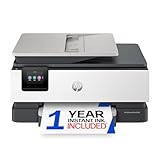
- FROM AMERICA'S MOST TRUSTED PRINTER BRAND – The OfficeJet Pro 8139 is perfect for home offices printing professional-quality color documents like business documents...
- 1 YEAR TRIAL OF INSTANT INK INCLUDED – Subscribe to the Instant Ink delivery service to get ink delivered directly to your door before you run out, and you save up to...
- KEY FEATURES – Fast color printing, scan, copy, fax, auto 2-sided printing, auto document feeder, and a 225-sheet input tray
- 2.7-INCH TOUCHSCREEN – Quickly navigate your printer with a large color touchscreen and a phone-like user interface
- WIRELESS PRINTING – Stay connected with our most reliable dual-band Wi-Fi, which automatically detects and resolves connection issues
The HP OfficeJet Pro 8139 Wireless All-in-One Printer is designed to streamline your small business or home office tasks. It delivers professional-quality color prints at fast speeds, making your reports and presentations stand out. With sharp 4800 x 1200 dpi resolution, your documents will look crisp and vibrant every time.
This printer simplifies your workflow with automatic duplex printing and a 225-sheet input tray, so you spend less time managing paper. The one-sided automatic document feeder (ADF) handles scanning and copying up to 99 pages, ideal for everyday tasks but limited to single-sided documents.
Connectivity is straightforward thanks to wireless dual-band Wi-Fi and AirPrint support. The 2.7-inch touchscreen offers an intuitive interface for easy operation. Plus, HP’s AI technology optimizes print formatting, helping you save on resources and reduce waste.
Maintenance is user-friendly, though firmware updates may restrict non-HP ink cartridges, which could affect ongoing costs. The eco-conscious design uses over 45% recycled plastic, supporting sustainability goals.
Best for: Small business owners and home office users who need reliable, versatile all-in-one printing with wireless convenience.
What We Like:
- Crisp, high-resolution color printing at fast speeds
- Automatic duplex printing and large paper capacity
- Easy wireless setup with a responsive touchscreen
- AI-driven print optimization for efficiency
- Eco-friendly design with recycled materials
Specification:
| Feature | Details |
|---|---|
| Manufacturer | HP |
| Dimensions | Not specified |
| Weight | Not specified |
| Print Speed | Up to 20 ppm (black), 10 ppm (color) |
| Print Resolution | Up to 4800 x 1200 dpi |
| Paper Capacity | 225-sheet input tray |
| Connectivity | Wireless dual-band Wi-Fi, AirPrint |
| Display | 2.7-inch touchscreen |
| Duplex Printing | Automatic |
| ADF | One-sided, up to 99 pages |
| Material | Includes over 45% recycled plastic |
HP OfficeJet Pro 9125 Wireless All-in-One Printer
No products found.
Experience efficient, high-quality document handling with the HP OfficeJet Pro 9125 Wireless All-in-One Printer. Designed to streamline your daily tasks, it prints sharp text and vibrant colors at speeds of up to 22 ppm for black and 18 ppm for color. This printer helps reduce downtime with its reliable performance and crisp 1200 x 1200 dpi resolution.
The dual-pass two-sided automatic document feeder makes scanning and copying double-sided documents quick and simple. You won’t have to constantly reload paper thanks to the 250-sheet input tray that keeps work flowing smoothly. Wireless dual-band connectivity and the HP Smart app support let you print and manage tasks easily from your mobile devices or computer.
Maintenance is straightforward, but keep in mind this printer requires original HP cartridges, which might affect operating costs. Its eco-conscious design includes over 40% recycled plastic, while HP Wolf Pro Security safeguards your data, helping protect your business information.
Best for: Small to medium-sized offices and home professionals needing a versatile, fast all-in-one printer with wireless and eco-friendly features.
What We Like:
- Fast, high-resolution printing for professional documents
- Dual-pass 2-sided ADF simplifies scanning and copying
- Wireless dual-band and mobile app connectivity for convenience
- Eco-friendly design with recycled materials
- Enhanced security with HP Wolf Pro Protection
Specification:
| Feature | Details |
|---|---|
| Manufacturer | HP |
| Model | OfficeJet Pro 9125 |
| Dimensions (W x D x H) | Approx. 17.3 x 18.5 x 9.6 inches |
| Weight | Approx. 23.4 lbs (10.6 kg) |
| Print Speed | Up to 22 ppm black, 18 ppm color |
| Print Resolution | 1200 x 1200 dpi |
| Input Tray Capacity | 250 sheets |
| Connectivity | Wireless dual-band, USB |
| Display | 2.7-inch touchscreen |
| Material | Contains over 40% recycled plastic |
Epson Workforce Pro WF-4920 Wireless All-in-One Printer

- Built for Speed — PrecisionCore Heat-Free technology delivers fast, high-volume printing with 25 (black)/12 (color) ISO ppm and fast first-page-out
- High-Precision Office Printing — Accurate dot placement and DURABrite Ultra instant-dry pigment inks for professional-quality prints
- High-Volume Durability for Heavy Workloads — Innovative heat-free technology engineered for reliability and reduced downtime
- Designed for Productivity — All-in-one printer with auto 2-sided printing and 1-sided, 35-page ADF streamline workflow
- Maximize Printing Efficiency — High-performance office printer with large, 250-sheet paper capacity
Experience seamless office printing with the Epson Workforce Pro WF-4920 Wireless All-in-One Printer. Designed to meet the demands of busy workspaces, this printer ensures fast, reliable output that keeps your tasks on track. Its smart design helps reduce manual effort, letting you focus on what matters most.
The 35-page automatic document feeder and automatic duplex printing save time and paper, streamlining multi-page jobs. A bright 4.3″ color touchscreen offers intuitive control, while wireless connectivity through Wi-Fi and Ethernet keeps your team connected with ease. Integration with Siri and the Epson Smart Panel app adds convenient hands-free operation and remote management.
Built with PrecisionCore Heat-Free technology, it delivers sharp text and vivid graphics at speeds up to 25 ppm in black and 12 ppm in color. DURABrite Ultra pigment inks provide durable, water-resistant prints that maintain quality over time. Compact yet capable, this model supports high-volume printing without frequent interruptions.
Maintenance is straightforward, with easy access to ink cartridges and minimal downtime. Its sturdy build handles daily workloads, although the maximum paper size of 8.5 x 14 inches may limit larger document printing. Weighing 22.5 pounds, it’s best suited for stationary use within an office or home setting.
Best for: Small to medium-sized businesses and home offices requiring a versatile, wireless all-in-one printer that balances speed, quality, and ease of use.
What We Like:
- Fast, precise printing with automatic duplex and a large touchscreen
- Wireless and app-based control for flexible operation
- Durable, high-quality prints using pigment-based inks
- Efficient multi-page handling with a 35-page document feeder
Specification:
| Feature | Details |
|---|---|
| Manufacturer | Epson |
| Dimensions (W×D×H) | Approx. 16.9 × 20.7 × 12.6 in |
| Weight | 22.5 lb (10.2 kg) |
| Color Options | Black |
| Connectivity | Wi-Fi, Ethernet, USB |
Canon Color imageCLASS MF753Cdw II – All-in-One Color Duplex Laser Printer

- Color, Wireless, Duplex 4-in-1: Print, scan, copy, fax.
The Canon Color imageCLASS MF753Cdw II is designed to meet the challenges of modern hybrid work. It delivers fast, high-quality color printing that keeps up with busy office demands. With duplex printing, it saves time and paper by printing on both sides automatically.
This multifunction printer simplifies tasks by combining printing, scanning, and copying in one device. The 50-sheet duplex automatic document feeder handles multi-page documents efficiently. Its expandable paper capacity supports various sizes, including legal, reducing frequent reloads.
Connectivity is seamless, with wireless, Ethernet, and USB options, plus mobile printing through the Canon PRINT app. The customizable touchscreen makes operation straightforward for all users. Maintenance is manageable with clear toner replacement and routine care.
While it weighs 50 pounds, requiring a stable setup, its robust design offers reliability. Toner cartridges yield about 1,100 pages each initially, which might need more frequent replacement for color-heavy tasks. Limited USB ports mean careful planning for wired connections.
Best for: Small and home office users or hybrid work environments needing a fast, reliable multifunction color laser printer with duplex capabilities.
What We Like:
- Fast print speed up to 35 ppm with sharp 1200 x 1200 dpi resolution
- Multiple connectivity options including wireless and mobile printing
- Efficient duplex automatic document feeder and expandable paper capacity
- Intuitive touchscreen interface for easy operation
- Supports a variety of paper sizes for versatile office needs
Specification:
| Feature | Details |
|---|---|
| Manufacturer | Canon |
| Dimensions (WxDxH) | Approx. 17.7 x 18.5 x 16.1 inches (45 x 47 x 41 cm) |
| Weight | 50 lbs (22.7 kg) |
| Print Speed | Up to 35 pages per minute |
| Print Resolution | 1200 x 1200 dpi |
| Paper Capacity | 250 sheets (expandable to 850 sheets) |
| Connectivity | Wireless, Ethernet, USB |
| Duplex Printing | Yes, automatic duplex |
Factors to Consider When Choosing an All in One Printer for Small Business?
When choosing an all-in-one printer for your small business, you’ll want to contemplate how fast it prints and if it supports the connections you need. Think about the paper capacity and how much ink or toner will cost over time.
Don’t forget to check for security features that protect your sensitive documents. It’s also a good idea to consider the size of the printer and whether it fits comfortably in your workspace. Plus, look for models with user-friendly interfaces to keep things running smoothly.
Print Speed Requirements
Although print speed might not be your only priority, you’ll want a printer that keeps up with your busiest days without causing delays. Start by estimating your monthly page volume and choose a model with rated speeds above your peak needs—for example, at least 25 ppm black for 1,000–2,000 pages per month.
Don’t just rely on advertised ppm; check first-page-out times too, aiming for under 15 seconds to avoid slow startups on short jobs. Remember, duplex printing and scanning with the ADF usually run slower than simplex, so verify duplex ppm and ADF speeds if you handle many two-sided or multi-page documents.
Finally, if you print in color often, make sure the color ppm matches your workflow to prevent bottlenecks in mixed print jobs. It’s all about keeping things smooth when you’re juggling different types of documents.
Connectivity Options Available
To keep your small business running smoothly, you’ll want a printer that offers versatile connectivity options. Make certain it supports both wired Ethernet and dual-band Wi-Fi (2.4/5 GHz) so you can connect workstations reliably while providing wireless access for mobile devices.
Look for Wi-Fi Direct and USB host ports to print directly from smartphones or USB drives without needing a network. Confirm compatibility with mobile and cloud printing standards like AirPrint, Mopria, and Google or Apple cloud print APIs to simplify printing and scanning from anywhere.
Gigabit Ethernet and USB 3.0 ensure faster file transfers, and optional NFC or Bluetooth adds convenience. If you have multiple users, verify that the printer supports secure network features and centralized management protocols to keep your office efficient and secure.
Paper Handling Capacity
You’ll often find that paper handling capacity plays an essential role in keeping your small business printer efficient and hassle-free. Start by checking the total paper capacity—combining input trays and multipurpose feeds—to match your monthly print volume.
For moderate use, 250–500 sheets work well; for higher volumes, aim for 500+ sheets. Look at the number and types of trays so you can load letter paper in the main tray and envelopes or cardstock in a bypass tray simultaneously.
Don’t overlook the automatic document feeder (ADF) and output tray capacities; typical ADFs hold 35–50 sheets, while output trays manage 60–250 sheets, reducing interruptions. Also, confirm your printer supports the media sizes and weights you need to avoid jams.
Finally, consider duplex printing’s effect on capacity and throughput for balanced efficiency. It’s all about finding the right balance to keep your workflow smooth and your printer happy.
Ink and Toner Costs
When choosing an all-in-one printer for your small business, figuring out ink and toner costs can make a big difference in your budget. Start by calculating the cost per page—divide the cartridge or bottle price by its rated yield, considering both black and color yields for mixed use.
Don’t overlook upfront versus ongoing expenses; laser toner and high-yield ink cartridges may cost more initially but often lower your long-term per-page cost. Also, check if subscription or refill programs fit your needs, including monthly fees and overage policies.
Adjust costs based on your actual page coverage—heavy graphics or photos consume more ink. Finally, include maintenance parts like printheads or drums in your total cost since these add to ownership expenses over time.
Security Features Needed
Although small business printers often get overlooked as security risks, they can become gateways for data breaches if not properly protected. You need to make certain your printer supports secure network protocols like WPA3, TLS, and IPsec, plus built-in firewall capabilities to block unauthorized access.
Look for user authentication options such as PIN codes or card logins, and role-based permissions to restrict sensitive functions. Verify that the printer offers automatic firmware updates with tamper-resistant design to keep security patches current.
Data protection features like secure boot, AES-256 encryption for internal storage, and automatic secure erase of job data are essential. Finally, choose devices with secure printing workflows—like PIN release—and encrypted scan-to destinations, along with audit logs to track user activity and maintain compliance.
Device Size and Footprint
Since workspace is often limited in small businesses, choosing an all-in-one printer with the right size and footprint is essential. Start by measuring your available space and comparing it to the printer’s dimensions—depth, width, and height—to make certain it fits comfortably on or under your desk or shelf.
Remember to factor in space for fully extended paper trays, the ADF lid, and output bins. Also, consider the printer’s weight; heavier devices may need two people or a cart for moving or maintenance.
Don’t forget to leave enough clearance around the unit for easy access when changing consumables or clearing jams. If floor space is tight, look for compact, vertical models or ones that can be placed on walls or inside cabinets while maintaining proper ventilation and cable access.
Frequently Asked Questions
How Do All-In-One Printers Impact Office Network Security?
All-in-one printers can create security risks if you don’t secure their network connections and access controls. You’ll want to update firmware regularly, use strong passwords, and enable encryption to protect sensitive office data effectively.
Keeping your printer’s software up to date is key. It helps close security gaps before they’re exploited. And don’t forget strong passwords — weak ones make it easy for hackers to get in. Plus, encryption adds an extra layer of defense for your important documents.
What Are the Environmental Benefits of Using All-In-One Printers?
Just like a vintage telegram saved paper, you’ll reduce waste by combining printing, scanning, and copying in one device.
You’ll cut energy use and lower your office’s carbon footprint, making your business greener and more efficient.
Can These Printers Integrate With Cloud Storage Services?
Yes, you’ll find many all-in-one printers that integrate seamlessly with cloud storage services like Google Drive and Dropbox.
This lets you print, scan, and save documents directly to the cloud, boosting your workflow efficiency.
It’s pretty convenient because you can access your files from anywhere, anytime. Plus, it keeps everything organized without extra hassle.
What Are Common Troubleshooting Steps for Connectivity Issues?
Since 85% of connectivity issues stem from simple glitches, you’ll want to restart your printer and router. This often clears up minor hiccups quickly.
Next, check your Wi-Fi signals and update your drivers to ensure everything is running smoothly. Don’t forget to verify your network settings as well.
Also, make sure your firewall isn’t blocking your printer’s access. These small steps can save you a lot of troubleshooting time.
How Do Printer Maintenance Costs Compare Across Brands?
You’ll find maintenance costs vary widely; some brands offer affordable ink and parts, while others charge a premium.
It’s smart to compare ongoing expenses, including cartridges and repairs, to avoid surprises and keep your budget on track.
After all, a printer that’s cheap upfront might cost you more down the line. So, make sure to check those maintenance fees before you decide!
Conclusion
Choosing the right all-in-one printer is like picking the perfect co-pilot for your business journey. Just as a skilled navigator helps you avoid detours and reach your destination smoothly, the right printer keeps your tasks efficient and stress-free.
By considering your needs carefully, you’ll find a reliable partner ready to support your small business success in 2027 and beyond. With the best all-in-one printers, you can streamline printing, scanning, and copying all in one device.
This not only saves time but also boosts productivity, making every workday feel like a well-charted adventure. So, invest wisely and watch your small business thrive with the perfect all-in-one printer by your side!