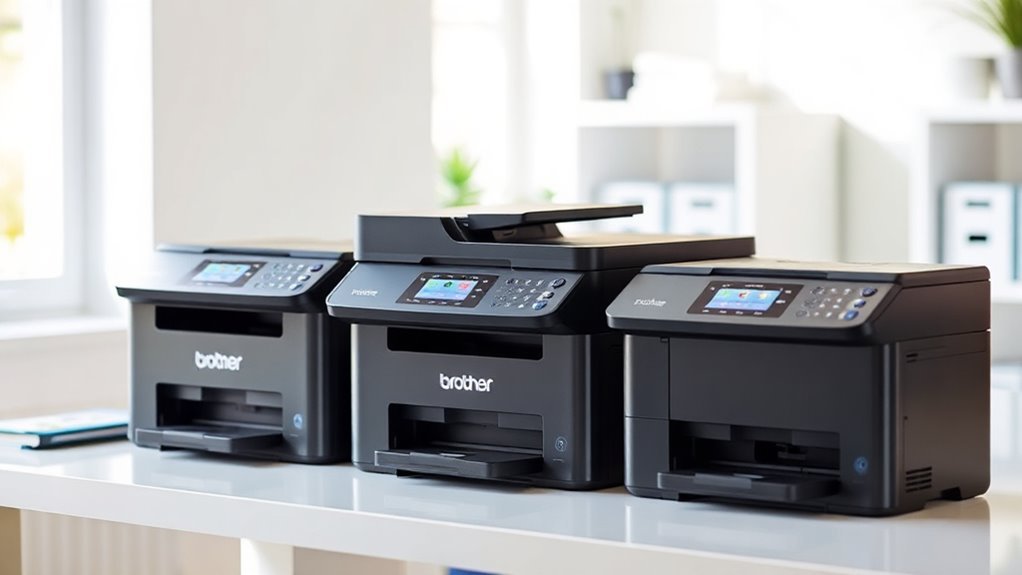
3 Best All-in-One Printer Brother Models for 2027
If you’re looking for reliable and versatile Brother all-in-one printers for 2027, you’ve got some great options to consider. The Work Smart 1360, DCP-L2640DW, and Work Smart 1410 stand out as top choices for both home and office use.
These models combine printing, scanning, and copying in one convenient package, making your workflow smoother and more efficient.
The Work Smart 1360 offers wireless color printing along with handy scanning and copying features, which is perfect for home offices or small businesses.
Meanwhile, the DCP-L2640DW shines with speedy monochrome prints and a robust paper capacity, ideal if you need volume and reliability.
On the other hand, the Work Smart 1410 brings wireless color printing and mobile-friendly features to the table, giving you flexibility when you’re on the go.
Each model supports duplex printing and is designed for easy maintenance.
Keep reading to find out which one fits your specific needs best!
| Image | Name | Editor's Rating | Price |
|---|---|---|---|

|
|
||

|
|
||

|
|
Brother Work Smart 1360 Wireless Color Inkjet All-in-One Print, Scan, Copy
- AFFORDABLE ALL-IN-ONE FOR HOME AND HOME OFFICE: Print, copy, and scan on one compact wireless printer designed for everyday home office printing, schoolwork, documents...
- EASY TO USE WITH CLOUD APP CONNECTIONS: Print from and scan to popular Cloud apps(2), including Google Drive, Dropbox, Box, OneDrive, and more from the simple-to-use...
- FULL-SIZE FEATURES IN A COMPACT DESIGN: This printer includes automatic duplex (2-sided) printing, a 20-sheet single-sided Automatic Document Feeder (ADF)(3), and a...
- MULTIPLE CONNECTION OPTIONS: Connect your way. Interface with your printer on your wireless network or via USB.
- MOBILE PRINTING MADE EASY: Go mobile with the Brother Mobile Connect app(5) that delivers easy onscreen menu navigation for printing, copying, scanning, and device...

The Brother Work Smart 1360 Wireless Color Inkjet All-in-One is designed to simplify your daily printing tasks. Its compact form fits neatly into any home office, saving valuable space without sacrificing performance. This all-in-one printer efficiently handles printing, scanning, and copying, making it ideal for busy households or small workspaces.
With print speeds of up to 16 pages per minute in black and 9 in color, it keeps your documents moving quickly. Automatic duplex printing reduces paper use and saves time on double-sided tasks. The sharp 1,200 x 6,000 dpi resolution ensures your color prints come out vibrant and clear, enhancing presentations and reports.
Maintenance is straightforward with a 150-sheet paper tray and a 20-sheet automatic document feeder for quick multi-page scanning or copying. Wireless connectivity options, including Wi-Fi Direct and mobile app support, offer the flexibility to print from smartphones or tablets, adapting to your remote work needs.
While the 20-sheet single-sided ADF may limit large batch scanning, the printer’s user-friendly design and efficient functionality make it a reliable choice for everyday home office use.
Best for: small home offices or individuals needing a versatile, space-saving wireless color printer with mobile connectivity.
What We Like:
- Fast printing speeds and automatic duplex for efficient workflows
- Wireless printing via Wi-Fi Direct, AirPrint®, and mobile app
- Compact design with easy-to-use 1.8” color display
- 20-sheet ADF and 150-sheet tray support smooth document handling
Specification:
| Feature | Details |
|---|---|
| Manufacturer | Brother |
| Dimensions | Compact (exact size not provided) |
| Weight | Not specified |
| Ink Type | Color Inkjet |
| Connectivity | Wireless (Wi-Fi Direct, AirPrint®, Mopria®) |
| Paper Capacity | 150 sheets |
| Automatic Document Feeder | 20 sheets, single-sided |
| Print Speed | Up to 16 ppm (black), 9 ppm (color) |
| Print Resolution | 1,200 x 6,000 dpi |
Brother DCP-L2640DW Wireless Monochrome Printer
- BEST FOR SMALL BUSINESSES – Engineered for extraordinary productivity, the Brother DCP-L2640DW Monochrome (Black & White) 3-in-1 combines laser printer, scanner, copier...
- FAST PRINTER WITH EFFICIENT SCANNING – Produces documents quickly with print speeds up to 36 ppm(2) and scan speeds up to 23.6/7.9 ipm(3) (black/color). A 50-page auto...
- FLEXIBLE CONNECTION OPTIONS – Easily navigate the changing demands of your business with secure multi-device connectivity via built-in dual-band wireless (2.4GHz...
- BROTHER MOBILE CONNECT APP – Print, scan, and manage your wireless printer anytime, from almost anywhere from your mobile device. Order Brother Genuine Supplies, track...
- CHOOSE BROTHER GENUINE TONER – When it’s time to replace your toner, be sure to choose Brother Genuine TN830 or TN830XL replacement toner. And with Refresh EZ Print...
The Brother DCP-L2640DW is designed to handle busy workspaces where speed and efficiency are essential. It delivers sharp, laser-quality monochrome prints at up to 36 pages per minute, helping you complete printing tasks quickly without sacrificing clarity.
Its 50-page automatic document feeder simplifies scanning and copying multi-page documents, saving you time and effort. The 250-sheet paper tray and automatic duplex printing help reduce paper refills and waste, making daily operation smoother and more eco-friendly.
Connectivity is versatile with dual-band wireless, Ethernet, and USB options, allowing seamless integration into your office setup. You can also print remotely using the Brother Mobile Connect app, which adds convenience when working on the go.
Maintenance is straightforward, supported by an energy-efficient design that minimizes power use. Advanced security safeguards protect sensitive data, making this monochrome printer a practical choice for small offices or individuals who prioritize both performance and security.
Best for: professionals or small offices needing fast, reliable monochrome printing, copying, and scanning with flexible connectivity and efficient paper handling.
What We Like:
- Fast print speed of up to 36 ppm for high productivity
- 50-page automatic document feeder for easy multitasking
- Dual-band wireless, Ethernet, and USB connectivity options
- Automatic duplex printing reduces paper usage
- Energy-efficient design with built-in security features
Specification:
| Feature | Details |
|---|---|
| Manufacturer | Brother |
| Dimensions (W x D x H) | 16.1 x 15.7 x 12.7 inches |
| Weight | 25 lbs (11.3 kg) |
| Printing Technology | Monochrome Laser |
| Paper Capacity | 250 sheets |
| Connectivity | Dual-band wireless, Ethernet, USB |
Brother Work Smart 1410 Wireless Color Inkjet Printer
- BEST FOR HOME OFFICE AND SMALL OFFICE: Get your work done with a multifunction printer. Print, copy, and scan on one convenient, compact printer, with quick and easy...
- EASY-TO-USE TOUCHSCREEN WITH CLOUD APP CONNECTIONS: Seamless integration with the Cloud(2). Print from and scan to popular Cloud apps(2), including Google Drive, Dropbox...
- PRODUCTIVITY-FOCUSED FEATURES: Automatic duplex (2-sided) printing, 20-sheet single-sided Automatic Document Feeder (ADF)(3), 150-sheet paper tray(3). Print at fast...
- MULTIPLE CONNECTION OPTIONS: Connect your way. Interface with your printer on your wireless network or via USB.
- THE BROTHER MOBILE CONNECT APP: Go mobile with the Brother Mobile Connect app(5) for easy onscreen menu navigation for printing, copying, scanning, and device management...
The Brother Work Smart 1410 wireless color inkjet printer is designed to streamline your home office tasks. Its fast automatic duplex printing helps reduce paper waste and doubles your productivity. Printing speeds of up to 16 ppm in black and 9 ppm in color keep your workflow efficient and uninterrupted.
Navigating the printer is simple with the bright 2.7” color touchscreen. The 20-sheet automatic document feeder and 150-sheet paper tray make handling multiple documents easy. Wireless and USB connectivity, along with the Brother Mobile Connect app, allow you to print and scan remotely, fitting seamlessly into your busy lifestyle.
This printer delivers sharp prints with a resolution of 1200 x 6000 dpi, ideal for everyday documents and color graphics. Compact and reliable, it integrates with cloud services to help you manage files effortlessly. Regular maintenance is straightforward, though the limited ADF capacity might not meet very high-volume scanning needs.
Best for: Busy home office users who need fast, reliable, and versatile wireless printing, scanning, and copying with convenient cloud and mobile app integration.
What We Like:
- Fast automatic duplex printing speeds up to 16 ppm black and 9 ppm color
- User-friendly 2.7” color touchscreen and efficient document handling
- Wireless connectivity plus Brother Mobile Connect app for remote use
- Sharp 1200 x 6000 dpi resolution for clear, vibrant prints
- Compact design fits well in limited workspace
Specification:
| Feature | Details |
|---|---|
| Manufacturer | Brother |
| Dimensions (W x D x H) | Approx. 16.1 x 14.5 x 7.2 in |
| Weight | About 12.1 lb (5.5 kg) |
| Connectivity | Wireless, USB |
| Paper Capacity | 150-sheet tray, 20-sheet ADF |
| Display | 2.7” color touchscreen |
Factors to Consider When Choosing an All in One Printer Brother
When choosing a Brother all-in-one printer, you’ll want to evaluate print speed and connectivity options to fit your workflow. Don’t forget to check the types of ink or toner it uses and whether it supports duplex printing.
Also, think about the paper handling capacity to make sure it meets your daily needs. It’s all about finding the right balance that works best for you.
Print Speed Performance
Choosing an all-in-one Brother printer that suits your needs means paying close attention to print speed performance. Print speed, measured in pages per minute (ppm), shows how fast your printer can produce documents. If you handle high volumes, aim for higher ppm values.
Monochrome models usually print faster, often over 30 ppm, compared to color printers. Automatic duplex printing lets you print on both sides, but it may slow the process depending on the model’s efficiency.
An Automatic Document Feeder (ADF) boosts speed for multi-page jobs by feeding documents automatically. Keep in mind, higher print resolutions (measured in dots per inch) can slow down printing since they take longer to process.
Balancing speed with quality helps you pick the right Brother printer for your workflow. It’s all about finding the sweet spot that works best for what you need.
Connectivity Options Available
Several connectivity options make Brother all-in-one printers versatile and easy to integrate into your workspace. You can print wirelessly using Wi-Fi Direct, which lets you connect compatible devices without a network.
Mobile printing is simple with apps like Brother Mobile Connect, AirPrint, and Mopria. Some models support dual-band Wi-Fi (2.4GHz/5GHz), ensuring a stable and fast connection no matter your network setup.
If you prefer wired connections, Ethernet and USB ports offer reliable alternatives. Cloud integration lets you print from and scan to services like Google Drive, Dropbox, Box, and OneDrive, streamlining your workflow.
Plus, user-friendly displays guide you through setting up and managing all these options, so you can get connected quickly and easily without hassle.
Ink And Toner Types
Understanding the differences between ink and toner types can help you pick the right Brother all-in-one printer for your needs.
Inkjet printers use liquid ink, like Brother Genuine LC501 cartridges, delivering vibrant colors perfect for photos and detailed documents. However, their cartridges have a shorter shelf life and lower page yields, so they need to be replaced more often.
Laser printers, on the other hand, use powdered toner such as Brother Genuine Toner TN830. They offer faster print speeds and economical black-and-white printing, which is ideal for text-heavy pages.
Though toner cartridges cost more upfront, they last longer and reduce your cost per page over time. Plus, some inkjet models offer subscription services that automatically send ink based on your usage. This helps minimize downtime and keeps your print quality consistent.
Think about your printing volume and what you need before making a choice. That way, you can pick the printer that’s just right for you.
Duplex Printing Features
After considering ink and toner types, you’ll want to look at duplex printing features when selecting a Brother all-in-one printer. Duplex printing lets you print on both sides of the paper automatically, which cuts down on paper use and lowers costs.
Many Brother models include built-in duplex capabilities, so you don’t have to flip pages manually. This feature speeds up printing for two-sided documents, boosting your overall efficiency.
If you’re running a business or managing a home office with frequent, high-volume printing, duplex printing can save you time and money. Plus, it supports sustainability by reducing waste and helps keep your documents organized more neatly.
Choosing a printer with reliable duplex functionality is a smart move for both productivity and environmental responsibility. It’s definitely worth considering when making your choice!
Paper Handling Capacity
One key factor to evaluate when choosing a Brother all-in-one printer is its paper handling capacity, which determines how many sheets the printer can hold and process at once. If you handle high-volume printing, look for models with larger trays—250 sheets or more—to minimize refills and keep your workflow smooth.
An Automatic Document Feeder (ADF) is essential if you scan or copy multi-page documents regularly; capacities typically range from 20 to 50 sheets, letting you work hands-free. Also, consider the maximum media size the printer supports, especially if you need to print on larger formats up to 8.5 x 14 inches.
Ensuring your printer manages paper efficiently saves time and boosts productivity in any busy environment. It’s definitely worth paying attention to these details before making your choice.
Mobile Printing Support
Efficient paper handling keeps your printing tasks running smoothly, but today’s busy lifestyle often requires printing on the go. Mobile printing support in Brother all-in-one printers lets you print directly from your smartphone or tablet using compatible apps, making it easier to manage tasks wherever you are.
Features like Wi-Fi Direct and AirPrint® allow seamless printing without a traditional network, simplifying setup. Many models include mobile apps that let you print, scan, and copy remotely.
Cloud integration with services like Google Drive and Dropbox further streamlines your workflow. Plus, monitoring ink levels and printer status through these apps helps you avoid interruptions, keeping your projects on track.
Choosing a model with robust mobile support guarantees convenience and efficiency in a fast-paced world. It’s all about making printing hassle-free, no matter where life takes you!
Device Size And Weight
Choosing the right Brother all-in-one printer means paying close attention to its size and weight. You’ll want to guarantee the printer fits comfortably in your workspace, especially if you have limited room.
Larger models might offer more features but can take up valuable desk space, while compact designs fit easily in small home offices. Weight also matters: lighter printers are easier to move around, which is great if you need portability.
However, heavier models often boast sturdier construction and better stability, vital for frequent scanning and copying. Don’t forget to take into account the printer’s footprint in relation to your other office equipment to keep your area organized and efficient.
Balancing size and weight guarantees you get a device that matches both your space and functional needs. It’s all about finding the perfect fit for your setup!
Warranty And Support
While picking a Brother all-in-one printer, you’ll want to pay close attention to the warranty and support options. Typically, Brother offers a one-year limited warranty covering manufacturing defects, giving you peace of mind.
You should also check the customer support channels available—free online resources, phone, and live chat assistance can make troubleshooting much easier. Don’t forget to evaluate the availability of genuine replacement ink or toner cartridges, as this affects your printer’s long-term performance.
Some models even offer a refresh subscription service that automatically delivers ink when you need it, simplifying maintenance. Finally, assess how easy it is to reach customer service and access support materials, since quick, effective help reduces downtime and keeps your printing running smoothly.
Frequently Asked Questions
What Is the Warranty Period for Brother All-In-One Printers?
Brother all-in-one printers typically come with a one-year limited warranty. You can usually extend it by registering your product online.
This warranty covers defects and repairs, so you’re protected if anything goes wrong within that period. It’s a good idea to register your printer right after buying it to make sure you don’t miss out on the extended coverage.
Are Brother Printers Compatible With Mac and Linux Systems?
Think of Brother printers like universal adapters—they’re compatible with both Mac and Linux systems. You won’t struggle printing from either, just like plugging in your phone anywhere.
It’s hassle-free and ready to go whenever you need it. No complicated setup, just smooth printing every time.
How Often Should I Replace Ink Cartridges in Brother Printers?
You should replace ink cartridges in your Brother printer when print quality drops or the ink level is low.
Typically, this happens after printing several hundred pages, but it varies based on usage and cartridge type.
Do Brother Printers Support Mobile Printing Apps?
Yes, Brother printers support mobile printing apps like Brother iPrint&Scan and AirPrint. You can easily print, scan, or check ink levels directly from your smartphone or tablet.
This makes wireless printing super convenient and hassle-free. So, whether you’re at home or on the go, you’ve got printing covered!
What Is the Average Lifespan of Brother All-In-One Printers?
It’s no coincidence that Brother all-in-one printers typically last 3 to 5 years—you’ll get reliable use if you maintain them well.
You’ll want to replace parts occasionally, but they’ll serve you faithfully during that span.
With a little care, they can really keep up with your daily printing needs.
Conclusion
Choosing the right Brother all-in-one printer is like finding a trusted compass in a sea of options—it guides you to efficiency and reliability. Whether you need vibrant color or sharp monochrome, these models are your steady anchors in the chaos of daily tasks.
By picking the one that fits your needs, you’re not just buying a device; you’re securing a partner that keeps your workflow sailing smoothly into 2027 and beyond. With the best Brother all-in-one printers, you get a blend of performance, versatility, and convenience.
So, when it comes to finding the perfect all-in-one printer for 2027, trust Brother’s lineup to deliver quality printing, scanning, and copying features. These models are designed to meet your everyday demands and help you stay productive with ease.