3 Best 3D Printers for Terrain in 2026 You Can’t Miss
If you want vivid, detailed terrain models in 2026, the Bambu Lab P2S Combo is a top choice. It pairs lightning-fast 600 mm/s speeds with multi-material printing thanks to its AMS 2 Pro filament system. This means you can create complex, colorful landscapes quickly without sacrificing detail.
The Anycubic Kobra 4 is perfect for beginners. It offers high-speed FDM printing with automatic leveling, making setup a breeze. Plus, its large 260 mm build volume is great for printing expansive terrain pieces.
For those who need advanced multi-color options and engineering materials, the Creality K2 Plus really stands out. It supports up to 16 colors and delivers reliable precision, ideal for detailed, professional terrain models. Keep exploring to see what makes each printer perfect for your terrain needs!
| Image | Name | Editor's Rating | Price |
|---|---|---|---|

|
|
||

|
|
||

|
|
Bambu Lab P2S Combo, P2S 3D Printer & AMS 2 Pro, Multi-Color 3D Printing
- High-Speed Precision: The Bambu Lab P2S 3D printer prints up to 600 mm/s while maintaining exceptional accuracy. With the PMSM Servo Extruder and Active Flowrate...
- Ready to Print in 15 Minutes: Set up your P2S FDM 3D printer and start printing in just 15 minutes. With AI failure detection, quick-swap nozzles, and automatic...
- Effortless Multi-Color Printing: The AMS 2 Pro enables seamless multi-color/multi-material 3D printing. It features built-in filament drying at up to 65 °C, keeping...
- Smart Airflow for Any Filament: The Adaptive Airflow System automatically balances cooling and heat retention—keeping overhangs crisp with cool air, or maintaining a...
- Limitless Creativity, Seamless Workflow: Explore over one million 3D models on MakerWorld and bring them to life with a smooth, unified workflow using Bambu Studio, Bambu...
Bring your terrain models to life with the Bambu Lab P2S Combo, designed for vivid, multi-color 3D printing that elevates your creations. This integrated system pairs the precision P2S 3D Printer with the versatile AMS 2 Pro accessory, allowing you to print complex, multi-material projects effortlessly.
The high-speed CoreXY mechanism supports printing speeds up to 600 mm/s, delivering sharp and smooth layers. Its 50 °C heated chamber ensures consistent, engineering-grade accuracy, ideal for detailed models that demand precision.
Maintenance is simplified with the AMS 2 Pro’s built-in filament drying feature, which keeps spools in optimal condition to prevent print failures and material degradation. This reduces downtime and ensures every print starts with dry, ready filament.
While the standalone P2S printer lacks multi-color capability, the AMS 2 Pro unlocks seamless color and material transitions. The combo’s size and weight mean it requires a dedicated workspace, but it offers advanced functionality for serious hobbyists and professionals.
Best for: hobbyists and professionals seeking a high-speed, multi-material 3D printing solution for detailed, colorful terrain models.
What We Like:
- Seamless multi-material and multi-color printing with AMS 2 Pro
- Fast CoreXY design enabling print speeds up to 600 mm/s
- 50 °C heated chamber for engineering-grade precision
- Built-in filament drying system to maintain filament quality
Specification:
| Feature | Details |
|---|---|
| Manufacturer | Bambu Lab |
| Dimensions | 18 x 22 x 18 inches |
| Weight | 46.3 pounds |
| Color Options | Not specified |
| Heated Chamber Temp | 50 °C |
| Max Print Speed | 600 mm/s |
Anycubic Kobra 4 3D Printer with Auto Leveling, High-Speed FDM Printer
- 【Fun Family Printing Experience】The Kobra 4 features simple setup and stable printing for family use. Print school projects, decorations, and DIY models together...
- 【LeviQ 3.0 Auto Leveling】 Smart auto leveling improves first-layer adhesion by compensating for uneven surfaces automatically. Reduce setup time and failed prints...
- 【Large Build Volume for Creativity】 The 260×260×260mm³ print area supports larger models, cosplay props, educational models, and multi-part projects. Print bigger...
- 【Quiet & Beginner Friendly】 Built for home use, the Kobra 4 combines quieter operation with intuitive controls and simple workflows. Easy operation makes it ideal for...
- 【Fast & Stable Home Printing】The optimized motion system supports faster printing with smooth surfaces and stable details. Finish projects with less waiting time...
Experience hassle-free 3D printing with the Anycubic Kobra 4, designed to simplify your creative projects. Its LeviQ 3.0 auto leveling system ensures precise first-layer adhesion, reducing setup time and minimizing print errors. This feature is especially helpful for beginners and those working on complex terrain models.
The printer offers a spacious 260×260×260 mm build volume, allowing you to create larger landscapes or multi-part assemblies without the need for multiple prints. Its high-speed FDM technology delivers smooth surfaces and sharp details, helping you complete projects faster and with professional quality.
Maintenance is straightforward, with quiet operation that fits well in home or classroom environments. Despite its weight of 21.8 pounds, the sturdy design provides stability during printing. This balance of performance and ease of use makes it ideal for students, hobbyists, and families.
Best for: Students, hobbyists, and families seeking a beginner-friendly, high-speed 3D printer for creative DIY projects and terrain modeling.
What We Like:
- LeviQ 3.0 auto leveling simplifies setup and improves print reliability.
- Large build volume supports bigger and multi-part projects.
- Quiet operation suitable for shared spaces.
- High-speed printing enhances productivity.
- Solid, stable design for consistent results.
Specification:
| Feature | Details |
|---|---|
| Manufacturer | Anycubic |
| Build Volume | 260 × 260 × 260 mm |
| Weight | 21.8 lb (9.9 kg) |
| Technology | FDM (Fused Deposition Modeling) |
| Auto Leveling | LeviQ 3.0 |
| Noise Level | Quiet operation |
Creality K2 Plus Combo 3D Printer, Multi Color Printing with New CFS
- 𝐄𝐧𝐣𝐨𝐲 𝐏𝐫𝐢𝐧𝐭𝐢𝐧𝐠 𝐢𝐧 𝐌𝐮𝐥𝐭𝐢𝐩𝐥𝐞 𝐂𝐨𝐥𝐨𝐫𝐬: By hooking up as many as four CFS units...
- 𝐇𝐢𝐠𝐡 𝐒𝐩𝐞𝐞𝐝 𝐏𝐫𝐢𝐧𝐭𝐢𝐧𝐠: Step-servo Motor System 30000mm/s² accelaration, 40mm³/s High-flow and quiet. For a large-format...
- 𝐌𝐮𝐥𝐭𝐢 𝐌𝐚𝐭𝐞𝐫𝐢𝐚𝐥 𝐂𝐚𝐩𝐚𝐛𝐢𝐥𝐢𝐭𝐲: K2 Plus Combo equipped with Actively Heated Chamber & High-temp Nozzle...
- 𝐃𝐮𝐚𝐥 𝐀𝐈 𝐂𝐚𝐦𝐞𝐫𝐚𝐬: K2 Plus uses an Al camera on the chamber side to watch over spaghetti failure, foreign objects, idling, etc. It...
- 𝐈𝐧𝐠𝐞𝐧𝐢𝐨𝐮𝐬 𝐀𝐧𝐭𝐢-𝐭𝐢𝐥𝐭 𝐀𝐮𝐭𝐨 𝐋𝐞𝐯𝐞𝐥𝐢𝐧𝐠: K2 Plus features dual independently motorized...

Unlock the potential of vibrant, multi-color 3D printing with the Creality K2 Plus Combo. This advanced printer connects up to four CFS units, enabling you to print with up to 16 colors seamlessly. It solves the challenge of managing multiple filaments by using the Creality Automatic Material System, which intelligently handles filament feeding for smooth, uninterrupted printing.
Designed for speed and precision, the step-servo motor achieves printing speeds up to 600 mm/s with turbocharged acceleration. This makes large, detailed prints faster without sacrificing quality. Its heated chamber and durable hardened steel nozzle allow you to work with a wide range of materials, including ABS and carbon-fiber blends, expanding your creative possibilities.
Maintenance is straightforward thanks to its robust frame, dual Z-axes for stability, and an auto-leveling system that ensures accurate first layers every time. AI-powered cameras provide real-time monitoring, enhancing safety and allowing you to keep an eye on prints remotely.
Best for: Advanced hobbyists and professionals seeking high-speed, multi-color 3D printing with versatile material compatibility and smart filament management.
What We Like:
- Supports up to 16 colors via multiple CFS units for complex, colorful prints.
- High-speed printing with reliable mechanical design and turbocharged acceleration.
- AI cameras and automated sensors enable real-time monitoring and safety.
Specification:
| Feature | Specification |
|---|---|
| Manufacturer | Creality |
| Dimensions | Not specified |
| Weight | Not specified |
| Material Compatibility | ABS, carbon-fiber blends, others |
| Color Options | Multi-color (up to 16 colors) via CFS units |
Factors to Consider When Choosing a 3d Printer for Terrain 2026
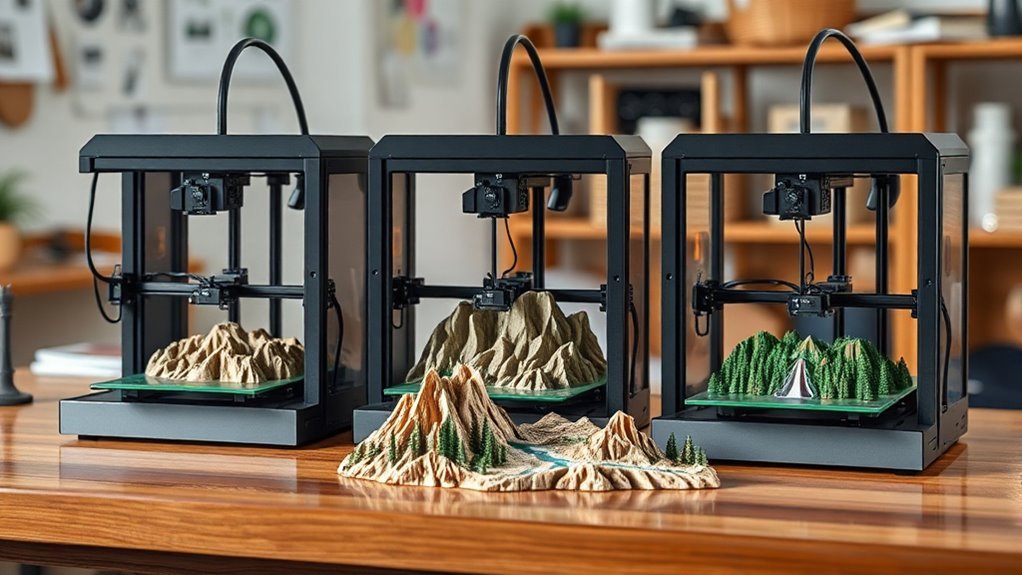
When choosing a 3D printer for terrain in 2026, you’ll want to focus on print volume capacity and multi-material support to handle complex designs.
Precision and speed are key for creating detailed models without wasting time. Don’t forget to weigh ease of use along with durability and reliability to make certain your printer performs consistently.
Print Volume Capacity
Although larger terrains demand substantial print volumes—typically at least 300 × 300 × 100 mm for single-piece sections, you’ll want even bigger capacities, around 400 × 400 × 200 mm or more, to create true table-sized terrain with fewer joins. When printing tall features like cliffs or mountains, make sure your printer’s Z-height exceeds the tallest element by 10–20 mm for supports and removal.
If your printer’s volume is moderate, look for precise alignment and repeatability to produce modular, tileable sections. Also, consider print orientation—larger X/Y dimensions can weaken seams if orientation isn’t ideal.
Since bigger prints risk warping and adhesion issues, pair large build volumes with heated beds or controlled environments, or break models into smaller parts to maintain accuracy and strength. It’s all about balancing size with quality, so you don’t end up with weak spots or failed prints.
Multi-Material Support
Getting the most out of your terrain prints often means combining multiple materials to balance strength, flexibility, and detail. You can use rigid PLA or PETG for sturdy layers and add flexible TPU in impact-prone areas or bumpers. This enhances both durability and realism.
Look for printers that support multiple spools with automatic filament switching. This lets you print complex color maps or layered geological strata without manual intervention, saving you time and improving alignment.
Make sure your printer features active filament drying and heated paths. These are key to handling moisture-sensitive materials like nylon and TPU, preventing jams and ensuring smooth extrusion.
Reliable toolpath calibration and automatic nozzle alignment are essential to avoid layer delamination. Also, verify nozzle compatibility with abrasive composites and high-temp polymers to maintain surface quality and prevent wear when printing mixed materials.
Precision and Speed
To capture the intricate details of terrain models, you’ll want a printer that delivers positional accuracy between 0.05 and 0.1 mm, preserving fine contours and surface textures. Look for small nozzles (0.2–0.4 mm) and fine layer heights (0.08–0.2 mm) to achieve detailed relief.
At the same time, larger nozzles can speed up bulk fills without sacrificing outline accuracy. Higher maximum linear speeds, up to 300–600 mm/s, help reduce print times on large terrain plates.
But keep in mind, you’ll need to slow down for perimeters and detailed areas to maintain surface fidelity. It’s a good idea to prioritize printers with high acceleration and jerk control to minimize ringing and keep sharp ridgelines crisp.
Also, closed-loop motion systems and active flow compensation guarantee consistent dimensional accuracy across long prints. This way, you prevent cumulative deviations in extended terrain pieces.
Ease of Use
You’ll often find that ease of use makes a huge difference when selecting a 3D printer for terrain modeling. Features like automatic bed leveling and reliable first-layer calibration save you time and prevent failed prints, especially with large, detailed pieces.
A large, heated build plate with uniform temperature control guarantees your wide terrain tiles print without warping or seams. Intuitive slicer integration and preconfigured profiles for common terrain materials help you get started quickly, while one-click print workflows simplify the process.
Responsive touchscreens, filament runout detection, and guided filament loading make routine tasks easier during lengthy prints. Plus, built-in print monitoring with cameras and failure detection lets you catch problems early, minimizing wasted material and downtime.
These ease-of-use factors make your terrain printing experience smoother and more efficient. Trust me, they really take the hassle out of the process!
Durability and Reliability
While ease of use helps streamline your terrain printing, durability and reliability guarantee your printer handles long, complex builds without hiccups. Choose printers with rigid frames like aluminum extrusions and reinforced joints to minimize wobble and maintain accuracy.
Look for high-precision motion systems featuring linear rails, dual Z-axis drives, and properly tensioned lead screws or belts to prevent layer shifts. These features keep your prints looking sharp and consistent.
Opt for extruders and hotends made from wear-resistant materials such as hardened steel nozzles and metal-geared extruders to withstand abrasive filaments. This way, you won’t have to worry about frequent part replacements.
Make certain your printer includes protections like filament runout detection and thermal runaway safeguards to avoid failures during extended prints. These safety features are a real lifesaver for long sessions.
Finally, check components’ MTBF ratings, ease of maintenance, and spare parts availability to keep your printer reliably printing terrain for years. It’s all about making sure your investment lasts and keeps performing well.
Frequently Asked Questions
What Software Is Best for Designing 3D Terrain Models?
You’ll want to use Blender or Autodesk Terrain Generator for designing 3D terrain models. Both offer powerful tools and flexibility, letting you create detailed, realistic landscapes easily.
Plus, they support various file formats for 3D printing, which is super handy. These programs make the process smooth, whether you’re a beginner or more experienced.
How Do I Maintain My 3D Printer for Optimal Terrain Printing?
You should regularly clean the print bed, lubricate moving parts, and calibrate the nozzle height. Keeping these in check helps your printer run smoothly.
Also, make sure to keep the firmware updated and use quality filament. Storing filament properly to prevent moisture is super important, too.
Following these steps will guarantee crisp, detailed terrain prints every time. It’s all about keeping your printer happy and ready to go!
Can These Printers Handle Flexible or Specialty Filaments?
Yes, many printers can handle flexible or specialty filaments if you adjust settings and use the right extruder. You’ll want a direct drive system and slower print speeds to avoid jams and get smooth results.
It’s all about tweaking things just right. With the proper setup, you can get great prints from those tricky filaments!
Are There Eco-Friendly Filament Options Suitable for Terrain Printing?
You’ll find eco-friendly filaments perfect for terrain printing, like biodegradable PLA and recycled PETG, that practically hug the planet while crafting your landscapes.
They’re not just green—they’re game-changers you’ll love using every time!
What Post-Processing Techniques Improve Terrain Print Realism?
You should sand your terrain prints for smoothness, apply acrylic paints for realistic colors, use washes to highlight details, and add dry brushing for texture.
Sealing with matte varnish finishes your realistic terrain models perfectly. It really brings everything together and gives your piece that professional look.
Conclusion
Choosing the right 3D printer for terrain in 2026 is like picking the perfect brush for your masterpiece. Whether you lean toward the vibrant precision of the Bambu Lab P2S Combo or the speedy reliability of the Anycubic Kobra 4, you’re setting yourself up for success.
Don’t forget the colorful versatility of the Creality K2 Plus Combo, which also brings your landscape visions to life beautifully. Each printer offers unique features that can help you create stunning terrain models with ease.
So, gear up and let your creativity carve out worlds. Your ideal terrain 3D printer is waiting to spark that magic and transform your ideas into detailed, tangible landscapes. With the right choice, your 3D printing projects in 2026 will reach new heights!