8 Best Compact All-in-One Printers for Mac in 2027
You’ll find top compact all-in-one printers like the Canon PIXMA TS7720 and TS6520 offer sleek designs and high-res print quality. They come with wireless dual-band Wi-Fi, making them super easy to connect with your Mac for smooth compatibility.
Lightweight models like the HP Envy 6155 and portable HP OfficeJet 250 make setup and transport simple. Some printers prioritize features like automatic duplexing and ADFs, while others focus more on photo-quality or fast monochrome output.
Keep exploring to discover which compact all-in-one printer fits your workspace and workflow best. Whether you need something ultra-portable or feature-packed, there’s a great option out there for your Mac.
| Image | Name | Editor's Rating | Price |
|---|---|---|---|

|
|
||

|
|
||

|
|
||

|
|
||

|
|
Canon PIXMA TS7720 Wireless All-in-One Printer
- ALL-IN-ONE: Print, Copy, Scan features for full control at your fingertips.
- FAST PRINT SPEEDS: Print approximately 15 (black) / 10 (color) images per minute.
- EASY SETUP: Get running in just a few minutes thanks to a streamlined and easy setup process out of the box.
- EASY TO INSTALL INK: Print full color with only 2 (no mess) easy-to-replace ink cartridges.
- 2.7” LCD SCREEN: Get the job done with an intuitive and easy to use 2.7” LCD touchscreen.

If you need a compact printer that fits easily into your home or office, the Canon PIXMA TS7720 offers a smart solution. It handles a variety of tasks, from printing sharp documents to vivid photos, all without taking up much space. This printer helps you produce clear, professional results at home or on the go.
The two-cartridge hybrid ink system ensures crisp text and vibrant images with up to 1200 x 1200 dpi resolution. Dual paper trays hold up to 100 sheets each and support multiple paper sizes, so you can switch between projects without hassle. Its borderless printing feature adds a polished look to your photos and presentations.
Maintenance is simple, though keep in mind the 2-cartridge system may require more frequent ink changes compared to multi-cartridge printers. Wireless connectivity and a 2.7-inch touchscreen make printing from computers and mobile devices straightforward and efficient.
While print speeds are moderate, the Canon PIXMA TS7720 is designed for users who value versatility and quality over volume. It does not include an automatic document feeder, so batch scanning and copying may take longer.
Best for: users needing a versatile, space-saving all-in-one printer for home document and photo printing with easy wireless access.
What We Like:
- High-resolution printing for sharp text and vivid photos
- Dual paper trays support various media sizes and borderless printing
- Intuitive 2.7″ touchscreen and seamless Wi-Fi connectivity
Specification:
| Feature | Details |
|---|---|
| Manufacturer | Canon |
| Dimensions | Compact size (exact size not provided) |
| Weight | Not specified |
| Ink System | Two-cartridge hybrid ink |
| Print Resolution | Up to 1200 x 1200 dpi |
| Print Speed | 15 ppm black, 10 ppm color |
| Paper Trays Capacity | Dual trays, 100 sheets each |
| Display | 2.7-inch touchscreen |
| Connectivity | Wi-Fi |
Canon PIXMA TS6520 Wireless Color Inkjet Printer, 1.42″ OLED Display, White
- Affordable Versatility - A budget-friendly all-in-one printer perfect for both home users and hybrid workers, offering exceptional value
- Crisp, Vibrant Prints - Experience impressive print quality for both documents and photos, thanks to its 2-cartridge hybrid ink system that delivers sharp text and vivid...
- Effortless Setup & Use - Get started quickly with easy setup for your smartphone or computer, so you can print, scan, and copy without delay
- Reliable Wireless Connectivity - Enjoy stable and consistent connections with dual-band Wi-Fi (2.4GHz or 5GHz), ensuring smooth printing from anywhere in your home or...
- Scan & Copy Handling - Utilize the device’s integrated scanner for efficient scanning and copying operations
The Canon PIXMA TS6520 is a compact all-in-one printer designed to simplify everyday tasks at home. Its small footprint and clean white design make it easy to fit into any workspace without clutter. This printer handles printing, scanning, and copying with sharp 1200 x 1200 dpi resolution, delivering clear, vibrant results.
Maintenance is straightforward thanks to the hybrid two-cartridge ink system, which balances color vibrancy with crisp black text. Setup is quick, with starter ink included to get you printing right away. Wireless connectivity via dual-band Wi-Fi and voice control through Alexa add convenience, letting you print from multiple devices effortlessly.
The 1.42″ monochrome OLED display offers intuitive controls, helping users manage tasks without hassle. While it lacks an automatic document feeder, the TS6520 suits users who print single or double-sided pages often and want reliable performance in a small package.
Best for: Families, students, and home workers looking for a versatile, space-saving all-in-one printer with wireless and voice command features.
What We Like:
- Compact design fits easily in home offices and study areas
- Sharp print quality with borderless and automatic duplex printing
- Multiple connectivity options including dual-band Wi-Fi and Alexa voice control
- Easy setup with starter ink included
- Intuitive OLED display for simple operation
Specification:
| Feature | Details |
|---|---|
| Manufacturer | Canon |
| Dimensions | Approx. 14.8 x 11.7 x 5.6 in |
| Weight | Approx. 9.5 lbs |
| Color | White |
| Display | 1.42″ Monochrome OLED |
| Connectivity | Dual-band Wi-Fi, USB, Alexa Voice Control |
HP Envy 6155 Wireless All-in-One Printer (C2WR7A)
- FROM AMERICA'S MOST TRUSTED PRINTER BRAND – The Envy 6155 is perfect for homes printing everyday high-quality color documents like homework and borderless photos. Print...
- 3 MONTH TRIAL OF INSTANT INK – Subscribe to the Instant Ink delivery service to get ink delivered directly to your door before you run out, and you save up to 50% on...
- KEY FEATURES – Color print, copy and scan, plus auto 2-sided printing and a 100-sheet input tray
- HP'S MOST INTUITIVE COLOR TOUCHSCREEN – Smoothly navigate your printer with the easy-to-use 2.4" touchscreen
- WIRELESS PRINTING – Stay connected with our most reliable dual-band Wi-Fi, which automatically detects and resolves connection issues
Experience effortless home printing with the HP Envy 6155 Wireless All-in-One Printer. This versatile device handles everyday color documents and photos, streamlining your tasks with printing, scanning, and copying functions. Its automatic duplex printing saves paper and time, while the 100-sheet input tray supports higher-volume jobs without frequent refills.
Maintenance is simple thanks to HP AI print optimization, which enhances print quality by cleaning up web pages before printing. The printer delivers vibrant, true-to-screen colors using advanced P3 color technology, ensuring your photos and documents look their best every time.
Designed for convenience, the HP Envy 6155 connects seamlessly via dual-band Wi-Fi. You can control printing tasks from your smartphone using the HP App, making it easy to print remotely. Plus, the included 3-month Instant Ink trial helps keep your cartridges replenished without hassle.
This model also features an eco-friendly design, using at least 60% recycled plastic in its construction. However, it requires original HP cartridges with proprietary chips, limiting third-party cartridge options. Print speeds are moderate, suitable for typical home use rather than heavy office workloads.
Best for: individuals and families needing a user-friendly, all-in-one wireless printer for everyday color printing and vibrant photos at home.
What We Like:
- Automatic duplex printing for efficient, two-sided output
- True-to-screen colors with P3 color technology and AI print optimization
- Wireless setup with smartphone control via the HP App
- Eco-conscious design using recycled plastic
- Convenient 3-month Instant Ink trial included
Specification:
| Feature | Details |
|---|---|
| Manufacturer | HP |
| Dimensions | 17.03 x 14.10 x 5.72 inches |
| Weight | 13.2 lbs (6 kg) |
| Connectivity | Dual-band Wi-Fi, HP App support |
| Input Tray Capacity | 100 sheets |
| Printing Technology | Inkjet |
Canon PIXMA TS4320 – Wireless Color Inkjet Printer with Print, Copy, Scan
- Affordable Versatility - A budget-friendly all-in-one printer perfect for both home users and hybrid workers, offering exceptional value
- Crisp, Vibrant Prints - Experience impressive print quality for both documents and photos, thanks to its 2-cartridge hybrid ink system that delivers sharp text and vivid...
- Effortless Setup & Use - Get started quickly with easy setup for your smartphone or computer, so you can print, scan, and copy without delay
- Reliable Wireless Connectivity - Enjoy stable and consistent connections with dual-band Wi-Fi (2.4GHz or 5GHz), ensuring smooth printing from anywhere in your home or...
- Scan & Copy Handling - Utilize the device’s integrated scanner for efficient scanning and copying operations
Experience effortless printing with the Canon PIXMA TS4320, an all-in-one wireless color inkjet printer designed to enhance your home or hybrid workspace. It delivers vibrant color and sharp black-and-white prints up to 1200 dpi, ensuring your documents and photos look professional every time.
This compact printer supports fast printing speeds—9 pages per minute in color and 14 in black—helping you save time on everyday tasks. Its wireless dual-band Wi-Fi and USB connectivity make printing from Macs, smartphones, and tablets easy through the Canon PRINT app or AirPrint.
Maintenance is straightforward with included starter ink tanks, though these may need replacing sooner if you print frequently. The TS4320 features duplex printing and a 100-sheet capacity, reducing paper handling and supporting various media types, all in a lightweight, stylish design.
Despite its many benefits, the printer handles only letter-size media and has a single paper tray, which might require frequent refilling during high-volume use. However, it supports voice control via Amazon Alexa, adding convenience to your printing routine.
Best for: Home users and hybrid workers needing a compact, versatile all-in-one printer for light to occasional printing, copying, and scanning tasks.
What We Like:
- Fast print speeds with high-resolution output up to 1200 dpi
- Wireless dual-band Wi-Fi and USB connectivity with mobile app and voice control
- Compact design featuring duplex printing and a 100-sheet capacity
Specification:
| Feature | Details |
|---|---|
| Manufacturer | Canon |
| Dimensions | Compact size (exact not specified) |
| Weight | Lightweight (exact not specified) |
| Print Technology | Color Inkjet |
| Connectivity | Dual-band Wi-Fi, USB |
| Print Resolution | Up to 1200 dpi |
| Paper Capacity | 100 sheets |
| Media Size | Letter-size only |
Brother DCP-L2640DW Wireless Monochrome Printer
- BEST FOR SMALL BUSINESSES – Engineered for extraordinary productivity, the Brother DCP-L2640DW Monochrome (Black & White) 3-in-1 combines laser printer, scanner, copier...
- FAST PRINTER WITH EFFICIENT SCANNING – Produces documents quickly with print speeds up to 36 ppm(2) and scan speeds up to 23.6/7.9 ipm(3) (black/color). A 50-page auto...
- FLEXIBLE CONNECTION OPTIONS – Easily navigate the changing demands of your business with secure multi-device connectivity via built-in dual-band wireless (2.4GHz...
- BROTHER MOBILE CONNECT APP – Print, scan, and manage your wireless printer anytime, from almost anywhere from your mobile device. Order Brother Genuine Supplies, track...
- CHOOSE BROTHER GENUINE TONER – When it’s time to replace your toner, be sure to choose Brother Genuine TN830 or TN830XL replacement toner. And with Refresh EZ Print...
If you need fast, reliable monochrome printing for your Mac-based home office or small business, the Brother DCP-L2640DW offers a practical solution. This wireless 3-in-1 laser printer combines printing, copying, and scanning in a compact design that fits well in limited spaces.
Designed to enhance productivity, it delivers print and copy speeds up to 36 pages per minute. The 50-page auto document feeder simplifies handling of multi-page documents, saving you time and effort. Duplex printing and support for legal-size media help reduce paper use while expanding your printing options.
Connecting is straightforward with dual-band Wi-Fi, Ethernet, and USB options. You can easily manage tasks remotely through the Brother Mobile Connect app, keeping your workflow smooth and flexible. Maintenance is user-friendly, making it easy to keep the printer running efficiently.
Energy-conscious users will appreciate its ENERGY STAR certification and EPEAT Silver rating. Though it only prints in monochrome and has a relatively short warranty, its performance and connectivity make it a valuable addition for small offices.
Best for: Small businesses and home offices needing fast, reliable monochrome printing with wireless multifunction capabilities.
What We Like:
- Fast print and copy speeds up to 36 ppm with a 50-page auto document feeder
- Duplex printing and legal-size media support reduce waste and increase versatility
- Multiple connectivity options including dual-band Wi-Fi, Ethernet, USB, and app management
- Compact design suited for tight spaces and easy maintenance
- ENERGY STAR certified and EPEAT Silver rated for eco-conscious use
Specification:
| Feature | Details |
|---|---|
| Manufacturer | Brother |
| Dimensions | Compact (exact size not provided) |
| Weight | Not specified |
| Color | Monochrome printer (black/white design) |
| Connectivity | Dual-band Wi-Fi, Ethernet, USB |
Canon PIXMA TR4720 Wireless All-in-One Printer

- PRINT, COPY, SCAN, FAX: The PIXMA TR4720 is a true 4-in-1 printer that is compact, versatile and easy-to-use
- EASY SETUP: Enjoy simple setup through the Canon PRINT Inkjet/SELPHY app[1].
- EASY TO INSTALL: Designed for easy ink cartridge installation and replacement.
- FRONT PAPER TRAY: A fast and easy to load front paper tray with 100 sheet plain paper capacity.
- QUALITY DOCUMENTS AND PHOTOS: Produce quality documents, photos and boarderless[11] prints up to 8.5" x 11"
The Canon PIXMA TR4720 is an ideal solution when you need a compact, all-in-one printer that fits seamlessly into your home or small office setup. It simplifies everyday tasks by combining printing, scanning, copying, and faxing in one device. This versatility helps reduce clutter and streamlines your workflow.
With sharp print quality up to 4800 x 1200 dpi, it produces clear color and black-and-white documents. The auto document feeder and automatic duplex printing save time on multi-page jobs, boosting efficiency. Its front-loading tray holds 100 sheets, which suits moderate daily use but may require refilling for larger tasks.
Connectivity is flexible with built-in Wi-Fi and USB options. Canon’s intuitive mobile and desktop apps make printing from smartphones, tablets, or computers straightforward. Weighing just 12.7 pounds, its compact design saves valuable space without compromising functionality.
Maintenance is simple, with easy access to ink cartridges and straightforward setup. The printer supports standard letter-sized media up to 8.5 x 11 inches, making it suitable for common office documents but not for larger prints.
Best for: small offices or home users needing a reliable, wireless all-in-one printer with essential multifunction capabilities.
What We Like:
- High-quality print resolution for sharp color and monochrome output
- Auto document feeder and duplex printing improve productivity
- Versatile connectivity with Wi-Fi, USB, and mobile app support
- Compact and lightweight design fits small spaces
Specification:
| Feature | Details |
|---|---|
| Manufacturer | Canon |
| Dimensions | Not specified |
| Weight | 12.7 lb (5.76 kg) |
| Color Options | Not specified |
| Maximum Print Size | 8.5 x 11 inches (Letter) |
Epson Expression Home XP-4100 Wireless Printer
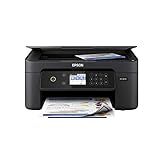
- This printer is designed for use with Epson cartridges only, not third party cartridges or ink; Cartridges described as Compatible, Re-manufactured, refilled or...
- Save time and paper auto 2 sided printing
- Simple setup and navigation high res 2. 4 inches Color LCD to easily print, copy and scan
- Complete wireless solution easily print from iPad, iPhone, Android tablets and smartphones (1); includes Wi Fi Direct (3)
- Affordable individual ink cartridges replace only the cartridge that runs out. Operating temperature - 10 to 35 degree Celsius
The Epson Expression Home XP-4100 offers a compact solution for everyday printing challenges. Its sleek design fits easily in tight spaces, making it ideal for home or small office environments. Wireless printing from smartphones, tablets, and computers lets you print documents and photos without hassle.
This all-in-one inkjet printer simplifies tasks with scanning and copying features built-in. Automatic two-sided printing helps save paper and reduces manual effort. The 2.4-inch color LCD and voice-activated printing add convenience, allowing quick access to functions and hands-free operation.
Maintaining the XP-4100 is straightforward with genuine Epson Claria ink, which ensures consistent quality and reliable output. The 100-sheet input tray supports moderate print volumes, while the high 5760 x 1440 dpi resolution produces sharp, vibrant prints ideal for text and images.
While print speeds are modest, especially for color jobs, the printer excels in delivering clear results. It requires an internet connection and account setup for some features, limiting offline usability. Overall, its wireless capabilities and compact design address common printing needs with ease.
Best for: users looking for a compact, all-in-one wireless printer that handles everyday home or small office printing with mobile device compatibility.
What We Like:
- Compact design with automatic two-sided printing conserves space and paper.
- High print resolution delivers sharp, vibrant documents and photos.
- Supports wireless printing from Macs, iPhones, iPads, and Android devices.
- Easy maintenance with genuine Epson Claria ink for reliable quality.
Specification:
| Feature | Details |
|---|---|
| Manufacturer | Epson |
| Dimensions | Compact (exact size not provided) |
| Weight | Not specified |
| Print Technology | Inkjet |
| Print Resolution | 5760 x 1440 dpi |
| Display | 2.4-inch color LCD |
| Connectivity | Wi-Fi, Wi-Fi Direct |
| Paper Capacity | 100 sheets |
| Functions | Print, Scan, Copy |
HP OfficeJet 250 Wireless Mobile All-in-One Printer

- BUSINESS PRINTING—VIRTUALLY ANYWHERE - Use your laptop, tablet, or smartphone to print, scan, and copy on the go, without having to connect to a network
- EASY PORTABLE PRINTING, SCANNING, AND COPYING WHEREVER YOU NEED IT - Print business documents anytime, anywhere, with a compact, portable all-in-one printer that fits...
- HP APP - Print and scan right from your smartphone with the easiest-to-use print app
- EASY SETUP AND PRINTING FROM MOBILE DEVICES - HP Auto Wireless Connect allows for easy setup right out of the box so you can print from your laptop or mobile devices...
- POWER UP, FAST - Charge within 90 minutes while the printer is turned off, with HP Fast Charge; plug in your AC power source at home, in the car, or the office
The HP OfficeJet 250 Wireless Mobile All-in-One Printer is designed to keep business travelers productive wherever they go. Its lightweight, compact design fits easily in a backpack or briefcase, making it simple to carry on the move. With print, scan, and copy functions in one device, it addresses the need for versatile document handling on the road.
Battery life is optimized with HP Fast Charge, reaching 90% in just 90 minutes, so downtime is minimized. The printer’s wireless connectivity and HP Auto Wireless Connect simplify setup. Users can print effortlessly from Mac, smartphones, or tablets using the intuitive HP Smart app.
Maintenance is straightforward with the 2.65-inch color touchscreen that streamlines navigation and control. While it supports multiple media sizes, the print speed and maximum paper size are limited, and duplex printing requires manual intervention. The single USB 2.0 port restricts wired options but emphasizes mobility and wireless use.
This printer is ideal for mobile professionals who prioritize convenience and versatility without sacrificing essential functions.
Best for: Business travelers and mobile professionals needing a portable all-in-one printer with wireless functionality and easy mobile integration.
What We Like:
- Lightweight, portable design perfect for travel
- Fast battery recharge with HP Fast Charge
- Simple wireless setup and mobile printing via HP Smart app
- Easy-to-use color touchscreen for navigation
Specification:
| Feature | Details |
|---|---|
| Manufacturer | HP |
| Dimensions | Compact (fits in backpack) |
| Weight | 6.5 lb (2.95 kg) |
| Connectivity | Wireless, USB 2.0 port |
| Display | 2.65-inch color touchscreen |
Factors to Consider When Choosing a Compact All in One Printer for Mac
When choosing a compact all-in-one printer for your Mac, you’ll want to check that it’s fully compatible and offers reliable wireless connectivity. Consider print quality, resolution, and whether the device is portable enough for your space.
Don’t forget to factor in the ink system and overall cost to get the best value. It’s all about finding the right balance between features and price that suits your needs.
Printer Compatibility With Mac
Although many printers claim Mac compatibility, confirming your compact all-in-one printer supports your exact macOS version is essential to avoid driver issues. Check that the printer’s drivers or AirPrint support your specific macOS release, like macOS 12 Monterey or macOS 14 Sonoma, since driver availability varies by OS.
Choose printers supporting AirPrint or driverless printing to use native Mac functions without extra software. It just makes things easier and smoother.
Make certain full scanning and advanced features work through macOS-compatible drivers or TWAIN/ICA scanner drivers. Some printers only offer basic printing with generic drivers, so double-check before you buy.
If you connect directly to newer MacBooks, verify USB-C or Lightning-to-USB adapter compatibility and plug-and-play wired support. It’s a small step that saves a lot of hassle later.
Finally, select printers with signed macOS installers and regular driver updates to keep your device secure and functional across macOS updates. Staying up to date means less stress down the road.
Wireless Connectivity Options
Since you rely on seamless printing and scanning from your Mac, choosing a compact all-in-one printer with robust wireless connectivity is essential. Make sure it supports dual-band Wi-Fi (2.4 GHz and 5 GHz) to reduce interference and improve range on busy networks.
Prioritize printers with native AirPrint or macOS-compatible protocols for driverless, effortless printing directly from Mac apps. If you need to print without a router, check for Wi-Fi Direct or hotspot mode.
Bluetooth or NFC options are handy for quick, local pairing when you want ad-hoc printing without joining Wi-Fi. Also, consider whether the printer offers cloud or app-based scanning and printing features.
Just keep in mind any privacy or data-transfer implications before committing to these internet-dependent options. It’s all about finding what fits your workflow best!
Print Quality And Resolution
Choosing a compact all-in-one printer for your Mac means paying close attention to print quality and resolution, as these factors directly impact the sharpness and detail of your documents and photos. Aim for a maximum print resolution of at least 1200 x 1200 dpi to guarantee crisp text and detailed graphics.
Look for pigment black inks for smudge-resistant text and dye-based color inks for vibrant, glossy photos. If accurate photo or graphic reproduction matters, check the color depth and supported modes, such as 24-bit or CMYK.
Also, consider the scanner or copier resolution separately—600 x 600 dpi or higher is ideal for quality scans. Keep in mind that higher resolution settings might slow down print speeds and increase ink usage, so balance quality with efficiency.
Device Size And Portability
When selecting a compact all-in-one printer for your Mac, you’ll want to carefully consider the device’s size and portability to make certain it fits your workspace and lifestyle. Start by measuring your desk or shelf space, allowing 1–2 inches of clearance around the printer for ventilation and scanner access.
If you move your printer often, prioritize models under 12–15 pounds with a footprint smaller than 15 inches in depth and width. Look for front-loading paper trays and top-opening scanners to minimize required space.
For true portability, check if the printer offers built-in or optional batteries and supports quick wireless setup. Sturdy handles or rubberized edges help with transport, and easily accessible cartridges guarantee you won’t struggle during maintenance on the go.
Ink System And Cost
Although you might focus on features and size, understanding the printer’s ink system is essential to managing long-term costs. Check if the printer uses a 2-cartridge hybrid system or individual color cartridges. Hybrid systems often cost less upfront but have a higher cost per page (CPP).
Compare cartridge yields and prices, aiming for high-yield or XL options to reduce CPP, especially if you print frequently. Make sure the black ink is pigment-based for sharp text and durability, while color inks are dye-based for vibrant photos.
Also, see if the printer supports ink subscriptions, but read the terms carefully to avoid surprises. Finally, choose models with user-replaceable individual color cartridges to minimize waste and save money by replacing only the colors you use.
Multi-Function Features
Managing ink costs is just one part of finding the right compact all-in-one printer for your Mac. You’ll want to guarantee it supports all the functions you need—print, scan, copy, and optionally fax or an automatic document feeder (ADF).
An ADF helps you scan or copy multi-page, double-sided documents without supervision. Check if the printer offers automatic duplex printing to save paper and speed up multi-page jobs.
Pay attention to scan resolution and color depth for quality results. Also, consider whether the scanner is flatbed or includes sheetfed options.
Make sure copy features like multiple-page copying, resizing, and suitable copy speeds match your workload. Finally, verify that the device has user-friendly controls and connectivity options—Wi-Fi, USB, or mobile app support—for seamless use with your Mac and mobile devices.
Frequently Asked Questions
How Do I Troubleshoot Printer Connectivity Issues on a Mac?
You’ll want to restart your Mac and printer, then check your Wi-Fi or USB connections to make sure everything’s hooked up right. It’s also a good idea to update your printer drivers so they’re running the latest version.
Next, take a look at your printer settings in System Preferences to confirm everything’s set up correctly. If you’re still having trouble, try resetting the printing system. After that, go ahead and reconnect your printer to see if that does the trick.
What Is the Average Lifespan of a Compact All-In-One Printer?
Though some gadgets last decades, your compact all-in-one printer typically lasts 3 to 5 years.
You’ll want to replace it sooner if print quality drops or repairs cost more than a new model.
Can These Printers Handle Photo Printing on Specialized Paper?
Yes, these printers can handle photo printing on specialized paper. You’ll want to check the printer’s specifications for supported paper types and weight.
But most compact all-in-ones offer quality photo printing options for your needs. So, you should be good to go!
Are There Eco-Friendly Ink Options Compatible With These Printers?
Yes, you’ll find eco-friendly ink options compatible with these printers. Many brands offer recycled or plant-based cartridges, helping you reduce environmental impact while maintaining print quality.
Just check compatibility before purchasing to guarantee a perfect fit. It’s always good to be sure your printer and the ink work well together.
How Do I Update Printer Drivers on macOS?
You update printer drivers on macOS by opening System Settings, selecting Printers & Scanners, choosing your printer, and clicking “Update Driver” if available.
Alternatively, you can visit the manufacturer’s website to download and install the latest drivers manually.
It’s pretty straightforward once you know where to look! Just keep your drivers updated to avoid any printing hiccups.
Conclusion
Choosing the perfect compact all-in-one printer for your Mac isn’t just important—it’s practically life-altering! With these top picks, you’ll breeze through printing, scanning, and copying like a tech wizard on a caffeine high.
Forget bulky machines taking over your space; these sleek printers fit anywhere and work flawlessly. So, gear up to transform your home or office into a powerhouse of productivity.
Because with the right compact all-in-one printer for Mac, you’re unstoppable! These printers combine convenience and efficiency, making tasks smoother and faster. Whether you’re printing important documents, scanning photos, or making quick copies, having a reliable, space-saving device changes the game. Embrace the best compact all-in-one printers for Mac and watch your workflow improve effortlessly.