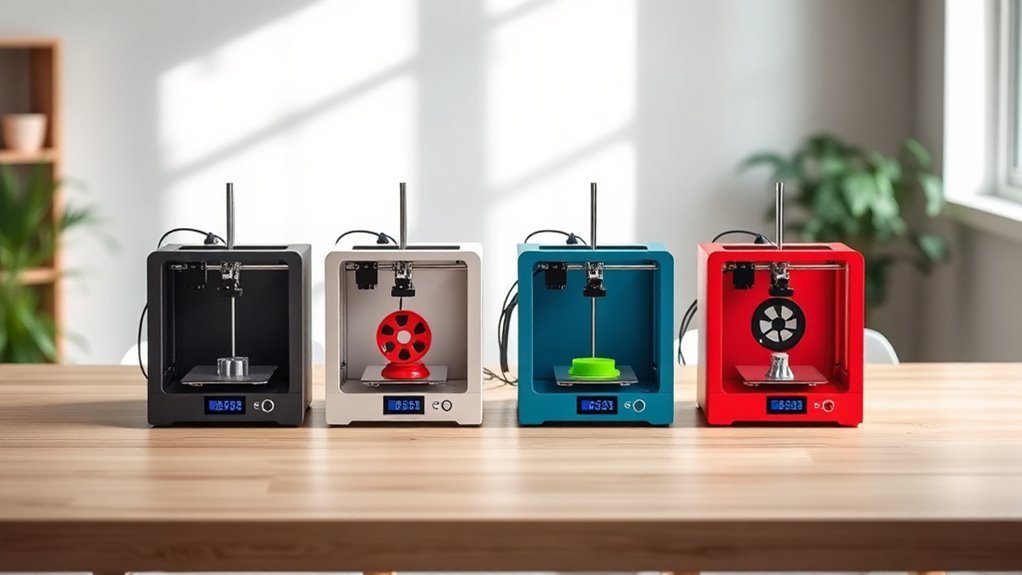
4 best cheapest 3d printer 2026
If you’re on the hunt for the best cheapest 3D printers in 2026, you’re in the right place. Finding an affordable 3D printer that doesn’t skimp on quality or features can be tricky.
But don’t worry, we’ve got you covered with some top picks that balance price and performance perfectly.
Consider the Entina Tina2 Plus for its WiFi connectivity and super easy setup. It’s great if you want to get printing quickly without fussing over complicated steps.
Then there’s the Creality Ender 3 V3 SE, known for fast printing speeds and an upgraded extruder that improves print quality.
If you’re into high-resolution resin prints, the ANYCUBIC Photon Mono 4 is a fantastic option.
Plus, the compact TINA2C is beginner-friendly and ready to print right out of the box.
Each of these models offers reliable performance and user-friendly features that save you time and hassle.
Keep exploring to find the perfect fit for your needs and budget!
| Image | Name | Editor's Rating | Price |
|---|---|---|---|

|
|
||

|
|
||

|
|
||

|
|
Entina Tina2 Plus WiFi 3D Printer for Beginners
- 【Start Printing in Minutes – Beginner Friendly】No setup required. Tina2 Plus 3d printer comes fully assembled and ready to use out of the box. With included TF card...
- 【Fast 250mm/s Printing Performance】This Tina2 Plus high speed 3D printer print speeds up to 250 mm/s help reduce waiting time and support fast project turnaround...
- 【WiFi App Control & STEM Model Library】Powered by the Poloprint Cloud app, this WiFi-enabled 3D printer gives access to 3,500+ printable models and 25+ creative DIY...
- 【40-Second Fast Heat Ceramic Hotend】High-efficiency ceramic hotend heats up in just 40 seconds for faster start-up and less downtime. The quick-swap nozzle design...
- 【Compact 3D Printer for Home & Classroom】Designed with a space-saving footprint while maintaining practical print capacity, this compact 3D printer fits easily on...
The Entina Tina2 Plus WiFi 3D printer offers an easy entry into the world of 3D printing. Designed for beginners, it comes fully assembled, eliminating setup frustrations. You can start printing almost immediately with preloaded models on the included TF card.
Its compact design fits snugly in small workspaces and weighs just 8.25 pounds. The printer’s WiFi connectivity and Poloprint Cloud app integration allow you to control prints remotely. This feature also provides access to over 3,500 models and enables slicing directly from your phone, simplifying the printing process.
Maintenance is straightforward thanks to its quick-heating ceramic hotend and stable dual Z-axis structure. While its smaller build volume limits larger projects, the Tina2 Plus balances ease of use with reliable print quality. The partially enclosed frame offers some protection but requires caution around hot parts.
This printer is ideal for hobbyists and beginners who want a hassle-free start with a compact, connected device that keeps complex controls to a minimum.
Best for: Beginners and hobbyists seeking a compact 3D printer with WiFi control and quick setup.
What We Like:
- Fully assembled for immediate printing.
- Wireless control through Poloprint Cloud app.
- Quick-heating ceramic hotend ensures consistent performance.
- Stable dual Z-axis enhances print reliability.
- Compact and lightweight design fits small spaces.
Specification:
| Feature | Details |
|---|---|
| Manufacturer | Entina |
| Dimensions | Compact size (exact not specified) |
| Weight | 8.25 lb (3.74 kg) |
| Material | Not specified |
| Color Options | Not specified |
Creality Ender 3 V3 SE 3D Printer Upgrade
- 【250mm/s High-speed Printing】Creality Ender 3 V3 SE 3d printer supports a maximum printing speed of 250mm/s, 2500mm/s² acceleration.The speed has been greatly...
- 【Powerful ""Sprite"" Direct Extruder】Ender 3 V3 SE is the upgrade of ender 3, ender 3 v2, ender 3 pro, ender 3 neo, ender 3 v2 neo, ender 3 s1, ender 3 s1 pro etc 3d...
- 【Worry-free CR Touch Auto Leveling & Strain Sensor】Creality Ender 3 upgraded 3d printer features a CR Touch sensor for auto leveling and a strain sensor for auto...
- 【Stable Dual Z-axis & Y-axis Linear Shafts】High-precision dual Z-axis lead screws reduce Z wobbling effectively, avoid printing deviation in single-axis printing...
- 【Quick Assembly & Easy to Use】Preassembly has solved those hassles and worries of parts assembly, It only takes 3 steps to complete the assemble the ender-3 v3 se 3d...

The Creality Ender 3 V3 SE brings speed and precision to your 3D printing projects. Its fast printing capability of up to 250mm/s helps you complete tasks quickly, cutting typical print times by about 73%. This efficiency makes it ideal for users who value time without compromising quality.
This model features an upgraded Sprite metal dual-gear extruder that ensures smooth filament feeding. It works well with popular materials like PLA, TPU, and PETG, allowing you to experiment with different prints. Automatic CR Touch leveling and a strain sensor simplify setup, reducing common calibration frustrations.
Designed for stability, the printer includes dual Z-axis screws and dual Y-axis shafts, enhancing accuracy and minimizing vibrations during printing. Maintenance is straightforward, and assembly is quick, taking roughly 20 minutes thanks to preassembled components and automatic filament loading.
While the print volume is moderate at 8.66 x 8.66 x 9.84 inches, it suits many hobbyist and professional projects. This printer balances speed, reliability, and ease of use, making it a solid upgrade for those seeking versatile 3D printing solutions.
Best for: hobbyists and professionals seeking a fast, reliable, and easy-to-use 3D printer with enhanced stability and versatile filament compatibility.
What We Like:
- Fast printing speed reduces project time by 73%
- Smooth feeding with upgraded metal dual-gear extruder
- Automatic leveling and strain sensor simplify setup
- Dual Z-axis screws and Y-axis shafts improve stability
- Quick assembly with preassembled parts and auto filament loading
Specification:
| Feature | Details |
|---|---|
| Manufacturer | Creality |
| Printing Speed | Up to 250 mm/s |
| Print Volume | 8.66 x 8.66 x 9.84 in |
| Filament Compatibility | PLA, TPU, PETG |
| Extruder | Sprite metal dual-gear |
| Leveling System | Automatic CR Touch |
| Assembly Time | Approximately 20 minutes |
ANYCUBIC Photon Mono 4, Resin 3D Printer with 7” 10K Mono LCD Screen
- 【7'' 10K High Resolution】Photon Mono 4 boasts an impressive 105% increase in print precision compared to Mono 2. With a resolution of 9024x5120, each pixel measures a...
- 【Powerful Light Source】The time-tested Anycubic LighTurbo matrix light source technology delivers stable, balanced, and uniform lighting to reduce layer lines and...
- 【Sufficient Print Size】With a generous maximum build volume of 6.04'' x 3.42'' x 6.49''/153.4mm x 87mm x 165mm, you have ample print space to easily tackle your daily...
- 【Laser-engraved Print Platform 2.0】With a new design, the laser engraving platform of the photon mono 4 improves adhesion to mitigate lifting and warping of the model...
- 【User-friendly Function】The 4-point leveling method is ideal for beginners, after the first leveling and tightening the 4 screws, no need to repeat leveling. Photon...
Experience ultra-precise resin printing with the ANYCUBIC Photon Mono 4. This printer’s 7-inch 10K Mono LCD screen offers stunning sharpness at 9024×5120 resolution, enabling intricate details with 17μm pixel accuracy. It enhances your projects by delivering consistently fine prints that stand out.
The innovative Anycubic LighTurbo matrix ensures uniform lighting, which reduces surface imperfections and produces smoother finishes. Its build volume of 6.04 x 3.42 x 6.49 inches supports a variety of detailed models, while a print speed of 70mm/h helps you complete jobs faster.
Setup and maintenance are straightforward with the 4-point leveling system, simplifying calibration. The power recovery feature protects your work by resuming prints after interruptions. Compact and lightweight, this printer fits well in limited spaces without compromising performance.
Ideal for resin printing enthusiasts or professionals, the Photon Mono 4 offers a reliable solution for high-resolution creations. Its design balances precision and user convenience, though its build volume may limit larger projects.
Best for: designers and makers who need ultra-high-resolution resin prints with consistent results and easy operation.
What We Like:
- Ultra-fine 10K resolution with 17μm pixels enhances print detail
- Anycubic LighTurbo matrix delivers smooth, even lighting
- Simple 4-point leveling eases setup and maintenance
- Power recovery protects prints during power outages
- Compact design suits small workspaces
Specification:
| Feature | Details |
|---|---|
| Manufacturer | ANYCUBIC |
| Dimensions (WxDxH) | 7.9 x 14.4 x 16.7 inches |
| Weight | Approx. 10.6 lbs (4.8 kg) |
| Build Volume | 6.04 x 3.42 x 6.49 inches |
| Screen Size | 7-inch Mono LCD |
| Screen Resolution | 9024 x 5120 (10K) |
| Pixel Size | 17μm |
| Print Speed | Up to 70 mm/h |
TINA2C 3D Printer Beginner Friendly, Easy-Ready to Print in 5 Mins
- 【BEGINNER FRIENDLY-READY TO PRINT】Hephi3d Tina2C 3d printer friendly for home, fully assembled, factory preset, auto leveling, ready to print right out of the box, no...
- 【EASY TO USE-ONE TAP PRINTING】Tina2C mini 3d printer provides 3500+ online massive ready to print model library, new designs update every day. You can print in one...
- 【UNLIMITED CREATIVITY-EASY DIY】Tina2C beginner friendly 3d printer with APP provides STEM Learning Module and 25+ design modules for simply customizing. AIGC & Photo...
- 【FULLY OPEN SOURCE-NO LIMITS】Tina2C beginner 3d printer is no software lock-In. Print you way freely with Wiibuilder or Cura on PC and laptops, one-click wifi upload...
- 【FAMILY & BEGINNER FRIENDLY】 Tina2c compact 3d printer for home can print anytime anywhere, space save. Silent Printing and Auto Detect Bed function give more safe...
The TINA2C 3D Printer transforms how beginners approach 3D printing by eliminating common setup frustrations. With its fully assembled design and auto leveling, users can start printing within just five minutes. This quick, hassle-free start saves time and reduces the learning curve for new makers.
Its one-tap printing feature unlocks access to over 3,500 ready-to-print models, updated daily. Controlled via a smart app, users can easily manage prints from their phone or tablet, making operation intuitive and convenient. This setup enhances creativity without complicated controls.
Maintenance is straightforward with a fast hotend release and silent printing, ensuring a smooth and quiet experience. The printer’s ability to resume printing after power loss adds reliability, reducing print failures and material waste.
Compact in size, the TINA2C is designed for small to medium projects, making it ideal for hobbyists and beginners. While it may lack advanced features for seasoned makers, its focus on ease of use and creative freedom makes it a strong choice for educational and personal use.
Best for: Beginners and hobbyists seeking an easy-to-use, quick-start 3D printer with creative and educational features.
What We Like:
- Fully assembled with auto leveling, ready to print in 5 minutes
- Access to 3,500+ ready-to-print models via one-tap printing
- Smart app control for simple operation from mobile devices
- Silent printing and resume after power loss for reliable results
- Fast hotend release simplifies maintenance and upgrades
Specification:
| Specification | Details |
|---|---|
| Manufacturer | TINA2C |
| Dimensions | 8.27 x 6.7 x 9.84 inches |
| Weight | Not specified |
| Material | Not specified |
| Build Volume | Limited due to compact size |
Factors to Consider When Choosing the Cheapest 3D Printer 2026
When picking the cheapest 3D printer in 2026, you’ll want to focus on printing speed and efficiency to save time. Make sure it’s easy to set up, offers good print quality, and has the connectivity options you need.
Don’t forget to check for safety features to keep your workspace secure. It’s important to have peace of mind while your printer is running. That way, you get the best balance between cost and performance.
Printing Speed And Efficiency
Although speed isn’t the only factor to evaluate, it plays a major role in how efficiently your 3D printer completes projects. Many entry-level printers reach speeds up to 250 mm/s, letting you finish prints faster.
Acceleration rates matter too; a model with 2500 mm/s² can cut printing time considerably compared to slower options. Fast heating components, like ceramic hotends that heat in about 40 seconds, reduce wait times before starting.
Plus, printers that resume after power outages save you from losing progress and wasting materials, especially on long jobs. Keep in mind, pushing for higher speeds might lower print quality, so you’ll want to find a balance between speed and detail to get the best results without compromising efficiency.
Ease Of Setup
Since you want to start printing quickly, choosing a 3D printer that comes fully assembled can save you hours of setup time. Look for models with auto-leveling features to simplify calibration and guarantee stable prints without hassle.
Printers offering preloaded models on included storage let you dive right in without complicated software setups. User-friendly controls, especially those with mobile app compatibility, streamline your workflow and give you easy access to your designs.
Don’t overlook quick heating components that reduce wait times and maintenance features designed for easy upkeep. Prioritizing these factors means you’ll enjoy a smooth, frustration-free start, perfect for beginners or anyone enthusiastic to get their projects off the ground fast.
Ease of setup is key to a satisfying 3D printing experience.
Print Quality And Precision
Three key factors determine the print quality and precision of your 3D printer: resolution, mechanical design, and printing technology. Higher resolution, measured in microns, lets you capture finer details and achieve smoother surfaces.
Look for printers with solid mechanical designs, like dual Z-axis structures, which minimize wobbling and boost accuracy. The printing technology you choose plays a significant role too.
Resin printers generally deliver better detail than FDM models because of their finer pixel sizes. Also, consider print speed—slower speeds often mean better layer adhesion and sharper details.
For resin printers, consistent lighting and exposure settings are crucial, as they affect curing uniformity and overall print quality. Paying attention to these factors guarantees your cheap 3D printer doesn’t compromise on precision or detail.
Connectivity Options Available
Achieving high print quality is just one piece of the puzzle when choosing the cheapest 3D printer in 2026. You’ll want to focus on connectivity options that make your printing experience smooth and flexible.
Look for printers offering Wi-Fi, USB, and TF card support so you can transfer files easily and control prints remotely. App control capabilities let you manage your projects right from your mobile device, adding convenience.
Make sure the printer supports multiple operating systems like Windows, macOS, Linux, and Chromebook to avoid compatibility issues. Features like automatic filament loading simplify setup, especially if you’re new to 3D printing.
Finally, consider printers with cloud-based online slicing to access a wider range of designs without needing extra software. It’s all about making your printing journey easier and more enjoyable!
Safety Features Included
When choosing the cheapest 3D printer in 2026, you’ll want to prioritize safety features that protect both you and your workspace. Look for models with a partially enclosed structure to shield you from hot components, reducing burn risks.
Automatic bed leveling guarantees print stability, minimizing failures that could cause damage or hazards. Plus, a silent operation mode keeps noise low, making your printing experience safer and more comfortable, especially at home.
Power recovery systems are vital—they let your printer resume after outages, preventing wasted material and potential safety issues. Also, consider printers with hotend release systems for quick, safe maintenance.
These features not only protect you but also help maintain your printer’s longevity. So, they’re fundamental when selecting a budget-friendly 3D printer.
Software Compatibility And Support
Why does software compatibility matter so much when picking the cheapest 3D printer in 2026? It guarantees your printer works seamlessly with your computer’s operating system—whether Windows, macOS, Linux, or Chromebook—giving you the freedom to choose your setup.
You’ll want a printer that supports popular slicing software so you can customize prints and optimize settings for various materials. Some models even offer cloud-based apps with huge libraries of printable models, making your printing experience richer.
Don’t overlook technical support and clear documentation, especially if you’re new to 3D printing; they make troubleshooting much easier. Finally, if you like experimenting, look for open-source printers that let you explore different software options and tweaks.
Software compatibility isn’t just convenience—it’s key to smooth, flexible printing.
Frequently Asked Questions
How Do I Maintain and Clean My 3D Printer Regularly?
You should clean the nozzle, bed, and extruder regularly. Lubricate moving parts and tighten screws to keep everything working well.
Don’t forget to update your firmware from time to time. Also, remove any filament residue and check the belts for proper tension.
Doing these little things will help your 3D printer run smoothly and last longer. It’s easier than you might think once you get into the habit!
What Software Is Best for Designing 3D Models for Beginners?
You’ll find Tinkercad perfect for beginners; it’s used by over 10 million people worldwide. It’s intuitive, web-based, and lets you create 3D models quickly without steep learning curves.
Can I Use Third-Party Filaments With These 3D Printers?
Yes, you can use third-party filaments with most 3D printers, but make sure they match your printer’s specifications.
Using quality filaments helps avoid clogs and guarantees better print results. So, choose wisely for the best performance.
What Safety Precautions Should I Follow While 3D Printing?
You should always guarantee proper ventilation, as 3D printing can release tiny particles—some printers emit over a million ultrafine particles per minute.
Don’t touch hot parts, wear gloves, and keep a fire extinguisher nearby just in case. It’s better to be safe than sorry!
How Long Does It Typically Take to Print a Small Object?
It typically takes you 30 minutes to 2 hours to print a small object, depending on the printer’s speed, layer height, and complexity.
Faster settings reduce quality, so you’ll want to balance speed and detail carefully.
It’s all about finding that sweet spot where your print looks good without taking forever.
Conclusion
When choosing the cheapest 3D printer in 2026, you want reliability, affordability, and ease of use. You want quick setup, crisp prints, and smooth upgrades.
You also want a printer that grows with your skills, fits your budget, and sparks your creativity. Whether you pick the Entina Tina2 Plus, Creality Ender 3 V3 SE, ANYCUBIC Photon Mono 4, or TINA2C, you’ll get value, quality, and fun all in one.
These best cheapest 3D printers combine affordability with performance, making them perfect for beginners and hobbyists alike. They’re designed to deliver consistent, high-quality prints without breaking the bank. So, if you’re looking for a reliable and budget-friendly 3D printer in 2026, these models are definitely worth considering. They offer a great balance of ease of use, upgrade options, and creative potential.