5 Best Colour Printers Under 10000 for 2027
If you’re looking for the best colour printers under 10000 for 2027, you’re in the right place. Finding a budget-friendly printer that delivers sharp prints without breaking the bank is totally possible. Whether you need something for home use, a small office, or occasional printing, there are great options out there.
Check out the Epson EcoTank ET-3950 for crisp prints and duplex efficiency that saves you time and paper. Or consider the Canon MegaTank G3270, which offers a high page yield and multifunction features to handle all your tasks.
The Epson ET-2900 is perfect for home offices with its easy wireless setup, while the ET-4800 supports high-volume printing plus faxing. For light home use, the Canon PIXMA TS4320 combines a compact design with versatile connectivity options.
Take a closer look to see which one fits your needs best!
| Image | Name | Editor's Rating | Price |
|---|---|---|---|
|
|
||

|
|
||

|
|
||

|
|
||

|
|
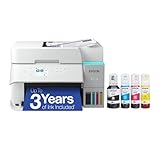
Epson EcoTank ET-3950 Wireless Color All-in-One Supertank Printer
- SUPERIOR PRINT QUALITY - Experience crisp, vibrant documents and photos with 4800 x 1200 maximum print resolution, ensuring every detail is captured with exceptional...
- SEAMLESS WIRELESS CONNECTIVITY - Effortlessly print from anywhere in your home or office using Wi-Fi 5 (802.11ac) and Wi-Fi Direct, supporting various operating systems...
- EFFICIENT SCAN & COPY FUNCTION - Enhance productivity with the integrated color flatbed/ADF scanner, offering 1-sided to 2-sided scanning and versatile copy modes for all...
- MAXIMIZE INK EFFICIENCY - Utilize four individual ink bottles (Cyan, Magenta, Yellow, Black) with impressive yields of 8,500 pages (black) and 6,500 pages (color) for...
- RAPID PRINT SPEED - Achieve professional results quickly with print speeds of 18 ISO ppm (black) and 9 ISO ppm (color), ensuring your tasks are completed efficiently...
Experience hassle-free printing with the Epson EcoTank ET-3950, designed to simplify your daily tasks. This wireless color all-in-one printer handles printing, scanning, and copying with ease, making it ideal for busy homes or small offices.
Its innovative refillable EcoTank system drastically reduces ink costs and the need for frequent refills. You can print thousands of pages without interruption, ensuring smooth workflow and less downtime. The printer’s automatic duplex feature saves paper and boosts efficiency.
Connectivity is seamless with Wi-Fi, Ethernet, and USB options, allowing you to print from multiple devices effortlessly. The compact design fits well in tight spaces without sacrificing capacity, thanks to a 250-sheet paper tray that decreases the hassle of constant paper loading.
While print speeds are moderate, especially for color prints, the ET-3950 delivers sharp, high-resolution output with PrecisionCore technology. Its single paper tray may limit multi-paper use, but it balances convenience with simplicity.
Best for: Small offices or individuals needing an affordable, reliable all-in-one printer with high ink capacity and versatile wireless connectivity.
What We Like:
- Refillable EcoTank system lowers ink costs and reduces refills
- Automatic duplex printing saves paper and time
- Multiple connectivity options for flexible device use
- Compact design fits small spaces without sacrificing capacity
Specification:
| Feature | Details |
|---|---|
| Manufacturer | Epson |
| Dimensions (W×D×H) | 14.8 × 13.7 × 9.5 inches |
| Weight | 11.2 lbs (5.1 kg) |
| Color Options | White |
| Connectivity | Wi-Fi, Ethernet, USB |
Canon MegaTank G3270 All-in-One Wireless Color Printer
- Wireless Print/Copy/Scan
- Up to 2 years of ink included (2)
- Print up to 6,000 black & white / 7,700 color pages using a single set of inks! (1)
- Save up to $1,000 on ink (1)
- 1.35” Square LCD display

The Canon MegaTank G3270 is designed to simplify your printing tasks while keeping costs low. Its refillable MegaTank system delivers an exceptional ink supply, allowing you to print up to 6,000 black and 7,700 color pages per refill. This means fewer interruptions and more productivity for home or small office environments.
This all-in-one device handles printing, copying, and scanning with sharp 4800 × 1200 dpi resolution. It connects wirelessly or via USB, giving you flexible control through smartphone apps or the compact 1.35″ LCD screen. The printer supports various paper types and sizes, including borderless printing for professional-looking documents.
Maintenance is straightforward with the high-yield ink bottles, reducing frequent refills and lowering running costs. Though it only supports single-sided printing and has a modest paper capacity of 100 sheets, it remains a reliable option for everyday use. Copy speeds are moderate, making it best suited for light to medium workloads.
Best for: Individuals and small home offices needing an affordable, versatile all-in-one color printer with excellent ink efficiency and wireless convenience.
What We Like:
- High-yield ink system with up to two years of ink included
- Versatile print, copy, and scan functions with sharp resolution
- Wireless and USB connectivity plus easy smartphone control
- Compact design with a clear 1.35″ LCD display
Specification:
| Feature | Details |
|---|---|
| Manufacturer | Canon |
| Dimensions | Not specified |
| Weight | Not specified |
| Print Resolution | 4800 × 1200 dpi |
| Paper Capacity | 100 sheets |
| Connectivity | Wireless, USB |
| Ink System | Refillable MegaTank |
Epson EcoTank ET-2900 Wireless All-in-One Printer
- Epson EcoTank includes enough ink to last up to 3 years⁴
- WORRY-FREE PRINTING — Epson EcoTank comes with enough ink to print up to 3,600 pages black/6,500 color⁹ for fewer out-of-ink frustrations. Each replacement ink bottle...
- SIMPLE INK REFILLING — Supersized ink tanks and uniquely keyed EcoFit bottles make refilling ink simple—no mess, no stress and no ink bottle mix-ups; fits in...
- THE WORLD’S #1 SELLING SUPERTANK PRINTER² — Epson invented EcoTank to revolutionize the way people print; we’ve sold 100 million EcoTanks worldwide⁷ and this is...
- KEY PRODUCTIVITY FEATURES — 11 black/6 color ISO ppm print speeds with zero warmup time, 100-sheet paper tray, high-resolution flatbed scanner and a 1.44" color display...
Experience hassle-free, high-volume color printing at home with the Epson EcoTank ET-2900. This wireless all-in-one printer eliminates the need for frequent ink replacements, letting you print thousands of pages with ink that lasts up to three years. Its refillable EcoFit bottles make refills simple and mess-free, solving the common problem of cartridge waste and ink spills.
The ET-2900 offers practical functionality with fast print speeds of 11 ppm for black and 6 ppm for color. Wireless connectivity ensures you can print easily from multiple devices without cables. Its 100-sheet tray and high-resolution flatbed scanner support everyday home office tasks efficiently.
Designed with a compact white finish, the ET-2900 fits neatly into any workspace. The 1.44″ color display provides basic navigation, keeping operations straightforward without overwhelming menus. This printer is ideal for users who want low-maintenance printing with consistent results.
While it may not match the speed or paper capacity of some office models, it balances convenience and cost-saving features well. The EcoTank system reduces waste and ongoing expenses, making it a practical choice for home users.
Best for: Home users seeking an affordable, low-maintenance wireless all-in-one printer with easy-to-refill ink tanks and reliable color printing.
What We Like:
- Ink lasts up to 3 years, minimizing replacements
- Cartridge-free design with mess-free refill bottles
- Wireless printing with zero warmup time
- Compact design fits well in home offices
- Simple color display for easy operation
Specification:
| Feature | Details |
|---|---|
| Manufacturer | Epson |
| Dimensions | Approx. 14.8 x 12.2 x 7.4 inches |
| Weight | Approx. 7.5 lbs |
| Color Options | White |
| Paper Tray Capacity | 100 sheets |
| Display | 1.44″ color LCD |
Epson EcoTank ET-4800 Wireless Color All-in-One Supertank Printer
- INNOVATIVE CARTRIDGE-FREE PRINTING — High-capacity ink tanks mean no more dealing with lots of tiny ink cartridges; Epson’s exclusive EcoFit ink bottles make filling...
- CLEAR AND VIBRANT PRINT QUALITY ― Create memorable prints and projects; Unique Micro Piezo Heat-Free Technology allows wireless color printer to produce sharp text and...
- ZERO CARTRIDGE WASTE — By using an Epson EcoTank printer you can help reduce the amount of cartridge waste ending up in landfills
- BUILT IN SCANNER AND COPIER ― All-In-One Epson EcoTank is more than a printer; High-resolution flatbed scanner and color display come together for easy document copying...
- LESS FREQUENT INK REPLACEMENT — Replacement ink bottles don't have to be changed nearly as often as ink cartridges¹; Printer, scanner and copier lets you print up to...
Experience seamless, high-volume printing without the hassle of cartridges with the Epson EcoTank ET-4800 Wireless Color All-in-One Supertank Printer. Its innovative cartridge-free ink system helps you avoid frequent replacements and reduces waste, making it ideal for busy home offices. The high-capacity ink tanks allow you to print thousands of pages before needing a refill, saving time and effort.
This printer uses Epson EcoFit ink bottles for easy refilling, ensuring you stay productive with minimal interruptions. Equipped with Micro Piezo Heat-Free Technology, it delivers sharp and vibrant documents and photos on nearly any paper type. The all-in-one design includes a high-resolution flatbed scanner, color display, copier, and fax, offering versatile functionality in one compact device.
Maintenance is straightforward but requires genuine Epson ink to preserve print quality and maintain warranty coverage. Initial setup and refilling may take some getting used to compared to traditional cartridge printers, but the long-term benefits outweigh the learning curve.
Best for: high-volume home office users needing an efficient, cartridge-free all-in-one printer with reliable print quality and multifunction features.
What We Like:
- High-capacity ink tanks reduce frequent refills.
- EcoFit ink bottles minimize cartridge waste.
- Multifunction design with scanner, copier, fax, and color display.
Specification:
| Feature | Details |
|---|---|
| Manufacturer | Epson |
| Dimensions | 14.8 x 13.7 x 9.8 inches |
| Weight | 11.6 lbs |
| Color Options | White |
| Connectivity | Wireless |
Canon PIXMA TS4320 – Wireless Color Inkjet Printer with Print, Copy, Scan
- Affordable Versatility - A budget-friendly all-in-one printer perfect for both home users and hybrid workers, offering exceptional value
- Crisp, Vibrant Prints - Experience impressive print quality for both documents and photos, thanks to its 2-cartridge hybrid ink system that delivers sharp text and vivid...
- Effortless Setup & Use - Get started quickly with easy setup for your smartphone or computer, so you can print, scan, and copy without delay
- Reliable Wireless Connectivity - Enjoy stable and consistent connections with dual-band Wi-Fi (2.4GHz or 5GHz), ensuring smooth printing from anywhere in your home or...
- Scan & Copy Handling - Utilize the device’s integrated scanner for efficient scanning and copying operations
The Canon PIXMA TS4320 is a compact and stylish all-in-one printer designed to simplify light home printing tasks. It combines printing, copying, and scanning functions in one device, making it easy to handle homework, photos, and occasional documents. The printer delivers sharp color and black-and-white prints, ensuring clear results every time.
This model offers dual-band Wi-Fi connectivity, allowing seamless wireless printing through the Canon PRINT app, Apple AirPrint, or Mopria. Its support for various media types and automatic duplex printing helps you save time and paper without extra effort. The small footprint fits comfortably in tight spaces, making it ideal for home offices or study areas.
Maintenance is straightforward with the PIXMA TS4320, though the starter ink tanks have limited yield, meaning frequent users might need to replace cartridges sooner. The paper tray holds up to 100 sheets, which suits light printing but may require regular refills for bigger jobs.
Best for: Home users and hybrid workers seeking a compact, stylish all-in-one printer for light, occasional printing, copying, and scanning tasks.
What We Like:
- Supports auto duplex printing and multiple media types including photo paper and envelopes
- Dual-band Wi-Fi with mobile printing options via Canon PRINT app, Apple AirPrint, and Mopria
- Fast print speeds with sharp output up to 1200 x 1200 dpi
Specification:
| Feature | Details |
|---|---|
| Manufacturer | Canon |
| Dimensions | Compact size (exact size not provided) |
| Weight | Not specified |
| Color Options | Not specified |
| Print Resolution | Up to 1200 x 1200 dpi |
| Paper Capacity | 100 sheets |
| Connectivity | Dual-band Wi-Fi |
Factors to Consider When Choosing a Colour Printer Under 10000
When choosing a colour printer under 10000, you need to focus on print quality and resolution to get sharp, vibrant results. Consider ink efficiency and cost to keep running expenses low.
Also, check the connectivity options that suit your devices. Print speed and paper handling capacity are important too, so make sure the printer meets your daily needs.
Print Quality and Resolution
Although price limits your options, you can still find colour printers under 10000 that deliver impressive print quality and resolution. Look for models offering at least 4800 x 1200 dpi native resolution to ensure sharp photos and smooth color gradations.
Don’t just focus on maximum dpi; check effective print resolution for fine details and halftone performance. Consider the type of ink used—pigment inks provide crisper text and longer-lasting prints, while dye-based inks offer more vibrant photos.
Also, pay attention to color depth and processing capabilities, as higher bit-depth means smoother gradients and truer colors. Finally, verify if the printer supports borderless photo printing and the paper sizes it can handle, as media compatibility directly affects your final image quality.
Ink Efficiency and Cost
Print quality matters, but keeping your printing affordable over time is just as important. To do this, compare the cost per page by dividing ink or tank refill prices by the manufacturer’s rated page yield.
Opt for printers with refillable tanks or high-yield cartridges since they offer thousands of pages at a lower cost per page than standard cartridges. Check ink yield separately for black and color, as color ink usually runs out faster.
Printers with individual color tanks help you replace only the color that’s depleted, saving money. Also, consider hidden costs like maintenance cycles, printhead replacements, and whether using non-genuine inks voids warranties.
These factors impact your total cost of ownership more than you might expect. So, it pays to look beyond just the sticker price when choosing a printer.
Connectivity Options Available
You’ll want to zero in on connectivity options that fit how you work and where you print. Check if the printer supports Wi‑Fi, including dual‑band 2.4 GHz and 5 GHz, or Wi‑Fi Direct to print wirelessly from multiple devices without cable clutter.
If you need stable network access, look for Ethernet or wired LAN, especially in shared or home offices. USB Type‑B or Type‑A ports help when you want direct PC connections or print from USB drives without network access.
Don’t forget mobile printing compatibility like Apple AirPrint, Mopria, or brand apps to print straight from smartphones or tablets. Finally, consider cloud printing or email-to-print features if you often print remotely or from web-hosted files.
Choosing the right connectivity keeps your workflow smooth and flexible. It’s all about making printing easier and more convenient for you.
Print Speed Performance
When choosing a colour printer under 10000, understanding speed performance can save you time and frustration. Look for ISO print speeds listed separately for black and color prints—this helps you gauge realistic output rather than relying on “up to” claims.
Also, check first-page-out times and warmup behavior. Models that start jobs quickly with near-zero warmup and 5–10 second first pages really improve your workflow.
Don’t forget duplex and automatic document feeder speeds since they reduce manual effort and boost overall throughput. It’s worth confirming if stated ppm rates apply to draft, normal, or high-quality modes. Color or photo prints can be much slower, so keep that in mind.
Finally, consider duty cycles. Fast printers with low limits might throttle or wear out sooner if you print heavily. So, balance speed with durability for the best experience.
Paper Handling Capacity
Speed matters, but so does how much paper your printer can handle without constant refills or jams. Check the maximum input tray capacity—ideally between 100 and 250 sheets—to match your typical print volume. You don’t want to stop printing frequently to reload paper.
Also, look for a dedicated output tray that can hold enough pages and supports continuous printing without causing jams during large jobs. Verify the supported paper sizes, like A4, Letter, or Legal, and the maximum media dimensions to confirm your documents fit.
If you print on specialty media such as cardstock, envelopes, or glossy photo paper, confirm your printer has manual or rear feed slots. Finally, if duplex printing is a must, be certain it’s supported and note how it affects paper capacity and speed.
Device Size and Weight
Although printers under 10000 offer great features, their size and weight can markedly impact where and how you use them. First, measure your intended space—desk, shelf, or counter—and compare it to the printer’s footprint and height.
Remember, all-in-one models can exceed 20″ deep, while compact ones stay under 15″. Check the weight too: lighter models around 10–16 lbs are easier to relocate, but heavier units need a stable surface.
Don’t forget extra space for paper trays, ADFs, or flip-up covers when extended, plus clearance for ventilation and cable routing. If you plan to store the printer, make sure you can safely lift its size and weight into cabinets or shelves.
Proper sizing guarantees hassle-free setup and operation. So, take the time to measure and think about where your printer will live before you buy.
Frequently Asked Questions
How Long Do Ink Cartridges Typically Last in Budget Color Printers?
Ink cartridges in budget color printers typically last about 100-300 pages, depending on usage and print settings.
You’ll need to replace them more often if you print frequently or use high-quality color modes. It really comes down to how much you print and what kind of quality you’re aiming for.
Can These Printers Connect to Smartphones via Bluetooth?
You can think of these printers as bridges—they often connect to your smartphone via Bluetooth, letting you print wirelessly with ease.
Just make sure your device supports Bluetooth, and you’ll have seamless, cable-free printing anywhere. It’s pretty convenient, right?
What Is the Average Print Speed for Color Pages?
You’ll typically get color print speeds around 5 to 15 pages per minute, depending on the model.
Some budget printers might be slower, but most balance speed and quality well for everyday use. It really depends on what you need and how often you print.
Are Replacement Ink Cartridges Readily Available and Affordable?
You might expect replacement ink cartridges to be scarce and pricey, but you’ll find them surprisingly available and affordable.
This balance helps you keep printing without breaking the bank or chasing hard-to-find supplies.
Do These Printers Support Borderless Photo Printing?
Yes, many of these printers support borderless photo printing, letting you print vibrant, edge-to-edge photos without white margins.
Just check each model’s specs to guarantee it matches your specific borderless printing needs before buying.
Conclusion
You might think that quality colour printers under 10,000 can’t keep up with higher-end models, but these options prove otherwise. They deliver vibrant prints, reliable wireless connectivity, and multifunction features without breaking the bank.
Whether you need it for home or small office use, you’ll find excellent value and performance here. Don’t let budget constraints hold you back—these printers offer everything you need to get professional-quality prints at an affordable price.
In fact, these best colour printers under 10,000 for 2027 combine affordability with features like fast printing speeds, sharp image quality, and easy setup. So, if you’re looking for a budget-friendly printer that doesn’t compromise on quality, these models are definitely worth considering. You’ll enjoy hassle-free printing and vibrant results every time!