12 Best All in One Printer LaserJet Models for 2027 Review
If you need a fast, reliable all-in-one laser printer, models like the HP LaserJet Pro 3105sdw and M234sdw offer sharp monochrome prints. These printers are great for anyone looking to handle everyday black-and-white printing tasks efficiently.
On the other hand, the HP Color LaserJet Pro MFP 3301sdw delivers vibrant color with versatile features. It’s perfect if you want high-quality color prints without sacrificing speed or convenience.
Brother’s DCP-L2640DW and Canon imageCLASS MF465dw II provide excellent speed and paper handling. Both are designed to keep up with busy home offices or small businesses.
You’ll find wireless, duplex, and app connectivity in most models, making them ideal for home or office use. Exploring these options will help you find the best fit for your printing needs.
| Image | Name | Editor's Rating | Price |
|---|---|---|---|

|
|
||

|
|
||

|
|
||

|
|
||

|
|
HP LaserJet Pro 3105sdw Monochrome Laser Printer | All-in-One
No products found.
Experience efficient black-and-white printing with the HP LaserJet Pro 3105sdw, designed to meet the demands of small teams. This all-in-one printer handles professional documents swiftly, delivering up to 33 pages per minute to keep your workflow moving smoothly.
Its smart design reduces downtime by automatically recovering from paper jams, so you spend less time troubleshooting. The device supports auto two-sided printing and one-sided scanning via a document feeder, helping you finish tasks faster and with less manual effort.
Maintaining print quality is straightforward with original HP cartridges, ensuring consistent output and secure performance. HP’s AI technology enhances scanned documents by formatting them intelligently, and the HP app allows you to print, scan, or fax directly from your smartphone for added convenience.
While it supports only monochrome printing and requires original cartridges with HP chips, the LaserJet Pro 3105sdw is ideal for those who prioritize speed, reliability, and secure connectivity in their office printing solutions.
Best for: Teams of up to seven users needing a fast, reliable all-in-one monochrome laser printer for professional black-and-white documents.
What We Like:
- Fast printing of up to 33 pages per minute
- Auto recovery from paper jams minimizes downtime
- Auto two-sided printing and one-sided scanning improve efficiency
- Smart AI formatting and mobile app integration enhance productivity
- Secure connectivity with original HP cartridge support
Specification:
| Feature | Details |
|---|---|
| Manufacturer | HP |
| Dimensions (W×D×H) | 15.4 × 14.2 × 10.2 inches |
| Weight | 16.5 lb (7.48 kg) |
| Printing Type | Monochrome Laser |
| Connectivity | Wireless, USB |
| Functions | Print, Scan, Copy, Fax |
HP LaserJet M234sdw Monochrome Laser Printer | All-in-One
No products found.
Experience efficient document management with the HP LaserJet M234sdw Monochrome Laser Printer. Designed for small teams, this all-in-one device simplifies your printing, copying, and scanning tasks. It delivers crisp, professional black-and-white prints quickly, helping you meet tight deadlines without hassle.
Its fast print speed of up to 30 pages per minute ensures your documents are ready when you need them. The automatic two-sided printing saves paper and time, while the 40-page auto document feeder allows hands-free copying and scanning, streamlining your workflow.
Connectivity options include dual-band Wi-Fi, Ethernet, and USB, so you can print wirelessly from various devices using the HP Smart app. The intuitive touchscreen control makes operation straightforward, reducing learning curves and improving productivity.
Maintenance is straightforward, with a compact design that fits small office spaces and an Energy Star certification that supports energy savings. While it only prints in monochrome and has a 150-sheet paper capacity, it balances performance and convenience for busy offices.
Best for: Small teams of 1–5 people needing a reliable, fast, and professional-quality monochrome laser all-in-one printer for office documents and reports.
What We Like:
- Fast print speed up to 30 ppm with automatic duplex printing
- 40-page auto document feeder for efficient copying and scanning
- Multiple connectivity options including dual-band Wi-Fi and Ethernet
- User-friendly touchscreen and HP Smart app integration
- Compact design with Energy Star certification for energy efficiency
Specification:
| Feature | Details |
|---|---|
| Manufacturer | HP |
| Dimensions (W x D x H) | Approx. 16.7 x 14.3 x 10.7 in (42.5 x 36.3 x 27.2 cm) |
| Weight | Approx. 16.7 lbs (7.6 kg) |
| Color | White |
| Printing Technology | Monochrome Laser |
HP Color LaserJet Pro MFP 3301sdw Printer
- FROM AMERICA'S MOST TRUSTED PRINTER BRAND – Perfect for small teams printing, scanning and copying professional-quality color documents and reports. Print speeds up to...
- PROFESSIONAL PRODUCTIVITY – Proficiency with every print—next-generation TerraJet toner brings your business to life with more vivid colors.
- ORIGINAL HP TONER CARTRIDGES – This HP printer uses Original HP 218A standard and 218X high yield LaserJet toner cartridges.
- UPGRADED FEATURES – Fast color printing, scan, copy, auto 2-sided printing, auto document feeder, and a 250-sheet input tray.
- AWARD-WINNING RELIABILITY – Performance you can count on page after page, and always ready for the high demands of business.

The HP Color LaserJet Pro MFP 3301sdw is designed to streamline your office tasks with reliable all-in-one functionality. It handles printing, scanning, and copying effortlessly, making your workflow smoother. Its ability to print in color at speeds up to 26 pages per minute keeps busy teams productive.
This printer supports automatic two-sided printing, reducing paper use and saving time. Wireless and Ethernet connectivity options offer flexible placement and easy access from multiple devices. The compact design fits well in small office spaces without sacrificing performance.
Maintenance is straightforward with Original HP toner cartridges that ensure consistent print quality. However, these cartridges use proprietary chips, which may limit compatibility with third-party options. The flatbed scanner adds versatility for digitizing documents quickly.
Ideal for small teams, this printer balances dependable color output with efficient duplex printing. While its print resolution maxes out at 600 x 600 dpi, it suits everyday office needs where speed and ease of use matter most.
Best for: Small teams and offices requiring a dependable, compact color laser printer with versatile connectivity and duplex capability.
What We Like:
- Fast color and black print speeds with automatic duplexing
- Multiple connectivity options: Wi-Fi, Ethernet, USB, and app control
- Compact footprint with a 250-sheet input tray and flatbed scanner
- Consistent print quality using Original HP toner cartridges
Specification:
| Feature | Details |
|---|---|
| Manufacturer | HP |
| Dimensions | Compact design (exact size not specified) |
| Weight | Not specified |
| Print Speed | Up to 26 ppm (color and black) |
| Print Resolution | 600 x 600 dpi |
| Connectivity | Wi-Fi, Ethernet, USB |
| Input Tray Capacity | 250 sheets |
| Scanner Type | Flatbed |
Brother DCP-L2640DW Wireless Monochrome Multi-Function Printer
- BEST FOR SMALL BUSINESSES – Engineered for extraordinary productivity, the Brother DCP-L2640DW Monochrome (Black & White) 3-in-1 combines laser printer, scanner, copier...
- FAST PRINTER WITH EFFICIENT SCANNING – Produces documents quickly with print speeds up to 36 ppm(2) and scan speeds up to 23.6/7.9 ipm(3) (black/color). A 50-page auto...
- FLEXIBLE CONNECTION OPTIONS – Easily navigate the changing demands of your business with secure multi-device connectivity via built-in dual-band wireless (2.4GHz...
- BROTHER MOBILE CONNECT APP – Print, scan, and manage your wireless printer anytime, from almost anywhere from your mobile device. Order Brother Genuine Supplies, track...
- CHOOSE BROTHER GENUINE TONER – When it’s time to replace your toner, be sure to choose Brother Genuine TN830 or TN830XL replacement toner. And with Refresh EZ Print...
The Brother DCP-L2640DW Wireless Monochrome Multi-Function Printer is designed to simplify busy office workflows. It handles printing, copying, and scanning tasks with ease, delivering up to 36 pages per minute to keep up with fast-paced environments. Its compact design fits neatly in small workspaces without sacrificing functionality.
This printer supports legal-size paper and features a 50-page auto document feeder, reducing manual effort. Duplex printing is automatic, helping you save both time and toner by printing on both sides of the page. Connectivity is flexible with built-in dual-band Wi-Fi, Ethernet, and mobile printing options, making it easy to connect from various devices.
Maintenance is straightforward, and using Brother’s Refresh subscription can lower toner costs, ensuring your office runs smoothly without unexpected interruptions. The device is also ENERGY STAR compliant and EPEAT Silver rated, reflecting its eco-friendly design.
While it only prints in monochrome and handles up to legal-size paper, it remains a reliable choice for offices focusing on efficient black-and-white document management.
Best for: Small businesses and busy offices needing a compact, efficient monochrome printer with fast printing, copying, and scanning capabilities.
What We Like:
- Fast print and copy speeds at 36 pages per minute with automatic duplexing
- Multiple connectivity options including dual-band Wi-Fi and Ethernet
- 50-page auto document feeder streamlines multi-page tasks
- Eco-friendly with ENERGY STAR and EPEAT Silver certifications
Specification:
| Feature | Description |
|---|---|
| Manufacturer | Brother |
| Dimensions (W x D x H) | Approx. 16.1 x 15.7 x 11.7 inches |
| Weight | Approx. 14.3 lbs (6.5 kg) |
| Color | Monochrome (Black and White) |
| Paper Size | Up to legal size (8.5 x 14 inches) |
| Connectivity | Dual-band Wi-Fi, Ethernet, USB |
HP LaserJet Pro 3101sdw | Monochrome | Laser Printer | All-in-One | Duplex
- FROM AMERICA'S MOST TRUSTED PRINTER BRAND – Perfect for small teams printing professional-quality black-and-white documents and reports. Print speeds up to 35 ppm...
- PROFESSIONAL PRODUCTIVITY – Proficiency with every print—bring your business to life with toner designed for sharp, professional-quality prints
- UPGRADED FEATURES – Fast printing, scanning and copying, auto 2-sided printing, a 250-sheet input tray and 50-sheet auto document feeder
- AWARD-WINNING RELIABILITY – Performance you can count on page after page, and always ready for the high demands of business
- WIRELESS PRINTING – Stay connected with our most dependable Wi-Fi, which looks for the best connection to stay online
Experience efficient monochrome printing designed to keep your workspace running smoothly with the HP LaserJet Pro 3101sdw. This all-in-one laser printer handles printing, scanning, and copying with ease, making it a versatile addition to any office. Its fast duplex printing capability lets you produce two-sided documents automatically, saving both time and paper.
Designed for busy environments, the 50-sheet auto document feeder streamlines multi-page scanning and copying tasks. The flatbed scanner allows for quick, high-quality digitization of single pages or delicate documents. With crisp 1200 x 1200 dpi resolution, your monochrome prints will maintain sharp detail and clarity.
Maintenance is straightforward thanks to the 250-sheet input and output trays, which reduce the frequency of paper refills during daily use. Connectivity options like Wi-Fi, Ethernet, and USB ensure you can print from multiple devices conveniently. Control printing jobs easily via the LED display or mobile app, simplifying workflow management.
While it excels at black-and-white documents, it does not support color printing. The printer requires genuine HP toner cartridges with chips, which may limit third-party options. Overall, its compact design and solid functionality make it a reliable choice for steady office productivity.
Best for: Small to medium businesses or teams needing reliable, fast monochrome printing with scanning and copying capabilities.
What We Like:
- Fast print speed up to 35 ppm with automatic two-sided printing
- Versatile all-in-one design including a 50-sheet auto document feeder
- Multiple connectivity options: Wi-Fi, Ethernet, USB, and app control
- Sharp 1200 x 1200 dpi resolution for clear monochrome documents
Specification:
| Feature | Details |
|---|---|
| Manufacturer | HP |
| Dimensions (W×D×H) | 15.4 × 14.2 × 9.4 inches |
| Weight | 23.1 lb (10.5 kg) |
| Print Technology | Monochrome Laser |
| Functions | Print, Scan, Copy |
| Duplex Printing | Automatic two-sided |
| Input Tray Capacity | 250 sheets |
| ADF Capacity | 50 sheets |
| Resolution | 1200 x 1200 dpi |
| Connectivity | Wi-Fi, Ethernet, USB |
Canon imageCLASS MF465dw II Wireless Laser Printer
- Monochrome Wireless, Duplex 4-in-1: Print, Scan, Copy, Fax
- Print up to 42 ppm
- Easy Wireless Setup
- 5-inch Touchscreen
- Mobile Device Printing
Experience efficient monochrome printing designed to keep pace with your busy hybrid or home office. The Canon imageCLASS MF465dw II offers fast print speeds of up to 42 pages per minute, helping you manage high-volume tasks without delay. Its sharp 1200 x 1200 dpi output ensures professional-quality documents every time.
This all-in-one device simplifies your workflow with automatic duplex printing and scanning, paired with a 50-sheet automatic document feeder that supports legal-size paper. You can handle multi-page documents easily, saving time and effort. Its 5-inch customizable touchscreen makes navigation intuitive and user-friendly.
Maintenance is straightforward with a 250-sheet paper cassette and expandable capacity up to 900 sheets, reducing frequent reloads. Connectivity options include Wi-Fi, Ethernet, and USB, plus mobile printing through the Canon PRINT app, allowing you to print conveniently from smartphones or tablets.
While it only prints in monochrome and consumes up to 1250 watts during use, the MF465dw II balances speed and versatility in a compact design. It fits well in settings where reliable black-and-white printing and scanning are essential.
Best for: Small and home offices or hybrid work environments requiring fast, reliable monochrome printing and versatile all-in-one functionality.
What We Like:
- High-speed printing and copying at up to 42 ppm with crisp 1200 x 1200 dpi resolution
- Automatic duplex printing and scanning with a 50-sheet ADF supporting legal-size documents
- Multiple connectivity options: Wi-Fi, Ethernet, USB, and mobile printing via Canon PRINT app
- Large paper capacity with expandable trays to handle heavy workloads
- Intuitive 5-inch touchscreen for easy operation
Specification:
| Feature | Details |
|---|---|
| Manufacturer | Canon |
| Dimensions (W×D×H) | Approx. 16.5 × 18.1 × 15.3 inches (41.9 × 46 × 38.8 cm) |
| Weight | Approx. 27.9 lb (12.7 kg) |
| Print Technology | Monochrome Laser |
| Print Speed | Up to 42 pages per minute |
| Resolution | 1200 x 1200 dpi |
| Paper Capacity | 250-sheet cassette, expandable to 900 sheets |
| Connectivity | Wi-Fi, Ethernet, USB, Mobile via Canon PRINT app |
HP Color LaserJet Pro MFP 4301fdw | Color Printer | Wireless | All-in-One
- EVERYTHING SMALL TEAMS NEED – Print, scan and copy professional-quality color documents and reports plus fax. Auto 2-sided printing and auto document feeder for fast...
- BLAZING FAST COLOR – Up to 35 color pages per minute, with sharp details and incredible color
- STAYS CONNECTED – Intelligent Wi-Fi looks for the best connection to stay online and ready to print
- PROTECTS YOUR DATA – Includes HP Wolf Pro Security with customizable settings so your printer and information are always secure
- PRINT FROM ANY DEVICE – Wireless printing from any mobile device, PC or tablet. Ethernet and Bluetooth included. Works with Microsoft, Mac, AirPrint, Android...
The HP Color LaserJet Pro MFP 4301fdw transforms how small offices handle daily printing tasks. This all-in-one color laser printer is designed to keep your team productive and your workflow smooth. It prints sharp, vibrant color documents at speeds up to 33 pages per minute and crisp black-and-white pages at 35 ppm, helping you meet tight deadlines without compromise.
With automatic duplex printing and a two-tray system holding 300 sheets total, this device reduces the need for frequent paper refills. Its wireless, Bluetooth, and mobile printing options offer versatile connectivity, making it easier for multiple users to print from various devices. The compact design fits well in small office spaces, balancing performance with a manageable footprint.
Maintenance is straightforward but requires original HP cartridges with chip authentication, ensuring high-quality output and security but limiting third-party cartridge use. The printer’s moderate resolution supports most business needs, though it may not be ideal for detailed photo prints. Advanced security safeguards protect sensitive data, while the LED display and app control simplify operation.
Best for: Small office teams up to 10 people needing a reliable, versatile all-in-one color laser printer with wireless and mobile printing capabilities.
What We Like:
- High-speed printing with up to 35 ppm black and 33 ppm color output
- Automatic duplexing and large 300-sheet paper capacity enhance efficiency
- Flexible connectivity including Wi-Fi, Ethernet, Bluetooth, and mobile printing
- Robust security features protect your data
- Intuitive LED display and app control streamline daily use
Specification:
| Feature | Description |
|---|---|
| Manufacturer | HP |
| Dimensions | Compact footprint (exact size not specified) |
| Weight | 45 lbs (20.4 kg) |
| Printing Speed | Up to 35 ppm (black), 33 ppm (color) |
| Paper Capacity | 300 sheets (two trays) |
| Print Resolution | 607 x 600 dpi |
| Connectivity | Wi-Fi, Ethernet, Bluetooth, Mobile printing |
HP Laserjet MFP M140w Wireless Printer

- FROM AMERICA'S MOST TRUSTED PRINTER BRAND – Perfect for small teams printing, scanning and copying professional-quality black & white documents and reports. Perfect for...
- WORLD'S SMALLEST LASER IN ITS CLASS – Precision laser printing, scanning, and copying that fits anywhere
- FAST PRINT SPEEDS – Up to 21 black-and-white pages per minute single-sided
- WIRELESS WITH SELF-RESET – Helps you stay connected
- EASILY COPY ID CARDS AND MORE – Copy both sides of ID cards or other small-size documents onto the same side of one sheet of paper
The HP LaserJet MFP M140w Wireless Printer is designed to streamline everyday office tasks for individuals and small teams. Its compact size fits neatly into tight workspaces, eliminating clutter while providing reliable, high-quality printing. With crisp 600 dpi resolution, it delivers clear, professional-looking documents at speeds up to 21 pages per minute.
This monochrome laser printer goes beyond printing by offering fast scanning and copying functions. Wireless connectivity lets you print directly from smartphones and tablets using the HP Smart app, making mobile printing effortless. The simple setup and user-friendly interface help reduce downtime and keep your workflow smooth.
Maintenance is straightforward with easy access to toner cartridges and a manageable 99-sheet input tray. While it doesn’t support duplex printing, the M140w features ID card copying on a single sheet, adding practical value for office environments. Its lightweight, space-saving design suits small offices needing dependable, efficient document handling.
Best for: Small teams or individuals requiring a compact, dependable monochrome laser printer for daily printing, scanning, and copying tasks.
What We Like:
- Compact, lightweight design ideal for limited spaces
- Fast printing speed with sharp 600 dpi resolution
- Reliable wireless connectivity and mobile printing via HP Smart app
- Efficient scanning and copying functions
- Convenient ID card copying on one sheet
Specification:
| Feature | Details |
|---|---|
| Manufacturer | HP |
| Dimensions | Compact, fits small workspaces |
| Weight | Lightweight |
| Printing Technology | Monochrome Laser |
| Print Speed | Up to 21 pages per minute |
| Print Resolution | 600 dpi |
| Paper Tray Capacity | 99 sheets |
| Connectivity | Wireless (Wi-Fi) |
HP Color LaserJet Pro 3304fdw | Color Laser Printer | Wireless | All-in-One

- FROM AMERICA'S MOST TRUSTED PRINTER BRAND – Perfect for office teams creating professional-quality color documents and reports. Auto 2-sided printing/scanning, auto...
- SIMPLIFY SCAN TO EMAIL – Save time when scanning documents to email. HP AI automatically generates smart subject lines, file names, and actionable summaries to...
- BLAZING FAST COLOR – Up to 26 color pages per minute, with sharp details and incredible color
- STAYS CONNECTED – Reliable Wi-Fi automatically reconnects to stay online and ready to print
- PROTECTS YOUR DATA – Includes HP Wolf Pro Security with customizable settings so your printer and information are always secure
The HP Color LaserJet Pro 3304fdw is designed to simplify printing and scanning for small office teams. It delivers fast output at up to 26 pages per minute, helping you meet tight deadlines without compromise. Auto duplex printing cuts paper use, saving both time and resources.
This all-in-one printer combines an automatic document feeder with a flatbed scanner, making it easy to handle multiple page types efficiently. Wireless, Ethernet, and USB connectivity allow seamless integration into your existing network. Mobile printing options like the HP app, AirPrint, and Mopria keep your workflow flexible and accessible.
Maintenance is straightforward, with support for a 250-sheet capacity that reduces frequent paper refills. Its robust security features, including HP Wolf Pro Security and AI-powered email scanning, protect sensitive information and ensure smooth operation. However, the printer’s 600 x 600 dpi resolution might not suit high-detail print needs, and its size could challenge tight spaces.
Best for: Small to medium-sized business teams needing a fast, versatile, and secure all-in-one color laser printer with wireless and mobile connectivity.
What We Like:
- Rapid print speeds with automatic duplexing.
- Versatile scanning with both ADF and flatbed options.
- Multiple connection methods including wireless and mobile printing.
- Enhanced security features to safeguard data.
- Large input tray reduces paper handling interruptions.
Specification:
| Feature | Details |
|---|---|
| Manufacturer | HP |
| Dimensions (W×D×H) | Approx. 16.5 × 19.3 × 15 in |
| Weight | 37.7 lb (17.1 kg) |
| Print Speed | Up to 26 pages per minute |
| Print Resolution | 600 x 600 dpi |
| Connectivity | Wi-Fi, Ethernet, USB, Mobile |
| Paper Capacity | Up to 250 sheets |
HP LaserJet Pro 3101fdw | Monochrome | Laser Printer | All-in-One

- EVERYTHING SMALL TEAMS NEED – Print, scan and copy professional-quality black & white documents and reports plus fax. Auto 2-sided printing and auto document feeder for...
- SUPER-FAST PRINT SPEEDS – Up to 35 black-and-white pages per minute single-sided
- STAYS CONNECTED – Intelligent Wi-Fi looks for the best connection to stay online and ready to print
- PROTECTS YOUR DATA – Includes HP Wolf Pro Security with customizable settings so your printer and information are always secure
- PRINT FROM ANY DEVICE – Wireless printing from any mobile device, PC or tablet. Ethernet and Bluetooth included. Works with Microsoft, Mac, AirPrint, Android...
The HP LaserJet Pro 3101fdw is designed to enhance productivity in small offices and busy workgroups. This monochrome laser all-in-one printer handles printing, copying, scanning, and faxing with ease. Its fast print speed of up to 35 pages per minute ensures tasks are completed quickly, reducing wait times.
Maintenance is straightforward with a 250-sheet input tray that supports automatic duplex printing, minimizing manual handling and paper waste. The device’s compact design fits neatly into tight office spaces without sacrificing functionality.
Connectivity options are versatile, including wireless, Ethernet, Bluetooth, and USB, allowing seamless integration with multiple devices. Mobile printing compatibility through the HP Smart app simplifies document management and remote operation.
Security is built-in to safeguard sensitive data during document processing. While it’s strictly monochrome, this model is ideal for teams needing reliable black-and-white output. Keep in mind, the single tray capacity might require frequent refills in very high-volume settings.
Best for: Small teams and SMBs requiring a reliable, fast monochrome all-in-one printer to streamline office workflows including printing, copying, scanning, and faxing.
What We Like:
- Rapid printing at up to 35 pages per minute with crisp 1200 x 1200 dpi resolution
- Multiple connectivity options including wireless, Ethernet, Bluetooth, USB, and mobile device support
- Automatic duplex printing reduces paper use and manual intervention
- Built-in security features protect sensitive information
- Compact design fits well in small office environments
Specification:
| Feature | Details |
|---|---|
| Manufacturer | HP |
| Model | LaserJet Pro 3101fdw |
| Type | Monochrome Laser Printer |
| Functions | Print, Copy, Scan, Fax |
| Print Speed | Up to 35 ppm (black) |
| Resolution | 1200 x 1200 dpi |
| Paper Capacity | 250-sheet input tray |
| Connectivity | Wireless, Ethernet, Bluetooth, USB |
| Dimensions (W×D×H) | Approx. 16.7 × 15.4 × 11.7 in |
| Weight | Approx. 21.6 lb (9.8 kg) |
HP Laserjet MFP M140w Wireless All-in-One Printer
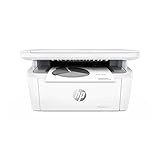
- All-in-One Functionality: The HP LaserJet MFP M140w offers the convenience of printing, copying, and scanning in a single, compact device, saving valuable space in your...
- Wireless Connectivity for Easy Printing: Enjoy the flexibility of wireless printing with seamless Wi-Fi connectivity. You can easily print documents from your phone...
- Fast, High-Quality Monochrome Printing: Achieve clear, sharp, black-and-white prints with fast print speeds, making this printer perfect for handling high-volume tasks...
- Effortless Setup and User-Friendly Operation: The HP LaserJet MFP M140w is designed for quick and simple setup. With a user-friendly interface, you'll be up and running...
- Energy-Efficient with Auto-On/Off Technology: Save on energy costs with HP’s Auto-On/Off technology, which automatically powers the printer on when you send a print job...
The HP LaserJet MFP M140w Wireless All-in-One Printer simplifies everyday tasks with reliable monochrome printing, copying, and scanning. It helps you handle documents swiftly, making it ideal for home offices or small businesses where space and speed matter.
This printer delivers sharp prints at 21 pages per minute with 600 x 600 dpi resolution. Its wireless connectivity lets you print directly from smartphones or tablets with the HP Smart app, reducing the hassle of cables and enabling flexible setups. Automatic duplex printing saves paper by printing on both sides without extra effort.
Designed for convenience, the compact M140w holds up to 150 sheets, minimizing frequent paper refills. The energy-saving Auto-On/Auto-Off feature reduces power use, supporting eco-friendly operation without manual intervention. Maintenance is straightforward, keeping downtime low.
While it only prints in black and white and offers a single paper tray, this printer balances functionality with simplicity. Its efficient design targets users who need dependable performance without color printing needs.
Best for: professionals and small business users seeking a compact, wireless monochrome multifunction printer for basic document management.
What We Like:
- Fast printing speed with automatic duplexing
- Wireless mobile printing via HP Smart app
- Compact design fits small workspaces
- Energy-efficient Auto-On/Auto-Off feature
Specification:
| Feature | Details |
|---|---|
| Manufacturer | HP |
| Dimensions | Approx. 14.2 x 14.5 x 11.7 inches (36 x 37 x 30 cm) |
| Weight | Around 12.8 lbs (5.8 kg) |
| Printing Technology | Monochrome Laser |
| Connectivity | Wi-Fi, USB |
| Paper Capacity | 150 sheets |
| Print Speed | Up to 21 ppm |
HP Laserjet Pro MFP 4101fdw All-in-One Printer

- FROM AMERICA'S MOST TRUSTED PRINTER BRAND – Perfect for small teams printing, scanning & copying professional-quality black & white documents & reports plus fax. Auto...
- BLAZING FAST PRINT SPEEDS – Up to 42 black-and-white pages per minute single-sided
- STAYS CONNECTED – Intelligent Wi-Fi looks for the best connection to stay online and ready to print
- PROTECTS YOUR DATA – Includes HP Wolf Pro Security with customizable settings so your printer and information are always secure
- PRINT FROM ANY DEVICE – Wireless printing from any mobile device, PC or tablet. Ethernet and Bluetooth included. Works with Microsoft, Mac, AirPrint, Android...
Experience seamless productivity with the HP LaserJet Pro MFP 4101fdw, designed to handle busy workgroups effortlessly. This all-in-one printer delivers crisp black-and-white documents quickly, printing up to 42 pages per minute. Its reliable performance reduces waiting times and keeps your office running smoothly.
Maintenance is simplified with the 350-sheet input tray, allowing extended print runs without frequent refills. Automatic two-sided printing saves paper and streamlines tasks. The device’s smart Wi-Fi automatically selects the strongest connection, minimizing interruptions and boosting efficiency.
Equipped with scanning, copying, and faxing capabilities, this model supports diverse office needs in one compact unit. The color touchscreen interface makes navigation intuitive and user-friendly, aiding quick access to essential functions. HP Wolf Pro Security ensures your documents remain protected against unauthorized access.
While built for speed and security, it supports only black-and-white printing. Dynamic security enforces use of genuine HP cartridges, which may restrict some third-party supplies. Despite a higher power draw, its robust design suits demanding office environments.
Best for: Small workgroups or offices requiring fast, secure monochrome printing with versatile multifunction features.
What We Like:
- High-speed printing up to 42 ppm with automatic duplexing
- Multifunctional with flatbed and sheetfed scanning, copying, and faxing
- Smart Wi-Fi for reliable connectivity and easy setup
- Strong security protection with HP Wolf Pro Security
- Large input capacity reduces maintenance frequency
Specification:
| Feature | Details |
|---|---|
| Manufacturer | HP |
| Dimensions (W×D×H) | 16.9 × 16.9 × 15.1 inches |
| Weight | Approximately 35.7 lbs |
| Print Speed | Up to 42 pages per minute |
| Print Resolution | 1200 x 1200 dpi |
| Input Tray Capacity | 350 sheets |
| Connectivity | Wireless (Wi-Fi), USB |
| Functions | Print, Scan, Copy, Fax |
| Security Features | HP Wolf Pro Security |
Factors to Consider When Choosing an All in One Printer Laserjet

When choosing an all-in-one LaserJet printer, you’ll want to contemplate how fast you need it to print and the types of connections it supports.
Think about whether duplex printing and security features are must-haves for your setup. Don’t forget to check the paper handling capacity to make certain it fits your workload.
Print Speed Requirements
Although print speed isn’t the only factor to take into account, choosing an all-in-one LaserJet that matches your daily workload can prevent frustrating delays. If you’re in a small home office with 1–3 users, aim for a monochrome model offering at least 20–25 ppm to keep tasks moving smoothly.
For small teams of 3–7, 30–35 ppm printers handle shared jobs without bottlenecks during busy times. Larger groups or departments printing high volumes or time-sensitive documents should consider 40+ ppm models.
Also, think about your job mix—multi-page reports and duplex printing demand higher sustained speeds, while occasional single-page prints can tolerate less. Finally, focus on real-world throughput, including warm-up and duplex times, since advertised ppm often reflects ideal conditions only.
Connectivity Options Available
Choosing the right connectivity options can make or break your experience with an all-in-one LaserJet printer. You’ll want dual-band Wi-Fi (2.4 GHz and 5 GHz) for stable wireless printing with less interference, especially in busy networks.
If you prefer a wired connection, Ethernet (Gigabit or 10/100) guarantees reliable, high-speed access. This is ideal for shared office use.
USB Type-B or USB 2.0/3.0 ports let you print directly from a single PC quickly without network setup. Don’t overlook mobile printing protocols like AirPrint or Mopria—they simplify printing and scanning from smartphones and tablets without extra drivers.
Plus, Wi-Fi Direct allows secure printing from nearby devices without joining your office network. It’s perfect for guests or BYOD scenarios.
Choose wisely to fit your workflow and environment.
Duplex Printing Capabilities
Since duplex printing substantially reduces paper usage by printing on both sides automatically, you’ll want to prioritize all-in-one LaserJet printers with true automatic duplexing. This built-in feature eliminates manual page flipping, cutting paper use by up to 50% while streamlining multi-page jobs.
Avoid models relying on manual duplex to prevent workflow interruptions and tedious refeeding. Check the duplex print speed and first-page time, as these often differ from simplex rates, so you get realistic performance expectations.
Also, make sure the duplex mechanism supports your common media sizes and types, including heavier cardstock or envelopes, since some printers limit duplex on nonstandard media. Finally, verify the scanner and automatic document feeder support two-sided scanning and copying to maintain efficient double-sided document workflows throughout your tasks.
Security Features Importance
When you handle sensitive documents, ensuring your all-in-one LaserJet printer has robust security features is essential to protect your data and network. Look for built-in device-level security like secure boot and firmware integrity checks to prevent unauthorized access.
Network protections such as WPA3 encryption and secure management protocols reduce risks of eavesdropping or lateral attacks. It’s all about keeping your printer—and your information—safe from unwanted eyes.
User authentication options like PIN printing and Active Directory integration control who can print or alter settings, safeguarding your documents. This way, you know exactly who’s accessing what.
Data protection features including disk encryption and secure erase keep your stored jobs safe, while TLS/SSL secures data in transit. So your information stays protected whether it’s resting or on the move.
Finally, automatic security updates and centralized management help you quickly patch vulnerabilities and maintain an auditable security posture. This ensures ongoing protection without extra hassle—keeping your printing environment secure and stress-free.
Paper Handling Capacity
Evaluate the paper handling capacity carefully to match your printing demands and workflow. Check the input tray capacity—usually 100 to 250 sheets—to make certain it suits your daily print volume and minimizes frequent reloads.
Also, consider the output tray size and duplexing ability so you can manage multi-page jobs with less hassle. If you scan or copy multi-page documents often, look for an Automatic Document Feeder (ADF) with a 40–50 sheet capacity to save time.
Don’t forget to verify if the printer offers expandable paper capacity through extra trays or multipurpose feeders, especially if you handle diverse media like legal-size paper or envelopes. Lastly, align the printer’s recommended monthly duty cycle and maximum sheet capacity with your peak usage to keep things running smoothly.
Cartridge Compatibility
Choosing the right cartridge compatibility can make or break your experience with an all-in-one LaserJet printer. Many modern models use dynamic security, which means they require cartridges with original manufacturer chips.
This means that third-party or refilled cartridges might not work because their chips can be blocked by firmware updates or fail to report toner levels and page counts accurately. So, if you rely on remanufactured or refill services, it’s a good idea to check whether your printer supports reused OEM or remanufactured chips.
Also, consider high-yield cartridges. They often share chip protocols with standard ones, but you should verify your printer accepts them to benefit from cost savings.
Keep in mind that using non-authorized cartridges can void warranties and limit service support. So, always confirm compatibility before making your choice.
Frequently Asked Questions
How Do All-In-One Laserjet Printers Compare in Energy Efficiency?
All-in-one LaserJet printers generally use less energy than traditional models. You’ll find many with ENERGY STAR ratings, meaning they save power during standby and printing.
Choosing one helps you reduce electricity costs and environmental impact. It’s a smart move if you’re looking to be more eco-friendly and save some money in the long run.
What Are the Typical Maintenance Costs for Laserjet All-In-One Printers?
You’ll typically spend on toner replacements and occasional drum units, which vary by model. Maintenance kits and service visits add costs, but regular cleaning and using genuine parts help keep expenses manageable over time.
Keeping your printer in good shape means you won’t have to shell out big bucks unexpectedly. Plus, sticking to genuine parts can save you headaches and money down the line. It’s all about staying on top of things with a little regular care.
Can These Laserjet Models Handle Printing on Specialty Media?
Yes, you can print on specialty media with many LaserJet all-in-one printers. But you’ll want to check the specific model’s specs to verify compatibility with materials like labels, cardstock, or transparencies.
That way, you can make sure you get the best results possible! It’s always good to double-check before you start your print job.
How Secure Are the Wireless Connections on These Laserjet Printers?
You’ll find these LaserJet printers use strong wireless security protocols like WPA3 and encryption to protect your data.
Just make sure you update firmware regularly and use secure passwords to keep your connections safe from intruders.
Are There Subscription Services Available for Toner Replenishment?
Like clockwork, yes, many LaserJet printers offer subscription services for toner replenishment. You’ll get automatic deliveries before you run out, so you don’t have to worry about running dry or making last-minute store trips.
It’s pretty convenient, right? These services help keep your printer running smoothly without you having to think about it. Just set it up once, and the toner shows up when you need it.
Conclusion
Choosing the right all-in-one LaserJet printer is like picking the perfect tool in your workshop—it needs to fit your tasks seamlessly and work reliably every time. Whether you prioritize speed, color, or wireless convenience, these top models have you covered.
Keep your needs in focus, and you’ll find a printer that not only handles your daily demands but also boosts your productivity effortlessly. Your ideal all-in-one LaserJet printer is waiting to become the backbone of your workflow.
With so many options available, you can find a model that fits your budget and specific requirements, from home offices to busy workplaces. Investing in the best all-in-one LaserJet printer means getting reliable performance, sharp printing quality, and versatile features all in one device.
So, take your time choosing, and you’ll enjoy a printer that keeps up with you—making your tasks easier and more efficient every day.