7 Best 3D Printer Self-Leveling Solutions for 2027
If you want hassle-free, precise first layers in 2027, consider these top self-leveling 3D printers. They make sure your prints start perfectly every time, saving you time and frustration. From automatic bed leveling to advanced calibration systems, these printers have it all.
Take the Bambu Lab P1S Combo with its automatic bed leveling and high color versatility. Or check out the Anycubic Kobra X Multicolor featuring LeviQ 3.0’s 49-point calibration for super precise results. Creality Ender 3 V3 SE also stands out with its reliable CR Touch sensor, giving consistent performance.
If speed is what you need, the Creality K2 Combo and FLASHFORGE Adventurer 5M offer smart leveling paired with fast printing capabilities. Each system cuts setup time and boosts print success—you’ll find the right fit and features tailored to your needs here.
| Image | Name | Editor's Rating | Price |
|---|---|---|---|

|
|
||

|
|
||

|
|
||

|
|
||

|
|
Bambu Lab P1S Combo, P1S 3D Printer and AMS, Multi-Color 3D Printing
- Up to 16 Colors: Bring your designs to life with vibrant multi-color/multi-material printing capabilities, perfect for showcasing your creativity. Note: Connecting Bambu...
- 500mm/s and 20000 mm/s² Acceleration True High Speed: Don't wait around for your masterpieces. Lightning-fast printing speed lets you focus on creating, not waiting.
- Enclosed Design: Fully enclosed body improves print performance for advanced filaments. Automatic Bed Leveling: Say hello to high-quality, successful prints. Auto bed...
- Set Up in 15 Minutes: Spend more time printing and less time setting up. User-friendly design ensures a hassle-free assembly experience for all skill levels.
- Supported Filament: Ideal: PLA, PETG, TPU, PVA, PET ABS, ASA; Capable : PA, PC; Not Recommended: Carbon/Glass Fiber Reinforced Polymer.
The Bambu Lab P1S Combo redefines 3D printing with its blend of speed, precision, and ease of use. Designed to minimize setup time, this printer gets you printing quickly, allowing you to focus on your creative projects without technical delays. Its CoreXY design supports print speeds up to 500 mm/s, enabling faster production without sacrificing accuracy.
Maintenance is straightforward thanks to automatic bed leveling and an enclosed body that stabilizes temperature for consistent results. The enclosed design also allows the use of advanced filaments, broadening your material choices for complex prints. This thoughtful engineering reduces common printing issues, improving reliability for both beginners and professionals.
The Bambu Lab P1S Combo excels in multi-material and multi-color printing by integrating the AMS system. It can handle up to 16 colors smoothly, expanding creative possibilities for detailed and vibrant models. Despite its advanced capabilities, the printer remains user-friendly, with setup completed in about 15 minutes.
One limitation to consider is that it is not suitable for carbon or glass fiber reinforced polymers, which restricts some high-strength material options. The unit’s weight of 47.5 pounds affects portability but contributes to stability during high-speed printing.
Best for: Professionals and enthusiasts seeking a fast, precise multi-color 3D printer with easy setup and support for advanced filaments.
What We Like:
- Seamless multi-color printing with up to 16 colors via the AMS system
- High-speed printing up to 500 mm/s with smooth acceleration
- Automatic bed leveling for hassle-free maintenance
- Enclosed body supports advanced filament types
- Quick setup process reduces downtime
Specification:
| Feature | Details |
|---|---|
| Manufacturer | Bambu Lab |
| Dimensions | Not specified |
| Weight | 47.5 lb (21.5 kg) |
| Material Support | Advanced filaments (excluding carbon/glass fiber reinforced polymers) |
| Color Options | Multi-color with AMS support |
Anycubic Kobra X Multicolor 3D Printer, Easy Setup, Native 4-Color
- 【 Newest Level - 19-Color with 4 ACE 2 Pro】Why settle for one color when you can have multicolor? The Kobra X comes born with 4 colors built-in. It is innovative 3D...
- 【 Savings 2X Time】Stop wasting hours and filament on purging! Kobra X impresora 3D reduces the filament and machine travel path by 81.25%, so 2X the Speed, and...
- 【Hardened Precision & High Speed 】 Equipped with a high-durability hardened steel nozzle and vibration compensation, the Kobra X ensures every layer remains smooth...
- 【Flawless First Layer with LeviQ 3.0】The LeviQ 3.0 and auto bed leveling system uses a 49-point calibration and advanced leveling algorithm to ensure 100% bed...
- 【Smart AI Monitoring & Large Model Library】APP remote control, features Spaghetti detection and foreign object detection. The innovative top-mount spool holder...

Experience the freedom of true multicolor 3D printing with the Anycubic Kobra X Multicolor. Its native 4-color system cuts filament purging by up to 81%, letting you print faster without wasting material. Complex, vibrant models like Benchy take just 14 minutes, saving you time and effort.
Setup is quick and hassle-free thanks to the LeviQ 3.0 auto bed leveling. This ensures a perfectly flat print surface with 49-point calibration, so you can start printing about 15 minutes after unboxing. The hardened steel nozzle supports a wide range of filaments, making it versatile for different projects.
Maintenance is simplified with quiet operation and smart AI monitoring. You can remotely control and track your prints via dual-band Wi-Fi, enhancing convenience and precision. While the printer supports up to four colors natively, it can also expand to 19 colors with additional units, although these expansions require separate ACE 2 Pro devices.
The build volume is 260 × 260 × 260 mm, suitable for most hobbyist and professional projects but may limit very large prints. Filament is sold separately, so you’ll need to purchase materials before starting your work.
Best for: hobbyists, educators, and professionals seeking a fast, easy-to-use multicolor 3D printer with versatile material options and smart features.
What We Like:
- Native 4-color system reduces filament waste and doubles print speed
- Advanced LeviQ 3.0 auto bed leveling for reliable, flat printing surfaces
- Smart AI monitoring and dual-band Wi-Fi for remote print management
Specification:
| Feature | Details |
|---|---|
| Manufacturer | Anycubic |
| Build Volume | 260 × 260 × 260 mm |
| Color Options | Native 4-color, expandable to 19 colors |
| Nozzle Material | Hardened steel |
| Connectivity | Dual-band Wi-Fi |
| Calibration Points | 49-point auto leveling |
Creality Ender 3 V3 SE Beginner-Friendly 3D Printer with Auto Leveling
- 250mm/s High-Speed Printing: Print at speeds of up to 250mm/s with 2500mm/s² acceleration, helping you complete prototypes, functional parts, and everyday projects...
- Easy Setup with Auto Leveling: Designed for a fast and straightforward setup, the Ender 3 V3 SE can be assembled in just a few simple steps. CR Touch Auto Leveling and...
- Proven Sprite Direct Drive Extruder: The upgraded Sprite Direct Drive Extruder provides smooth and consistent filament feeding for PLA, PETG, and TPU. Its proven design...
- Stable Motion System for Consistent Results: Dual synchronized Z-axis lead screws and precision Y-axis linear shafts work together to help reduce vibration and Z...
- Quiet Operation with Easy Print Removal: A 32-bit silent mainboard helps reduce operating noise for a more comfortable printing experience, while the flexible PC spring...
The Creality Ender 3 V3 SE offers a straightforward solution for beginners seeking reliable 3D printing without the hassle. Its built-in CR Touch auto leveling automatically calibrates the Z-offset, eliminating tedious manual adjustments and ensuring consistent first-layer adhesion. This feature makes setup quicker and prints more dependable.
The printer’s upgraded Sprite Direct Drive Extruder provides smooth, steady filament feeding compatible with PLA, PETG, and TPU. This reduces common printing issues like clogs or uneven extrusion. The dual Z-axis lead screws combined with precision Y-axis shafts also limit vibration and wobble, resulting in stable prints even at higher speeds.
Maintenance is simple thanks to its compact design and quiet 32-bit mainboard, which runs efficiently and quietly. The Ender 3 V3 SE’s moderate build volume suits everyday projects and prototypes, balancing size and workspace needs without overwhelming new users.
While it performs well with common filaments, it may require modifications for specialty materials. The printer’s size might also restrict larger prints, but it remains a solid choice for many hobbyists and beginners.
Best for: Beginners and hobbyists looking for an easy-to-use 3D printer with reliable auto leveling and consistent performance.
What We Like:
- CR Touch auto leveling with automatic Z-offset calibration for hassle-free setup
- Smooth filament feeding via upgraded Sprite Direct Drive Extruder
- Dual Z-axis lead screws and precision Y-axis shafts for stable, high-speed printing
- Quiet operation thanks to the 32-bit mainboard
- Compact design ideal for home or small workshop use
Specification:
| Feature | Details |
|---|---|
| Manufacturer | Creality |
| Dimensions (W×D×H) | 15 × 19.6 × 15 inches |
| Weight | Not specified |
| Filament Compatibility | PLA, PETG, TPU |
| Auto Leveling | CR Touch automatic Z-offset |
| Extruder Type | Upgraded Sprite Direct Drive |
| Control Board | Quiet 32-bit mainboard |
Creality K2 Combo 3D Printer with Auto Leveling
- Multicolor 3D Printing: 4 × CFS for up to 16 colors. By hooking up as many as four CFS units together, you are able to print in the splendor of 16 colors. Saves the need...
- Ultra Quiet Printing: Silent Mode for a quieter printing experience. Annoyed by the buzzing noise? Not K2. By adopting step-servo motors and dynamically balanced fans. It...
- Out-of-the-Box Experience: Pre-assembled for plug and play. You can use K2 right after unpacking and screen installation. Unlocks a wider selection of materials...
- Smart Auto Leveling & AI Camera: Faster leveling of only the target print area. The leveling sensor only probes and levels the bed area relevant to the desired print...
- Superior Print Quality: Sturdy frame and precise step-servo motor system. K2 uses 3 step-servo motors, both in the extruder and on the X/Y axis. They can adjust torque...
The Creality K2 Combo 3D Printer is designed to simplify multicolor printing. By linking four CFS units, it allows seamless printing with up to 16 colors, eliminating the need for post-print painting. This setup saves time and enhances creativity, making complex projects easier to achieve.
Its generous 260 × 260 × 260 mm build volume accommodates a wide range of designs. The next-generation direct drive extruder, powered by three step-servo motors, ensures smooth and consistent filament flow. Printing speeds can reach up to 600 mm/s, helping you complete projects faster without sacrificing quality.
Maintenance is straightforward with smart auto-leveling that focuses only on relevant bed areas. Real-time AI monitoring detects print issues early, reducing failed prints and material waste. The sturdy frame and ultra-quiet operation provide a stable, distraction-free workspace.
The K2 Combo combines advanced features with user-friendly design, making it ideal for creators who value precision and efficiency. While some setup is required to link multiple CFS units and install the screen, most of the printer arrives 95% pre-assembled for quick use.
Best for: Creators and professionals seeking fast, precise multicolor 3D printing with minimal setup and advanced monitoring features.
What We Like:
- Supports up to 16 colors via linked CFS units, reducing post-print work
- Smart auto-leveling targets key bed areas for precise prints
- Real-time AI camera monitoring minimizes print failures
- Ultra-quiet operation enhances workflow focus
- Sturdy frame ensures consistent print quality
Specification:
| Feature | Details |
|---|---|
| Manufacturer | Creality |
| Build Volume | 260 × 260 × 260 mm |
| Extruder Type | Direct drive with 3 step-servo motors |
| Max Printing Speed | Up to 600 mm/s |
| Color Options | Supports up to 16 colors via linked CFS units |
| Assembly | 95% pre-assembled; screen installation required |
FLASHFORGE Adventurer 5M High-Speed 3D Printer
- Your Creativity Knows No Bounds: Good Helper for Beginners. Adventurer 5M meets the innovative needs of users with brand-new technology and craftsmanship, whether you are...
- Attain a Flawless Printing Experience: The Adventurer 5M features a fully automatic one-click leveling system. It measures the distance from the nozzle to the build plate...
- Core XY All-Metal Motion Structure: The Adventurer 5M employs a new and robust design to ensure fast printing speeds while delivering high-quality output. The stable and...
- Patent Quick-Detachable Nozzle: Different nozzle diameter options (0.25/0.4/0.6/0.8 mm) are suitable for both high precision and high-efficiency modes. Quick change...
- Smarter Control & More Efficiency: Orca-Flashforge slicer supports one-click group file sending and multi-printer network print monitoring, while you can use Flash Maker...
The FLASHFORGE Adventurer 5M High-Speed 3D Printer transforms complex 3D printing tasks into simple, efficient processes. Its one-click auto-leveling feature automatically measures the nozzle-to-build-plate distance, removing the need for manual calibration. This ensures a perfect first layer with every print, saving time and reducing errors.
Equipped with a CoreXY all-metal motion system, the printer achieves speeds up to 600 mm/s while maintaining stability and low noise. This combination allows users to complete projects quickly without sacrificing quality. The design supports quick nozzle swaps without tools, offering four different diameters for precise customization and fast printing.
Maintenance is straightforward thanks to its flexible PEI steel build plate and easily detachable nozzles. However, careful handling is advised when bending the plate for print removal. The smart software also includes remote monitoring and recovery features, helping to manage prints even during power interruptions.
This printer suits both beginners and experienced users who need a fast, reliable, and easy-to-use machine for creative projects. It balances speed, precision, and convenience in one compact package.
Best for: Users seeking a high-speed 3D printer that simplifies setup and maintenance while delivering consistent, high-quality prints.
What We Like:
- Fully automatic one-click leveling for hassle-free setup
- High-speed CoreXY system delivers quiet, stable printing
- Tool-free nozzle changes with multiple size options
- Remote monitoring and print recovery features
Specification:
| Feature | Details |
|---|---|
| Manufacturer | FLASHFORGE |
| Printer Type | CoreXY High-Speed 3D Printer |
| Max Print Speed | 600 mm/s |
| Nozzle Temperature | Up to 280°C |
| Nozzle Sizes | Four interchangeable diameters |
| Build Plate | Flexible PEI steel |
| Auto-Leveling | One-click automatic |
Creality SPARKX i7 Combo Multi-Color 3D Printer

- AI Turns Portraits into 3D Models: Say goodbye to complex modeling software. With Creality's CubeMe AI, sparkx i7 combo 3d printer simply upload a portrait and generate a...
- Unbox & Start Printing in 5 Mins: From unboxing to your first print in just five minutes. The SPARKX i7 arrives fully pre-assembled — no tools, no complicated setup, no...
- Multicolor Printing with 50% Less Waste: Upgrade your printing with four-color capability— smoother transitions, faster printing, and 50% less waste compared to...
- Smart AI Detects Spaghetti & Failures: This creality built-in AI camera watches over every print in real time, detecting common failures like spaghetti, air printing...
- Large 260mm Build & Quiet Night Mode: Creality sparkx i7 3d printer with a generous 260 × 260 × 255 mm build volume, create everything from full-size airless...
The Creality SPARKX i7 Combo delivers multicolor 3D printing with minimal setup, making it ideal for users who want fast, hassle-free results. Its 95% pre-assembled design lets you start printing in about five minutes without any tools. This saves time and removes the frustration often associated with complex printer setups.
Equipped with four-color printing, it reduces filament waste by 50% and ensures smooth color transitions. The printer’s built-in AI camera actively monitors prints in real time. It detects issues like spaghetti or filament tangles and sends instant alerts, helping you avoid failed prints and wasted materials.
Maintenance is straightforward but necessary. While multicolor printing offers advanced capabilities, occasional upkeep ensures optimal performance. The printer’s quiet Night Mode and a build volume of 260 × 260 × 255 mm make it versatile for various projects, from hobbyist models to professional prototypes.
CubeMe AI integration lets you convert portraits into 3D models instantly, without extra software. This feature enhances creativity and streamlines the design process for users of all levels.
Best for: users seeking an easy-to-use, multicolor 3D printer with smart AI features for both beginners and professionals.
What We Like:
- Quick setup with 95% pre-assembly.
- Four-color printing reduces filament waste and smooths transitions.
- Real-time AI camera monitoring prevents print failures.
- CubeMe AI enables instant 3D portrait creation.
- Quiet operation with practical build volume.
Specification:
| Feature | Details |
|---|---|
| Manufacturer | Creality |
| Build Volume | 260 × 260 × 255 mm |
| Assembly | 95% pre-assembled |
| Color Options | Four-color printing |
| Special Features | AI camera, CubeMe AI |
Creality CR Touch Auto Leveling Sensor Kit
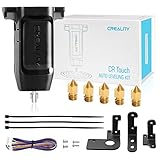
- 【Wide Application】This Creality cr touch auto-leveling kit is equipped with 3 mounting brackets and is only suitable for the following 3D printers with V4.4.2/V...
- 【About Reflash the Firmware】1. Download the corresponding firmware from the Creality official website. 2. copy it to the SD card. 3. Rename it to 123.bin, 4. Insert...
- 【Independent research and development Stable function】CR Touch is a Creality 3D research institute self-developed 3D printer platform leveling solution based on...
- 【Multi-point detection Smart compensation】CR Touch performs multi-point detaction on the printing platform and records the heigh of each detaction point. The system...
- 【Strong compatibility】Creality CR Touch auto leveling kit Compatible with PEI / sticker / glass / metal platform.
The Creality CR Touch Auto Leveling Sensor Kit transforms bed leveling into a simple and precise task. It tackles the common issue of uneven print surfaces by using multi-point detection to create an accurate map of your bed. This ensures consistent first layers and reduces print failures caused by nozzle tilt.
Designed specifically for select Ender and CR-10 models with 32-bit V4.2.2 and V4.2.7 motherboards, the sensor adapts to various surfaces like PEI, glass, and metal. Its robust design supports over 100,000 activations, making maintenance minimal and reliable over time.
Installation is straightforward with the included nozzles, mounting brackets, and a clear guide. However, users must verify printer compatibility and update the firmware via Creality’s website to enable full functionality. This step ensures smooth integration but may require some technical familiarity.
Overall, the CR Touch kit enhances print quality by automating bed leveling and nozzle adjustment. Its precise measurements save time and improve print consistency, though it is limited to specific Creality models and requires firmware updates.
Best for: Creality Ender and CR-10 users with compatible 32-bit mainboards seeking accurate, automatic bed leveling.
What We Like:
- Accurate multi-point bed leveling with automatic nozzle tilt compensation
- Works on various build surfaces including PEI, glass, and metal
- Durable sensor capable of over 100,000 activations
- Includes all necessary installation parts and clear instructions
Specification:
| Feature | Details |
|---|---|
| Manufacturer | Creality |
| Compatible Models | Select Ender and CR-10 printers |
| Mainboard Versions | 32-bit V4.2.2 / V4.2.7 |
| Activation Count | Over 100,000 times |
| Build Surface | PEI, glass, metal |
Factors to Consider When Choosing 3D Printer Self Leveling
When choosing a 3D printer self-leveling system, you’ll want to focus on accuracy and how consistent it performs. Make sure it’s compatible with your printer and easy enough for you to install without hassle.
Also, don’t forget to take into account the sensor type. Plus, think about how durable and low-maintenance the system is over time. It’ll save you headaches down the road!
Accuracy and Consistency
Since accurate and consistent bed leveling directly impacts your print quality, you’ll want to focus on sensors that offer high probing resolution and repeatability, ideally at the micron level. Choose systems with multi-point mesh probing—25 to 100+ points—to map bed tilt and warps precisely. This guarantees better compensation than single-point methods.
Check the Z-offset calibration accuracy and confirm the system stores a fixed mesh per bed or filament. That way, you prevent drift and maintain long-term consistency. Also, consider the sensor’s activation type and durability. Contact sensors with over 100k activations help reduce false triggers and wear-related errors.
Finally, make sure the leveling routine includes thermal compensation by probing at printing temperature. It should also account for bed surface variations. This way, your first layer remains accurate despite thermal expansion or surface differences.
Compatibility With Printers
Although choosing a self-leveling sensor can boost your print quality, you’ll need to make certain it’s fully compatible with your printer’s hardware and firmware. Verify the sensor matches your printer’s motherboard electrically and mechanically, checking probe header types and voltage levels to prevent wiring or firmware conflicts.
Make sure its mounting pattern and probe clearance suit your carriage and nozzle design. This way, you can cover the full build area without worrying about collisions.
Confirm your firmware supports the sensor type—whether inductive, capacitive, or BLTouch-style—and offers configuration options for probe offsets and mesh probing. Also, guarantee the sensor’s detection method works with your build surface, since some sensors don’t work well on glass or PEI.
Finally, pick a sensor with probing resolution and mesh density that align with your bed size and first-layer precision needs. This ensures you get the best results without overcomplicating things.
Ease Of Installation
Many factors influence how easily you can install a 3D printer self-leveling system. First, check if the system is pre-installed or requires add-on hardware and firmware updates—pre-installed options save time.
Make certain the sensor has a plug-and-play connector and a mounting bracket compatible with your printer frame. This helps avoid mechanical changes or custom wiring.
Look for clear firmware update instructions and easy update methods like SD card or USB. That way, you can prevent installation issues.
Consider whether the leveling routine is fully automatic, reducing manual calibration, or semi-automatic, requiring more effort after setup.
Finally, verify the package includes all necessary hardware—sensors, cables, screws, mounting templates—and step-by-step guides. This ensures you won’t need extra tools or parts during installation.
Sensor Technology Types
When choosing a self-leveling system for your 3D printer, you’ll want to zero in on the sensor technology it uses. Capacitive sensors detect changes in the electric field. They work well on various surfaces but can be sensitive to material and temperature.
Inductive sensors reliably sense metal build plates but struggle with glass or PEI unless a metal target is present. Mechanical micro-switch probes offer simple, low-cost accuracy by physically touching the bed. However, they may cause wear over time.
Optical and infrared sensors use light reflection for fast, non-contact probing. Though, dark or reflective surfaces can reduce their performance. Strain-gauge or nozzle-touch systems sense contact force or nozzle deflection, providing precise first-layer control without extra hardware.
That said, they need careful calibration and compatible firmware. So, choose based on your surface type and accuracy needs. It’s all about what fits your setup best!
Maintenance And Durability
Since your 3D printer’s self-leveling sensor undergoes frequent use, you’ll want to prioritize durability and ease of maintenance. Look for sensors rated for 100,000+ actuations to reduce replacement frequency and long-term costs.
Choose models with sealed or ruggedized housings and corrosion-resistant parts to handle repeated probing and filament debris, especially in dusty environments. This way, your sensor stays reliable even when conditions get tough.
Easy-to-access mounts and standardized connectors let you swap or service sensors quickly without major disassembly. That means less downtime and less hassle when things need fixing.
Make sure your firmware supports automatic recalibration and error reporting to catch sensor drift early. It’s a smart way to minimize downtime and keep your printer running smoothly.
Finally, consider spare-part availability and commonality, so repairs don’t stall your printing. Prioritizing these factors guarantees your self-leveling system remains reliable, cost-effective, and hassle-free over time.
Frequently Asked Questions
How Does Self-Leveling Improve Print Quality?
Self-leveling guarantees your print bed stays perfectly flat, preventing uneven layers and adhesion issues. This means your prints come out smoother, with better detail and fewer failed attempts.
It also saves you time and material waste. So, you get better results without the extra hassle.
Can Self-Leveling Sensors Be Retrofitted on Any 3D Printer?
You might think you can retrofit self-leveling sensors on any 3D printer, but it really depends on your model’s compatibility and firmware.
Check your printer specs carefully—sometimes, upgrades require more than just hardware swaps.
It’s not always a simple plug-and-play situation. So, make sure to do a bit of homework before diving in!
What Is the Average Lifespan of a Self-Leveling Sensor?
You can expect a self-leveling sensor to last around 2 to 5 years, depending on usage and maintenance.
Regular cleaning and careful handling will help you extend its lifespan and keep your prints accurate.
Taking a little extra care really makes a difference over time.
Are There Software Updates Needed for Self-Leveling Features?
You’ll want to keep your self-leveling software updated like tuning a finely crafted instrument. Updates fix bugs, improve accuracy, and add features.
This ensures your printer stays sharp and delivers flawless prints every time you hit start. Keeping things current really makes a difference!
How Does Self-Leveling Impact Print Speed?
Self-leveling slightly slows your print speed since the printer pauses to measure and adjust the bed. However, it saves you time overall by preventing failed prints and reducing manual bed leveling.
This makes your workflow smoother and more efficient. So, even though it takes a bit longer upfront, it’s worth it in the long run!
Conclusion
You want precision, ease, and reliability in your 3D printing. You want seamless multi-color options, fast setups, and beginner-friendly interfaces.
You want advanced auto-leveling sensors, versatile combos, and high-speed performance. With these top self-leveling solutions, you get all that and more.
You get innovation, convenience, and quality wrapped into one. So choose wisely, print confidently, and watch your creations come to life effortlessly every time.
When it comes to 3D printer self-leveling solutions, finding the right fit means enjoying hassle-free setups and consistent print quality. These advanced auto-leveling sensors not only save time but also boost your printer’s reliability and precision. Whether you’re a beginner or a pro, these tools make multi-color printing and high-speed performance easier than ever. So, embrace these innovative self-leveling combos to elevate your 3D printing experience with convenience and accuracy, ensuring every print is a success.