12 Best 3D Printer Kickstarters to Watch in 2027
If you’re on the hunt for the best 3D printer Kickstarters to watch in 2027, you’re in the right place. These upcoming models bring exciting features that promise to change the game in 3D printing.
From blazing-fast speeds to smart AI tools, there’s something here for every type of maker.
For instance, the Bambu Lab P1S Combo stands out with its ability to print multi-color projects at a rapid 500mm/s.
Then there’s the AOSEED AI 3D Printer, which combines a safe enclosed design with powerful AI-driven tools for precision and ease.
Don’t overlook the FLASHFORGE Adventurer 5M, boasting a super-fast CoreXY movement at 600mm/s — ideal if you’re aiming for detailed, high-quality prints.
Whether you’re a beginner or a seasoned pro looking for the latest tech, these Kickstarters cover all bases.
Dive deeper to find the perfect fit for your creative projects!
| Image | Name | Editor's Rating | Price |
|---|---|---|---|

|
|
||

|
|
||

|
|
||

|
|
||

|
|
Bambu Lab P1S Combo, P1S 3D Printer and AMS, Multi-Color 3D Printing
- Up to 16 Colors: Bring your designs to life with vibrant multi-color/multi-material printing capabilities, perfect for showcasing your creativity. Note: Connecting Bambu...
- 500mm/s and 20000 mm/s² Acceleration True High Speed: Don't wait around for your masterpieces. Lightning-fast printing speed lets you focus on creating, not waiting.
- Enclosed Design: Fully enclosed body improves print performance for advanced filaments. Automatic Bed Leveling: Say hello to high-quality, successful prints. Auto bed...
- Set Up in 15 Minutes: Spend more time printing and less time setting up. User-friendly design ensures a hassle-free assembly experience for all skill levels.
- Supported Filament: Ideal: PLA, PETG, TPU, PVA, PET ABS, ASA; Capable : PA, PC; Not Recommended: Carbon/Glass Fiber Reinforced Polymer.
The Bambu Lab P1S Combo is a smart solution for creators who want to bring multi-color and multi-material designs to life effortlessly. It tackles common 3D printing challenges like color switching and material handling with its Automatic Material System (AMS), which supports up to 16 filament colors. This feature makes complex projects easier and less time-consuming.
Designed for precision and speed, the P1S Combo prints at 500mm/s and includes automatic bed leveling to ensure consistent, high-quality results. Its enclosed frame helps maintain temperature stability, reducing print failures and improving material compatibility. Setup is straightforward, taking about 15 minutes, which lowers the barrier for beginners and busy professionals alike.
Maintenance is simplified by the printer’s robust design and user-friendly interface. While it handles popular filaments like PLA, PETG, TPU, and ABS well, it is less suited for carbon or glass fiber reinforced polymers. The printer’s size and weight make it better for a dedicated workspace rather than portability.
Overall, the Bambu Lab P1S Combo offers versatile, reliable multi-color and multi-material 3D printing, making it an excellent tool for detailed and colorful projects with minimal hassle.
Best for: Creators and hobbyists seeking a versatile, fast, and user-friendly 3D printer capable of multi-color and multi-material projects with minimal setup.
What We Like:
- Supports up to 16 filament colors with Automatic Material System for smooth multi-color printing.
- Fast printing speed of 500mm/s and automatic bed leveling for consistent quality.
- Quick setup time of 15 minutes suitable for all skill levels.
- Enclosed design improves print reliability and material handling.
Specification:
| Feature | Details |
|---|---|
| Manufacturer | Bambu Lab |
| Dimensions | Not specified |
| Weight | 47.5 lb (21.5 kg) |
| Supported Filament Types | PLA, PETG, TPU, ABS |
| Filament Capacity | Up to 16 colors (AMS) |
| Printing Speed | Up to 500 mm/s |
| Setup Time | Approximately 15 minutes |
Entina Tina2C Mini 3D Printer for Beginners
- 【Easy to Use 3D Printer – Ready in 5 Minutes】 Meet the Entina Tina2C, a plug-and-play mini 3D printer designed for first-time users. Fully assembled with factory...
- 【3500+ 3D Models & Easy One-Tap Printing】 Explore 3500+ ready-to-print 3D models and 25+ DIY projects in the Poloprint Cloud app, with new designs added daily...
- 【Smart WiFi 3D Printer & AI-Powered App】 Connect via 2.4GHz WiFi and enjoy convenient 3D printer app control through Poloprint Cloud. Explore models, manage prints...
- 【Auto Leveling 3D Printer & Power-Loss Recovery】 Automatic bed leveling helps improve first-layer adhesion and reduces manual adjustments for a smoother 3D printing...
- 【Flexible Magnetic Print Bed & Quick-Swap Nozzle】 The flexible magnetic build plate makes finished 3D prints easier to remove with a gentle bend. A removable...
The Entina Tina2C Mini 3D Printer transforms 3D printing into an easy and enjoyable experience for beginners and kids. Its plug-and-play design eliminates setup frustrations, allowing users to start printing within five minutes. This simplicity makes it ideal for home or classroom use.
Maintenance is straightforward thanks to its auto leveling feature, which ensures accurate prints without manual adjustments. The flexible magnetic print bed allows hassle-free removal of finished projects, reducing downtime and frustration. Power-loss recovery safeguards your print progress, preventing wasted materials.
Designed for creative exploration, the printer connects via WiFi or supports offline printing with a TF card. The accompanying Poloprint app offers over 3,500 print models and DIY projects, encouraging learning and experimentation. It also supports popular software like Cura for users ready to create custom designs.
While compact and quiet, the printer’s build volume is limited to 3.9 x 3.9 x 3.9 inches, which may restrict larger projects. WiFi works only on 2.4GHz networks, which could limit connectivity options. Advanced users may find its feature set basic but suitable for beginners.
Best for: Beginners and kids seeking a simple, compact 3D printer for home or educational settings.
What We Like:
- Easy setup with fully assembled, plug-and-play design
- User-friendly Poloprint app with thousands of models
- Auto leveling and power-loss recovery for reliable printing
- Flexible magnetic bed for easy print removal
- Quiet operation suitable for classrooms and homes
Specification:
| Feature | Details |
|---|---|
| Manufacturer | Entina |
| Build Volume | 3.9 x 3.9 x 3.9 inches |
| Connectivity | WiFi (2.4GHz), TF card |
| Setup Time | Approximately 5 minutes |
| Operation Noise | Quiet |
| Supported Software | Poloprint app, Cura |
Beginner Compact 3D Printer for Educational Projects
- EFFORTLESS SETUP FOR BEGINNERS: This beginner 3D printer is designed for easy usage right out of the box, making it perfect for students, hobbyists, and educators who are...
- COMPACT AND SPACE SAVING DESIGN: With its small footprint, this compact 3D printer fits easily on any desk, workbench, or classroom table without taking up valuable...
- HIGH RESOLUTION PRECISION PRINTING: Experience exceptional detail and accuracy with this high resolution 3D printer. It delivers smooth, precise layers that bring your...
- EFFICIENT HEATING FOR FASTER PRINTS: The efficient heating system of this 3D printing machine reaches optimal temperatures quickly, reducing wait times and speeding up...
- ROBUST AND RELIABLE FOR DAILY USE: Built with a robust design, this beginner 3D printer is durable and dependable for regular use. It is an excellent choice for...
Discover a compact 3D printer designed specifically to simplify educational projects. Its beginner-friendly design helps users quickly engage with hands-on learning, making creativity accessible from the start. The printer’s small footprint and sturdy ABS frame fit neatly on any desk, ideal for classrooms or home study areas.
This 3D printer works with PLA and TPU filaments, producing high-quality prints with fine layers down to 0.05mm. Its intuitive controls are compatible with Windows and OS X, easing the process of loading and unloading materials. Fast heating ensures minimal wait times, helping students and educators stay focused on their projects.
Maintenance is straightforward but requires careful leveling to avoid print failures. While the print volume is limited to around 100 x 100 x 100mm, it suits most small-scale educational applications. The print speed ranges from 10-40mm/s, balancing quality and reliability over speed.
Overall, this compact 3D printer supports creative learning by allowing users to print preloaded models or custom designs. It encourages skill development in spatial awareness and design thinking in any learning environment.
Best for: educators and beginners seeking a compact, easy-to-use 3D printer to support interactive educational projects.
What We Like:
- Easy setup with user-friendly controls ideal for beginners
- Supports fine-layer printing using PLA and TPU filaments
- Durable ABS frame fits well in tight spaces and classroom settings
- Fast heating reduces downtime before printing
Specification:
| Feature | Details |
|---|---|
| Manufacturer | Not specified |
| Dimensions | Compact (approx. 100mm³) |
| Weight | Not specified |
| Material | ABS |
| Supported Filaments | PLA, TPU |
| Layer Resolution | Up to 0.05mm |
| Print Speed | 10-40 mm/s |
| Compatible OS | Windows, OS X |
AOSEED AI 3D Printer for Kids, Fast 400mm/s, 20,000+ Models, Enclosed Safe
- [NOTE] PLA comes in multiple colors, but this printer supports single-color printing only. Multi-color designs can be created by printing separate parts and assembling...
- A Home Toy Factory with Endless DIY Fun: This mini 3D printer brings a toy factory home, helping families make new toys without extra store trips. With access to...
- AI-Powered Creativity Made Simple: This AI 3D printer lets kids bring their imagination to life. With AI Doodle, children can create custom 3D models using voice, text...
- Easy, Safe One-Tap Printing: Designed as a 3D printer for kids, it makes every project simple. Kids can print with one tap in the app, while parents can feel confident...
- Fast, Precise Printing with Smart Detection: This 3D printer delivers precision up to 0.05 mm and upgraded speeds of 220–250 mm/s, with peaks up to 400 mm/s. Small toy...
AOSEED’s AI 3D Printer offers a safe and fast way for kids to bring their ideas to life. Its enclosed, pinch-resistant design protects little hands while printing at speeds up to 400 mm/s, making creativity both exciting and secure. The printer removes common frustrations with a leveling-free platform and one-tap start, eliminating setup hassles.
Maintenance is simple with included PLA filament and essential tools, ensuring parents and children can focus on the fun of creation rather than complicated upkeep. The quiet operation suits home or classroom use without distractions. Monitoring prints is easy through the built-in camera, allowing users to track progress and share time-lapse videos.
This printer is ideal for young users eager to explore 3D printing with access to over 20,000 human-reviewed models. Its AI-powered Doodle and MiniMe tools encourage custom designs, fostering creativity without requiring advanced skills or extensive learning.
While the device supports PLA filament exclusively, which limits material options, its compact design fits most spaces comfortably. Some AI features may require internet access for full functionality, but overall, it delivers an educational and engaging experience.
Best for: Kids and beginners eager to explore creativity through safe, fast, and easy-to-use 3D printing technology.
What We Like:
- Fast printing speeds up to 400 mm/s with precise 0.05 mm detail
- Enclosed, pinch-resistant design ensures child safety
- Access to 20,000+ human-reviewed models and AI customization tools
- Quiet operation and simple, maintenance-friendly setup
- Built-in camera for monitoring and sharing prints
Specification:
| Feature | Description |
|---|---|
| Manufacturer | AOSEED |
| Dimensions | Compact size, fits most spaces |
| Weight | Moderate, suitable for home use |
| Material | PLA filament included |
| Color Options | Standard kid-friendly design |
FLASHFORGE Adventurer 5M 3D Printer, All-Metal CoreXY, 600mm/s Max Travel
- One-Click Automatic Printing: Experience hassle-free 3D printing with the Adventurer 5M Series. Enjoy automatic bed leveling for flawless first layers, ensuring...
- 12X Ultra Fast Printing: Featuring a CoreXY structure with 600mm/s travel speed and 20000mm/s² acceleration, the AD5M maximizes efficiency, reduces production cycles...
- Smart and Efficient Design: Quick 3-second nozzle changes, a high-flow 32mm³/s nozzle, and fast 35-second warm-up to 200°C deliver stable high-speed printing. Its...
- Superior Print Quality & Adaptability: Combines a 280°C direct drive extruder with dual-fan cooling and vibration compensation. Includes a standard 0.4mm nozzle and...
- Real-Time App Monitoring: Monitor print progress, adjust settings, and receive instant status alerts remotely with the Flash Studio. Smart mobile control ensures a...
Speed and precision come together with the FLASHFORGE Adventurer 5M 3D printer, designed to accelerate your prototyping without sacrificing quality. Its all-metal CoreXY structure enables a maximum travel speed of 600mm/s, helping you complete projects faster than conventional printers.
This printer handles complex tasks effortlessly, thanks to its 20000mm/s² acceleration and a high-flow 0.4mm nozzle. Automatic bed leveling ensures perfect first layers every time, eliminating the need for manual adjustments and reducing setup time. The dual-fan cooling system and vibration compensation maintain consistent print quality even at high speeds.
Maintenance is straightforward with quick 3-second nozzle swaps and a rapid 35-second warm-up time, keeping downtime to a minimum. The compact 220 x 220 x 220 mm build volume fits well in limited spaces, supporting precise prints for a variety of applications. Plus, remote print monitoring and control through the Flash Studio app keep you connected and productive.
Best for: Speed-focused makers and professionals seeking rapid prototyping with high precision and remote print management.
What We Like:
- High-speed printing with 600mm/s travel and strong acceleration.
- Automatic bed leveling and vibration compensation for reliable quality.
- Quick nozzle changes and fast warm-up for efficient workflow.
- Remote print monitoring via Flash Studio app for convenience.
Specification:
| Feature | Details |
|---|---|
| Manufacturer | FLASHFORGE |
| Dimensions | Not specified |
| Build Volume | 220 x 220 x 220 mm |
| Max Travel Speed | 600 mm/s |
| Acceleration | 20000 mm/s² |
| Nozzle Size | 0.4 mm |
| Material | All-metal CoreXY frame |
Anycubic Kobra X Multicolor 3D Printer, Easy Setup, Native 4-Color

- 【 Newest Level - 19-Color with 4 ACE 2 Pro】Why settle for one color when you can have multicolor? The Kobra X comes born with 4 colors built-in. It is innovative 3D...
- 【 Savings 2X Time】Stop wasting hours and filament on purging! Kobra X impresora 3D reduces the filament and machine travel path by 81.25%, so 2X the Speed, and...
- 【Hardened Precision & High Speed 】 Equipped with a high-durability hardened steel nozzle and vibration compensation, the Kobra X ensures every layer remains smooth...
- 【Flawless First Layer with LeviQ 3.0】The LeviQ 3.0 and auto bed leveling system uses a 49-point calibration and advanced leveling algorithm to ensure 100% bed...
- 【Smart AI Monitoring & Large Model Library】APP remote control, features Spaghetti detection and foreign object detection. The innovative top-mount spool holder...
The Anycubic Kobra X Multicolor 3D Printer brings vibrant native 4-color printing to your creative projects with effortless setup. It tackles slow print times by reducing filament travel by 81.25%, allowing speeds up to 600mm/s. This means models like Benchy finish in just 14 minutes, saving you valuable time.
Maintenance is simple thanks to the LeviQ 3.0’s 49-point auto bed leveling, which ensures precise first layers without tedious adjustments. Setup takes only about 15 minutes, so you can start printing quickly and with confidence.
Designed for versatility, the printer supports multiple filament types and features AI monitoring to catch errors early, reducing failed prints. Its large 260mm³ build volume accommodates a variety of projects, whether for home use, education, or hobbyists.
While it excels in speed and color, the maximum nozzle temperature of 300℃ may limit some specialty filaments. Expanding beyond four colors requires additional ACE 2 Pro units, which can increase costs. The printer’s size also means you’ll need adequate workspace.
Best for: Creative individuals, educators, and hobbyists seeking fast, multicolor 3D printing with smart, easy-to-use features.
What We Like:
- Native 4-color printing with expansion up to 19 colors
- High-speed printing up to 600mm/s for quick model completion
- Advanced LeviQ 3.0 auto bed leveling for reliable first layers
- AI monitoring reduces print failures
- Large 260mm³ build volume for diverse projects
Specification:
| Feature | Details |
|---|---|
| Manufacturer | Anycubic |
| Build Volume | 260 mm × 260 mm × 260 mm |
| Max Nozzle Temperature | 300℃ |
| Printing Speed | Up to 600 mm/s |
| Auto Bed Leveling | LeviQ 3.0, 49 points |
| Connectivity | Dual-band Wi-Fi |
| Color Options | Native 4-color, expandable to 19 colors |
Bambu Lab A1 3D Printer, Ready-to-Use FDM 3D Printer for Beginners and Kids

- High-Speed Precision: Experience unparalleled speed and precision with the Bambu Lab A1 3D Printer. With an impressive acceleration of 10,000 mm/s², the A1 delivers...
- Multi-Color Printing with AMS lite: Unlock your creativity with vibrant and multi-colored 3D prints. The Bambu Lab A1 3D printers make multi-color printing accessible and...
- Full-Auto Calibration: Say goodbye to manual calibration hassles. The A1 3D printer takes care of all the calibration processes automatically, ensuring optimal...
- Active Flow Rate Compensation: Achieve consistently smooth prints with active flow rate compensation. The algorithm actively compensates the flow rate according to the...
- Easy and Quiet 3D Printing: Experience effortless printing with the Bambu Lab A1 FDM 3D printer. Its user-friendly interface and simplified touchscreen make it easy to...
Experience a smooth introduction to 3D printing with the Bambu Lab A1, designed to make the process simple and enjoyable. Its ready-to-use setup removes the usual barriers faced by beginners and kids, allowing users to focus on creativity instead of technical adjustments.
This 3D printer solves common setup frustrations with full-auto calibration, including Z-offset and bed leveling. It ensures your prints start correctly every time, reducing downtime and improving reliability. The touchscreen interface offers straightforward control, making operation intuitive even for first-timers.
Maintenance is hassle-free thanks to the 1-clip quick swap nozzle, which simplifies cleaning and replacement. The printer’s design supports fast, precise printing with high acceleration and active flow rate compensation, delivering quality results without long waits.
With AMS Lite compatibility, the Bambu Lab A1 enables multi-color printing, adding versatility to your projects. Its compact size and quiet operation fit well in home or classroom settings, though the build volume is better suited for small to medium projects.
Best for: beginners and kids seeking an easy-to-use 3D printer that balances reliable performance with multi-color printing capabilities.
What We Like:
- Full-auto calibration reduces setup time and errors
- Touchscreen interface enhances user-friendliness
- Quick swap nozzle simplifies maintenance
- High acceleration ensures fast, accurate prints
- AMS Lite support enables vibrant multi-color creations
Specification:
| Feature | Details |
|---|---|
| Manufacturer | Bambu Lab |
| Dimensions | Compact (exact size not specified) |
| Weight | 22 lb (10 kg) |
| Material | FDM Printing Technology |
| Color Options | Not specified |
Snapmaker U1 3D Printer,4-Toolhead with 5s Toolchanger,Multi-Color Printing

- 【4-Toolhead System with 5-Second Tool Changer】 Powered by the SnapSwap system, Snapmaker U1 multi-color 3D printer features four independent toolheads with filaments...
- 【5X Faster Printing, 5X Less Waste】 Unlike traditional filament-changing systems, Snapmaker U1 3D printer swaps toolheads instead of repeatedly loading, unloading...
- 【True Multi-Material & Mixed-Material Printing】 Snapmaker U1 3D printer combines rigid and flexible materials, water-soluble supports, and engineering materials in a...
- 【Smart Calibration】 Automatic toolhead offset calibration, vibration compensation, fine-tuned extrusion, and perfect first-layer work together to deliver smooth...
- 【Easy to Use for Beginners & Professionals】 With a built-in model library, Snapmaker Orca — custom open-source slicing software, makes it easy to get started with...
Experience the freedom of fast, multi-material 3D printing with the Snapmaker U1. This advanced printer tackles the common challenge of long wait times by swapping between four toolheads in just five seconds. It lets you create vibrant, multi-color, and articulated designs without interrupting your workflow.
The U1 supports various filaments like PLA, TPU, and PVA, offering flexibility for diverse projects. Its CoreXY motion system moves swiftly up to 500 mm/s within a spacious 270x270x270 mm build volume, helping you complete large prints efficiently.
Maintenance is simplified with automatic calibration and AI print monitoring, which reduce errors and ensure consistent print quality. The intuitive touchscreen interface makes operation straightforward, even when managing complex multi-material prints.
While the 4-toolhead setup enhances capabilities, it may require some initial learning for beginners. Overall, the Snapmaker U1 is designed to boost productivity and creativity for users needing precision and versatility in their 3D printing.
Best for: Creators and professionals who demand fast, multi-material, multi-color 3D printing with smooth tool changes and smart features.
What We Like:
- Tool changes in just 5 seconds minimize downtime and material waste
- Wide material compatibility supports diverse and colorful projects
- High-speed CoreXY system enables efficient large-volume printing
- Automatic calibration and AI monitoring simplify maintenance
- User-friendly touchscreen enhances print management
Specification:
| Feature | Details |
|---|---|
| Manufacturer | Snapmaker |
| Build Volume | 270 x 270 x 270 mm |
| Max Print Speed | Up to 500 mm/s |
| Toolheads | 4 |
| Tool Change Time | 5 seconds |
| Supported Materials | PLA, TPU, PVA |
| Motion System | CoreXY |
MakeBuddy Smart5 AI 3D Printer for Beginners, Plug & Play, High Speed

- 【Designed for Beginners】 MakeBuddy Smart5 3d printer arrives fully assembled and enclosed, so there is no kit to build. Guided app setup and automatic bed leveling...
- 【Easy to Start – Beginner Friendly 3D Printer】From unboxing to your first print in just 15 minutes. Features the leveling technology inherited from QIDI’s...
- 【Safe & Low-Noise Home 3D Printer】The QIDI Smart5 features a sealed enclosure that covers the hot end and moving gantry while lowering operating noise, so the printer...
- 【AI 3D Printer with One-Tap Printing】 The MakeBuddy Smart5 AI 3D printer turns a photo into a printable model: capture an object with a phone or tablet, let the AI...
- 【Complete Starter Kit with Filament and Course Access】 Smart5 ships with 4 PLA filaments, LED and clock DIY build kits, and access to a regularly updated STEAM...

The MakeBuddy Smart5 AI 3D Printer is designed to make 3D printing easy and accessible for beginners. Its plug-and-play setup allows you to start printing within 15 minutes, eliminating the usual technical hurdles. The guided app and fully assembled design simplify the process, so you can focus on creating rather than troubleshooting.
Maintenance is straightforward with automatic bed leveling and one-tap WiFi print control. These features reduce manual adjustments and make remote printing effortless. The sealed enclosure, low noise operation, and active filtration system ensure a safe and comfortable printing environment, especially in shared spaces.
This printer is ideal for users looking to explore 3D printing without needing advanced CAD skills. Its AI-powered photo-to-3D model conversion offers a unique way to turn images into printable objects. The CoreXY system ensures fast, precise prints, although the build volume is limited to 180 x 180 x 180 mm.
While it excels with PLA filaments, the Smart5’s material options are somewhat limited. Its weight of 31.6 pounds means it’s better suited for a dedicated workspace rather than frequent transport. Overall, it balances speed, safety, and ease of use for new hobbyists.
Best for: Beginners and hobbyists seeking a user-friendly, fast, and safe 3D printer with smart AI features and solid starter support.
What We Like:
- Quick setup with fully assembled design and guided app
- Advanced safety with sealed enclosure and odor control
- AI-driven photo-to-3D model conversion
- CoreXY mechanism for high-speed precision
- Simple maintenance via automatic bed leveling and WiFi printing
Specification:
| Feature | Description |
|---|---|
| Manufacturer | MakeBuddy |
| Build Volume | 180 x 180 x 180 mm |
| Weight | 31.6 lb (14.3 kg) |
| Filament Type | Primarily PLA |
| Connectivity | WiFi |
| Safety Features | Sealed enclosure, active filtration, low noise operation |
M1S Mini 3D Printer for Kids & Beginners

- Your First 3D Printer: Forget complicated assembly. With the M1S, go from unboxing to your first print in just 15 minutes. Discover hundreds of exciting models through...
- Success in Every Print: Say goodbye to manual knobs and paper calibration. Our 16-point fully automatic leveling system compensates for unevenness automatically. Combined...
- Print Fun with Flexible Materials: Unlike standard beginner printers that only use rigid plastic, the TEQStone M1 features a powerful Direct Drive Extruder. This allows...
- Keep Kids Engaged, Not Waiting: Kids are impatient, and we get that. With a rapid printing speed of up to 250mm/s and smart acceleration algorithms, the M1 prints a...
- Safe, Quiet & Compact for Home Use: Designed for the family home, the M1 features a compact footprint that fits on any desk. It operates with a PEI spring steel plate for...
The M1S Mini 3D Printer makes 3D printing simple and enjoyable for kids and beginners. Its intuitive Wi-Fi app lets users start printing in just 15 minutes without needing slicer software. This ease of use removes barriers and helps users focus on creativity from the start.
Maintenance is straightforward thanks to features like 16-point auto leveling and automatic nozzle cleaning. These smart functions reduce print errors and keep the printer running smoothly. The direct drive extruder supports flexible filaments like TPU, expanding the range of printable materials.
Designed with safety and convenience in mind, the compact printer pauses automatically if filament runs out. It also features a PEI spring steel plate that allows easy removal of finished models without damage. These thoughtful design elements make the printer reliable and user-friendly.
The M1S Mini is ideal for educational settings, encouraging STEM learning while being safe and accessible. Although it supports only PLA and TPU filaments and has a maximum print speed of 250mm/s, it meets the needs of beginners without overwhelming them. Mobile app control may be less appealing to those who prefer desktop or offline options.
Best for: Kids and beginners seeking an easy-to-use, safe 3D printer with flexible filament capabilities for creative learning.
What We Like:
- Quick setup and print start within 15 minutes, no slicer needed
- Smart 16-point auto leveling and automatic nozzle cleaning
- Supports flexible TPU filament with a direct drive extruder
- Safety features including filament run-out pause and easy model removal
- Compact design ideal for beginners and educational use
Specification:
| Feature | Details |
|---|---|
| Manufacturer | M1S |
| Dimensions | Compact size (exact not specified) |
| Weight | Not specified |
| Supported Filaments | PLA, TPU |
| Print Speed | Up to 250 mm/s |
| Connectivity | Wi-Fi app control |
SainSmart PrintyGo Mini 3D Printer for Kids
No products found.
The SainSmart PrintyGo Mini is designed to make 3D printing accessible and safe for children aged 4 to 12. Its fully enclosed frame and child lock system prevent accidental contact with heated parts, ensuring a secure environment for young users. This thoughtful design helps parents feel confident while their kids explore creative projects.
The printer’s intuitive 5-inch touchscreen and auto-leveling feature simplify setup and operation. Kids can start printing immediately without needing technical skills. Using non-toxic PLA materials and a fast print speed of 600mm/s, it balances safety with efficiency for basic models and educational use.
Maintenance is straightforward thanks to its pre-assembled design. Families spend less time on setup and troubleshooting, allowing more time for learning and creativity. Access to over 1,500 ready-to-print models offers a wide variety of options, encouraging STEM learning through hands-on experience.
While it’s ideal for beginners, the printer’s focus on PLA and basic functions means it may not meet the needs of older or more advanced users. Its speed, while quick for kids, might not suit detailed or professional projects.
Best for: young beginners eager to learn STEM concepts and enjoy safe, easy 3D printing.
What We Like:
- Fully enclosed design with child lock for safety
- Easy-to-use touchscreen and auto-leveling for quick setup
- Large, growing library of 1,500+ printable models
- Pre-assembled for hassle-free maintenance
- Uses non-toxic PLA material suitable for kids
Specification:
| Feature | Details |
|---|---|
| Manufacturer | SainSmart |
| Dimensions | Not specified |
| Weight | Not specified |
| Material | PLA (non-toxic) |
| Color Options | Not specified |
| Print Speed | 600 mm/s |
Mini 3D Printer Kit with 8 Colors PLA Filament
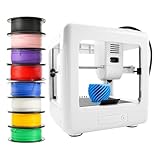
- 🎨 All-in-One Starter 3D Printer Kit – Comes with 8 vibrant PLA filament colors (200g each), a fully equipped printing kit, and user-friendly instructions—perfect...
- 🖨️ Compact & Portable FDM Design – This mini desktop 3D printer uses FDM technology and is compact enough for any desk or workspace. Great for school, home, or...
- 🧠 Effortless Setup, Plug & Print – No complex calibration needed. Supports TF Card and USB connections, compatible with Windows and macOS using CURA, Easyware, or...
- 💡 Precise & Smooth Printing – Achieve detailed prints with 0.05-0.2mm accuracy. Features a 0.4mm nozzle, supports 1.75mm PLA, and even WOOD filament.
- 📦 Full Accessories Included – Package includes the printer components, 8-color filaments, TF card and reader, US power adapter, filament holder, screwdriver, and a...
Discover a compact 3D printer designed to bring creativity and learning to any space. This mini 3D printer kit is lightweight and portable, making it easy to set up at home, in classrooms, or on the go. Its user-friendly design simplifies the printing process, allowing beginners to focus on creating without worrying about complex calibrations.
The printer uses a 0.4mm nozzle and supports both PLA and wood filaments, delivering precise results with an accuracy range from 0.05 to 0.2mm. With eight vibrant 200g PLA filaments included, users can explore a variety of colorful projects right away. The device supports USB and TF card printing, compatible with Windows and macOS through popular slicing software.
Maintenance is straightforward thanks to its simple design and included essential tools, ensuring smooth operation without the need for extensive technical knowledge. While the compact size limits the build volume, it remains ideal for small-scale prints and educational purposes. This printer balances ease of use and functionality, perfect for those starting in 3D printing.
Best for: Beginners, students, and hobbyists seeking a portable, easy-to-use 3D printer kit for creative learning and small projects.
What We Like:
- Includes 8 vibrant PLA filament colors and essential setup tools.
- Compact and lightweight for easy portability and versatile use.
- Simple plug-and-print operation with broad software compatibility.
- Supports both PLA and wood filaments for varied printing options.
Specification:
| Feature | Details |
|---|---|
| Manufacturer | Not specified |
| Dimensions | Compact size (not specified) |
| Weight | 3.3 lb (1.5 kg) |
| Material | PLA and wood filament supported |
| Color Options | 8 colors PLA filaments included |
Factors to Consider When Choosing a 3D Printer Kickstarter

When picking a 3D printer Kickstarter, you’ll want to check its printing speed and precision to match your projects. Make sure it handles multiple colors if that’s important to you and offers a setup process that’s easy to follow.
Don’t forget to evaluate safety features, especially for kids. Also, consider whether it supports the materials you plan to use. These details can make a big difference in your overall experience.
Printing Speed And Precision
Although many factors influence your choice of a 3D printer Kickstarter, printing speed and precision often top the list. You’ll want a printer that balances fast output with fine detail.
Some models reach speeds up to 600 mm/s, slashing print times for larger projects. Precision hinges on layer resolution—top printers achieve layers as thin as 0.05 mm, capturing intricate details.
Acceleration rates, like 20,000 mm/s², let your printer start and stop swiftly without sacrificing quality. Automatic bed leveling guarantees the first layer sticks perfectly, preventing errors down the line.
Also, consider nozzle size: smaller ones (around 0.4 mm) provide sharper detail, while larger nozzles boost speed by increasing material flow. Choosing wisely here sets the foundation for flawless, efficient prints.
Multi-Color Printing Capability
A 3D printer with multi-color printing capability lets you bring complex, vibrant designs to life by using several filament colors in one print. When choosing a Kickstarter, look for printers that feature dual or multiple extruders, allowing seamless color shifts without interrupting your workflow.
Some models offer innovative nozzle designs that mix colors, creating smooth gradients and expanding your palette. This capability not only enhances the visual appeal but also saves you time by cutting down on post-processing like painting or assembling parts.
Whether you’re an artist, educator, or hobbyist, multi-color printing opens up more creative possibilities and makes your projects stand out. So, prioritize printers with efficient and reliable multi-color technology to maximize both quality and convenience in your prints.
User-Friendly Setup Process
Multi-color printing opens up exciting creative possibilities, but getting started should be just as straightforward. When choosing a 3D printer Kickstarter, look for models with user-friendly setup processes that let you start printing in 5 to 15 minutes.
Plug-and-play designs and guided app setups make it easy to get going, even if you’ve never used a 3D printer before. Automatic bed leveling takes the guesswork out of adjustments, ensuring your first layer sticks perfectly without manual calibration.
Some printers even skip slicer software, giving you direct access to hundreds of ready-to-print models through mobile apps. These features combine to make your initial experience smooth and frustration-free, so you can focus on creating rather than troubleshooting right from the start.
Safety Features For Kids
When choosing a 3D printer Kickstarter for kids, you’ll want to prioritize safety features that protect young users during operation. Look for fully enclosed designs that prevent accidental contact with heated elements and moving parts.
Also, confirm the printer includes a child lock system that pauses printing when the enclosure door opens. This helps minimize risks.
Select models using non-toxic, eco-friendly materials like PLA to keep handling safe. It’s a smart choice for kids.
Consider printers equipped with automatic shutdown or filament break detection. These features help avoid overheating or failed prints that could cause hazards.
Finally, check for safety certifications such as TÜV Rheinland to verify the printer meets established safety standards for children. Prioritizing these features will help you find a safer 3D printer suitable for young users.
Material Compatibility Range
Understanding the range of materials a 3D printer can handle plays a significant role in choosing the right Kickstarter project for your needs. Material compatibility determines the types of filaments you can use, affecting your printer’s versatility.
Common filaments like PLA, PETG, TPU, ABS, and PVA each serve different purposes, from flexible parts to dissolvable supports. If you’re aiming for specialized projects, look for printers supporting advanced materials like carbon fiber or nylon.
Also, check the printer’s nozzle and bed temperature ranges since each material requires specific heat settings for ideal adhesion and print quality. Consider the printer’s design too—an enclosed body helps maintain stable temperatures, which is vital for materials sensitive to environmental changes.
This way, you can be sure your prints come out consistent and reliable every time.
Connectivity And App Support
How easily you can connect to and control your 3D printer often makes a big difference in your overall experience. Look for printers offering Wi-Fi or LAN connectivity, so you can start, monitor, and adjust prints remotely.
Companion apps simplify setup and let you pick models or track progress in real time. Advanced apps might even include AI-powered tools that turn images or text into 3D designs, making creativity way more accessible.
Also, check if the app provides a large model library—this saves you from designing from scratch. Finally, verify the printer supports popular slicing software, giving you full control over print settings for better results.
Prioritizing connectivity and app support will make your printing journey smoother and far more enjoyable. It’s definitely worth considering when choosing your next 3D printer!
Build Volume And Size
Choosing the right build volume and printer size can make all the difference in your 3D printing projects. The build volume determines the maximum size of objects you can print, so think about your project needs.
If you plan to create detailed miniatures, a smaller build volume might suffice. But if you want to print large prototypes or multiple items at once, opt for a larger build area to boost productivity.
Also, consider the printer’s footprint—its height, width, and depth—to guarantee it fits comfortably in your workspace without causing clutter. Compact printers work well in tight spaces or educational settings, while larger ones suit more complex tasks.
Frequently Asked Questions
What Are the Estimated Shipping Dates for These Kickstarter Projects?
You can expect estimated shipping dates ranging from late 2027 to early 2028, depending on each project’s progress.
Keep checking the Kickstarter updates regularly to stay informed about any changes or delays in their timelines.
It’s always a good idea to stay in the loop so you know exactly when your rewards might arrive.
Are There Any International Shipping Restrictions for These 3D Printers?
Shipping these 3D printers internationally isn’t always smooth sailing; some countries face restrictions due to customs or hazardous material rules. You’ll want to check each campaign’s shipping policy carefully to avoid unexpected obstacles on your creative journey.
It’s a good idea to double-check before you order. That way, you can keep your project moving without any hiccups!
What Warranty or Customer Support Options Do These Kickstarter Campaigns Offer?
You’ll usually get limited warranties covering defects and basic customer support through email or forums.
Some campaigns offer extended support packages or replacement parts, but always check each Kickstarter’s details to understand their exact warranty and support options.
It’s a good idea to read the fine print so you know what’s covered and how to get help if you need it.
Can These Printers Use Third-Party Filaments or Accessories?
Yes, most of these printers let you use third-party filaments and accessories, giving you flexibility. Just double-check compatibility details in their specs to avoid issues.
That way, you’re sure your favorite materials and add-ons will work smoothly without any hiccups.
How Do Kickstarter Backer Rewards and Tiers Work for These Projects?
Kickstarter backer rewards work by offering you different tiers, each with specific perks like early-bird pricing or exclusive accessories. You choose a tier, pledge the amount, and receive those rewards once the project succeeds.
It’s a pretty straightforward way to support a project you like. Plus, you get something cool in return for backing it early!
Conclusion
When choosing your 3D printer Kickstarter, think about what fits your needs—whether it’s the advanced multi-color Bambu Lab P1S Combo or the kid-friendly AOSEED AI.
Imagine Sarah, a teacher, who picked the Entina Tina2C Mini to inspire her students with hands-on projects. By matching features to your goals, you’ll get the best value and experience.
So, leap in confidently and bring your creative ideas to life with the perfect 3D printer! Whether you’re a hobbyist, educator, or professional, finding the right 3D printer Kickstarter can make all the difference. Keep an eye on the latest innovations and choose a model that aligns with your projects and budget. Your ideal 3D printer is out there—ready to turn your imagination into reality!