2 Best Beginner 3D Printer Projects for 2027
You’ll find the SCRIB3D P1 3D Printing Pen Kit perfect for beginners, offering adjustable settings and a lightweight design that makes printing easy and enjoyable.
This beginner-friendly 3D printing pen lets you dive right into creative projects without feeling overwhelmed. Plus, its intuitive controls help you get the hang of 3D printing quickly.
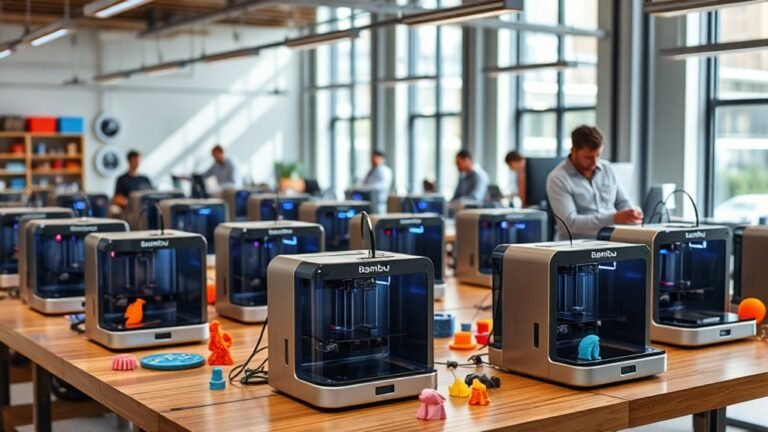
The 3D Printer Maker’s Beginner Kit for Bambu Lab also shines with its all-in-one simplicity and tailored compatibility.
It’s a great choice if you want a smooth setup experience and versatile projects to grow your skills. Both kits help you build confidence with straightforward instructions and reliable performance.
Before you start, consider project complexity, material choices, and time needed.
Exploring these factors will set you up for success and make your 3D printing journey much more enjoyable.
| Image | Name | Editor's Rating | Price |
|---|---|---|---|
|
|
||

|
|
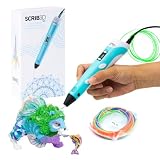
SCRIB3D P1 3D Printing Pen Kit with Display
- [A GIFT FOR THE WHOLE FAMILY] Create, Draw, Doodle, and Build in 3D with this affordable yet high grade 3D pen. The new SCRIB3D P1 3D Pen helps improve spatial thinking...
- [READY-TO-USE KIT] Includes 3 colors (30 feet) of PLA plastic to keep you Doodling for ages, as well as a power adapter, step-by-step manual, and a free stencil guide...
- [BEGINNER FRIENDLY] Plug the adapter into the back of the pen and choose your filament. The red light will turn on indicating warm up, this will take about 2-3 mins...
- [MULTI-FUNCTIONAL] The SCRIB3D P1 Pen is temperature adjustable to accommodate multiple types of filament: PLA (160-210℃, 320-410°F) or ABS (210-235℃, 410-455°F...
- [SAFE & RISK FREE PURCHASE] The P1's ceramic nozzle and premium motor ensure safety and high performance without clogging. Equipped with 2 minute auto sleep function...
Unlock your creativity with the SCRIB3D P1 3D Printing Pen Kit, designed to make 3D printing accessible and enjoyable. This pen addresses common challenges like uneven filament flow and clogging with its ceramic nozzle and anti-clog features, ensuring a smooth crafting experience every time.
The pen allows precise control with adjustable temperature and speed settings, accommodating both PLA and ABS filaments. This flexibility helps you create detailed designs without frustration. Its lightweight design reduces hand fatigue, making it ideal for longer projects or learning sessions.
Maintenance is straightforward thanks to the pen’s thoughtful build. The ceramic nozzle is durable and easy to clean, while the auto sleep function conserves energy and prevents filament waste when not in use. The included stencil book and project guide provide clear starting points to foster skill development.
While the kit includes only 30 feet of filament and offers limited color options for the pen, it remains a practical tool for beginners and hobbyists. The filament thickness range is suitable for most creative projects, though very fine details may require additional tools.
Best for: Beginners and hobbyists seeking a user-friendly, versatile 3D printing pen for creative learning and projects.
What We Like:
- Adjustable temperature and speed for PLA and ABS versatility
- Ceramic nozzle with anti-clog technology for hassle-free use
- Lightweight and ergonomic design reduces hand fatigue
- Includes stencil book and project guide for easy skill building
Specification:
| Feature | Details |
|---|---|
| Manufacturer | SCRIB3D |
| Dimensions | Not specified |
| Weight | Lightweight (exact weight not specified) |
| Material | Ceramic nozzle, plastic body |
| Color Options | Three pen colors available |
3D Printer Maker’s Beginner Kit for Bambu Lab
- Beginner-Friendly: Carefully selected 3D printing accessories designed for easy use and quick setup. Clear guidance helps new users start printing confidently—no extra...
- Versatile for All Printing Needs: Supports a wide range of print types and materials, Ideal for hobbyists and beginners learning to optimize their 3D print DIY
- Excellent Value: Includes multiple essential tools and components in one affordable package
The 3D Printer Maker’s Beginner Kit for Bambu Lab offers a straightforward solution for new users eager to start 3D printing with ease. It is designed to simplify setup and maintenance, so you can focus more on creating and less on troubleshooting. This all-in-one kit provides essential tools and supplies tailored to work seamlessly with Bambu Lab Makerworld printers.
Its compact and lightweight design makes storage and handling simple, saving space without sacrificing functionality. The kit supports various print types and materials, helping you explore a wide range of projects while gradually building your skills. Maintenance becomes easier with the included tools that help keep your printer in optimal condition.
While the kit is specifically made for Bambu Lab Makerworld, this focus ensures compatibility and smooth performance. It effectively addresses common beginner challenges, such as managing different materials and achieving consistent print quality. However, users should note it is not compatible with other 3D printer brands.
Best for: Beginners and hobbyists who want a practical, easy-to-use starter kit designed specifically for Bambu Lab Makerworld 3D printers.
What We Like:
- Simplifies setup with beginner-friendly tools
- Supports multiple printing materials and project types
- Compact, easy to store and carry
- Tailored for Bambu Lab Makerworld compatibility
Specification:
| Feature | Details |
|---|---|
| Manufacturer | Bambu Lab |
| Dimensions | Compact, lightweight design |
| Weight | Lightweight |
| Material | Included tools and supplies |
| Color Options | Not specified |
Factors to Consider When Choosing Beginner 3d Printer Projects
When picking your first 3D printer project, consider how complex it is and whether you have the right materials and tools on hand. Think about how much time you can realistically commit and how steep the learning curve might be.
Balancing these factors will help you choose a project that’s both fun and manageable. It’s all about finding something that keeps you interested without feeling overwhelmed.
Project Complexity Levels
Choosing beginner 3D printer projects involves balancing simplicity with gradual skill-building. Start with simple designs using basic geometric shapes that you can finish within a few hours.
These quick projects help you gain confidence and understand your printer’s functionality without feeling overwhelmed. As you improve, try projects with moving parts or intricate patterns to challenge yourself and develop new skills.
Keep in mind the time each project demands—short tasks keep motivation high and encourage experimentation. Although material choice affects complexity, focus first on designs that don’t require advanced settings or techniques.
Material Compatibility Needs
Several key factors influence which materials suit your beginner 3D printer projects best. You’ll want to evaluate the printing temperature, as materials like PLA print between 160-210°C, while ABS requires 210-235°C.
Since PLA melts at lower temperatures and warps less, it’s perfect if you’re just starting out. Think about your project’s purpose too—PLA is easy but less durable, while ABS offers strength but demands more skill.
PETG blends the best of both worlds, giving you flexibility and toughness without much hassle. Also, make sure the material matches your printer’s specs, like nozzle size and filament diameter, to avoid printing failures.
Keeping these compatibility needs in mind helps you pick materials that fit both your machine and project goals. It’ll make your printing experience smoother and your results way better!
Required Tools Accessibility
Picking the right materials for your beginner 3D printer projects sets a solid foundation, but having accessible and user-friendly tools makes the process even smoother. You’ll want to choose projects that require tools like 3D printing pens or starter kits, which are easy to find and simple to use.
Opt for tools with adjustable temperature settings so you can work with various filaments, especially commonly available PLA. Safety matters too—look for features like auto sleep functions and quality materials to keep your experience secure and enjoyable.
Finally, pick projects that include clear guides or stencil books, so you can follow step-by-step instructions without frustration. This way, you’ll gain confidence and enjoy crafting from the start.
Time Commitment Estimates
You’ll want to contemplate how much time you can realistically dedicate to a project before diving in. Beginner 3D printing projects can range from quick 1-2 hour prints to more detailed ones taking 5-10 hours or longer.
Remember, setting up your printer and preparing materials usually adds 30 minutes to an hour before printing even starts. After printing, you might spend another 1-3 hours on post-processing tasks like sanding, painting, or assembling parts.
Since you’re just starting, it’s wise to allocate extra time for troubleshooting and adjustments, as common printing issues can pop up. By estimating your available time honestly, you’ll pick projects that fit smoothly into your schedule and keep your 3D printing experience enjoyable.
Learning Curve Considerations
Understanding the time commitment helps, but recognizing how steep the learning curve can be is just as important when choosing your first 3D printer projects. Start with simple shapes and minimal assembly to build confidence and essential skills.
Opt for projects using common materials like PLA filament to keep costs down and simplify the process. Pick designs that gradually increase in complexity, so you can improve step by step without feeling overwhelmed.
Use printers with adjustable settings, like temperature and speed, to fine-tune your prints based on each project’s needs. Don’t forget to tap into community resources—forums and tutorial videos offer practical tips and solutions to common challenges, making your learning smoother and more enjoyable.
Frequently Asked Questions
How Do I Maintain My 3D Printer for Longevity?
You should regularly clean the nozzle, lubricate moving parts, and check belt tension.
Also, make sure to update your firmware and level the bed before each print.
Don’t forget to store your filament properly. These simple steps really help keep your 3D printer running smoothly and make it last longer.
What Safety Precautions Should Beginners Follow When 3D Printing?
You should always work in a well-ventilated area and wear gloves when handling hot parts. Avoid touching the nozzle to prevent burns.
Keep your workspace clean, and never leave the printer unattended during operation. Staying safe while 3D printing is super important, so these simple steps really help!
Can I Use Recycled Filament With Beginner 3D Printers?
Yes, you can use recycled filament with beginner 3D printers, but it’s best to choose high-quality recycled materials.
They might clog nozzles or produce inconsistent prints if the filament isn’t well-processed or properly stored.
How Do I Troubleshoot Common 3D Printing Errors?
You troubleshoot common 3D printing errors by checking bed leveling, cleaning the nozzle, and adjusting print speed. It’s also important to ensure proper filament loading and review your slicer settings.
Don’t forget to update your firmware regularly. Keep an eye out for filament jams or temperature issues—they can cause a lot of headaches if overlooked.
What Software Is Best for Designing Beginner 3D Models?
You’ll find Tinkercad perfect for designing beginner 3D models because it’s user-friendly and web-based.
Fusion 360 offers more features if you want to grow your skills, but Tinkercad’s simplicity helps you get started quickly.
Conclusion
Choosing your first 3D printer project doesn’t have to be overwhelming. With options like the SCRIB3D P1 Pen Kit and Bambu Lab’s Beginner Kit, you’re set for success.
Remember, considering project complexity, materials, tools, time, and learning curve will save you frustration. So, why not start with something designed just for beginners?
Jump in confidently and watch your creativity come to life. Starting with beginner-friendly 3D printer projects helps you build skills without stress. Your 3D printing journey begins now—embrace these simple projects to make your first experience enjoyable and rewarding!