6 Best Basic Printers With Cheap Ink for 2027 Savings
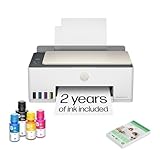
If you’re looking for a budget-friendly printer that saves money on ink, the HP Smart Tank 5100 or 5103 are great choices. These printers come with refillable tanks and include up to 3 years of ink right out of the box. That means you’ll slash your long-term printing costs without constantly buying new cartridges.
Another solid option is the Canon MegaTank G3270, which also offers high-capacity tanks to keep ink expenses low.
If space is tight, check out the HP DeskJet 2955 and Canon PIXMA TS3720. Both use affordable cartridges and deliver decent print quality for everyday tasks.
These printers strike a good balance between initial price, ink efficiency, and user-friendliness. Take a look below to see which model fits your printing needs best!
| Image | Name | Editor's Rating | Price |
|---|---|---|---|

|
|
||

|
|
||

|
|
||
|
|
||

|
|
HP DeskJet 2955 Color Inkjet Printer | Wireless | All-in-One
- PERFECT FOR BASIC PRINTING NEEDS – Print everyday color documents like to-do lists, letters, financial documents and recipes
- KEY FEATURES – Color print, copy, scan, and a 60-sheet input tray, plus mobile and wireless printing
- OPTIMIZE PRINT FORMATTING WITH HP AI – Print web pages and emails with precision—no wasted pages or awkward layouts; HP AI easily removes unwanted content, so your...
- ICON LCD – Print your basic documents with ease from the intuitive control panel
- PRINT SPEED – Up to 7.5 ppm black, 5.5 ppm color

The HP DeskJet 2955 Color Inkjet Printer is designed to fit comfortably in small spaces, making it ideal for home use. Its all-in-one functionality allows you to print, scan, and copy with ease, reducing the need for multiple devices. This helps simplify your workspace and daily tasks.
With print speeds of 7.5 ppm for black and 5.5 ppm for color, the DeskJet 2955 handles everyday printing efficiently. The printer produces sharp images with resolutions up to 4800 x 1200 dpi, ensuring clear photos and documents. However, it requires manual intervention for two-sided printing, which may slow down larger jobs.
Maintaining the printer is straightforward with its eco-friendly design, incorporating recycled plastics and energy-saving features. It also comes with a three-month trial of HP Instant Ink, which can significantly lower ink expenses and reduce the hassle of frequent cartridge changes.
Wireless connectivity through dual-band Wi-Fi and a mobile app lets you print directly from your smartphone or tablet. This convenience supports a modern, flexible workflow without the clutter of cables.
Best for: Individuals and families needing a compact, affordable all-in-one printer for home use with wireless convenience and moderate printing, scanning, and copying needs.
What We Like:
- Compact size fits well in small home offices or rooms.
- Dual-band Wi-Fi and mobile app for easy wireless printing.
- Three-month HP Instant Ink trial to help reduce ink costs.
- Clear photo printing with high resolution.
- Energy-efficient design using recycled materials.
Specification:
| Feature | Details |
|---|---|
| Manufacturer | HP |
| Dimensions | Compact design (exact size not specified) |
| Weight | Not specified |
| Printing Technology | Color Inkjet |
| Print Speed | 7.5 ppm (black), 5.5 ppm (color) |
| Maximum Print Resolution | 4800 x 1200 dpi |
| Connectivity | Dual-band Wi-Fi, Mobile app |
| Functions | Print, Scan, Copy |
| Duplex Printing | Manual |
Canon PIXMA TS3720 Wireless All-in-One Printer White
No products found.
The Canon PIXMA TS3720 Wireless All-in-One Printer White is designed to make your home printing straightforward and efficient. It tackles everyday printing challenges by delivering sharp text and vibrant photos with high print resolution up to 4800 x 1200 dpi. This means your documents and images come out clear and detailed without the cost of professional services.
Setting up this compact inkjet printer is hassle-free thanks to its easy wireless connectivity and support for mobile printing. Whether you use a smartphone, tablet, or laptop, you can print from anywhere in your home. The dual-band Wi-Fi enhances connection stability, reducing interruptions during use.
Maintenance is simple with affordable Canon PG-275 and CL-276 ink cartridges, helping keep running costs low. The 60-sheet rear tray supports various paper sizes, including legal and photo papers, fitting well into small home offices or study areas. However, note that it only supports single-sided prints and has moderate print speeds.
Best for: Individuals needing a compact, budget-friendly all-in-one printer for basic home document and photo printing with wireless convenience.
What We Like:
- High-resolution printing produces sharp text and vibrant images.
- Easy wireless setup with mobile device compatibility.
- Compact design fits well in limited spaces.
- Supports multiple paper sizes including legal and photo formats.
Specification:
| Specification | Details |
|---|---|
| Manufacturer | Canon |
| Dimensions | Compact size (exact size not specified) |
| Weight | Not specified |
| Color | White |
| Print Resolution | Up to 4800 x 1200 dpi |
| Print Speed | 7.7 ppm black, 4 ppm color |
| Paper Tray Capacity | 60 sheets |
| Connectivity | Wireless with dual-band Wi-Fi |
| Ink Cartridge Models | PG-275 (black), CL-276 (color) |
HP Smart Tank 5100 Ink Tank Printer | 3 Years of Ink Included | All-in-One
- THE LAST PRINTER YOU'LL EVER NEED – Set it up once and print with confidence; no complicated maintenance, just easy, reliable printing you can count on
- FULLY LOADED WITH SAVINGS – Best for low-cost, high-volume printing—up to 3 years of HP Ink included; get up to 6,000 color or black pages right out of the box
- KEY FEATURES – Print, copy and scan, plus borderless prints, mobile and wireless printing
- MESS-FREE REFILL – Replenish ink with HP's easy-access, mess-free refill system; simply plug the ink bottles into this cartridge-free ink tank and let them drain—no...
- BEST PRINT QUALITY, PERIOD – Sharper text, richer colors, only with HP Smart Tank
Experience smooth, cost-effective printing with the HP Smart Tank 5100 Ink Tank Printer, perfect for users needing large print volumes without frequent ink changes. This all-in-one device handles printing, copying, and scanning tasks with crisp results, helping you tackle daily documents efficiently.
Its cartridge-free ink system means you can refill easily with mess-free bottles, reducing waste and saving money over time. The printer delivers up to 6,000 pages in color or black, ideal for home environments where convenience and economy matter most.
Wireless connectivity and mobile printing options, including Apple AirPrint, let you print effortlessly from smartphones or tablets. The flatbed scanner and high resolution of up to 4800 × 1200 dpi ensure your scans and prints look sharp and professional.
While manual duplex printing requires a bit of extra effort and the paper tray holds just 30 sheets, the overall design focuses on simplicity and reliability for everyday use. With three years of ink included, it offers long-term convenience right from setup.
Best for: home users seeking an affordable, high-volume all-in-one printer with easy wireless and mobile printing capabilities.
What We Like:
- Up to 3 years of included ink supports high-volume printing without interruption.
- Cartridge-free, refillable ink bottles reduce mess and lower operating costs.
- Supports printing, copying, scanning, and borderless photo printing.
- Wireless and mobile printing features provide flexibility and ease of use.
Specification:
| Feature | Details |
|---|---|
| Manufacturer | HP |
| Dimensions | Approx. 15.7 × 14.1 × 7.6 in (40 × 35.8 × 19.3 cm) |
| Weight | Approx. 11.5 lb (5.2 kg) |
| Print Resolution | Up to 4800 × 1200 dpi |
| Connectivity | Wireless, USB, Apple AirPrint |
| Functions | Print, copy, scan |
| Ink System | Cartridge-free refillable tanks |
HP Smart Tank 5100 Ink Tank Printer | 3 Years of Ink Included | All-in-One
- THE LAST PRINTER YOU'LL EVER NEED – Set it up once and print with confidence; no complicated maintenance, just easy, reliable printing you can count on
- FULLY LOADED WITH SAVINGS – Best for low-cost, high-volume printing—up to 3 years of HP Ink included; get up to 6,000 color or black pages right out of the box
- KEY FEATURES – Print, copy and scan, plus borderless prints, mobile and wireless printing
- MESS-FREE REFILL – Replenish ink with HP's easy-access, mess-free refill system; simply plug the ink bottles into this cartridge-free ink tank and let them drain—no...
- BEST PRINT QUALITY, PERIOD – Sharper text, richer colors, only with HP Smart Tank
Experience hassle-free, high-volume printing with the HP Smart Tank 5100 Ink Tank Printer. Designed to eliminate frequent ink changes, this all-in-one printer comes with up to 3 years of ink included, letting you print thousands of pages right away. Its cartridge-free ink tanks mean fewer interruptions and less mess during refills.
This printer offers wireless printing, scanning, and copying from your laptop, smartphone, or tablet. The crisp color output up to 4800 x 1200 dpi ensures your documents and photos look sharp and vibrant. Its compact design fits well in home offices where space and convenience matter.
Maintenance is simple thanks to the refillable ink tanks, which use mess-free bottled ink. While it supports manual duplex printing, this requires user effort and driver support. Print speeds are moderate, suitable for typical home office needs rather than high-speed tasks.
Best for: Small home offices or individuals seeking an affordable, reliable all-in-one printer with minimal ink upkeep and wireless functionality.
What We Like:
- Includes up to 3 years of ink for extended printing without refills
- Cartridge-free refillable ink tanks reduce mess and downtime
- Wireless print, scan, and copy from multiple devices
Specification:
| Feature | Details |
|---|---|
| Manufacturer | HP |
| Dimensions | Compact (exact size not specified) |
| Weight | Not specified |
| Color Options | Not specified |
| Print Resolution | Up to 4800 x 1200 dpi |
| Print Speed | 5 ppm (color), 12 ppm (black) |
HP Smart Tank 5103 Ink Tank Printer | 2 Years of Ink Included | All-in-One
- SET IT UP ONCE AND PRINT WITH CONFIDENCE. No complicated maintenance. Just easy, reliable printing you can count on.
- INK FOR YEARS. NOT MONTHS. Up to 2 years of ink included. Get thousands of pages of cartridge-free printing. More pages, less hassle
- KEEPS PRINTING WELL AFTER COMPETITORS HAVE QUIT. No complex maintenance. Sharper text, richer colors.[2] Only with HP Smart Tank
- PREMIUM SUPPORT - Strong technical expertise to solve issues faster
- THE LAST PRINTER YOU'LL EVER NEED. Enjoy years of refillable, cartridge-free printing.
Experience hassle-free, high-volume printing with the HP Smart Tank 5103 Ink Tank Printer, designed to keep your workflow smooth and costs low. This all-in-one printer eliminates the need for cartridges, allowing you to print up to 6,000 pages using the included ink tanks. Its cartridge-free design means you won’t have to worry about frequent replacements or interruptions.
Refilling ink is straightforward and clean with specially designed bottles that minimize spills. This system makes maintenance simple, helping you avoid the mess and frustration often associated with traditional printers. The printer’s design supports heavy use while maintaining consistent quality.
Thanks to HP’s advanced AI technology, every print delivers sharp text and vibrant colors, ensuring professional results whether you’re printing documents or photos. The printer is built to last longer than many competitors, giving you peace of mind and premium support when needed.
While the initial setup takes a bit more time due to tank filling, the long-term savings and convenience make it worthwhile. It’s larger than compact cartridge printers, so plan for extra space in your workspace.
Best for: Small businesses or individuals who need a reliable, cost-effective printer for large-volume, cartridge-free printing with crisp and colorful output.
What We Like:
- Up to 2 years of ink included, enabling up to 6,000 pages without cartridge changes
- Easy, mess-free refilling with specially designed ink bottles
- Enhanced print quality with HP’s AI for sharp and vibrant prints
- Durable design built for heavy use and long-lasting performance
- Premium support available for troubleshooting and assistance
Specification:
| Feature | Details |
|---|---|
| Manufacturer | HP |
| Dimensions | Approx. 15.5 x 14.4 x 7.7 in (39.4 x 36.6 x 19.6 cm) |
| Weight | Approx. 4.6 kg (10.1 lbs) |
| Material | Plastic |
| Color Options | White with black accents |
Canon MegaTank G3270 All-in-One Wireless Color Printer
- Wireless Print/Copy/Scan
- Up to 2 years of ink included (2)
- Print up to 6,000 black & white / 7,700 color pages using a single set of inks! (1)
- Save up to $1,000 on ink (1)
- 1.35” Square LCD display
The Canon MegaTank G3270 All-in-One Wireless Color Printer offers a smart solution for those looking to reduce ink costs without compromising print quality. Its refillable MegaTank system delivers up to two years of ink, allowing you to print large volumes with ease. This means fewer interruptions and more time focusing on your tasks.
Designed for everyday use at home or in a home office, this printer produces sharp, vibrant prints at a resolution of 4800 x 1200 dpi. It handles a variety of paper sizes, from standard letters to photos, supporting diverse printing needs. Wireless connectivity and app control simplify printing directly from your smartphone or tablet.
Maintenance is straightforward thanks to the refillable ink tanks, reducing the hassle and expense of frequent cartridge replacements. Although it lacks automatic duplex printing and has a modest 100-sheet paper capacity, it remains a reliable and budget-friendly choice. Its compact design and Energy Star certification make it a practical, eco-conscious addition to your workspace.
Best for: home and home office users seeking a cost-effective, high-quality color printer with wireless convenience and low ink costs.
What We Like:
- Includes up to two years of ink for high-volume printing without frequent refills
- High print resolution ensures sharp and vibrant color and black-and-white documents
- Wireless connectivity and app control enable easy printing from mobile devices
Specification:
| Feature | Details |
|---|---|
| Manufacturer | Canon |
| Dimensions (in) | Not specified |
| Weight | 13.2 lb (6 kg) |
| Color Options | Not specified |
| Print Resolution | 4800 x 1200 dpi |
| Paper Capacity | 100 sheets |
| Connectivity | Wireless, app control |
Factors to Consider When Choosing a Basic Printer With Cheap Ink

When choosing a basic printer with cheap ink, you’ll want to focus on ink cost efficiency and print quality to get the best value.
Think about whether cartridge or tank systems suit your needs. Also, check out connectivity options like Wi-Fi or USB.
Don’t forget to look at the printer’s speed and capacity so it matches your printing habits. That way, you won’t end up with something that’s slow or runs out of space too quickly.
Ink Cost Efficiency
Although upfront printer prices might look appealing, you’ll save more in the long run by comparing the true ink cost per page. This is calculated by dividing the cartridge or bottle price by its page yield.
Opt for high-yield cartridges or refillable tanks—they often slash your cost per page by a large margin since they print thousands rather than just a few hundred pages. Subscription plans can lower costs but watch out for ongoing fees.
Make sure to compare total annual expenses against pay-as-you-go options. Also, pigment black inks usually last longer on paper, which reduces reprints and effectively lowers your cost per usable page.
Keep in mind your actual usage: photos and graphics use more ink than text, so your real-world cost per page might be higher than manufacturer estimates based on standard coverage.
Print Quality Standards
Since you want both affordable ink and quality prints, you’ll need to focus on key print quality standards before choosing a basic printer. Look for a minimum print resolution of 1200 x 1200 dpi for sharp black text, and at least 4800 x 1200 optimized dpi for decent photo and color output.
Make certain the printer uses pigment black ink rather than dye-based to avoid smudging, especially if you print many documents. Check the scanner’s optical resolution too—300 dpi or higher ensures good copy quality.
Color gamut matters: printers with multiple colorants and optimized photo modes deliver smoother gradients and more accurate colors. Also, consider first-page-out times and pages-per-minute rates, since quick-drying inks and consistent ink distribution impact your perceived print quality on every page.
Cartridge vs. Tank
Choosing between cartridge and tank printers largely depends on how you balance upfront costs with long-term ink expenses. Cartridge printers typically cost less initially and are easy to maintain since you just swap sealed cartridges.
However, they use smaller ink volumes and cost more per page. Tank printers, on the other hand, have higher upfront prices but offer large refillable reservoirs, dramatically lowering your ink cost per page.
One set of refill bottles can print thousands of pages versus a few hundred with cartridges. Tank systems reduce waste and frequent purchases but need careful handling to avoid spills and potential clogging if unused for a while.
To decide, calculate your total cost of ownership by dividing ink price by yield and consider printhead maintenance for both options.
Connectivity Options Available
When picking a basic printer with cheap ink, you’ll want to zero in on connectivity options that fit your setup. Make sure the printer supports both 2.4 GHz and 5 GHz Wi‑Fi bands for faster transfers and less interference.
If you print from smartphones or tablets, look for Wi‑Fi Direct or a built-in access point to skip needing a router. Compatibility with Apple AirPrint and Mopria lets you print natively from iOS, Android, or Chromebook without extra drivers.
For wired connections, check for a USB Type-B or Type-C port. And if multiple users share the printer, consider an Ethernet port.
Finally, cloud or remote printing features enable you to send print jobs via email or apps when you’re away from home. It’s super handy when you’re not physically near your printer!
Printer Speed & Capacity
Connectivity options keep your printer linked to your devices, but speed and capacity determine how efficiently it handles your print jobs. Check the pages-per-minute (ppm) rates—basic home printers usually print 5–12 ppm in black and 4–6 ppm in color.
Faster speeds mean less waiting. Also, note the first-page-out time, typically around 20 seconds, so you know how quickly printing starts.
Consider the monthly duty cycle and recommended page volume to avoid overworking the printer. Paper input trays generally hold 60–100 sheets, and output trays 20–30 sheets, so bigger trays reduce refill frequency.
If you copy or scan often, check speed limits and maximum copy runs, as some basic models restrict copies per session. This can slow your workflow if you print duplicates regularly.
Frequently Asked Questions
How Do Ink Refill Kits Compare to Original Cartridges in Cost and Quality?
Ink refill kits usually cost less than original cartridges, but you might notice lower print quality or occasional clogs. You’ll save money, but original cartridges generally offer more consistent, reliable results and longer-lasting performance.
That said, if you’re okay with a bit of trial and error, refill kits can be a budget-friendly option. Just keep in mind that the convenience and reliability of original cartridges often make them worth the extra cost.
Can These Printers Connect to Mobile Devices via Bluetooth?
Like a bridge over water, many basic printers do connect to your mobile devices via Bluetooth. You’ll find models that let you print wirelessly, making it easy to send documents straight from your phone or tablet.
It’s super convenient, right? Just tap, connect, and print without any cables getting in your way. Whether you’re at home or on the go, Bluetooth-enabled printers keep things simple and quick.
What Is the Typical Print Speed for Black and Color Documents?
You can expect typical print speeds around 7-12 pages per minute for black documents and 4-8 pages per minute for color. Speeds vary by model, but these ranges suit most basic home or office needs.
That said, your actual speed might be a bit different depending on the printer you use. But generally, these numbers give you a good idea of what to expect.
Are There Any Eco-Friendly Ink Options Compatible With These Printers?
Think of eco-friendly ink like planting seeds instead of cutting trees.
Yes, you’ll find compatible options made from plant-based or recycled materials that work with many basic printers.
They help you save money and the planet simultaneously.
How Do Warranty Terms Vary Among These Basic Printer Models?
Warranty terms vary widely—you’ll find some printers offering one-year coverage, while others extend up to two years with optional plans.
Always check what’s included, like parts, labor, or ink, so you don’t get surprised later.
It’s a good idea to read the fine print and see if there are any conditions that might affect your warranty.
That way, you’re fully prepared and can avoid any unexpected costs down the road.
Conclusion
When choosing a basic printer with cheap ink, remember that ink costs can make up over 70% of what you spend on printing. Picking the right model, like an ink tank printer, can save you a ton in the long run.
Whether you need wireless convenience or all-in-one features, going for printers with affordable ink refills means more savings and less hassle. So, invest smartly now and watch your printing costs drop!
Choosing one of the best basic printers with cheap ink for 2027 is a smart move if you want to keep expenses low. These printers offer reliable performance without the high cost of replacement ink. By focusing on models designed for budget-friendly ink use, you ensure your printing remains affordable and efficient over time. Remember, smart choices today lead to big savings tomorrow!