4 Best and Cheap 3D Printers for 2027
If you’re looking for an affordable and reliable 3D printer in 2027, you’re in the right place.
Finding the best cheap 3D printers can be tricky, but there are some great options that deliver quality without breaking the bank.
Whether you’re a beginner or just want something easy to use, these models have you covered.
Check out the Portable Compact FDM, which comes with a removable build plate that makes printing and cleanup super easy.
The Creality Ender 3 V3 SE is another fantastic choice—offering fast, high-quality prints with smart upgrades to enhance your experience.
Beginners will appreciate the Entina Tina2 Mini, featuring one-touch leveling and a setup that’s ready to go right out of the box.
For kids or those new to 3D printing, the Geeetech Mini is perfect with its auto-leveling and heated bed.
Keep exploring to find the model that fits your needs best!
| Image | Name | Editor's Rating | Price |
|---|---|---|---|

|
|
||

|
|
||
|
|
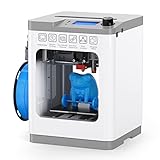
Portable Compact FDM 3D Printer with Removable Plate
- Foolproof Setup with Video Guides – Never get stuck! We provide a crystal-clear Quick Start Guide and step-by-step video tutorials. Watch them online to get started.
- Simple Assembly with Video Guide – Requires quick modular setup (watch our step-by-step video). Comes with 10m PLA filament, TF card, tools, and 12V Type-C power...
- Versatile Filament Compatibility – Unleash your creativity with both PLA and flexible TPU (1.75mm). The reliable 0.4mm nozzle and precise 0.05-0.3mm layer thickness...
- Reliable Performance & Compact Design – Features stable FDM technology and a removable build plate for easy model removal. The perfect 100x100x100mm build volume is...
- Complete Package – No Hidden Costs – Includes printer, 10m PLA filament, 8GB TF card + reader, tools, illustrated manual, and 12V Type-C power adapter. Plus free...
Experience hassle-free 3D printing with the Portable Compact FDM 3D Printer featuring a removable plate. Its compact design fits neatly into small spaces, making it an excellent choice for classrooms, studios, or home workshops. The removable build plate simplifies the process of taking off finished models, reducing the risk of damage during removal.
This 3D printer supports PLA and TPU filaments, allowing users to explore flexible and rigid materials with ease. Its precise layer control, ranging from 0.05 to 0.3 mm, ensures detailed and smooth prints, helping beginners and hobbyists achieve professional-looking results. The 0.4 mm nozzle balances detail and print speed effectively.
Maintenance is straightforward thanks to the lightweight build and simple setup. The printer comes with clear tutorials, guiding users through every step, which minimizes downtime and learning frustration. Although the build volume is limited to 100 x 100 x 100 mm, it is well-suited for small, detailed projects.
While it lacks advanced features like touchscreen controls or Wi-Fi connectivity, this model focuses on core functionality and ease of use. Its portability and user-friendly design make it ideal for educational purposes and entry-level printing.
Best for: Beginners, students, and hobbyists seeking a reliable, portable 3D printer for small, detailed projects and educational use.
What We Like:
- Compact design with a removable build plate for easy model removal
- Supports PLA and TPU filaments for versatile printing options
- Precise layer thickness control for high-quality prints
- Lightweight and portable, perfect for small workspaces
- Includes clear setup guides and video tutorials
Specification:
| Feature | Details |
|---|---|
| Manufacturer | — |
| Dimensions | — |
| Weight | — |
| Build Volume | 100 x 100 x 100 mm |
| Nozzle Size | 0.4 mm |
| Supported Filaments | PLA, TPU |
| Layer Thickness | 0.05 to 0.3 mm |
Creality Ender 3 V3 SE 3D Printer Upgrade
- 【250mm/s High-speed Printing】Creality Ender 3 V3 SE 3d printer supports a maximum printing speed of 250mm/s, 2500mm/s² acceleration.The speed has been greatly...
- 【Powerful ""Sprite"" Direct Extruder】Ender 3 V3 SE is the upgrade of ender 3, ender 3 v2, ender 3 pro, ender 3 neo, ender 3 v2 neo, ender 3 s1, ender 3 s1 pro etc 3d...
- 【Worry-free CR Touch Auto Leveling & Strain Sensor】Creality Ender 3 upgraded 3d printer features a CR Touch sensor for auto leveling and a strain sensor for auto...
- 【Stable Dual Z-axis & Y-axis Linear Shafts】High-precision dual Z-axis lead screws reduce Z wobbling effectively, avoid printing deviation in single-axis printing...
- 【Quick Assembly & Easy to Use】Preassembly has solved those hassles and worries of parts assembly, It only takes 3 steps to complete the assemble the ender-3 v3 se 3d...

Experience a new level of speed and precision with the Creality Ender 3 V3 SE 3D printer upgrade. Designed to cut your print times by up to 73%, this model reaches impressive speeds of 250 mm/s with smooth acceleration. It helps makers finish projects faster while maintaining high-quality results.
The printer features a Sprite full-metal dual-gear direct extruder, compatible with PLA, TPU, and PETG. Its automatic filament loading and unloading simplify material changes, reducing downtime and making maintenance easier. This design supports consistent extrusion and fewer clogs.
Stability is enhanced through dual Z-axis lead screws, sturdy Y-axis shafts, and the CR Touch auto-leveling sensor coupled with a strain sensor for precise Z-offset adjustment. These features ensure reliable prints with minimal manual calibration. Setup is straightforward, requiring only about 20 minutes.
While the build volume is moderate at 8.66 x 8.66 x 9.84 inches, the upgrade is ideal for existing Ender 3 users seeking a faster, more stable, and user-friendly machine. It blends improved functionality with ease of use to enhance your 3D printing experience.
Best for: Makers and hobbyists looking to upgrade their Ender 3 for faster printing and greater reliability.
What We Like:
- Fast print speeds with significant time savings
- Reliable dual-gear direct extruder with easy filament handling
- Enhanced stability from dual Z-axis screws and precise auto-leveling
- Quick and simple setup with minimal calibration needed
Specification:
| Feature | Details |
|---|---|
| Manufacturer | Creality |
| Build Volume | 8.66 x 8.66 x 9.84 inches |
| Max Print Speed | 250 mm/s |
| Acceleration | 2500 mm/s² |
| Extruder Type | Sprite full-metal dual-gear |
| Supported Filaments | PLA, TPU, PETG |
| Auto-Leveling Sensor | CR Touch |
| Z-Axis | Dual lead screws |
Entina Tina2 Mini 3D Printer for Beginners
- 3D Printer for Beginners and Kids: Out of the box, fully assembled, Speedy Printing –TINA2 BASIC 3d printer is super easy to use and does not require a complex setup...
- Ready to Print: Equipped with 2.4" LCD screen and Wiibulider slicer software makes it easy to conduct offline printing using the MicroSD Card. The 3-d printer supports...
- Fully Open-Source: Entina TINA2 BASIC Mini 3D printer adopts a safety-first design philosophy, featuring complete open-source compatibility for enhanced flexibility and a...
- Auto Leveling & Magnetic Platform: The small 3d printer does not need manual leveling, the intelligent leveling system can automatically adjust the uneven bed, thus...
- Compact Design:This is light weight and minimalist desktop 3D printers, the mini 3D printer size is 8.3''x8.3''x11.4'', weight is 3kg. Light weight and portable design...
The Entina Tina2 Mini 3D Printer is designed to make 3D printing accessible and hassle-free. Its fully assembled, compact design means you can start printing almost immediately, without complicated setup. The lightweight frame fits easily on any desk, ideal for small spaces at home, school, or office.
This printer addresses common beginner challenges with its one-touch auto-leveling system, ensuring a smooth printing surface every time. Dual Z-axis rails provide extra stability, which improves print quality and reduces errors. The flexible magnetic build plate lets you remove models without damage or fuss.
Maintenance is straightforward thanks to its durable components and user-friendly features. Offline printing via MicroSD card lets you print without a connected computer, adding convenience and flexibility. The 2.4″ LCD screen offers basic controls that keep navigation simple and effective.
Though the build volume is compact, it suits beginners and hobbyists exploring small projects. Its open-source compatibility encourages learning and experimentation. The printer is best suited for those new to 3D printing, including educators and kids, who need a safe and reliable device.
Best for: Beginners, hobbyists, and educators seeking a compact, easy-to-use 3D printer for small-scale projects.
What We Like:
- Quick first print setup with fully assembled design
- One-touch auto-leveling for consistent print quality
- Dual Z-axis rails enhance stability during printing
- Flexible magnetic build plate simplifies model removal
- Offline printing capability via MicroSD card
Specification:
| Feature | Details |
|---|---|
| Manufacturer | Entina |
| Dimensions | 8.3 x 8.3 x 11.4 inches |
| Weight | 6 lbs |
| Build Volume | 100 x 105 x 100 mm |
| Print Technology | FDM |
| Display | 2.4″ LCD screen |
| Connectivity | MicroSD card (offline) |
Geeetech Mini 3D Printer for Kids and Beginners
No products found.
The Geeetech Mini 3D Printer is designed to make 3D printing simple and accessible, especially for kids and beginners. Its fully assembled design and intuitive knob controls remove the hassle of setup. The one-button filament loading system further simplifies operation, helping users start printing quickly.
This compact printer offers a 3.94 × 4.33 × 3.94 inch print area, ideal for small projects. It supports TPU and PLA filaments, allowing for versatile printing with high accuracy. The fast printing speed of up to 250 mm/s enhances productivity without compromising quality.
Maintenance is straightforward with the 16-point full auto-leveling system, ensuring your prints stay smooth and warp-free. The heated magnetic PEI build plate makes removing prints easy while maintaining adhesion during printing. These features reduce the need for manual adjustments and frequent troubleshooting.
Though compact, the printer’s design supports educational and DIY projects effectively. The 2.4-inch LCD color screen, with bright backlighting, offers clear navigation. Keep in mind, the smaller print volume and 0.5 kg filament spool capacity might require more frequent filament changes.
Best for: Kids and beginners seeking an easy-to-use, fully assembled 3D printer for learning and small creative projects.
What We Like:
- Fully assembled with simple knob and one-button filament loading
- 16-point auto-leveling and heated magnetic PEI plate for smooth prints
- Supports TPU and PLA filaments with fast printing speeds up to 250 mm/s
- Compact size ideal for small, detailed projects
- Clear 2.4″ LCD color screen for easy navigation
Specification:
| Feature | Specification |
|---|---|
| Manufacturer | Geeetech |
| Print Area | 3.94 × 4.33 × 3.94 in |
| Filament Compatibility | TPU, PLA |
| Print Speed | Up to 250 mm/s |
| Build Plate | Heated magnetic PEI |
| Auto-Leveling | 16-point full auto-leveling |
| Display | 2.4″ LCD color screen |
| Filament Spool Size | 0.5 kg |
Factors to Consider When Choosing a Cheap 3D Printer

When choosing a cheap 3D printer, you’ll want to focus on print quality and the build volume that fits your projects.
Also, think about how easy it is to set up. And check if it supports the filament types you plan to use.
Don’t forget to balance your budget with warranty options. That way, you get the best value for your money.
Print Quality Importance
Achieving high print quality hinges on several key factors that directly impact your 3D printer’s performance. First, layer height controls the vertical resolution—smaller layers mean finer details but longer prints.
Nozzle and filament diameters set the smallest feature size, influencing surface finish and detail clarity. Mechanical stability matters a lot; a stiff frame with well-supported axes reduces vibrations and Z-wobble that ruin accuracy.
You’ll also need reliable bed adhesion and a flat, removable build plate with consistent leveling to guarantee your prints stick well and start right. Finally, extruder consistency and precise temperature control affect extrusion smoothness, layer bonding, and overall finish.
Paying attention to these factors guarantees you get the best print quality from a budget-friendly 3D printer.
Build Volume Needs
Print quality depends heavily on your printer’s capabilities, but the size of the objects you want to create also plays a big role. Match your build volume to the largest object you plan to print—small models fit within 100 × 100 × 100 mm, while larger prototypes need 200–300 mm or more.
Keep in mind the usable build volume might differ from the printer’s external size. Compact machines often limit part orientation or support placement for taller prints.
If you want to print multiple small parts simultaneously, a larger bed saves time by batch-printing. Also, think ahead: if you expect to scale projects or print functional parts, choose extra room in height and width.
Removable or flexible build plates help extend usability even on smaller printers. It’s a handy feature that can make a big difference when you’re juggling different projects.
Ease Of Setup
For a smooth start with your 3D printer, ease of setup matters a lot—especially if you want to be up and running quickly. Choose printers that arrive fully assembled or require minimal assembly, paired with clear Quick Start guides.
Look for one-button or guided filament loading and unloading, plus straightforward bed-leveling methods, whether manual aids or automatic leveling, to avoid setup errors. This makes things way less frustrating at the beginning.
Make certain the printer supports common filament sizes like 1.75 mm and includes a test spool along with sample G-code or preloaded models for your first prints. Having these on hand really helps you dive right in.
Removable or flexible build plates and simple model removal help protect prints and speed post-processing. It’s a small feature that makes a big difference when you’re just starting out.
Also, prioritize machines with beginner-friendly resources—step-by-step videos, illustrated manuals, troubleshooting guides—and simple offline controls like USB or card printing with an LCD. These features make your initial experience much easier and more enjoyable.
Filament Compatibility Range
While choosing a cheap 3D printer, you’ll want to make sure it supports the filament types and diameters you plan to use. Most printers accept 1.75 mm filament, but double-check to avoid compatibility issues.
Also, consider which materials it handles—PLA is common, but if you want TPU, PETG, or ABS, confirm the printer has a direct drive extruder or a heated hotend that reaches 240°C or higher. A heated bed capable of 70–110°C is essential for materials prone to warping.
The extrusion system matters too; flexible filaments like TPU print better with direct drive setups due to better filament control. Finally, verify the recommended print surfaces since certain filaments need specific beds or adhesives to stick well and prevent warping during printing.
Budget And Warranty
Although you might be keen to get the cheapest 3D printer available, setting a clear budget range before you shop helps you balance essential features like build volume, nozzle precision, and print speed against cost.
Decide if you want to spend under $200, $200–$500, or $500–$1,000. Also, keep in mind the total ownership costs—filament, replacement parts, upgrades, and shipping can add 10–30% more.
Check the warranty length and coverage carefully. Many entry-level printers offer 6–12 months but may only cover manufacturing defects.
Choose brands with accessible customer support and clear warranty claims. Also, verify if warranty service is local or requires shipping back, which can be costly.
Make sure replacement parts are easy to find, including from third-party suppliers, to keep your printer running smoothly.
Frequently Asked Questions
How Do 3D Printers Impact the Environment?
You’ll find 3D printers impact the environment by consuming energy and producing plastic waste. But they also reduce material waste and shipping emissions by enabling local manufacturing.
Choosing eco-friendly materials helps minimize their footprint. It’s all about balancing the pros and cons to make smarter choices.
What Materials Are Safest for Home 3D Printing?
You’ll find PLA is safest for home 3D printing since it’s biodegradable and emits minimal fumes.
Avoid ABS indoors without ventilation, and always use well-ventilated spaces to keep your environment and health protected during printing.
It’s really all about keeping things safe and comfortable while you create. Just a little fresh air goes a long way!
Can 3D Printers Be Used for Medical Applications?
Can you imagine printing a custom prosthetic right at home? Yes, you can!
3D printers create medical models, implants, and prosthetics. They help you personalize care and speed up treatments with precision and cost-effectiveness.
What Software Is Best for 3D Printing Beginners?
You’ll want to start with user-friendly software like Tinkercad or Ultimaker Cura. They’re intuitive, free, and perfect for beginners.
These tools help you easily design, slice, and prepare your models for 3D printing without overwhelming complexity. It’s a great way to get comfortable with the process right from the start.
How Do I Maintain My 3D Printer for Longevity?
You should regularly clean your printer’s nozzle and bed, lubricate moving parts, and check belts for tension. These simple steps help keep everything running smoothly.
Also, don’t forget to update your firmware and store filament properly. Keeping up with these little tasks can really extend your 3D printer’s lifespan.
Conclusion
When you hold one of these affordable 3D printers in your hands, imagine the endless creations waiting to spring to life layer by layer. Whether it’s the compact portability or beginner-friendly design, each option invites you to explore your creativity without breaking the bank.
Picture the satisfying hum as your ideas transform from digital dreams into tangible objects. With the right printer, your journey into 3D printing will be exciting, accessible, and full of possibility.
Choosing the best and cheap 3D printers for 2027 means you don’t have to compromise quality for cost. These printers make 3D printing easy for beginners and versatile enough for more advanced users. So, get ready to bring your imagination to life with affordable, reliable 3D printing technology that fits your budget and sparks your creativity.