6 Best 3D Printers for Warhammer Models in 2027
For Warhammer models in 2027, you’ll want highly detailed, reliable 3D printers that bring your miniatures to life. Whether you’re after sharp details, multi-color printing, or a beginner-friendly setup, there’s something perfect for every hobbyist. Top picks include the Bambu Lab P2S Combo with AMS 2 Pro, great for seamless multi-color prints, and the compact A1 Mini Combo, ideal for smaller spaces.
The ELEGOO Mars 5 resin printer excels at capturing fine detail, making your models look stunning. If you want native 4-color printing without hassle, the Anycubic Kobra X is a solid choice. Beginners will appreciate the Creality Ender 3 V3 SE, which features auto-leveling for ease of use. Don’t forget to pair your printer with a quality 68-piece tool kit to make post-processing smooth and enjoyable. Let’s dive in to find the best fit for your miniature modeling needs!
| Image | Name | Editor's Rating | Price |
|---|---|---|---|

|
|
||

|
|
||
|
|
||

|
|
||

|
|
Bambu Lab P2S Combo, P2S 3D Printer & AMS 2 Pro, Multi-Color 3D Printing
- High-Speed Precision: The Bambu Lab P2S 3D printer prints up to 600 mm/s while maintaining exceptional accuracy. With the PMSM Servo Extruder and Active Flowrate...
- Ready to Print in 15 Minutes: Set up your P2S FDM 3D printer and start printing in just 15 minutes. With AI failure detection, quick-swap nozzles, and automatic...
- Effortless Multi-Color Printing: The AMS 2 Pro enables seamless multi-color/multi-material 3D printing. It features built-in filament drying at up to 65 °C, keeping...
- Smart Airflow for Any Filament: The Adaptive Airflow System automatically balances cooling and heat retention—keeping overhangs crisp with cool air, or maintaining a...
- Limitless Creativity, Seamless Workflow: Explore over one million 3D models on MakerWorld and bring them to life with a smooth, unified workflow using Bambu Studio, Bambu...
Bring your Warhammer models to life with vibrant, multi-color details using the Bambu Lab P2S Combo. This advanced setup combines the fast and precise P2S 3D printer with the AMS 2 Pro filament system, designed to overcome the limitations of single-color printing. Now, you can create complex, multi-material models without manual filament changes.
The combo’s smart design improves your workflow by integrating a reliable filament drying system within the AMS 2 Pro. This keeps your spools in optimal condition, reducing print failures caused by moisture. Quick-swap nozzles and automatic calibration make maintenance simple, so you spend less time troubleshooting and more time printing.
With a high-speed CoreXY mechanism and an adaptive airflow system, the printer delivers sharp, smooth layers that capture fine details. Its AI failure detection adds an extra layer of security, stopping issues before they affect your prints. This combo is engineered for users who need precision and efficiency in multi-color 3D printing.
Best for: hobbyists and professionals who require fast, accurate multi-material printing for detailed miniatures and prototypes.
What We Like:
- Seamless multi-color printing with AMS 2 Pro integration
- Advanced servo extruder ensures sharp, smooth layers
- Built-in filament drying system maintains print quality
- Automatic calibration and AI failure detection enhance usability
Specification:
| Feature | Details |
|---|---|
| Manufacturer | Bambu Lab |
| Printer Model | P2S |
| Filament System | AMS 2 Pro |
| Dimensions | Large footprint |
| Weight | Relatively heavy |
| Printing Technology | CoreXY, multi-material |
| Color Options | Multi-color support |
Bambu Lab A1 Mini Combo, A1 Mini 3D Printer&AMS lite, Multi-Color Printing
- High-Speed Precision: Experience unparalleled speed and precision with the Bambu Lab A1 Mini 3D Printer. With an impressive acceleration of 10,000 mm/s², the A1 Mini...
- Multi-Color Printing with AMS lite: Unlock your creativity with vibrant and multi-colored 3D prints. The Bambu Lab A1 Mini 3D printers make multi-color printing...
- Full-Auto Calibration: Say goodbye to manual calibration hassles. The A1 Mini 3D printer takes care of all the calibration processes automatically, ensuring optimal...
- Active Flow Rate Compensation: Achieve consistently smooth prints with active flow rate compensation. The algorithm actively compensates the flow rate according to the...
- Easy and Quiet 3D Printing: A1 mini 3D printer offers easy printing with a user-friendly interface and simplified touchscreen. Setup for your first print takes just...
The Bambu Lab A1 Mini Combo is designed to bring your multi-color 3D printing projects to life with ease. Its compact design fits neatly into small workspaces while delivering vibrant, detailed prints. This printer solves the common problem of tedious color changes by incorporating AMS lite, which allows seamless switching between filaments without interrupting your workflow.
Maintenance is straightforward thanks to the 1-Clip quick swap nozzle system, which simplifies cleaning and replacement. Automatic features like active flow rate compensation and full-auto calibration ensure consistent, precise prints every time, reducing the need for manual adjustments. Setup is fast, taking about 20 minutes, and the intuitive touchscreen interface makes operation accessible for beginners and experienced users alike.
The Bambu Lab A1 Mini Combo is also built with quiet operation in mind, featuring active noise cancellation to keep your workspace peaceful. While it weighs 22 pounds, making it less portable, its solid build supports reliable, high-speed printing. Overall, this printer enhances your creative process by streamlining multi-color printing with minimal hassle.
Best for: hobbyists and Warhammer enthusiasts seeking a compact, beginner-friendly 3D printer capable of high-speed, multi-color printing with precise detail.
What We Like:
- Seamless multi-color printing with AMS lite accessory included.
- Quick and easy setup with a user-friendly touchscreen.
- Precise print quality supported by active flow rate compensation.
- Simple maintenance via 1-Clip quick swap nozzle.
- Quiet operation due to active noise cancellation.
Specification:
| Feature | Details |
|---|---|
| Manufacturer | Bambu Lab |
| Dimensions | Compact size (exact size not specified) |
| Weight | 22 lb (10 kg) |
| Material | Not specified |
| Color Options | Not specified |
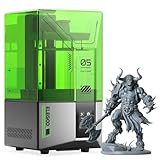
ELEGOO Mars 5 Resin 3D Printer
- 【Effortless Magic with One-Click Automatic Leveling】Effortless precision is just a click away. ELEGOO Mars 5 resin 3D printer offers advanced automatic leveling...
- 【Print Smarter, Print Worry-Free】With a smart mechanical sensor, ELEGOO Mars 5 resin printer supports residue detection to prevent damage to the LCD screen. Plus...
- 【One-Click Self-Check, Ensuring Reliable Prints】Tired of setup hassles and unexpected errors ruining your printing projects? With just a simple click, ELEGOO Mars...
- 【4K Mono LCD for Stunning Details】Featuring a 4K mono LCD with advanced COB light source, ELEGOO Mars 5 impresora 3D de resina faithfully reproduces intricate details...
- 【Advanced Overheat Protection, Cool and Safe】No more overheating worries. The advanced overheat protection automatically halts printing and triggers an alarm if the...

The ELEGOO Mars 5 Resin 3D Printer brings precision to your creative projects with its sharp 4K mono LCD and reliable COB light source. This printer addresses the challenge of achieving fine detail, making it ideal for enthusiasts who need high-resolution miniatures and models. Setup is hassle-free thanks to automatic one-click leveling and a self-check system that ensures consistent print quality every time.
Maintenance is straightforward with a smart residue sensor that safeguards the LCD from damage. Alerts for resin shortages and leveling issues help minimize wasted materials and downtime. The efficient cooling system and built-in overheat protection work together to keep the printer running smoothly and extend its lifespan.
With a compact build volume of 5.65 × 3.53 × 5.91 inches, the Mars 5 is perfect for detailed projects but may limit larger prints. Weighing 14.52 pounds, it offers stability though it’s less portable than lighter models. This balance makes it a dependable tool for hobbyists focused on intricate resin printing.
Best for: hobbyists and model makers seeking detailed, reliable resin 3D printing with easy setup and smart maintenance features.
What We Like:
- Sharp 4K mono LCD with COB light source for exceptional detail
- Automatic leveling and self-check for consistent prints
- Smart sensors and alarms reduce waste and protect components
Specification:
| Feature | Details |
|---|---|
| Manufacturer | ELEGOO |
| Build Volume | 5.65 × 3.53 × 5.91 in |
| Weight | 14.52 lb |
| Display | 4K Mono LCD with COB light source |
| Special Features | Automatic one-click leveling, smart residue sensor, alarms |
68Pcs 3D Printer Tool Kit with Storage Case
- 【Upgraded 68-in-1 3D Printer Tools Kit, 1-Year Warranty】Designed by a Team of 15-Year 3D Printing Enthusiasts, the kit includes all essential tools. From wire cutters...
- 【Scrapers for Flawless Removal 3D Printed Models】One Stainless Steel removal scraper features a 15-degree angled (0.5mm thickness, 1.57-inch length), providing...
- 【1 Deburring Tool & 10 HSS BS1010 Swivel Blades】Our model polishing tools include 3 engraving knives with 9 types of blades, 5 different metal files and a...
- 【Nozzle Cleaning Needles, Brushes & Tweezers】To avoid inconsistent filament extrusion caused by a clogged nozzle, we provide 5 types of cleaning needles, (0.2mm...
- 【3D Printer Accessories Gifts Must-Have】4 cut-resistant finger cots to protect your fingers while working. A black sleeve case makes it easy to find, organize, store...
Bring precision and ease to your 3D printing projects with the 68-piece 3D Printer Tool Kit with Storage Case. Designed for detailed model finishing, this kit helps you tackle common 3D print issues like rough edges and leftover filament. It streamlines post-print cleanup so your models look polished and professional.
The kit is tailored for 1.75mm filament printers, compatible with popular brands such as Bambu Lab, Ender 3, and Kobra. Each tool is crafted to improve accuracy and control, from angled scrapers to fine engraving knives. This thoughtful design supports intricate work and enhances your printing experience.
Maintenance becomes simpler with tools like cleaning needles and swivel-head deburring tools, which help keep your printer nozzles clear and functioning well. The included cut-resistant finger cots protect your hands during delicate tasks, making safety part of your workflow.
All tools are housed in a sturdy Oxford fabric case, providing organized storage and easy portability. While comprehensive, the kit’s size might be bulky for those seeking a minimalist setup, and some tools require practice for best results.
Best for: Enthusiasts and hobbyists who want a precise, all-in-one toolkit for refining and maintaining 3D prints from 1.75mm filament printers.
What We Like:
- Comprehensive precision tools tailored for detailed 3D print finishing
- Safety features including cut-resistant finger cots
- Durable, organized storage case for easy transport
- Compatible with major 1.75mm filament 3D printers
- Tools designed to assist in printer maintenance and nozzle cleaning
Specification:
| Feature | Details |
|---|---|
| Manufacturer | Not specified |
| Dimensions | Not specified |
| Weight | Not specified |
| Material | Various tool-grade metals and Oxford fabric case |
| Color Options | Not specified |
Anycubic Kobra X Multicolor 3D Printer, Easy Setup, Native 4-Color
- 【 Newest Level - 19-Color with 4 ACE 2 Pro】Why settle for one color when you can have multicolor? The Kobra X comes born with 4 colors built-in. It is innovative 3D...
- 【 Savings 2X Time】Stop wasting hours and filament on purging! Kobra X impresora 3D reduces the filament and machine travel path by 81.25%, so 2X the Speed, and...
- 【Hardened Precision & High Speed 】 Equipped with a high-durability hardened steel nozzle and vibration compensation, the Kobra X ensures every layer remains smooth...
- 【Flawless First Layer with LeviQ 3.0】The LeviQ 3.0 and auto bed leveling system uses a 49-point calibration and advanced leveling algorithm to ensure 100% bed...
- 【Smart AI Monitoring & Large Model Library】APP remote control, features Spaghetti detection and foreign object detection. The innovative top-mount spool holder...
Bring your creative ideas to life with the Anycubic Kobra X Multicolor 3D Printer, engineered for vibrant, detailed multicolor printing. This printer solves the challenge of producing complex, colorful miniatures by offering native 4-color printing and expandability up to 19 colors. You can create intricate models without the hassle of swapping filaments manually.
Setup is straightforward and quick, allowing you to start printing in just about 15 minutes. The printer’s 260 × 260 × 260 mm build volume and fast speed of up to 600 mm/s help you complete projects efficiently. Its LeviQ 3.0 auto bed leveling ensures a perfectly flat print surface every time, reducing print failures and maintenance efforts.
Designed for both beginners and experienced users, the Kobra X Multicolor features quiet operation and smart AI monitoring to keep your prints on track. Connectivity options include Wi-Fi and LAN for seamless workflow integration. Keep in mind, filament is sold separately, and expansion modules must be compatible to avoid upgrade limitations.
Best for: hobbyists and professionals seeking an easy-to-use multicolor 3D printer that delivers fast, high-quality results for detailed miniatures and models.
What We Like:
- Native 4-color printing with expandability up to 19 colors for complex designs
- Fast print speeds up to 600 mm/s and quick setup process
- Advanced LeviQ 3.0 auto bed leveling for consistent print quality
- Quiet operation with smart AI monitoring and versatile connectivity options
Specification:
| Feature | Details |
|---|---|
| Manufacturer | Anycubic |
| Build Volume | 260 × 260 × 260 mm |
| Max Print Speed | 600 mm/s |
| Color Options | Native 4-color, expandable to 19 colors |
| Auto Bed Leveling | LeviQ 3.0 |
| Connectivity | Wi-Fi, LAN |
Creality Ender 3 V3 SE Beginner-Friendly 3D Printer with Auto Leveling

- 250mm/s High-Speed Printing: Print at speeds of up to 250mm/s with 2500mm/s² acceleration, helping you complete prototypes, functional parts, and everyday projects...
- Easy Setup with Auto Leveling: Designed for a fast and straightforward setup, the Ender 3 V3 SE can be assembled in just a few simple steps. CR Touch Auto Leveling and...
- Proven Sprite Direct Drive Extruder: The upgraded Sprite Direct Drive Extruder provides smooth and consistent filament feeding for PLA, PETG, and TPU. Its proven design...
- Stable Motion System for Consistent Results: Dual synchronized Z-axis lead screws and precision Y-axis linear shafts work together to help reduce vibration and Z...
- Quiet Operation with Easy Print Removal: A 32-bit silent mainboard helps reduce operating noise for a more comfortable printing experience, while the flexible PC spring...
The Creality Ender 3 V3 SE offers an effortless start for new 3D printing enthusiasts. Its CR Touch auto leveling and automatic Z-offset calibration simplify bed leveling, cutting down the time spent on setup and adjustments. This feature helps ensure your first layers stick well, which is often a challenge for beginners.
With the Sprite Direct Drive Extruder, filament feeds smoothly, supporting common materials like PLA, PETG, and TPU. This helps reduce jams and improves print quality. The printer’s dual Z-axis screws provide stability, reducing vibrations and enhancing precision during printing.
Maintenance is straightforward thanks to the flexible PC spring steel bed that makes removing prints easy without damage. The quiet 32-bit mainboard keeps noise levels low, making it suitable for home or shared spaces. While the max speed of 250 mm/s is fast enough for hobbyists, it may not meet industrial demands.
Overall, this model balances ease of use, reliability, and quality in a compact package designed for hobbyists and beginners tackling detailed projects like Warhammer models.
Best for: Beginners and hobbyists seeking a hassle-free 3D printing experience with reliable first layers and ease of use.
What We Like:
- Automatic CR Touch leveling and Z-offset calibration reduce manual setup.
- Smooth filament feeding with Sprite Direct Drive Extruder supports multiple materials.
- Stable dual Z-axis screws ensure precise, low-vibration printing.
- Flexible spring steel bed simplifies print removal.
- Quiet 32-bit mainboard suitable for noise-sensitive environments.
Specification:
| Specification | Details |
|---|---|
| Manufacturer | Creality |
| Dimensions | Not specified |
| Weight | Not specified |
| Supported Filament Types | PLA, PETG, TPU |
| Max Print Speed | 250 mm/s |
| Bed Type | Flexible PC spring steel |
| Mainboard | Quiet 32-bit |
Factors to Consider When Choosing a 3D Printer for Warhammer Models

When choosing a 3D printer for your Warhammer models, you’ll want to focus on print resolution quality to capture fine details. Consider the range of materials it supports, whether it can handle multi-color printing, and how fast it completes each print.
Also, make sure the build volume fits the size of the models you plan to create. It’s all about finding the right balance between detail, material options, and size. That way, your miniatures come out looking just how you imagined.
Print Resolution Quality
Although many factors influence your choice of a 3D printer for Warhammer models, print resolution quality stands out as essential for capturing fine details like facial features and armor edges. Aim for layer heights between 25 and 50 microns to keep crispness without dragging print times.
For XY resolution, pick printers or settings matching or surpassing your nozzle diameter—using smaller nozzles (0.2–0.25 mm) or resin printers gives you superior surface detail beyond a standard 0.4 mm nozzle.
On resin or LCD printers, check voxel or pixel sizes (usually 35–50 microns), since finer pixels reproduce sculpted textures and tiny inscriptions better.
Minimize visible layer stepping by combining low layer heights, smart print orientation, and minimal support contact to preserve sculpt lines and reduce cleanup.
Focus on low surface roughness and fewer artifacts for sharper miniature details.
Material Compatibility Range
Beyond print resolution, the range of materials your 3D printer can handle plays a big role in achieving the look and durability you want for Warhammer models.
Resin printers (SLA/DLP/LCD) excel with fine details thanks to layer heights between 10–50 µm, capturing intricate faces and armor glyphs perfectly. Filament-based (FDM) printers work well for larger terrain or conversion parts but need fine nozzles (≤0.25 mm) and post-processing to approach miniature-level detail.
Flexible filaments like TPU are great for durable bases but can’t deliver sharp miniature features. Also, think about material behaviors: resins require solvent washing and careful curing to avoid brittleness, while filaments need heated beds and adhesion aids.
Finally, consider paint adhesion and primer compatibility since some resins can be brittle, and PLA often needs sealing for the best finish.
Multi-Color Printing Support
Many Warhammer enthusiasts want multi-color printing to cut down on hand-painting while preserving intricate sculpt details. When choosing a 3D printer, consider how it handles multi-material or multi-color workflows.
Proper calibration is vital to avoid visible seams, oozing, or misaligned layers on your tiny miniatures. Check filament compatibility because combining rigid PLA or PETG with flexible materials or soluble supports like PVA can enhance armor, capes, and support structures in one print.
Also, nozzle size matters—a smaller nozzle (0.2–0.4 mm) delivers finer color shifts and detail but may increase print times. Finally, confirm your slicer software supports color assignments, purge towers, and filament-drying routines to boost print reliability and achieve crisp, vibrant Warhammer models.
Print Speed Efficiency
Balancing detailed color work with fast print times can be tricky when creating Warhammer models. You’ll want to prioritize layer accuracy over raw speed since high speeds often cause ringing and detail loss.
Instead, choose printers with strong acceleration and jerk settings to quickly reach target speeds during short, intricate moves. This improves efficiency without compromising quality.
Remember, smaller layer heights drastically increase print time. So, balance speed and detail by printing backup models with thicker layers and final pieces finely.
Optimize batch printing and arrange miniatures smartly on the build plate. This helps save time on warm-up and adhesion.
Finally, use slicer strategies like adaptive layers, combing, and coasting. Tailor these techniques to your miniature’s geometry to cut print time while keeping crisp details intact.
Build Volume Size
When choosing a 3D printer for your Warhammer models, build volume size plays a critical role in determining what and how you can print. For single infantry figures, a build volume around 120 × 120 × 120 mm usually suffices.
However, if you want to print larger dioramas or multiple miniatures at once, aim for at least 200 × 200 × 200 mm. Taller Z height (≥200 mm) is essential to print tall characters or banners in one piece, avoiding the hassle of assembly.
A wider X/Y dimension lets you print squads of 5–10 miniatures simultaneously, boosting productivity. Remember, usable volume shrinks slightly with supports and purge towers.
If you prefer high-resolution resin printing, a smaller build volume works, but make certain it fits your largest single-piece model. You don’t want to end up scaling down or dealing with seams later on.
Ease Of Use
How easily you can operate your 3D printer greatly impacts your Warhammer modeling experience. A printer with reliable auto bed-leveling and consistent first-layer calibration saves you setup time and reduces failed prints. That’s vital for sharp miniature details.
Intuitive software and an easy filament-loading process cut your learning curve. This lets you iterate designs faster without fiddling with complex slicer settings.
Quick-change nozzles and simple maintenance keep downtime low when switching from fine-detail to speed prints. Stable, quiet operation with precise motion preserves micro-details and prevents reprints caused by vibrations or layer shifts.
A clear, responsive interface paired with community resources helps you reproduce crisp faces, armor edges, and thin tabs with confidence—even if you’re just starting out. It really makes the whole process smoother and more enjoyable.
Reliability And Durability
Operating a 3D printer smoothly is only part of the equation for creating detailed Warhammer models. You need reliability and durability to guarantee consistent, high-quality prints.
Look for printers with robust steel or aluminum frames and dual-axis stabilization to reduce vibrations that cause layer shifts. Prioritize precise motion systems like lead screws or reinforced belts along with quality linear rails to maintain accuracy over long prints.
Choose extruders and hotends made from wear-resistant materials, featuring replaceable nozzles and easy gear access to minimize downtime. Also, check for features like power-loss recovery, filament runout sensors, and automated calibration to prevent failed prints.
Finally, evaluate component lifetimes and strong firmware support so you can quickly fix issues and replace parts without retiring your printer. It’s all about keeping your machine running smoothly so your models come out perfect every time.
Frequently Asked Questions
What Type of Filament Is Best for Painting Warhammer Models?
You’ll want to use PLA filament since it’s easy to paint, sticks well with primers, and holds fine details. It’s beginner-friendly and doesn’t warp much, making your Warhammer models look fantastic once painted.
Plus, PLA is widely available and affordable, so it’s a solid choice if you’re just starting out. Once you get the hang of painting, you can experiment with other filaments, but PLA is definitely the best for beginners.
How Do I Maintain My 3D Printer for Long-Term Use?
You should maintain your 3D printer like tuning a fine instrument—regularly clean the nozzle, lubricate moving parts, update firmware, and calibrate the bed.
Doing these things helps keep prints sharp and reliable for your Warhammer creations over time. It’s all about consistency to get the best results.
Can I Print Warhammer Accessories Other Than Models?
Yes, you can print Warhammer accessories like terrain pieces, bases, and custom bits. Just make sure your printer’s resolution matches the detail level you want, and use suitable resin or filament for durability and fine features.
It’s pretty cool because you’re not limited to just models. You can really customize your game environment and add a personal touch with your printed accessories. Just remember, the better your printer and materials, the nicer the final pieces will look!
What Software Is Recommended for Designing Warhammer Miniatures?
You’ll want to use Blender or ZBrush for detailed Warhammer miniature designs. Both offer powerful sculpting tools, while TinkerCAD suits beginners.
These programs let you create intricate, customizable models ready for 3D printing. Plus, they give you the flexibility to bring your unique ideas to life with ease.
Are There Specific Post-Processing Tips for Resin vs. Filament Prints?
Yes, for resin prints, you’ll need to wash them in isopropyl alcohol and then cure them under UV light. This helps to harden the print and get rid of any leftover resin.
On the other hand, filament prints benefit from sanding and priming. These steps smooth out the surface and prepare it for painting or finishing.
Both types require careful support removal to avoid damaging fine details. So, take your time and be gentle during this step!
Conclusion
You might think high-quality Warhammer models require expensive, complicated printers, but that’s not true. Whether you’re just starting or upgrading, there’s a perfect 3D printer for you—from budget-friendly options like the Creality Ender 3 V3 SE to advanced multi-color setups like the Bambu Lab P2S Combo.
With the right printer, you’ll bring your miniatures to life effortlessly. So, don’t wait—dive in and level up your Warhammer game with one of these top picks!
Finding the best 3D printer for Warhammer models doesn’t have to be overwhelming. Whether you want crisp details for your miniatures or fast printing speeds, there’s a model that fits your needs and budget. From beginner-friendly machines to professional-level printers, the right choice can make all the difference in your Warhammer hobby.
Explore these options to find a 3D printer that matches your style and helps you create stunning, detailed miniatures every time. Your Warhammer collection deserves the best, so invest in a printer that delivers quality and reliability.