What to Do With an Old Printer: 7 Tips for Selling or Donating
Before selling or donating your old printer, make sure to clear all personal data. This includes saved documents and network settings to protect your privacy.
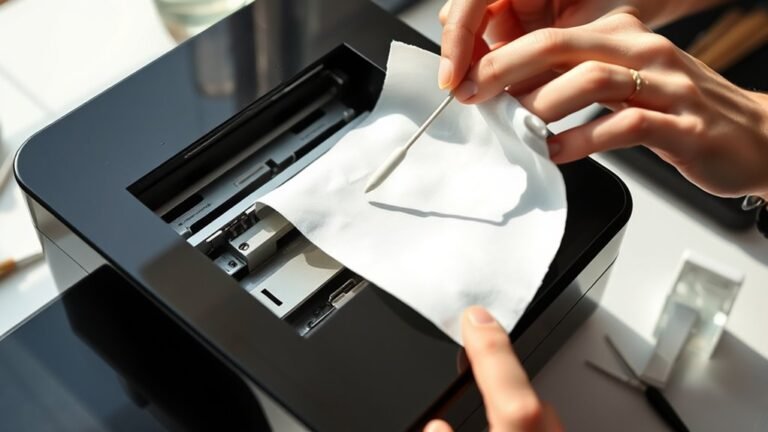
Next, test the printer’s functions and clean the printheads. This helps you know if it’s working properly or if repairs are needed.
Deciding whether fixing it is worth the cost can save you time and money.
When it’s time to price your printer, check online listings to get a fair idea.
Taking clear photos will make your sale more appealing to buyers.
Always use safe selling practices or opt for local donation options to avoid any disputes.
If you prefer, you can recycle your printer through scheduled local e-waste programs, making disposal easy and eco-friendly.
Keep reading to find detailed tips on each step so you can handle your old printer the smart way!
Key Takeaways
- Clear all personal data, saved documents, and Wi-Fi profiles from the printer before donating or selling. This step helps protect your privacy and ensures the next user starts fresh.
- Test the printer’s functionality, clean printheads, and check for paper jams. Doing this will help you decide whether to repair it or sell it as is.
- Research market prices, include accessories, and take clear photos to create a trustworthy listing for selling. A well-prepared listing can attract more buyers.
- Avoid selling nonworking printers; consider donating through local programs or recycling instead. This helps prevent disputes and makes sure your printer is put to good use.
- Schedule recycling appointments with local waste districts for convenient, responsible printer disposal. This is an eco-friendly way to get rid of your old device.
Check for Personal Data and Clean Your Printer
Before you donate or sell your printer, make sure to fully clear all personal data stored on the device. You need to dispose of old electronics safely by deleting saved documents, fax, and scan history from the printer’s menu or settings.
If your model has a hard drive, erase any stored jobs and reset it to factory defaults to wipe lingering info. Don’t forget to remove saved Wi‑Fi profiles and passwords, especially if it stores network configurations.
Make sure to consult your printer’s manual or security options for model-specific data-wipe instructions. After cleaning, run a test print or scan to confirm the printer works well.
This ensures anyone receiving your printer from a wide variety of options won’t get stuck with a nonfunctional device.
Assess Printer Usability and Repair Options
Start by powering on your printer and running a test page to check its basic functionality. If the print quality is poor, try cleaning the print heads or running the self-cleaning cycle before considering repairs.
Also, weigh the cost of any necessary fixes against the printer’s resale value. This will help you decide if it’s worth selling or better to recycle.
Check Printer Functionality
One essential step in selling or donating your printer is running a test print to check its core functions like paper feeding, ink or toner levels, and printhead condition. This helps you spot any issues before handing it over.
Make sure to:
- Verify paper feeds smoothly without jams
- Check ink or toner cartridges detect correctly
- Inspect printhead and nozzles for clogs or smudges
- Confirm power cord, cables, and controls work properly
- Test connection methods like USB or Wi-Fi are compatible
If you find minor problems, look up model-specific troubleshooting tips on the manufacturer’s site for quick fixes like cleaning the printhead or reseating cartridges. It’s pretty straightforward and can save a lot of hassle.
Ensuring full functionality boosts your printer’s value and usability for the next user. So, taking a little extra time now really pays off later!
Explore Repair Possibilities
Though your printer may seem outdated or faulty, you can often extend its life by exploring simple repairs like cleaning print heads or replacing toner cartridges. Start by testing core functions—print a page, check ink or toner levels, and confirm it powers on and connects properly.
If print quality is poor, clean inkjet nozzles or replace laser toner cartridges to fix common issues. Research your model’s typical repair parts, such as fusers or rollers, to see if repairs cost less than buying new.
Also, verify if your printer supports common connections like USB or Wi‑Fi, since connectivity affects resale or donation value. If repairs aren’t practical, make sure no personal data remains before donating or recycling your printer.
Price and Photograph Your Printer for Sale
You’ll want to check current prices by searching your printer’s exact brand and model online to set a fair asking price.
Then, take clear, well-lit photos from multiple angles to make your listing stand out.
These steps help attract serious buyers and get you the best deal.
Assess Market Value
How can you determine the right price for your old printer? Start by researching completed listings on eBay for your specific model and condition to get a realistic market value.
Then, consider these key points to set your price and attract buyers:
- Note if the printer prints reliably and specify cartridge or toner types used.
- Include accessories or manuals, as they add value.
Also, factor in shipping costs and confirm them before listing. It’s important to be clear about that upfront.
Take clear photos showing the entire printer, front panel, ports, and any wear. If possible, show the printer powered on to demonstrate functionality.
This way, buyers get a good sense of what they’re getting and you’re more likely to sell at a fair price.
Capture Clear Images
When preparing your printer for sale, capturing clear, detailed images is essential to attract buyers and build trust. Take photos from multiple angles—front panel, rear ports, and labels or serial numbers—so buyers can confirm compatibility.
Make sure to include a close-up of the model and condition. If you can, snap a picture of the printer printing a test page to prove it’s functional.
Use steady lighting and avoid blur for sharp, readable images showing buttons and any wear. This really helps buyers get a good sense of what they’re getting.
Also, check recent eBay listings to set a realistic price based on condition and included accessories. Want to get a higher price? Then photograph all included items like power cords, cables, and software discs since completeness often increases buyer interest.
Sell Your Printer Safely and Avoid Scams
Before selling your printer, make sure to remove all personal data and disconnect any linked accounts to protect your privacy.
Then, take these steps to sell safely and avoid scams:
Follow these steps to sell your printer securely and steer clear of scams.
- Research prices on eBay to set a fair asking price and steer clear of lowball offers.
- Snap clear photos and include details like model number and functionality to minimize buyer questions.
- Never ship the printer before payment fully clears.
- Avoid buyers requesting unusual payment methods or shipping to different addresses.
- Don’t misrepresent nonworking printers; consider donating or recycling instead to avoid disputes.
Following these tips helps you sell your printer confidently, keeping your information safe and ensuring smooth transactions.
Find Local Donation Options for Printers
If selling your old printer doesn’t work out or feels too complicated, donating it offers a great alternative. Start by scheduling a drop-off through your local solid-waste district’s electronics appointment system, like TimeToRecycle used by Stark-Tuscarawas-Wayne Joint Solid Waste Management District.
If you’re near Canton, check community notes for specific drop-off spots, such as near West Tuscarawas by Liberty Ford. Before donating, clear any stored data and make sure your printer includes power cords and cartridges so the program can test it.
Also, confirm the type of printer accepted and whether reservations are needed, since donation windows vary. If local charities don’t take printers, look for specialty electronics collection programs nearby that focus on these devices.
This way, your printer gets a second life responsibly.
Use Manufacturer or Retailer Take-Back and Recycling Programs
While selling or donating your old printer can be great options, using manufacturer or retailer buyback and recycling programs often provides a low-effort way to ensure your device is disposed of responsibly. These programs typically accept devices from various brands and offer convenient drop-off or shipping options.
For example, Dell accepts any Dell product for free and offers free recycling when you buy a new Dell computer. Apple recycles any old computer with a new Apple purchase and takes iPods or cell phones for free.
HP’s program covers printers and other devices from any brand, usually with a small fee. Retailers like Staples accept printers and related equipment, sometimes charging a modest recycling fee.
Just be sure to check the program’s accepted items list before shipping or dropping off your printer. That way, you know exactly what they’ll take and avoid any surprises.
Book a Local E-Waste Recycling Appointment
You can easily book a local e-waste recycling appointment through the Stark–Tuscarawas–Wayne Joint Solid Waste Management District to drop off your old printer and other electronics. Just head over to their “Make Your Appointment Today!” page at timetorecycle.org/hhw-appointments/ and pick a day and time that works for you.
Keep in mind, the facility near Liberty Ford in West Tuscarawas is only open two days per week, so it’s really important to schedule ahead. When you get there, you can drive right in and unload your items quickly—staff say the whole process is smooth and straightforward.
Make sure your printer and any other electronics are ready to go since the drop-off is designed for easy, no-fuss unloading. This local option makes it simple and responsible to recycle your printer without any hassle.
Frequently Asked Questions
Will Goodwill Take a Printer?
Goodwill might take your printer if it’s in good, reusable condition. You should call ahead to confirm their policy since it varies by location.
It’s always a good idea to remove any personal data before donating. That way, you keep your privacy protected.
Should I Wipe My Hard Drive Before Recycling?
You should wipe your hard drive before recycling—over 60% of used devices still contain recoverable personal data.
Don’t just delete files; fully erase storage to protect your privacy from potential data thieves or unintended access. It’s a simple step that can save you a lot of trouble later.
Does Best Buy Recycle Old Printers for Free?
Best Buy often recycles old printers for free, but it depends on your printer type and local store rules. You should check their website or call to confirm if your specific printer qualifies for free drop-off.
It’s always a good idea to double-check before you go. That way, you won’t be caught off guard if there are any fees or restrictions.
Can You Trade in Your Old Printer?
Yes, you can trade in your old printer through many retailers and manufacturers. Just clear personal data and check your printer’s condition first.
Then, use trade-in programs or online buyback services to get offers. They often provide convenient shipping options, making the process easy for you.
Conclusion
Don’t let your old printer gather dust like forgotten memories. Instead, wipe away personal data, give it a fresh checkup, and find it a new home—whether by selling, donating, or recycling.
Think of it as passing the baton in a relay race, keeping your device’s story alive while making space for new tech adventures. By taking these simple steps, you turn clutter into opportunity, helping both the planet and someone in need.
Selling or donating your old printer not only clears out space but also supports sustainability by reducing electronic waste. Recycling ensures that valuable materials are recovered and reused, protecting the environment. So, before you toss that printer, consider these options to give it a second life. It’s a smart, eco-friendly way to handle old electronics while making a positive impact on your community.