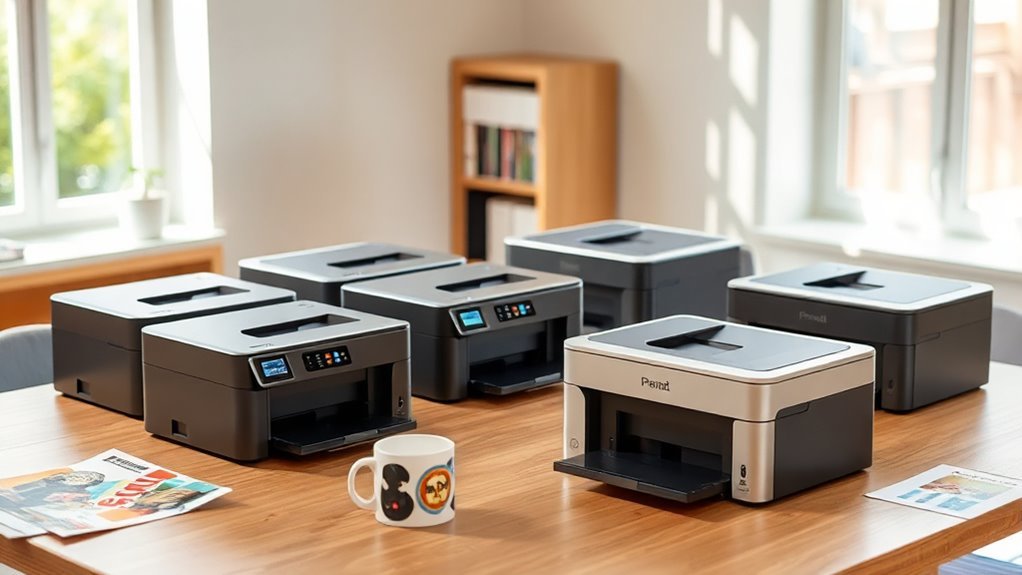
7 Best Budget Sublimation Printers for 2026 That Save You Money
If you’re looking for budget sublimation printers that save money in 2026, you’ve come to the right place. These printers are perfect for anyone wanting vibrant, high-quality prints without breaking the bank. Whether you’re a hobbyist or a small business owner, finding the right sublimation printer can make all the difference.
Check out the Epson SureColor F170 and its Kit versions. They’re compact, cartridge-free, and deliver bright, vivid colors. Plus, they’re super easy to use.
For bigger projects, the Epson SureColor F570 handles wider 24″ media effortlessly. It’s great if you need to print on larger surfaces.
The Sawgrass SG500 bundle is another fantastic option. It offers vivid precision and features auto-maintenance heads. Bundles usually come with inks, paper, and heat presses, so you can get started right away without any hassle.
Keep exploring to find the perfect model that fits your needs and budget.
| Image | Name | Editor's Rating | Price |
|---|---|---|---|

|
|
||

|
|
||

|
|
||

|
|
||

|
|
Epson SureColor F170 Compact Dye-Sublimation Printer
- 𝗔𝘀𝘁𝗼𝘂𝗻𝗱𝗶𝗻𝗴 𝗣𝗿𝗶𝗻𝘁 𝗤𝘂𝗮𝗹𝗶𝘁𝘆: Epson's Surecolor F170 Sublimation printer boasts the PrecisionCore printhead...
- 𝗚𝗲𝗻𝘂𝗶𝗻𝗲 𝗘𝗽𝘀𝗼𝗻 𝗗𝘆𝗲-𝗦𝘂𝗯𝗹𝗶𝗺𝗮𝘁𝗶𝗼𝗻 𝗜𝗻𝗸 𝗧𝗲𝗰𝗵𝗻𝗼𝗹𝗼𝗴𝘆: Epson...
- 𝗩𝗲𝗿𝘀𝗮𝘁𝗶𝗹𝗲 𝗠𝗲𝗱𝗶𝗮 𝗦𝘂𝗽𝗽𝗼𝗿𝘁: Includes a 150-sheet auto-feed tray for added efficiency. Epson SureColor...
- 𝗥𝗲𝗽𝗹𝗮𝗰𝗲 𝗜𝗻𝗸 𝗟𝗲𝘀𝘀 𝗢𝗳𝘁𝗲𝗻: Our high-capacity sublimation ink bottles with auto-stop for easy, mess-free filling...
- Versatile Wi-Fi and USB Connectivity: Easily print from Windows or macOS computers using Epson Print Layout or Epson Edge Print software. Compatible with the Epson iPrint...
The Epson SureColor F170 Compact Dye-Sublimation Printer is designed to deliver vibrant, high-quality prints in a small footprint. Its PrecisionCore printhead and advanced dye-sublimation technology ensure sharp, detailed images at resolutions up to 5760 x 1440 dpi. This makes it ideal for producing professional-grade color on a variety of materials.
Maintenance is simple with high-capacity ink bottles that reduce the need for frequent refills and minimize mess. The 150-sheet dust-resistant tray keeps your prints protected and ready for immediate use. Connectivity is versatile, offering Wi-Fi, USB, and Ethernet options, so you can print directly from laptops, tablets, or smartphones with ease.
This printer is tailored for users who need reliable, vibrant color output without bulk. While it focuses solely on printing and does not include scanning or copying, its compact design fits well in small workspaces or hobbyist setups. Note that ink loading is final, so careful installation is required.
Best for: Small businesses, hobbyists, and professionals seeking a compact, high-quality dye-sublimation printer with flexible connectivity options.
What We Like:
- Sharp, vibrant prints with high resolution and PrecisionCore technology
- Economical high-capacity ink bottles reduce refill time and waste
- Multiple connectivity options for easy printing from various devices
Specification:
| Feature | Details |
|---|---|
| Manufacturer | Epson |
| Dimensions (W × D × H) | Compact size (exact dimensions not provided) |
| Weight | Not specified |
| Print Resolution | Up to 5760 x 1440 dpi |
| Ink System | High-capacity dye-sublimation ink bottles |
| Connectivity | Wi-Fi, USB, Ethernet |
| Paper Tray Capacity | 150 sheets, dust-resistant |
Epson SureColor F170 Dye-Sublimation Printer Kit
- Confidence - Epson authorized partner. Original Epson Manufactured product delivered in Epson’s factory-sealed packaging with Epson documentation and Epson’s full...
- Genuine Epson Ink Included - Comes with a full set of OEM Epson sublimation inks, certified ECO PASSPORT by OEKO-TEX for safe use on textiles, apparel, mugs, mousepads...
- Astounding Print Quality - Epson's Surecolor F170 Sublimation printer boasts the PrecisionCore printhead which offers Precision Droplet Control for the most outstanding...
- Versatile Media Support - Includes a 150-sheet auto-feed tray for added efficiency. Epson SureColor sublimation printers house the paper in a dust resistant closed tray...
- Compact Reliable Solution - Space-saving design with user-friendly setup for MacOS & Windows. Please note that connection to mobile devices is not supported with this...
The Epson SureColor F170 Dye-Sublimation Printer Kit is designed for those seeking vibrant, precise prints on a compact machine. It simplifies the dye-sublimation process, making it easy to create professional-quality images on fabrics, mugs, and other sublimation-compatible materials.
This printer kit includes OEM Epson sublimation ink with auto-stop bottles, sublimation blanks, and thermal tape, so you can begin your projects immediately. Its PrecisionCore printhead ensures sharp, detailed output at 1200 x 600 dpi, delivering consistent, high-quality results every time.
Maintenance is straightforward with the included consumables and eco-certified inks, which are safe for textiles and support sustainable printing practices. Connectivity options like wireless, USB, and Ethernet make setup and integration into your workflow hassle-free.
While it offers excellent print quality, the printer’s speed is modest at about one page per minute, and the media tray supports sheets only up to 8.5 inches wide. It lacks mobile device connectivity, which might be a limitation for some users.
Best for: Hobbyists, crafters, and small business owners who need a reliable, user-friendly dye-sublimation printer kit for vibrant, detailed prints on various sublimation blanks.
What We Like:
- Includes OEM Epson sublimation ink with convenient auto-stop bottles
- Sharp 1200 x 600 dpi output on multiple sublimation materials
- Multiple connectivity options: wireless, USB, and Ethernet
- Eco-certified inks safe for textiles and easy to maintain
Specification:
| Feature | Details |
|---|---|
| Manufacturer | Epson |
| Dimensions (W×D×H) | Not specified |
| Weight | Not specified |
| Print Resolution | 1200 x 600 dpi |
| Media Width | Up to 8.5 inches |
| Connectivity | Wireless, USB, Ethernet |
| Ink Type | OEM Epson dye-sublimation ink |
Epson Surecolor F570 24″ Desktop Sublimation Printer Bundle
- ...
- Astounding Print Quality - PrecisionCore MicroTFP printhead offers Precision Droplet Control for outstanding clarity, plus commercial-grade reliability with Nozzle...
- Versatile Media Support - Accommodates rolls and sheets up to 24" wide; includes a 50-sheet auto-feed tray and built-in cutter for added efficiency.
- Professional Software - Epson Edge Print Pro with an Adobe PostScript 3 and Adobe PDF Print Engine features job layout and nesting, pattern repeats, and advanced color...
- Compatibility - The T49M inks are engineered to work seamlessly with Epson SureColor printers, ensuring optimal performance and reliability. The inks are compatible with...
The Epson SureColor F570 24″ Desktop Sublimation Printer Bundle is designed to bring professional dye sublimation printing within reach of small businesses and creative studios. It solves the challenge of needing high-quality prints without the complexity or cost of large industrial machines. Its compact design fits comfortably on a desktop while handling wide format printing up to 24 inches.
This printer supports both roll and sheet media, making it adaptable for printing on polyester fabrics and coated ceramics. You’ll benefit from an efficient workflow with the 50-sheet auto-feed tray and built-in cutter, reducing manual handling and setup time. The included Epson Edge Print Pro software ensures precise color management for vibrant, sharp results.
Maintenance is straightforward with the PrecisionCore MicroTFP printhead technology delivering consistent output. The bundle includes a full ink set, remote installation assistance, and free tech support, all aimed at minimizing downtime and simplifying operation. Though it is color-only and relatively heavy, its capabilities offer a balance between quality and convenience.
Best for: Small businesses and creative professionals needing a reliable desktop sublimation printer for diverse polyester and ceramic printing projects.
What We Like:
- Supports both roll and sheet media up to 24″ wide for versatile printing options.
- Includes 50-sheet auto-feed tray and built-in cutter for streamlined production.
- Bundled full ink set and remote installation simplify setup and maintenance.
- PrecisionCore MicroTFP printhead delivers sharp, vibrant prints.
- Free tech support enhances user confidence and troubleshooting.
Specification:
| Feature | Details |
|---|---|
| Manufacturer | Epson |
| Print Width | Up to 24 inches (60.96 cm) |
| Media Types | Roll and sheet |
| Weight | 151 lbs (68.5 kg) |
| Ink Set Included | Yes |
| Color Printing | Yes |
Sawgrass SG500 Sublimation Printer, 31 mL Inks and Paper Bundle
- Professional-Grade Print Quality: The Sawgrass SG500 delivers professional-grade sublimation printing, perfect for creating custom t-shirts, drinkware, signage, and...
- Rich & Vivid CMYK Sublimation Printing Inkset: Includes a full set of SubliJet UHD inks (cyan, magenta, yellow, black), specially formulated in small batches to produce...
- Compact Design with Big Potential: The SG500 offers desktop-friendly dimensions without compromising performance, printing on media up to 8.5” x 14”; This makes it...
- Powerful, User-Friendly Software: Gain access to our all-in-one MySawgrass platform, an intuitive online design tool packed with templates, allowing you to create...
- Built for Growth and Reliability: With features like Wi-Fi connectivity and print head auto-maintenance, the SG500 is engineered for durability and long-term use; Whether...
The Sawgrass SG500 Sublimation Printer is designed to bring professional sublimation printing within easy reach. It helps small businesses and home entrepreneurs create high-quality, vibrant prints without complicated setups. This printer solves common issues like inconsistent color output and print head maintenance.
With 4 x 31 mL SubliJet UHD inks and TruePix paper included, you get reliable, sharp results at up to 1200 x 1200 dpi. The printer can handle media up to 8.5″ x 51″, making it versatile for various projects. Its user-friendly design includes Wi-Fi and USB connectivity, simplifying your workflow.
Maintenance is straightforward thanks to its auto-maintenance print heads, reducing downtime and ensuring consistent performance. While it supports only simplex printing and holds up to 100 sheets, it fits well in environments with moderate print volumes.
The SG500 is tailored for use with 110/120V North American power outlets. This focus ensures stable operation but may require adapters for use elsewhere.
Best for: Small businesses and home entrepreneurs seeking dependable sublimation printing with vivid color accuracy and easy upkeep.
What We Like:
- Includes 4 x 31 mL SubliJet UHD inks and TruePix paper for consistent color vibrancy
- High resolution prints up to 1200 x 1200 dpi with versatile media size support
- Wi-Fi and USB connectivity for flexible setup options
- Auto-maintenance print heads reduce manual upkeep and improve reliability
- Compact design suited for small workspaces
Specification:
| Feature | Details |
|---|---|
| Manufacturer | Sawgrass |
| Print Resolution | Up to 1200 x 1200 dpi |
| Ink Volume | 4 x 31 mL |
| Maximum Media Size | 8.5″ x 51″ (21.6 x 129.5 cm) |
| Connectivity | Wi-Fi, USB |
| Power Requirements | 110/120V (North America) |
| Sheet Capacity | 100 sheets |
Epson F170 Cartridge-Free Sublimation Printer Bundle
- DESCRIPTION You will receive: 1 Original F170 sublimation printer. 10 Sheets of original sublimation Paper for polyester garments 1 Mini Iron Heat Press Machine 1 Thermal...
- Original Sublimation Printer
- We request signature at the delivery
- It prints 8.5x11 or 8.5x14 sheets
- Once you fill in with inks the printer, can't be returned.
Experience hassle-free sublimation printing with the Epson F170 Cartridge-Free Sublimation Printer Bundle. Designed for vibrant, durable prints on polyester fabrics, this EcoTank printer eliminates the need for cartridges, reducing maintenance and ink costs. It delivers sharp, detailed images up to 8.5″ x 14″ at 1200 dpi, perfect for creating custom apparel and gifts.
The bundle includes all essentials to get started immediately: CMYK sublimation inks, sublimation paper, a mini heat press, and thermal tape. Its compact design, weighing just 16 pounds, fits neatly into your workspace. Connectivity options like Wi-Fi, Bluetooth, and USB let you print wirelessly or directly without a PC, enhancing convenience and efficiency.
Maintenance is simplified thanks to the cartridge-free EcoTank system, which minimizes ink refills and downtime. While the mini heat press supports small to medium projects, it may limit press size for larger items. Print speed is moderate, making it ideal for hobbyists and small businesses rather than high-volume production.
Best for: hobbyists and small business owners who regularly print vibrant polyester garment designs and want a complete, cartridge-free sublimation printing setup.
What We Like:
- Complete starter kit with inks, paper, heat press, and thermal tape
- Cartridge-free EcoTank system lowers running costs and maintenance
- Multiple wireless and wired connectivity options for flexible printing
- Compact and lightweight design fits small workspaces
Specification:
| Feature | Details |
|---|---|
| Manufacturer | Epson |
| Maximum Print Size | 8.5″ x 14″ (21.6 x 35.6 cm) |
| Resolution | 1200 dpi |
| Weight | 16 lb (7.3 kg) |
| Connectivity | Wi-Fi, Bluetooth, USB |
| Included Extras | CMYK sublimation inks, sublimation paper, mini heat press, thermal tape |
Epson SureColor F170 Dye-Sublimation Printer Bundle

- Confidence - Epson authorized partner. Original Epson Manufactured product delivered in Epson’s factory-sealed packaging with Epson documentation and Epson’s full...
- Genuine Epson Ink Included - Comes with a full set of OEM Epson sublimation inks, certified ECO PASSPORT by OEKO-TEX for safe use on textiles, apparel, mugs, mousepads...
- Astounding Print Quality - Epson's Surecolor F170 Sublimation printer boasts the PrecisionCore printhead which offers Precision Droplet Control for the most outstanding...
- Versatile Media Support - Includes a 150-sheet auto-feed tray for added efficiency. Epson SureColor sublimation printers house the paper in a dust resistant closed tray...
- Compact Reliable Solution - Space-saving design with user-friendly setup for MacOS & Windows. Please note that connection to mobile devices is not supported with this...
The Epson SureColor F170 Dye-Sublimation Printer Bundle is designed to simplify the start of your dye-sublimation printing journey. It combines a precision Epson printer with a Heat Press, delivering sharp and vibrant prints with ease. This bundle addresses the common challenges of transferring images smoothly onto various materials.
Its dust-resistant paper tray holds up to 150 sheets, reducing interruptions during printing. The printer supports media widths up to 8.5 inches, ideal for creating custom apparel and merchandise with professional clarity. Connectivity options include USB, Ethernet, and wireless, allowing flexible setup with MacOS and Windows devices.
Maintenance is straightforward thanks to genuine Epson sublimation inks designed for consistent performance. While it doesn’t support mobile device printing and operates at a modest speed of about one page per minute, it remains a practical choice for low to medium volume production. This bundle is compact and user-friendly, making it well-suited for hobbyists and small business owners.
Best for: Hobbyists and small businesses seeking an affordable, all-in-one dye-sublimation printer and heat press solution for vibrant custom products.
What We Like:
- Complete bundle with printer, genuine sublimation inks, and Hotronix Craft Press
- Dust-resistant tray with 150-sheet capacity and support for media up to 8.5″ wide
- Multiple connectivity options compatible with MacOS and Windows
- Reliable image quality thanks to PrecisionCore printhead technology
Specification:
| Feature | Details |
|---|---|
| Manufacturer | Epson |
| Printer Dimensions | Not specified |
| Weight | Not specified |
| Media Width Support | Up to 8.5 inches (21.6 cm) |
| Paper Tray Capacity | 150 sheets |
| Connectivity | USB, Ethernet, Wireless |
| Compatible OS | MacOS, Windows |
| Included Components | Printer, sublimation inks, Hotronix Craft Press |
Epson SureColor F170 Dye-Sublimation Printer Set
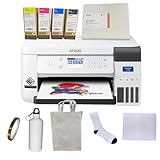
- Complete Sublimation Bundle: Includes an Epson SureColor F170 dye-sublimation printer, 4 sublimation ink bottles (CMYK), user guide, AC power cable, 1 pack of Sublimation...
- Fast, Reliable performance 150 sheet auto feed tray Flexible connectivity, Wifi, USB (cable not included).
- Windows 10, Windows 8, 8.1 (32-bit, 64-bit), Windows 7 (32-bit, 64-bit) Mac OS X 10.6 – macOS 10.15.x6
- Compact design
- High-Quality Output: Epson PrecisionCore TFP printhead produces sharp images and rich colors for professional-looking results.
Discover the Epson SureColor F170 Dye-Sublimation Printer Set, designed to simplify custom printing with precision and ease. Its cartridge-free EcoTank system eliminates frequent ink replacements, saving time and reducing costs.
This compact printer delivers vivid, sharp prints at 1200 x 1200 dpi, ideal for personalizing apparel, mugs, and promotional products. The included sublimation inks, paper, practice blanks, and hot tape mean you can start creating right away without extra purchases.
Maintenance is straightforward thanks to the EcoTank refillable ink tanks, which minimize interruptions and mess. Connectivity options like Wi-Fi and USB allow seamless integration with both Windows and Mac OS environments.
While it offers only print functionality and supports up to A3 media size, its ease of use and comprehensive supplies make it a practical choice for small-scale projects and personalized crafting.
Best for: Small business owners and craft enthusiasts seeking a reliable, affordable dye-sublimation printer for vibrant custom items.
What We Like:
- EcoTank system reduces ink replacement hassles and costs
- Complete sublimation kit included for immediate use
- Compact design with versatile Wi-Fi and USB connectivity
- High-quality 1200 x 1200 dpi prints ideal for detailed personalization
Specification:
| Feature | Details |
|---|---|
| Manufacturer | Epson |
| Print Resolution | 1200 x 1200 dpi |
| Ink System | Cartridge-free EcoTank |
| Included Supplies | CMYK sublimation inks, paper, practice blanks, hot tape |
| Connectivity | Wi-Fi, USB |
| Compatible OS | Windows, Mac OS |
| Max Media Size | A3 |
| Dimensions | Compact design (specific dimensions not provided) |
Factors to Consider When Choosing a Budget Sublimation Printer 2026
When choosing a budget sublimation printer in 2026, you’ll want to focus on print quality and resolution to guarantee sharp results. Consider ink efficiency and cost, plus the range of compatible media to match your projects.
Don’t forget to check connectivity options, software support, and the warranty or return policies for peace of mind. These little details can make a big difference when you’re using your printer regularly.
Print Quality and Resolution
Because print quality directly impacts the final look of your sublimation projects, you should prioritize printers with at least a 1200 x 600 dpi native resolution. Higher native resolution guarantees fine detail and smooth gradients, essential for vibrant transfers.
Look for models featuring micro-droplet or Precision Droplet Control tech to achieve sharp text and seamless color shifts with tiny droplet sizes. Also, check for true 24-bit or higher color depth and solid ICC profile support to reproduce accurate, saturated colors on polyester substrates.
Uniformity across the print area matters too—consistent dot placement and minimal banding prevent visible flaws on garments or large prints. Finally, consider the maximum printable width and how well the resolution holds at that size to guarantee photo-quality results on bigger transfers.
Ink Efficiency and Cost
Evaluate ink efficiency carefully to keep your overall printing costs manageable when choosing a budget sublimation printer. Start by calculating the cost per finished print—divide the total ink price by the number of prints per refill, based on manufacturer-stated refill volume and typical ink usage per A4 transfer.
Opt for printers with high-capacity, refillable ink systems and spill-reduction features to reduce refill frequency and cost per print. It’s all about getting more prints out of each refill without wasting ink.
Compare ink yield and pages-per-milliliter metrics; higher yields and lower ink consumption per print directly cut expenses. Also, consider ink formulation efficiency—better transfer reduces ink needed and reprints.
Don’t forget maintenance ink usage: automatic cleaning cycles can consume significant ink annually. So, factor that into your total cost to avoid surprises and keep your budget on track.
Media Compatibility Range
Managing ink costs is just one piece of the puzzle; you also need to make certain your printer handles the media you plan to use. Check the maximum media width and supported formats to match your sheet, roll, or item sizes.
Confirm which substrate types the printer supports—polyester fabrics, coated ceramics, metal, or tumblers—and any required coatings for durable transfers. If you need continuous printing, verify roll media compatibility, tray capacity, and built-in cutters.
Also, make certain your printer’s ink and transfer process suit your fabric’s weight and weave, since sublimation works best on polyester or high-poly blends and poorly on untreated natural fibers. Finally, look for specs on printable thickness and borderless capability if you want full-bleed prints on thicker substrates.
Connectivity and Software Support
While choosing a budget sublimation printer, you’ll want to prioritize versatile connectivity options like Wi-Fi, Ethernet, and USB to seamlessly integrate with your desktop, mobile, or networked setup. Make certain the printer supports Wi-Fi 802.11ac or better and offers secure connections with password protection and encrypted firmware updates.
Check that the manufacturer’s software is regularly updated and compatible with Windows 10/11 and recent macOS versions to avoid system upgrade issues. Look for built-in color management tools like ICC profile support, print preview, and layout features for consistent results.
If you print from mobile devices or need professional workflows, confirm the printer supports mobile apps, raw print formats like PDF/TIFF, and RIP or edge-tool compatibility. Remote management and cloud printing support add convenience and reliability.
Warranty and Return Policies
Because budget sublimation printers can experience wear or defects, you should carefully review the manufacturer’s warranty details before buying. Check the warranty length and coverage—most offer 1–2 years covering parts, labor, and printheads, but some only cover defects.
Also, know what voids the warranty; using third-party inks or unauthorized repairs often disqualifies you. It’s good to understand if warranty service requires sending back the printer or if on-site repairs are possible.
Don’t forget to review the seller’s return policy, noting return windows and fees. Keep in mind that opened ink cartridges and consumables usually aren’t returnable.
Look for clear info on shipping costs, diagnostic fees, and repair turnaround times. This helps you estimate downtime and total costs.
Finally, consider extended warranties if available. Weigh their coverage and cost against the printer’s price for some added peace of mind.
Frequently Asked Questions
How Do Sublimation Printers Compare to Traditional Inkjet Printers?
Sublimation printers produce vibrant, durable prints by turning ink into gas, unlike inkjets that spray liquid ink. You’ll find sublimation better for fabric and hard surfaces, while inkjets work well on paper and general use.
Basically, sublimation is great if you want your designs to last and look bright on things like t-shirts or mugs. On the other hand, inkjets are super versatile and perfect for everyday printing needs, especially on regular paper.
What Types of Materials Can Sublimation Printers Print On?
Imagine your printer as a magic paintbrush—sublimation printers let you paint vibrant designs on polyester fabrics, specially coated ceramics, metals, and plastics.
You’ll bring hard surfaces and soft textiles alike vividly to life with ease.
Are Sublimation Printers Safe to Use at Home?
Yes, you can safely use sublimation printers at home if you guarantee proper ventilation and avoid inhaling fumes. Always follow the manufacturer’s safety guidelines.
Keep the printer away from kids and pets for a safe environment. It’s pretty straightforward, just make sure you handle everything carefully.
How Long Do Sublimation Prints Typically Last?
Sublimation prints typically last 5-10 years without fading if you handle them properly. You’ll want to avoid harsh sunlight and abrasive cleaning to keep colors vibrant and sharp on your items for a long time.
It’s really about taking good care of your prints. Keep them out of direct sunlight and be gentle when cleaning. That way, your designs stay looking fresh and bright for years!
Can Sublimation Printers Be Used for Large-Scale Commercial Printing?
Absolutely, you can count on sublimation printers for large-scale commercial printing. They deliver durable, dazzling designs quickly, making them perfect for producing vibrant, vast volumes of products efficiently.
And the best part? They do all this without sacrificing quality or speed. So, you get both eye-catching results and fast turnaround times.
Conclusion
If you’re just starting with sublimation or looking to save money, choosing the right budget printer makes all the difference. Imagine Sarah, a small business owner, who switched to the Epson SureColor F170 and doubled her profits within months thanks to its reliability and cost efficiency.
By picking a budget-friendly printer that suits your needs, you’ll not only save money but also boost your creativity and business growth in 2026. Finding the best budget sublimation printer can be a game-changer, helping you produce vibrant, high-quality prints without breaking the bank.
So, whether you’re crafting personalized gifts or launching a new product line, investing in an affordable sublimation printer is key. It’s all about balancing cost, quality, and features to get the most value. In 2026, the right budget sublimation printer will help you expand your creative possibilities while keeping expenses low.