8 Best Budget Printers for College Students in 2027
You want an affordable, compact printer that handles print, scan, and copy tasks with ease. College students need something reliable and budget-friendly. The HP DeskJet 2923 and Canon PIXMA TS4320 offer wireless convenience and solid quality. These models are perfect for dorm rooms or small study spaces.
If ink costs worry you, consider the Canon MegaTank G3270’s refillable tanks or HP’s Instant Ink-enabled DeskJet 3755. Both options help keep printing expenses low over time.
For simple, everyday use, the Canon Pixma MG2522 or Epson XP-4100 deliver reliable prints without breaking the bank.
Explore these models’ features and connections to find your perfect campus printing partner. Whether you want wireless printing or just a straightforward device, there’s something on this list to fit your college needs.
| Image | Name | Editor's Rating | Price |
|---|---|---|---|

|
|
||

|
|
||

|
|
||

|
|
||

|
|
HP DeskJet 2923 Color Inkjet Printer | Wireless | All-in-One
- Perfect for basic printing needs – Print everyday color documents like to-do lists, letters, financial documents and recipes
- KEY FEATURES – Color print, copy, scan, and a 60-sheet input tray, plus mobile and wireless printing
- OPTIMIZE PRINT FORMATTING WITH HP AI – Print web pages and emails with precision—no wasted pages or awkward layouts; HP AI easily removes unwanted content, so your...
- ICON LCD – Print your basic documents with ease from the intuitive control panel
- PRINT SPEED – Up to 7.5 ppm black, 5.5 ppm color

Experience hassle-free printing with the HP DeskJet 2923, designed to meet everyday document needs efficiently. This all-in-one wireless color inkjet printer lets you print, scan, and copy with ease, making it ideal for students and home users looking for reliable functionality without complexity.
Its compact design fits comfortably in small spaces like dorm rooms or home offices. The printer supports mobile printing through Apple AirPrint and Mopria, so you can send documents directly from your smartphone or tablet. This wireless convenience helps reduce clutter and streamlines your workflow.
Maintenance is simple, thanks to the 60-sheet input tray and manual duplex printing that lets you save paper when needed. The included 6-month Instant Ink trial significantly lowers ink expenses by automatically managing supply levels, so you won’t run out unexpectedly.
The HP AI technology further improves efficiency by optimizing web and email printing, cutting down wasted pages and keeping your prints focused on what matters. While print speeds and resolution are moderate, this printer covers basic color printing and scanning needs effectively.
Best for: Students and home users seeking an affordable, compact all-in-one printer with wireless capabilities and straightforward color printing.
What We Like:
- Wireless printing with Apple AirPrint and Mopria support for mobile devices
- 6-month Instant Ink trial reduces ink costs by up to 50%
- Compact and energy-efficient design fits small spaces
- HP AI optimizes printing to minimize waste and clutter
Specification:
| Feature | Details |
|---|---|
| Manufacturer | HP |
| Dimensions | Approx. 16.5 x 12.16 x 6.3 inches (41.9 x 30.9 x 16 cm) |
| Weight | About 5.4 lb (2.45 kg) |
| Color Options | White with black accents |
| Connectivity | Wireless (Wi-Fi), USB |
Canon PIXMA TS4320 – Wireless Color Inkjet Printer with Print, Copy, Scan
- Affordable Versatility - A budget-friendly all-in-one printer perfect for both home users and hybrid workers, offering exceptional value
- Crisp, Vibrant Prints - Experience impressive print quality for both documents and photos, thanks to its 2-cartridge hybrid ink system that delivers sharp text and vivid...
- Effortless Setup & Use - Get started quickly with easy setup for your smartphone or computer, so you can print, scan, and copy without delay
- Reliable Wireless Connectivity - Enjoy stable and consistent connections with dual-band Wi-Fi (2.4GHz or 5GHz), ensuring smooth printing from anywhere in your home or...
- Scan & Copy Handling - Utilize the device’s integrated scanner for efficient scanning and copying operations
The Canon PIXMA TS4320 is designed to simplify your printing, copying, and scanning needs with reliable wireless connectivity in a compact form. Its small footprint fits comfortably on a dorm desk or in a home office, making it an ideal choice for limited spaces.
This all-in-one printer uses a hybrid 2-cartridge ink system that delivers crisp color and black-and-white prints at up to 1200 dpi. Automatic duplex printing helps reduce paper waste and saves time, while support for various media types lets you print photos, documents, and cardstock with ease.
Maintaining the TS4320 is straightforward, though its 2-cartridge system may require more frequent replacements compared to multi-cartridge setups. The absence of an automatic document feeder limits batch scanning or copying, but its simple push-button controls make daily operation hassle-free.
Wireless connectivity through dual-band Wi-Fi and compatibility with the Canon PRINT app or Apple AirPrint lets you print directly from your phone or tablet. This printer offers a balanced mix of functionality and convenience for students and home users tackling school projects and everyday printing tasks.
Best for: Students and home users needing a compact, affordable all-in-one printer for everyday documents, photos, and schoolwork.
What We Like:
- Compact design ideal for small spaces
- Automatic duplex printing to save paper
- Dual-band Wi-Fi and mobile printing support
- Sharp print quality up to 1200 dpi
Specification:
| Feature | Details |
|---|---|
| Manufacturer | Canon |
| Dimensions (W×D×H) | Approx. 12.0 × 11.7 × 5.0 in (30.5 × 29.7 × 12.7 cm) |
| Weight | Approx. 10.6 lb (4.8 kg) |
| Ink System | Hybrid 2-cartridge |
| Connectivity | Dual-band Wi-Fi, USB |
| Media Support | Plain paper, photos, cardstock |
HP DeskJet 3755 Wireless All-in-One Printer (J9V91A)
- This refurbished product is tested and certified to look and work like new. The refurbishing process includes functionality testing, basic cleaning, inspection, and...
The HP DeskJet 3755 Wireless All-in-One Printer is designed to fit seamlessly into small spaces without sacrificing functionality. Its compact size makes it ideal for dorm rooms or home offices where space is limited. This printer handles printing, scanning, and copying, delivering sharp results with resolutions up to 4800 x 1200 dpi.
Wireless connectivity allows you to print directly from your smartphone or tablet, simplifying your workflow. Voice commands through Alexa add convenience, letting you print hands-free. The printer supports multiple paper sizes and types, making it versatile for both documents and photos.
Maintaining the DeskJet 3755 is straightforward. It is eligible for HP Instant Ink, which helps manage ink costs and ensures you never run out unexpectedly. Although the paper tray holds only 10 sheets and duplex printing is manual, these trade-offs suit light to moderate use settings.
Best for: Students and home users who need a compact, affordable all-in-one printer with wireless and mobile printing features.
What We Like:
- Compact design fits easily in tight spaces.
- Wireless and mobile printing with Alexa voice control.
- HP Instant Ink eligibility reduces ink expenses.
- Sharp print quality suitable for documents and photos.
- Simple maintenance with easy ink cartridge replacement.
Specification:
| Feature | Details |
|---|---|
| Manufacturer | HP |
| Dimensions (D x W x H) | 6.0 x 15.3 x 5.5 inches |
| Weight | 5 lbs (2.27 kg) |
| Color Options | White |
| Connectivity | Wireless, Mobile, Voice (Alexa) |
HP DeskJet 2955 Color Inkjet Printer | Wireless | All-in-One
- PERFECT FOR BASIC PRINTING NEEDS – Print everyday color documents like to-do lists, letters, financial documents and recipes
- KEY FEATURES – Color print, copy, scan, and a 60-sheet input tray, plus mobile and wireless printing
- OPTIMIZE PRINT FORMATTING WITH HP AI – Print web pages and emails with precision—no wasted pages or awkward layouts; HP AI easily removes unwanted content, so your...
- ICON LCD – Print your basic documents with ease from the intuitive control panel
- PRINT SPEED – Up to 7.5 ppm black, 5.5 ppm color
The HP DeskJet 2955 Color Inkjet Printer is designed to fit seamlessly into small spaces, making it a practical choice for students and home users. Its compact, all-in-one design combines printing, scanning, and copying, reducing the need for multiple devices. This multi-functionality helps save room and keeps your workspace organized.
With wireless dual-band Wi-Fi and mobile app support, printing from a smartphone or laptop is straightforward and hassle-free. The printer handles color and black-and-white documents efficiently, though print speeds are moderate, suitable for everyday tasks rather than heavy workloads. Its sharp resolution enhances the quality of your prints and copies.
Maintenance is simple, with HP Instant Ink eligibility helping to manage ink costs and reduce downtime. While the printer offers manual duplex printing and a limited copy run of nine pages, it remains an eco-conscious option, being ENERGY STAR certified and made with recycled plastics.
Best for: Students and home users needing a compact, affordable all-in-one printer with wireless connectivity and essential color printing, scanning, and copying capabilities.
What We Like:
- Compact design ideal for small spaces like dorms or home offices
- Wireless dual-band Wi-Fi enables easy mobile and laptop printing
- ENERGY STAR certified and constructed with recycled plastics
- HP Instant Ink eligibility lowers ink expenses and simplifies maintenance
Specification:
| Feature | Details |
|---|---|
| Manufacturer | HP |
| Dimensions | Compact size (exact not specified) |
| Weight | Not specified |
| Material | Recycled plastics |
| Color Options | Not specified |
Canon MegaTank G3270 All-in-One Wireless Color Printer
- Wireless Print/Copy/Scan
- Up to 2 years of ink included (2)
- Print up to 6,000 black & white / 7,700 color pages using a single set of inks! (1)
- Save up to $1,000 on ink (1)
- 1.35” Square LCD display
The Canon MegaTank G3270 is designed to simplify printing for college students and home office users. Its refillable ink tanks can last up to two years, reducing the hassle and cost of frequent replacements. This feature ensures you spend less time worrying about ink and more time on your important tasks.
This all-in-one wireless color printer handles printing, copying, and scanning with sharp, vibrant results thanks to its high resolution up to 4800 x 1200 dpi. It supports both Wi-Fi and USB connections, allowing you to print directly from your smartphone or computer with ease.
Maintaining the printer is straightforward, with the MegaTank system making ink refills clean and efficient. Its compact design fits well in small spaces like dorm rooms or home offices, while versatile paper handling meets everyday printing needs.
Although it prints at a moderate speed and lacks automatic duplex printing, the G3270 balances quality and convenience effectively. The small LCD screen keeps controls simple, though navigation might require some getting used to.
Best for: College students and home office users seeking a cost-effective, high-quality all-in-one wireless color printer with long-lasting ink supplies.
What We Like:
- Refillable MegaTank ink system offers up to two years of ink.
- High resolution delivers sharp, colorful prints and copies.
- Wireless and USB connectivity with smartphone control.
- Compact size fits easily in small workspaces.
Specification:
| Feature | Details |
|---|---|
| Manufacturer | Canon |
| Dimensions | Compact (exact size not provided) |
| Weight | Not specified |
| Color Options | Standard (Black/White) |
| Print Resolution | Up to 4800 x 1200 dpi |
| Print Speed | Up to 11 ppm (B&W), 6 ppm (Color) |
| Connectivity | Wi-Fi, USB |
| Screen | 1.35″ LCD |
Canon Pixma MG2522 All-in-One Inkjet Printer, Scanner & Copier

- Meet the PIXMA MG2522, a simple printer for your home printing needs
- The PIXMA MG2522 makes it easy to print documents and it even supports optional XL ink cartridges so you replace them less often
- Welcome to affordable home printing.
Experience hassle-free printing, scanning, and copying with the Canon Pixma MG2522 All-in-One Inkjet Printer. Designed for simplicity, this device handles your everyday tasks efficiently. Its sharp print resolution delivers clear text and images, ensuring your documents look professional every time.
This printer’s compact white design fits neatly on any desk, saving valuable space. Connecting via USB, it pairs easily with laptops and PCs, making it a practical choice for basic home or office use. Maintenance is straightforward; replacing ink cartridges is quick, and the option for XL cartridges helps manage running costs.
While it supports duplex printing, note that the maximum media size is limited to 4 x 6 inches, which suits standard photo and document sizes but restricts larger prints. Print speeds are modest, offering up to 8 pages per minute in black and white and 4 pages per minute in color.
The Canon Pixma MG2522 is a reliable solution for users who need a straightforward, easy-to-maintain all-in-one printer without complex network features.
Best for: Individuals or students seeking an affordable, compact, and easy-to-use all-in-one printer for basic home or office printing, scanning, and copying needs.
What We Like:
- Clear print quality with 600 x 1200 dpi resolution
- Compact design that fits small workspaces
- Easy USB connectivity with laptops and PCs
- Supports duplex printing and budget-friendly XL ink cartridges
Specification:
| Feature | Details |
|---|---|
| Manufacturer | Canon |
| Dimensions | Not specified |
| Weight | Not specified |
| Color Options | White |
| Connectivity | USB 2.0 |
| Max Print Resolution | 600 x 1200 dpi |
| Max Media Size | 4 x 6 inches |
| Print Speed | Up to 8 ppm (B&W), 4 ppm (color) |
HP DeskJet 4255e Wireless All-in-One Printer (Renewed)

Experience hassle-free printing with the HP DeskJet 4255e Wireless All-in-One Printer (Renewed), designed to meet the demands of busy students and home users. Its compact size fits neatly on desks or in dorm rooms, saving valuable space without sacrificing functionality. This printer handles your everyday needs by allowing you to print, scan, copy, and even send faxes directly from your device.
The wireless connectivity frees you from tangled cables, enabling printing from laptops, smartphones, or tablets with ease. It produces clear documents at 8.5 pages per minute in black and 5.5 in color, with sharp 1200 dpi resolution, ensuring your assignments and projects look professional. The 100-sheet input tray supports moderate printing volumes, reducing frequent refills.
Maintenance is simple with HP 67 cartridges and an included Instant Ink trial, helping you manage ink costs efficiently. Though it doesn’t support automatic double-sided printing, its eco-conscious build uses 60% recycled plastic and is HP+ compatible, reflecting a commitment to sustainability.
Best for: Students and home users seeking a reliable, space-saving all-in-one printer for daily tasks including printing, scanning, copying, and occasional faxing.
What We Like:
- All-in-one functionality with print, scan, copy, and mobile fax features
- Wireless printing and HP Instant Ink eligibility for convenient ink management
- Compact, eco-friendly design using recycled materials and HP+ compatibility
- Sharp print quality at 1200 dpi for clear documents and images
Specification:
| Feature | Details |
|---|---|
| Manufacturer | HP |
| Model | DeskJet 4255e Wireless All-in-One (Renewed) |
| Dimensions (W x D x H) | 16.46 x 11.61 x 6.69 inches |
| Weight | Approx. 7.4 lb (3.36 kg) |
| Paper Capacity | 100 sheets |
| Print Speed | 8.5 ppm (black), 5.5 ppm (color) |
| Print Resolution | Up to 1200 dpi |
| Connectivity | Wireless, USB |
| Ink Cartridge | HP 67 |
| Duplex Printing | Manual only |
Epson Expression Home XP-4100 Wireless Printer
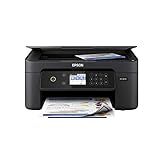
- This printer is designed for use with Epson cartridges only, not third party cartridges or ink; Cartridges described as Compatible, Re-manufactured, refilled or...
- Save time and paper auto 2 sided printing
- Simple setup and navigation high res 2. 4 inches Color LCD to easily print, copy and scan
- Complete wireless solution easily print from iPad, iPhone, Android tablets and smartphones (1); includes Wi Fi Direct (3)
- Affordable individual ink cartridges replace only the cartridge that runs out. Operating temperature - 10 to 35 degree Celsius
Looking for a compact all-in-one printer that fits perfectly in tight spaces? The Epson Expression Home XP-4100 is designed to meet the needs of students and home users. It handles printing, scanning, and copying with sharp detail and vibrant Claria ink that brings documents and photos to life.
This model simplifies your workflow by offering automatic two-sided printing, saving you time and paper. Wireless connectivity options like Wi-Fi and Wi-Fi Direct let you print easily from smartphones and tablets without cables. The intuitive 2.4-inch LCD screen makes setup and daily use straightforward.
Maintenance is hassle-free with a single 100-sheet paper tray and easy cartridge replacement. While the print speed is moderate, this printer excels in delivering quality results in a compact design. It’s an ideal choice for those who prioritize space and versatility over high-volume printing.
Best for: Students and home users needing a reliable, space-saving all-in-one printer with wireless features and duplex printing.
What We Like:
- Compact design ideal for small spaces
- Wireless printing via Wi-Fi, Wi-Fi Direct, and mobile devices
- Automatic two-sided printing for efficient paper use
- High print resolution with vibrant Claria ink colors
Specification:
| Feature | Details |
|---|---|
| Manufacturer | Epson |
| Dimensions | 14 x 12 x 6 inches (approx.) |
| Weight | 8.5 lb (approx.) |
| Color Options | White |
| Print Resolution | Up to 5760 x 1440 dpi |
| Paper Capacity | 100 sheets |
Factors to Consider When Choosing a Budget Printer for College Students

When picking a budget printer, you’ll want to contemplate how fast it prints and whether it connects easily to your devices wirelessly. Don’t forget to check the print quality and how much the ink cartridges will cost over time.
Also, think about whether you need extra features like scanning or copying to get the most value. These can come in handy for college assignments and projects. So, it’s worth considering what you’ll actually use before you buy.
Printing Speed Importance
Although print speed might not seem critical at first, it markedly impacts how quickly you can finish large assignments or study materials.
Print speed, measured in pages per minute (ppm), determines how long it takes to print multi-page documents.
For typical college tasks like essays and syllabi, a black-and-white speed of 8–15 ppm usually works well.
Speeds under 8 ppm can slow you down during busy study times.
Keep in mind, color prints and high-resolution images print slower than black-and-white pages.
Also, real-world speeds often dip below manufacturer estimates, especially with duplex printing or complex layouts.
If you print large volumes regularly, prioritize printers with higher ppm and bigger paper trays to avoid constant refills and minimize wait times.
Wireless Connectivity Options
Picking a budget printer that easily hooks up to your devices can save you a lot of hassle. Make sure the printer supports both 2.4 GHz and 5 GHz Wi‑Fi bands to avoid connection dropouts, especially in crowded dorms.
Look for built-in mobile printing options like AirPrint or Mopria so you can print straight from your phone or tablet without installing drivers. Wireless Direct or Wi‑Fi Direct is handy for printing without campus or home Wi‑Fi, perfect for guests or temporary setups.
If you want quick local printing, check for Bluetooth or NFC pairing to skip entering Wi‑Fi info. Also, prioritize models with easy network setup through WPS or guided apps and clear troubleshooting features to get you printing faster with less frustration.
Print Quality Standards
Focus on print quality standards that matter most for your college needs to get the best value from a budget printer. Aim for at least 600–1200 dpi to guarantee sharp text and clear basic graphics. This is essential for notes and essays.
If you plan to print photos or detailed images, higher dpi (2400–4800) helps. But keep in mind, this often slows down printing.
Prioritize crisp black text with consistent strokes since readability beats glossy photo output for academic work. Check color accuracy if you’ll print charts or presentations because budget printers may shift or wash out colors.
Also, consider the printer’s supported paper types—photo quality degrades on plain paper. Finally, balance resolution settings to maintain reasonable print speeds without sacrificing necessary clarity.
Ink Cost Efficiency
You’ll often find that ink costs make a big difference in your overall printing budget. To keep expenses low, calculate the cost per page by dividing the price of replacement ink by its page yield. Compare black-and-white and color separately—color pages usually cost much more.
Choose printers with individual color cartridges or refillable tanks. That way, you only replace what’s empty, not a combined tri-color cartridge.
If you consider subscription ink plans, check monthly fees, included pages, and overage charges. Make sure they actually save you money.
Estimate your annual ink cost realistically by multiplying your typical student print volume by the cost per page.
Also, remember that frequent cleaning cycles and idle time waste ink. So, use draft or grayscale modes to stretch your ink further.
Multi-function Capabilities
Beyond ink costs, multi-function capabilities can greatly enhance your productivity and convenience as a student. Look for true multi-function printers that print, scan, and copy, letting you digitize handouts and submit scanned assignments without extra devices.
Check scanner specs like optical resolution—300 to 600 dpi is ideal—and prefer flatbed scanners for capturing notes, images, and photos clearly. Confirm copy features such as maximum copies per run and resolution; at least 300 dpi keeps study materials legible.
Make sure mobile scanning and printing support with an app or simple USB/network workflow to quickly send scans to cloud storage or email. Also, verify duplex printing and multi-page scanning options like ADF to save time and paper when creating study packets.
Paper Handling Capacity
When choosing a budget printer for college, pay close attention to its paper handling capacity to keep up with your workload. Aim for an input tray that holds 60–100 sheets to avoid constant refills during busy weeks.
Check the output tray’s capacity—models with 100 sheets or automatic stacking help prevent jams and keep pages organized. If you print multi-page assignments, pick a printer with automatic duplexing to save paper and cut costs.
Also, consider what media sizes and types the printer supports, like letter, legal, envelopes, or cardstock, so you can handle various class materials. Finally, review the maximum monthly duty cycle and recommended page volume to make sure the printer can handle your typical printing needs without breaking down.
Mobile Printing Support
Don’t overlook mobile printing support when picking a budget printer for college—it can make your life much easier. Make sure your printer supports common standards like Apple AirPrint, Mopria, or an OEM app, so you can print directly from your phone or tablet without fussing over drivers.
Check for dual-band Wi-Fi (2.4 GHz and 5 GHz) to keep your connection stable and speedy, especially on busy dorm networks. Wireless direct or Wi-Fi Direct lets you print even if campus Wi-Fi is down or restricted.
Also, find a printer that offers mobile scanning and cloud uploads, so you can digitize assignments and submit work straight from your device. Finally, see if the mobile app requires an account and offers preview or formatting tools to save paper and toner.
Size and Portability
Picking a printer that fits your dorm space and lifestyle can make a big difference in daily convenience. Opt for a compact printer with a footprint under 15 inches deep and 18 inches wide to avoid crowding your desk.
If you plan to move it between home and campus, choose a lightweight model around 5 to 10 pounds. Check the printer’s trays and closed dimensions to guarantee it stays streamlined on shelves when not in use, since open trays can add extra inches.
Also, consider vertical height and button access so it fits under shelves without blocking the scanner lid or controls. Finally, if portability matters, look for printers that power up quickly and connect easily over Wi-Fi or USB to save setup time.
Frequently Asked Questions
How Do I Connect These Printers to Campus Wi-Fi Securely?
You connect your printer to campus Wi-Fi securely by selecting the encrypted network and entering your unique campus credentials. Make sure to enable WPA3 security if it’s available—that adds an extra layer of protection.
Also, don’t forget to update the printer’s firmware regularly. This helps protect against vulnerabilities and keeps your connection safe. It’s a simple step that goes a long way!
What Are the Average Ink Cartridge Costs for These Printers?
You’ll find average ink cartridge costs range from $15 to $40, depending on the printer model and cartridge type.
Opt for high-yield cartridges to save money, especially if you print frequently during college. It really helps stretch your budget further over time.
Are These Printers Compatible With Both Windows and Macos?
Yes, these printers are compatible with both Windows and macOS. You’ll find easy setup guides and drivers for each system, so you won’t have trouble connecting or printing regardless of which operating system you use.
Setting them up is pretty straightforward, and the instructions are clear. Whether you’re on a PC or a Mac, you’ll be good to go in no time.
Can These Printers Handle Double-Sided Printing Automatically?
Just like a skilled accordionist effortlessly folds and unfolds, these printers handle double-sided printing automatically.
You won’t have to flip pages manually, saving you time and paper—perfect for your busy study sessions and tight budgets.
Do Any of These Printers Support Mobile Printing Apps?
Yes, many of these printers support mobile printing apps like HP Smart or Epson iPrint. You can easily print documents or photos directly from your smartphone or tablet.
This makes your workflow more convenient and efficient. So, whether you’re at home or on the go, printing is just a tap away!
Conclusion
Choosing the right budget printer for college is like picking the perfect study buddy—it needs to be reliable, efficient, and fit your unique needs. Whether you prioritize wireless convenience, all-in-one functionality, or ink-saving features, there’s a model here that’ll keep your assignments flowing smoothly without breaking the bank.
With these options, you’ll be ready to tackle every paper and project with ease. A good budget printer for college students can make a huge difference in managing deadlines and reducing stress. Plus, having a dependable printer means you won’t have to scramble for printing services last minute.
So, if you’re looking for the best budget printers for college students in 2027, this list has you covered. From affordability to versatility, these printers combine quality and value. They’re designed to meet the demands of student life, helping you stay productive without overspending.